> ## Documentation Index
> Fetch the complete documentation index at: https://help.coachiq.io/llms.txt
> Use this file to discover all available pages before exploring further.
# Use Hidden Products to Control Paywall Access
> Learn how to use hidden products on your athlete portal paywall to manage grandfathered pricing, invite-only access, and complimentary memberships.
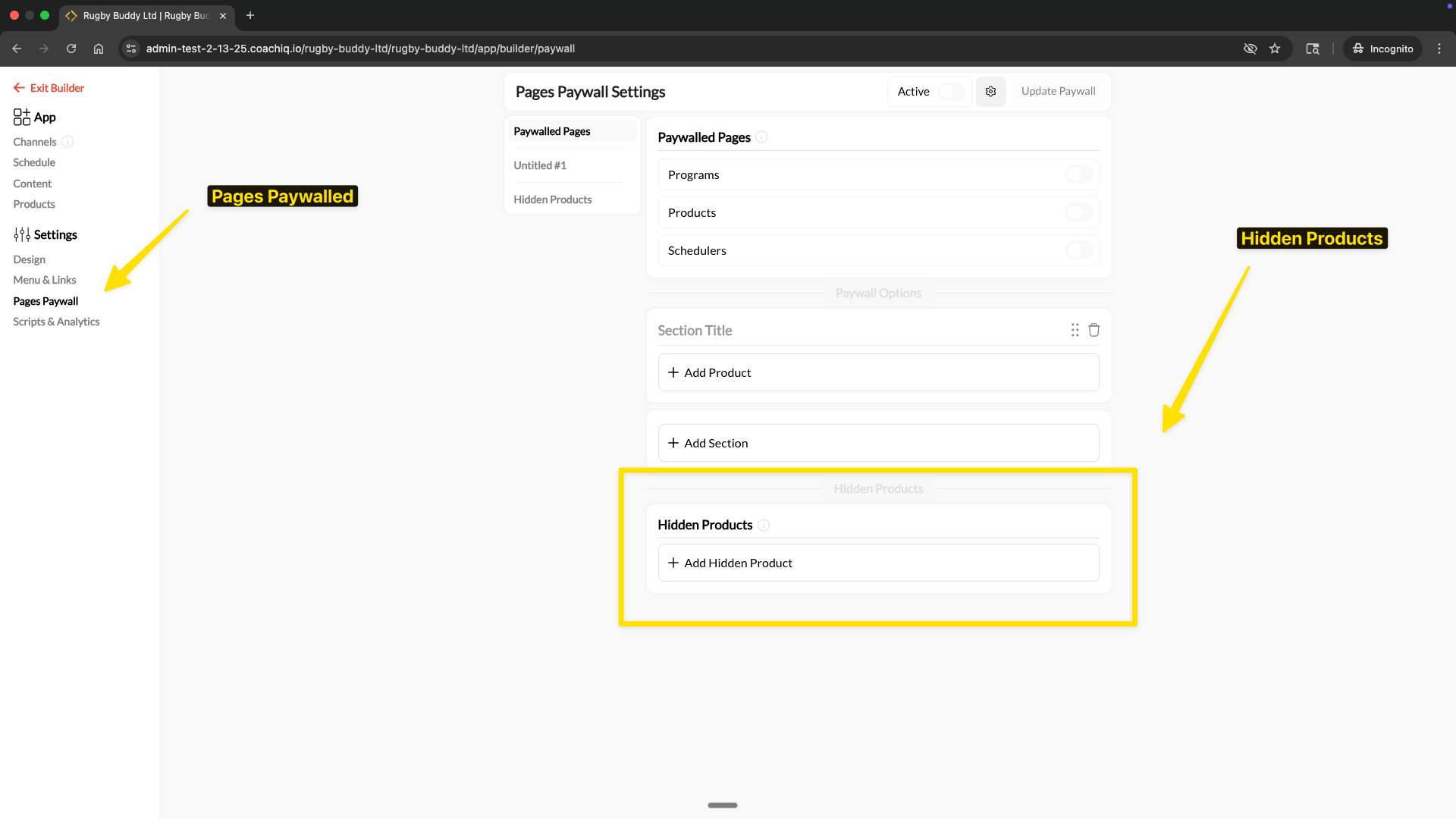
**Quick Answer**: Hidden products unlock paywalled pages just like regular products, but athletes never see them on the paywall purchase screen. Use them for grandfathered pricing, invite-only access, or complimentary memberships. Configure at App Builder → Settings → Pages Paywall → Hidden Products.
 ## What are hidden products?
Hidden products are paywall products that grant athletes access to paywalled pages without appearing on the paywall purchase screen. When an athlete lands on a paywalled page, they see your visible products as purchase options — but hidden products are never shown. Athletes who already have a hidden product still get full access, they just can't discover or buy it from the paywall.
This gives you precise control over who can access your app and at what price, without exposing every option to every athlete.
## When to use hidden products
### Grandfathered pricing
You raised your monthly membership from \$49 to \$69, but your existing athletes are locked in at the old rate. Without hidden products, that \$49 option sits on your paywall and every new athlete picks the cheaper one.
**With hidden products**: Hide the \$49 product from the paywall. Current athletes keep their rate and retain full access. New athletes only see the \$69 option.
This is especially useful when you adjust pricing over time. Every time you change rates, hide the old product and add the new one as a visible option. Existing subscribers are unaffected.
### Invite-only or exclusive access
You want to give a select group of athletes access to your app — a travel team, a tryout group, or a VIP tier — without the product being available to everyone.
**With hidden products**: Create a product for that group, hide it from the paywall, and assign it only to the athletes you choose. Other athletes never know it exists.
### Complimentary or sponsored access
You need to give free or discounted access to staff, coaching assistants, scholarship athletes, or sponsored partners. A visible \$0 product on your paywall invites everyone to grab it.
**With hidden products**: Create a free or discounted product, hide it from the paywall, and assign it directly to the athletes who qualify. Your public pricing stays clean.
## How to add a hidden product
From your App Builder, click **Settings** in the left sidebar, then select **Pages Paywall**.
In the left panel, click **Hidden Products** to switch to the hidden products configuration.
Click **+ Add Hidden Product**. Select the product you want to hide from your product list.
The product must already exist in Payments → Products. If you haven't created it yet, do that first.
Click **Update Paywall** to apply. The hidden product now grants paywall access without appearing on the athlete-facing purchase screen.
Athletes with this product can access paywalled pages immediately. Athletes without it never see the product as an option.
## How athletes receive hidden products
Since hidden products don't appear on the paywall, you need to get them to athletes through other channels:
* **Assign directly** — Add the product to an athlete's account in People → \[Athlete] → Products
* **Send a purchase link** — Share a direct link to the product via DM, email, or SMS
* **Use an access code** — Create an access code for the hidden product and share it privately
For grandfathered pricing, you typically don't need to do anything. Athletes already subscribed to the old-rate product keep their access automatically when you hide it from the paywall.
## Common questions
Yes. There is no difference in how access works. If an athlete has a hidden product that's linked to the paywall, they get full access to the paywalled pages — identical to a visible product.
Yes. You can have some products visible on the paywall for new athletes to purchase, and other products hidden for grandfathered or invite-only athletes. Both types grant the same access.
The same thing that happens with any paywall product — the athlete loses access and sees the paywall purchase screen. Since the hidden product isn't visible there, they would need to resubscribe through a direct link or have you reassign it.
Athletes can see products they've purchased in their account details, but they cannot discover or purchase a hidden product from the paywall screen.
1. Create your new product at the updated price
2. Add the new product as a **visible** paywall product
3. Move the old product to **Hidden Products**
4. Existing subscribers keep their rate and access; new athletes only see the new price
## Related articles
* [Set Up Page Paywalls](/athlete-portal/paywall-settings)
* [Display Products & Payments in Your Athlete Portal](/athlete-portal/products)
* [Creating Products](/payments/product-builder)
* [Understanding Your Athlete Portal](/athlete-portal/understanding-your-athlete-portal)
## What are hidden products?
Hidden products are paywall products that grant athletes access to paywalled pages without appearing on the paywall purchase screen. When an athlete lands on a paywalled page, they see your visible products as purchase options — but hidden products are never shown. Athletes who already have a hidden product still get full access, they just can't discover or buy it from the paywall.
This gives you precise control over who can access your app and at what price, without exposing every option to every athlete.
## When to use hidden products
### Grandfathered pricing
You raised your monthly membership from \$49 to \$69, but your existing athletes are locked in at the old rate. Without hidden products, that \$49 option sits on your paywall and every new athlete picks the cheaper one.
**With hidden products**: Hide the \$49 product from the paywall. Current athletes keep their rate and retain full access. New athletes only see the \$69 option.
This is especially useful when you adjust pricing over time. Every time you change rates, hide the old product and add the new one as a visible option. Existing subscribers are unaffected.
### Invite-only or exclusive access
You want to give a select group of athletes access to your app — a travel team, a tryout group, or a VIP tier — without the product being available to everyone.
**With hidden products**: Create a product for that group, hide it from the paywall, and assign it only to the athletes you choose. Other athletes never know it exists.
### Complimentary or sponsored access
You need to give free or discounted access to staff, coaching assistants, scholarship athletes, or sponsored partners. A visible \$0 product on your paywall invites everyone to grab it.
**With hidden products**: Create a free or discounted product, hide it from the paywall, and assign it directly to the athletes who qualify. Your public pricing stays clean.
## How to add a hidden product
From your App Builder, click **Settings** in the left sidebar, then select **Pages Paywall**.
In the left panel, click **Hidden Products** to switch to the hidden products configuration.
Click **+ Add Hidden Product**. Select the product you want to hide from your product list.
The product must already exist in Payments → Products. If you haven't created it yet, do that first.
Click **Update Paywall** to apply. The hidden product now grants paywall access without appearing on the athlete-facing purchase screen.
Athletes with this product can access paywalled pages immediately. Athletes without it never see the product as an option.
## How athletes receive hidden products
Since hidden products don't appear on the paywall, you need to get them to athletes through other channels:
* **Assign directly** — Add the product to an athlete's account in People → \[Athlete] → Products
* **Send a purchase link** — Share a direct link to the product via DM, email, or SMS
* **Use an access code** — Create an access code for the hidden product and share it privately
For grandfathered pricing, you typically don't need to do anything. Athletes already subscribed to the old-rate product keep their access automatically when you hide it from the paywall.
## Common questions
Yes. There is no difference in how access works. If an athlete has a hidden product that's linked to the paywall, they get full access to the paywalled pages — identical to a visible product.
Yes. You can have some products visible on the paywall for new athletes to purchase, and other products hidden for grandfathered or invite-only athletes. Both types grant the same access.
The same thing that happens with any paywall product — the athlete loses access and sees the paywall purchase screen. Since the hidden product isn't visible there, they would need to resubscribe through a direct link or have you reassign it.
Athletes can see products they've purchased in their account details, but they cannot discover or purchase a hidden product from the paywall screen.
1. Create your new product at the updated price
2. Add the new product as a **visible** paywall product
3. Move the old product to **Hidden Products**
4. Existing subscribers keep their rate and access; new athletes only see the new price
## Related articles
* [Set Up Page Paywalls](/athlete-portal/paywall-settings)
* [Display Products & Payments in Your Athlete Portal](/athlete-portal/products)
* [Creating Products](/payments/product-builder)
* [Understanding Your Athlete Portal](/athlete-portal/understanding-your-athlete-portal)