> ## Documentation Index
> Fetch the complete documentation index at: https://help.coachiq.io/llms.txt
> Use this file to discover all available pages before exploring further.
# How Athletes Cancel Their Subscription
> Enable athletes to cancel subscriptions themselves through their portal, reducing admin work and support requests
**Where athletes find this**: Athlete Portal → Profile Menu → **Billing**
## Enabling self-service cancellation
Before athletes can cancel directly, you need to enable this option for the subscription product.
From your dashboard, go to **Payments** → **Products** and select the subscription product you want to configure.
Scroll to the subscription settings and toggle **ON** the **Allow users to cancel** option.
Enable this for most subscriptions to reduce support requests. Only disable it if you want to have a conversation before processing cancellations.
Save your changes.
## How athletes cancel their subscription
Athletes with an active paid membership will always see a cancel option in the **Billing** section of their portal. What happens when they tap it depends on your product settings.
The athlete clicks their **profile picture** or **initials** in the top right corner of the portal.
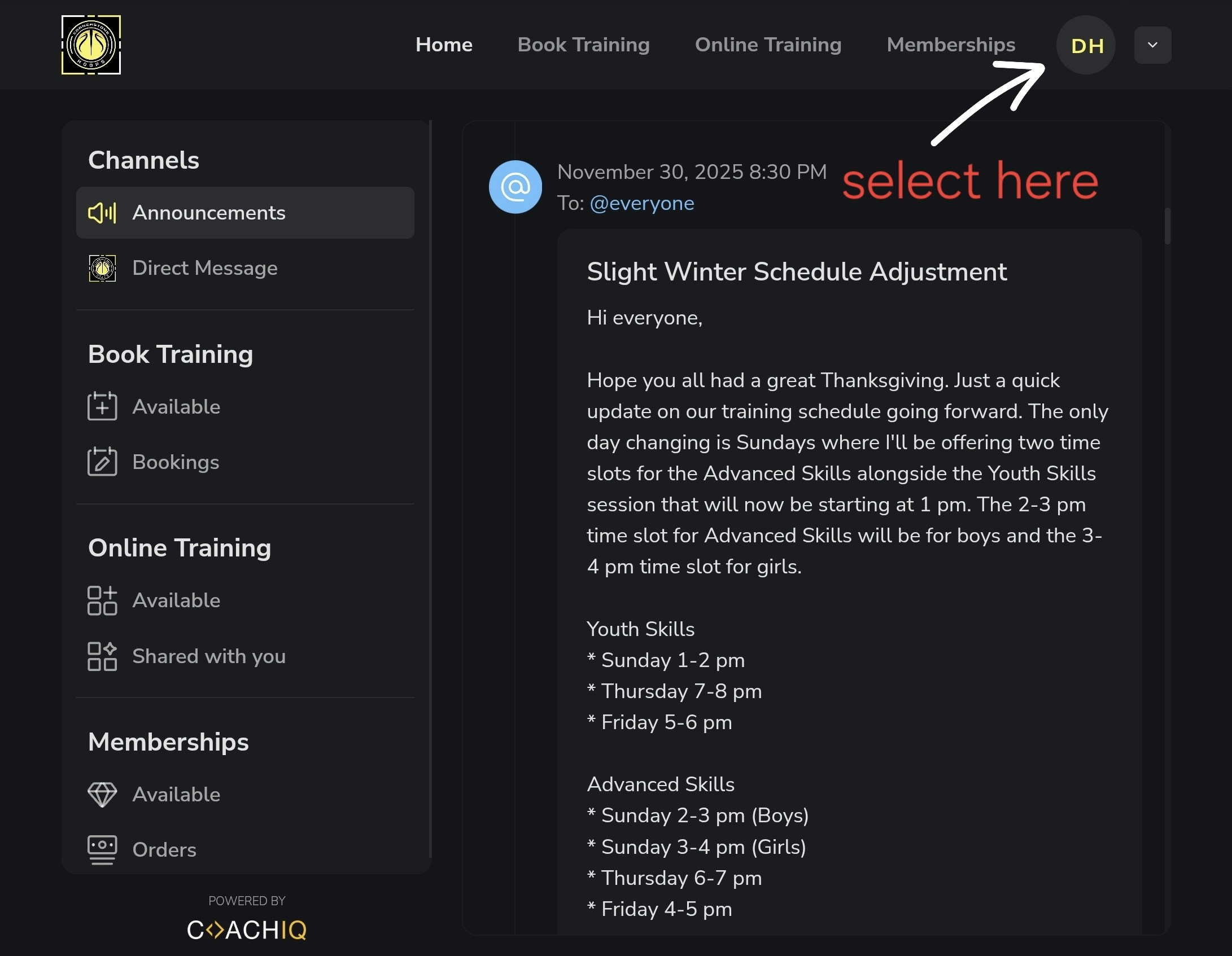 Select **Billing** from the sidebar menu. Active subscriptions are listed here.
The athlete will always see a cancel option next to their subscription. What happens next depends on your settings:
| Setting | What the athlete sees |
| -------------------------- | ------------------------------------------------------------------------------------------------------------------------------- |
| **Allow cancellation ON** | Subscription is canceled immediately. Access continues until the end of the current billing period. You receive a notification. |
| **Allow cancellation OFF** | Athlete is prompted to send you a cancellation request message. You handle the cancellation manually. |
## Data deletion requests (iOS app)
If you receive a message saying an athlete wants to delete their data, this is separate from subscription cancellation. Apple requires all iOS apps to provide users with a way to request account and data deletion.
Athletes find this button in **Settings** inside the CoachIQ iOS app. Tapping it sends a deletion request — it does not cancel a subscription or affect billing.
If you receive a data deletion request, contact the CoachIQ team to process it.
## Common questions
The subscription remains active until the end of the current billing period. The athlete retains access until then and won't be charged again.
Yes. When an athlete cancels directly, you'll receive a notification through CoachIQ. When cancellation is disabled, you'll receive their cancellation request message instead.
Yes, athletes can purchase a new subscription at any time through your products page or their portal.
Toggle **OFF** the **Allow users to cancel** setting for that product. Athletes will still see the cancel option, but it will direct them to send you a cancellation request message instead of canceling automatically.
Once an athlete cancels, they cannot undo the cancellation themselves. They would need to purchase a new subscription.
Select **Billing** from the sidebar menu. Active subscriptions are listed here.
The athlete will always see a cancel option next to their subscription. What happens next depends on your settings:
| Setting | What the athlete sees |
| -------------------------- | ------------------------------------------------------------------------------------------------------------------------------- |
| **Allow cancellation ON** | Subscription is canceled immediately. Access continues until the end of the current billing period. You receive a notification. |
| **Allow cancellation OFF** | Athlete is prompted to send you a cancellation request message. You handle the cancellation manually. |
## Data deletion requests (iOS app)
If you receive a message saying an athlete wants to delete their data, this is separate from subscription cancellation. Apple requires all iOS apps to provide users with a way to request account and data deletion.
Athletes find this button in **Settings** inside the CoachIQ iOS app. Tapping it sends a deletion request — it does not cancel a subscription or affect billing.
If you receive a data deletion request, contact the CoachIQ team to process it.
## Common questions
The subscription remains active until the end of the current billing period. The athlete retains access until then and won't be charged again.
Yes. When an athlete cancels directly, you'll receive a notification through CoachIQ. When cancellation is disabled, you'll receive their cancellation request message instead.
Yes, athletes can purchase a new subscription at any time through your products page or their portal.
Toggle **OFF** the **Allow users to cancel** setting for that product. Athletes will still see the cancel option, but it will direct them to send you a cancellation request message instead of canceling automatically.
Once an athlete cancels, they cannot undo the cancellation themselves. They would need to purchase a new subscription.