> ## Documentation Index
> Fetch the complete documentation index at: https://help.coachiq.io/llms.txt
> Use this file to discover all available pages before exploring further.
# In-App Messages - Direct Athlete Communication
> Send free, direct messages to athletes through the CoachIQ app and athlete portal. Learn how to use in-app messaging for personalized coaching communication.
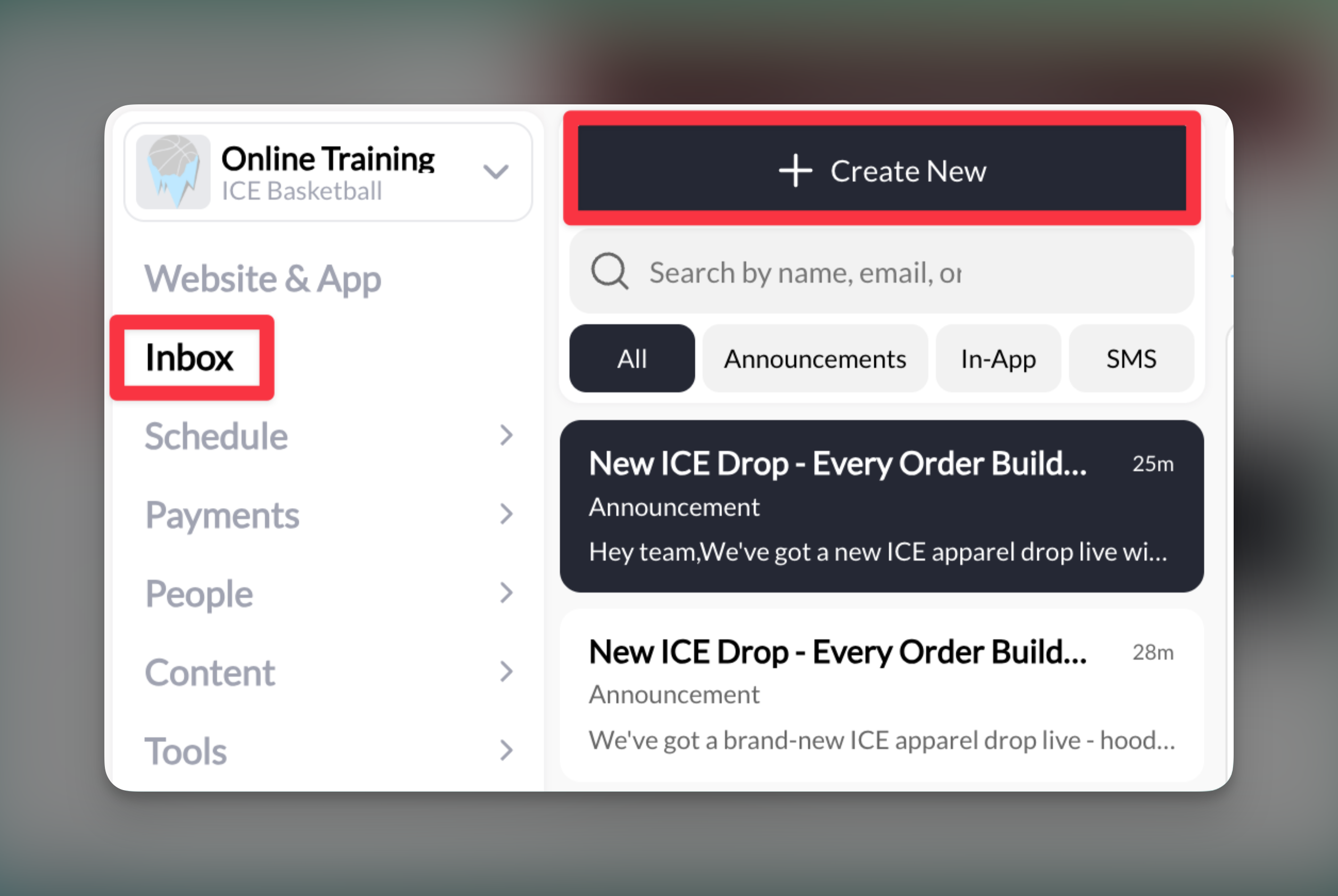
**Where to find this**: Dashboard → Inbox → Create New → In-App
## What are In-App messages?
In-App messages are your direct line to athletes through the CoachIQ platform. These messages appear in the athlete's app and portal, creating a private conversation thread between you and your athletes - similar to texting but without the phone charges.
## Why use In-App messages?
No per-message costs, unlike SMS. Send unlimited messages without worrying about fees.
Attach forms, sessions, products, and media directly in your messages.
Athletes can reply, creating ongoing dialogue for feedback and questions.
Messages appear in both the mobile app and web portal, plus email notifications.
## Prerequisites
**Important**: Athletes must have either:
* The CoachIQ mobile app installed, OR
* An active profile in the athlete portal
Athletes without either will not receive In-App messages.
## Sending an In-App message
Navigate to your **Inbox** and click **Create New**. Select **In-App** from the message type options.
 In the "Send to" field, you can:
* Type an athlete's name to message them individually
* Select multiple athletes for a group message
* Use tags to message predefined groups
* Choose roles (Admin, User, Customer)
Start typing and CoachIQ will suggest matching athletes from your database.
Write your message in the text field. There's no character limit, so you can be as detailed as needed.
Example messages: Hey Sarah, great work at practice today! Here's the drill video we discussed. Let me know if you have questions about the footwork.
Russell, we have a session opening tomorrow at 3pm. Click the scheduler below to claim your spot!
Click the **+ Attach** button to include:
* **Forms**: Collect information or feedback
* **Media**: Share videos or images for instruction
* **Products**: Allow direct purchase or signup
* **Scheduler**: Enable instant session booking
In the "Send to" field, you can:
* Type an athlete's name to message them individually
* Select multiple athletes for a group message
* Use tags to message predefined groups
* Choose roles (Admin, User, Customer)
Start typing and CoachIQ will suggest matching athletes from your database.
Write your message in the text field. There's no character limit, so you can be as detailed as needed.
Example messages: Hey Sarah, great work at practice today! Here's the drill video we discussed. Let me know if you have questions about the footwork.
Russell, we have a session opening tomorrow at 3pm. Click the scheduler below to claim your spot!
Click the **+ Attach** button to include:
* **Forms**: Collect information or feedback
* **Media**: Share videos or images for instruction
* **Products**: Allow direct purchase or signup
* **Scheduler**: Enable instant session booking
 Click **Send** to deliver your message. Athletes will receive:
* An in-app notification (if they have the app)
* A portal notification (if they use the web version)
* An email notification to their registered address
**Success!** Your message is delivered instantly across all platforms.
## How athletes receive In-App messages
### Mobile app users
* Push notification appears on their phone
* Message shows in the Inbox/Channels section
* Can reply directly from the app
### Portal users
* Notification appears when they log in
* Message visible in their inbox
* Can reply from the web interface
### Email notifications
All In-App messages trigger an email to ensure athletes don't miss important communications, even if they haven't opened the app recently.
## Managing In-App conversations
### Viewing replies
* Replies appear in your main Inbox view
* Conversations maintain full thread history
* New replies trigger notifications to you
### Continuing conversations
Simply click on any existing conversation to:
* View the full message history
* Send follow-up messages
* Add new attachments
* See when messages were read
## Best practices
**Choose In-App when:**
* Sending regular updates or feedback
* Cost is a consideration
* You need rich attachments
* The message isn't time-critical
**Choose SMS when:**
* It's urgent (practice cancelled, last-minute changes)
* You're unsure if the athlete checks the app
* You need to reach parents who don't use the app
* **Be personal**: Use the athlete's name and reference specific situations
* **Add value**: Include helpful attachments like drill videos or booking links
* **Set expectations**: Let athletes know if you need a reply
* **Time it right**: Send technique feedback soon after practice while it's fresh
* **Forms**: Great for collecting feedback after sessions
* **Schedulers**: Perfect for filling last-minute cancellations
* **Media**: Ideal for sharing technique videos or progress photos
* **Products**: Useful for promoting camps or special programs
## Common questions
No, once an In-App message is sent, it cannot be deleted. This maintains conversation integrity and accountability.
No, when you send to multiple recipients, each conversation remains private between you and each individual athlete.
They won't receive In-App messages. You'll need to use SMS or ensure they set up their athlete portal access.
No, In-App messages have no character limit. You can write as much detail as needed.
Yes, if parents have their own profile in the system with app or portal access.
## Pro tips
**Quick feedback loop**: After each training session, send personalized In-App messages to 2-3 athletes with specific feedback. This builds strong coach-athlete relationships.
**Attachment combo**: Pair a form with a session scheduler - "Please fill out this injury prevention form, then book your recovery session."
**Template messages**: Keep common messages in a notes app to copy/paste, like session reminders or homework assignments.
## Limitations to remember
* Athletes must have app or portal access
* Messages cannot be deleted once sent
* No read receipts (you can't see if the message was read)
* Attachments appear as cards/links, not embedded content
## Related articles
* [SMS Messages - Setup and Best Practices](/inbox/sms-messages)
* [Announcements - Broadcasting to Your Team](/inbox/announcements)
* [Attaching Forms, Sessions, and Products](/inbox/attaching-forms-schedulers-and-products)
* [Using Tags for Group Messages](/inbox/using-tags-for-group-messages)
Click **Send** to deliver your message. Athletes will receive:
* An in-app notification (if they have the app)
* A portal notification (if they use the web version)
* An email notification to their registered address
**Success!** Your message is delivered instantly across all platforms.
## How athletes receive In-App messages
### Mobile app users
* Push notification appears on their phone
* Message shows in the Inbox/Channels section
* Can reply directly from the app
### Portal users
* Notification appears when they log in
* Message visible in their inbox
* Can reply from the web interface
### Email notifications
All In-App messages trigger an email to ensure athletes don't miss important communications, even if they haven't opened the app recently.
## Managing In-App conversations
### Viewing replies
* Replies appear in your main Inbox view
* Conversations maintain full thread history
* New replies trigger notifications to you
### Continuing conversations
Simply click on any existing conversation to:
* View the full message history
* Send follow-up messages
* Add new attachments
* See when messages were read
## Best practices
**Choose In-App when:**
* Sending regular updates or feedback
* Cost is a consideration
* You need rich attachments
* The message isn't time-critical
**Choose SMS when:**
* It's urgent (practice cancelled, last-minute changes)
* You're unsure if the athlete checks the app
* You need to reach parents who don't use the app
* **Be personal**: Use the athlete's name and reference specific situations
* **Add value**: Include helpful attachments like drill videos or booking links
* **Set expectations**: Let athletes know if you need a reply
* **Time it right**: Send technique feedback soon after practice while it's fresh
* **Forms**: Great for collecting feedback after sessions
* **Schedulers**: Perfect for filling last-minute cancellations
* **Media**: Ideal for sharing technique videos or progress photos
* **Products**: Useful for promoting camps or special programs
## Common questions
No, once an In-App message is sent, it cannot be deleted. This maintains conversation integrity and accountability.
No, when you send to multiple recipients, each conversation remains private between you and each individual athlete.
They won't receive In-App messages. You'll need to use SMS or ensure they set up their athlete portal access.
No, In-App messages have no character limit. You can write as much detail as needed.
Yes, if parents have their own profile in the system with app or portal access.
## Pro tips
**Quick feedback loop**: After each training session, send personalized In-App messages to 2-3 athletes with specific feedback. This builds strong coach-athlete relationships.
**Attachment combo**: Pair a form with a session scheduler - "Please fill out this injury prevention form, then book your recovery session."
**Template messages**: Keep common messages in a notes app to copy/paste, like session reminders or homework assignments.
## Limitations to remember
* Athletes must have app or portal access
* Messages cannot be deleted once sent
* No read receipts (you can't see if the message was read)
* Attachments appear as cards/links, not embedded content
## Related articles
* [SMS Messages - Setup and Best Practices](/inbox/sms-messages)
* [Announcements - Broadcasting to Your Team](/inbox/announcements)
* [Attaching Forms, Sessions, and Products](/inbox/attaching-forms-schedulers-and-products)
* [Using Tags for Group Messages](/inbox/using-tags-for-group-messages)