> ## Documentation Index
> Fetch the complete documentation index at: https://help.coachiq.io/llms.txt
> Use this file to discover all available pages before exploring further.
# How SMS credits work
> Understand how SMS credits are used, check your balance, and buy more so your text messages keep sending.
SMS credits are how you pay for text messaging in CoachIQ. Every text you send or receive draws from your credit balance, and you top it up whenever you need more.
**Where to find this:** **Settings** → **Credits**
## What uses a credit
Each SMS message uses credits, whether you send it or an athlete texts you back. Longer messages that split into multiple segments use a credit per segment, so keeping texts short stretches your balance further.
Avoid emojis in SMS. They switch the message to a different encoding that shortens each segment, which means one text can use several credits.
## Check your balance and buy more
Go to **Settings** → **Credits**. Your **Current Balance** shows at the top of the page.
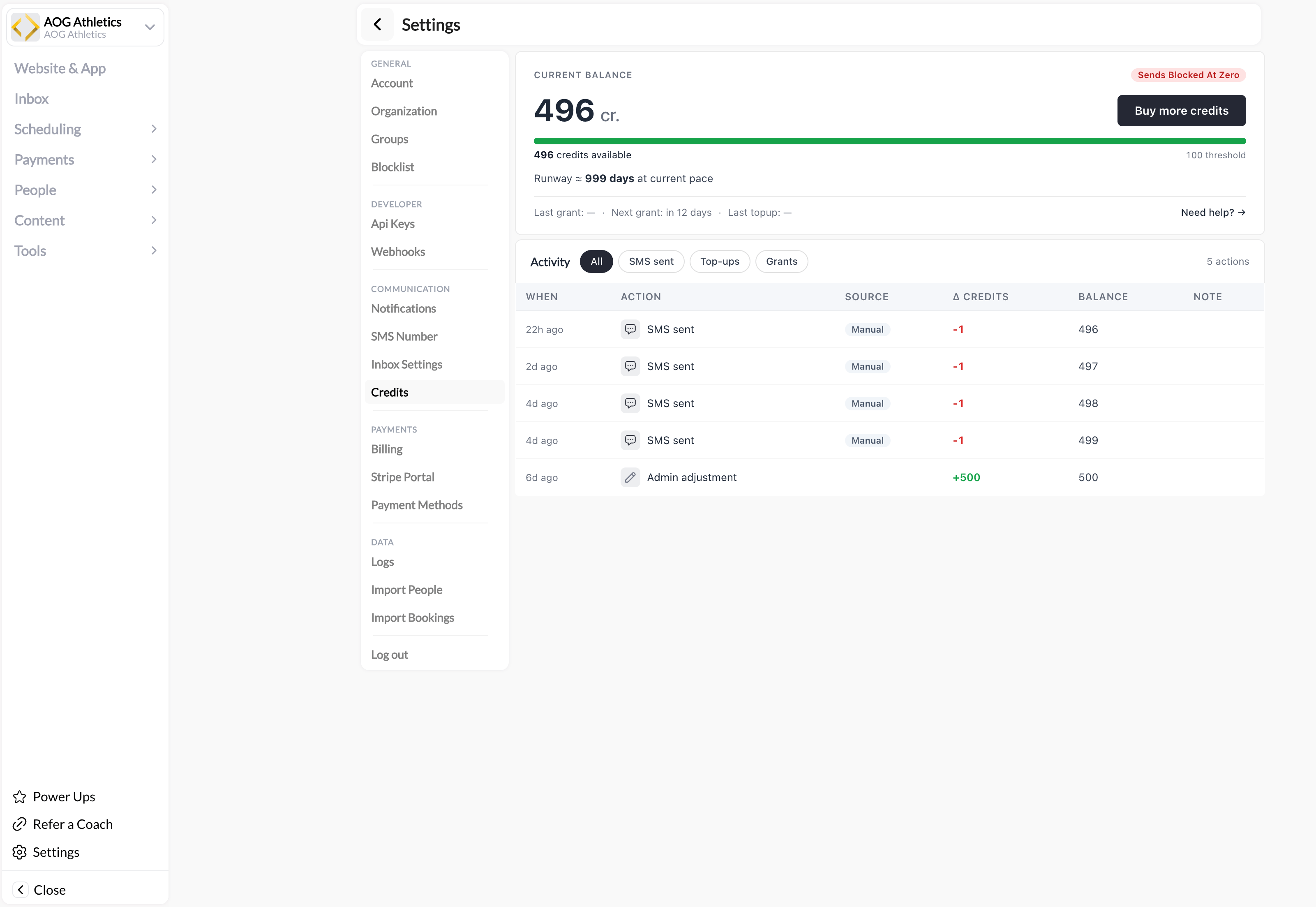 The **Activity** list shows each credit change: messages sent, top-ups, and any manual adjustments. Use the filters (**All**, **SMS sent**, **Top-ups**, **Grants**) to narrow the view, and the **Balance** column to see your running total after each entry.
Click **Buy more credits** and follow the prompts to add credits to your account. Your new balance is available right away.
## Common questions
Once you run out of credits, outgoing texts stop sending until you top up. Buy more credits from **Settings** → **Credits** to start sending again.
Yes. Both messages you send and replies you receive draw from your credit balance.
No. SMS credits pay for text messaging and live under **Settings** → **Credits**. Session credits are what athletes use to book sessions and are managed on each athlete's profile. The two are completely separate.
## Related articles
Complete 10DLC registration and get your business number.
See how In-App, SMS, and Announcements compare.
The **Activity** list shows each credit change: messages sent, top-ups, and any manual adjustments. Use the filters (**All**, **SMS sent**, **Top-ups**, **Grants**) to narrow the view, and the **Balance** column to see your running total after each entry.
Click **Buy more credits** and follow the prompts to add credits to your account. Your new balance is available right away.
## Common questions
Once you run out of credits, outgoing texts stop sending until you top up. Buy more credits from **Settings** → **Credits** to start sending again.
Yes. Both messages you send and replies you receive draw from your credit balance.
No. SMS credits pay for text messaging and live under **Settings** → **Credits**. Session credits are what athletes use to book sessions and are managed on each athlete's profile. The two are completely separate.
## Related articles
Complete 10DLC registration and get your business number.
See how In-App, SMS, and Announcements compare.