> ## Documentation Index
> Fetch the complete documentation index at: https://help.coachiq.io/llms.txt
> Use this file to discover all available pages before exploring further.
# SMS Messages - Setup and Best Practices
> Set up your business phone number and send text messages through CoachIQ. Learn SMS best practices, costs, and how to manage text conversations.
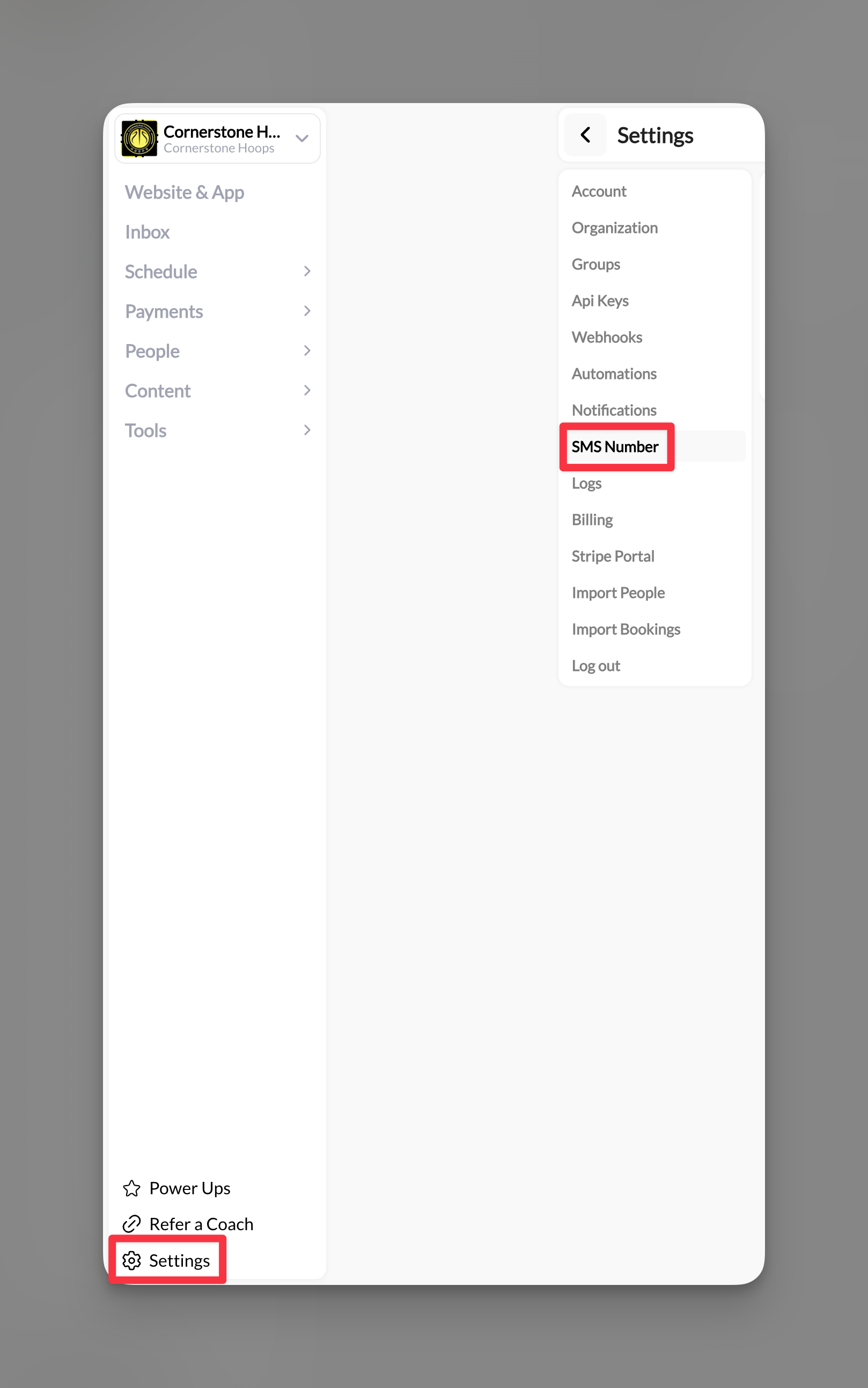
**Where to find this**: Dashboard → Settings → SMS Number (for setup) Dashboard → Inbox → Create New → SMS (for sending)
## Why SMS messaging matters
SMS gives you a direct line to athletes and parents through text messaging - the communication channel with a 98% open rate. Unlike app-based messages, SMS reaches everyone with a phone, making it perfect for urgent updates and reaching parents who don't use the CoachIQ app.
## Your business phone number
CoachIQ provides you with a dedicated business phone number for professional text communication. This keeps your personal number private while maintaining professional boundaries.
### How it works
* You get a unique phone number exclusively for your coaching business
* Send and receive texts through CoachIQ (desktop or mobile app)
* Parents can call this number (with call forwarding to your phone)
* All messages stay organized in your Inbox
* Full conversation history maintained
**Behind the scenes**: CoachIQ uses enterprise-grade SMS infrastructure to ensure reliable message delivery and compliance with messaging regulations.
## Setting up SMS messaging
Go to **Settings** (bottom left of dashboard) → **SMS Number**
 You'll see the 10DLC Compliance form. This is required by law for business texting.
Select your business type:
* **Sole Proprietor**: Individual coaches
* **Business**: Established coaching businesses, academies, facilities
Enter your preferred area codes (primary and backup).
Click **Begin** to submit your application. The information goes through verification to ensure compliance with business messaging regulations.
**Processing time**: Approval typically takes **one week**. This is standard for business number verification and ensures your messages won't be blocked as spam.
Once approved, set up call forwarding in your settings:
* Parents can call your business number
* Calls redirect to your personal phone
* You answer without revealing your personal number
**Pro setup**: Forward calls during business hours only by updating the redirect number based on your schedule.
Once approved, you'll see a confirmation and can immediately start sending SMS messages through your Inbox.
**You're ready!** Your professional SMS system is now active.
## Sending SMS messages
### Individual SMS conversations
Go to **Inbox** → **Create New** → Select **SMS**
Type the athlete or parent's name. They must have a phone number in their profile.
Write your message (up to 1400 characters for individual conversations).
Example: Hi John, practice is moved to 4pm today due to weather. Please confirm you received this. Coach Mike
Attach forms, sessions, products, or media. These appear as clickable links in the text.
Click Send. The recipient receives a text from your business number instantly.
### Mass SMS messages
Perfect for team-wide urgent updates:
You'll see the 10DLC Compliance form. This is required by law for business texting.
Select your business type:
* **Sole Proprietor**: Individual coaches
* **Business**: Established coaching businesses, academies, facilities
Enter your preferred area codes (primary and backup).
Click **Begin** to submit your application. The information goes through verification to ensure compliance with business messaging regulations.
**Processing time**: Approval typically takes **one week**. This is standard for business number verification and ensures your messages won't be blocked as spam.
Once approved, set up call forwarding in your settings:
* Parents can call your business number
* Calls redirect to your personal phone
* You answer without revealing your personal number
**Pro setup**: Forward calls during business hours only by updating the redirect number based on your schedule.
Once approved, you'll see a confirmation and can immediately start sending SMS messages through your Inbox.
**You're ready!** Your professional SMS system is now active.
## Sending SMS messages
### Individual SMS conversations
Go to **Inbox** → **Create New** → Select **SMS**
Type the athlete or parent's name. They must have a phone number in their profile.
Write your message (up to 1400 characters for individual conversations).
Example: Hi John, practice is moved to 4pm today due to weather. Please confirm you received this. Coach Mike
Attach forms, sessions, products, or media. These appear as clickable links in the text.
Click Send. The recipient receives a text from your business number instantly.
### Mass SMS messages
Perfect for team-wide urgent updates:
 Use tags or select multiple individuals (remember: 155 character limit for mass texts)
Practice CANCELLED tonight due to storm. Check app for makeup session. -Coach
One click sends to everyone selected
## SMS costs and limits
### Pricing structure
* **Cost per message**: \$0.0079 (both sent and received)
* **Example costs**:
* Text to 1 athlete = \$0.008
* Team announcement to 50 = \$0.40
* Monthly texts to 100 athletes (4 messages each) = \$3.16
### Character limits
**Important limits to remember:**
* **Mass messages**: 155 characters maximum
* **Individual conversations**: 1400 characters maximum
* **No emojis**: Emojis break character encoding and increase costs
### Message segments
* Standard SMS: 160 characters
* Messages over 160 characters split into segments
* Each segment counts as a separate message for billing
* 1400 character limit = approximately 9 segments
## Managing SMS conversations
### Two-way texting
* Athletes and parents can reply directly
* Replies appear in your Inbox immediately
* Full conversation threading maintained
* Reply costs apply (\$0.0079 per inbound message)
### Call handling
**Important**: You cannot make outbound calls from your CoachIQ number, but:
* Parents/athletes CAN call your business number
* Calls forward to your designated phone
* Set redirect number in Settings → SMS Number
## Best practices
**Use SMS for:**
* Practice cancellations
* Weather updates
* Last-minute schedule changes
* Reaching parents (not just athletes)
* Time-sensitive reminders
**Use In-App for:**
* Detailed feedback
* Non-urgent updates
* Cost-sensitive communication
* Rich media sharing
* **Front-load critical info**: "CANCELLED: Tonight's practice..."
* **Include your name/title**: Parents might not recognize the number
* **Request confirmation**: "Reply YES if you received this"
* **Time stamps**: "Updated 3:45pm" for changing situations
* **Clear action items**: "Pick up at WEST entrance today"
* Use In-App for regular communication
* Reserve SMS for truly urgent matters
* Create contact groups to avoid duplicate texts
* Monitor monthly usage in your billing section
* Consider announcement + SMS combo (announce first, SMS reminder for urgent items)
## Common questions
This is rare but can happen if information is incomplete. Contact support to understand the issue and resubmit with corrected information.
Yes, but you'll need to go through the approval process again. Your conversation history remains intact.
No, replies come back as individual conversations to maintain privacy.
Calls forward to whatever number you've set. Consider updating your redirect number or using do-not-disturb on your personal phone.
Yes, but international rates vary by country. Contact support for specific international pricing.
## Pro tips
**Save templates**: Keep common messages saved in your notes: "Practice moved to \[TIME] due to \[REASON]. Location: \[PLACE]. Reply to confirm."
**Timing matters**: Send practice changes at least 2 hours before when possible. Parents need time to adjust schedules.
**Cost control**: Set a monthly SMS budget. At $0.008/text, $10/month = \~1,250 messages.
## SMS limitations
* Cannot delete sent messages
* No formatting (bold, italic, etc.)
* Links must be typed out fully
* No emojis to maintain cost efficiency
* Cannot make outbound calls (receive only)
## Related articles
* [In-App Messages - Direct Athlete Communication](/inbox/in-app-messages)
* [Inbox Overview](/inbox/inbox-overview)
* [Announcements](/inbox/announcements)
* [Using Tags for Group Messages](/inbox/using-tags-for-group-messages)
Use tags or select multiple individuals (remember: 155 character limit for mass texts)
Practice CANCELLED tonight due to storm. Check app for makeup session. -Coach
One click sends to everyone selected
## SMS costs and limits
### Pricing structure
* **Cost per message**: \$0.0079 (both sent and received)
* **Example costs**:
* Text to 1 athlete = \$0.008
* Team announcement to 50 = \$0.40
* Monthly texts to 100 athletes (4 messages each) = \$3.16
### Character limits
**Important limits to remember:**
* **Mass messages**: 155 characters maximum
* **Individual conversations**: 1400 characters maximum
* **No emojis**: Emojis break character encoding and increase costs
### Message segments
* Standard SMS: 160 characters
* Messages over 160 characters split into segments
* Each segment counts as a separate message for billing
* 1400 character limit = approximately 9 segments
## Managing SMS conversations
### Two-way texting
* Athletes and parents can reply directly
* Replies appear in your Inbox immediately
* Full conversation threading maintained
* Reply costs apply (\$0.0079 per inbound message)
### Call handling
**Important**: You cannot make outbound calls from your CoachIQ number, but:
* Parents/athletes CAN call your business number
* Calls forward to your designated phone
* Set redirect number in Settings → SMS Number
## Best practices
**Use SMS for:**
* Practice cancellations
* Weather updates
* Last-minute schedule changes
* Reaching parents (not just athletes)
* Time-sensitive reminders
**Use In-App for:**
* Detailed feedback
* Non-urgent updates
* Cost-sensitive communication
* Rich media sharing
* **Front-load critical info**: "CANCELLED: Tonight's practice..."
* **Include your name/title**: Parents might not recognize the number
* **Request confirmation**: "Reply YES if you received this"
* **Time stamps**: "Updated 3:45pm" for changing situations
* **Clear action items**: "Pick up at WEST entrance today"
* Use In-App for regular communication
* Reserve SMS for truly urgent matters
* Create contact groups to avoid duplicate texts
* Monitor monthly usage in your billing section
* Consider announcement + SMS combo (announce first, SMS reminder for urgent items)
## Common questions
This is rare but can happen if information is incomplete. Contact support to understand the issue and resubmit with corrected information.
Yes, but you'll need to go through the approval process again. Your conversation history remains intact.
No, replies come back as individual conversations to maintain privacy.
Calls forward to whatever number you've set. Consider updating your redirect number or using do-not-disturb on your personal phone.
Yes, but international rates vary by country. Contact support for specific international pricing.
## Pro tips
**Save templates**: Keep common messages saved in your notes: "Practice moved to \[TIME] due to \[REASON]. Location: \[PLACE]. Reply to confirm."
**Timing matters**: Send practice changes at least 2 hours before when possible. Parents need time to adjust schedules.
**Cost control**: Set a monthly SMS budget. At $0.008/text, $10/month = \~1,250 messages.
## SMS limitations
* Cannot delete sent messages
* No formatting (bold, italic, etc.)
* Links must be typed out fully
* No emojis to maintain cost efficiency
* Cannot make outbound calls (receive only)
## Related articles
* [In-App Messages - Direct Athlete Communication](/inbox/in-app-messages)
* [Inbox Overview](/inbox/inbox-overview)
* [Announcements](/inbox/announcements)
* [Using Tags for Group Messages](/inbox/using-tags-for-group-messages)