> ## Documentation Index
> Fetch the complete documentation index at: https://help.coachiq.io/llms.txt
> Use this file to discover all available pages before exploring further.
# Coupons
> Create and manage discount codes for promotions, partnerships, and special offers
**Where to find this**: Payments → Coupons
## What coupons are
Coupons are discount codes that reduce product prices at checkout:
* Percentage discounts (10%, 25%, 50% off)
* Fixed amount discounts ($10, $25 off)
* Free access (100% off)
Clients enter coupon codes during checkout to apply discounts automatically.
## The Coupons page
Navigate to **Payments → Coupons** to view all discount codes.
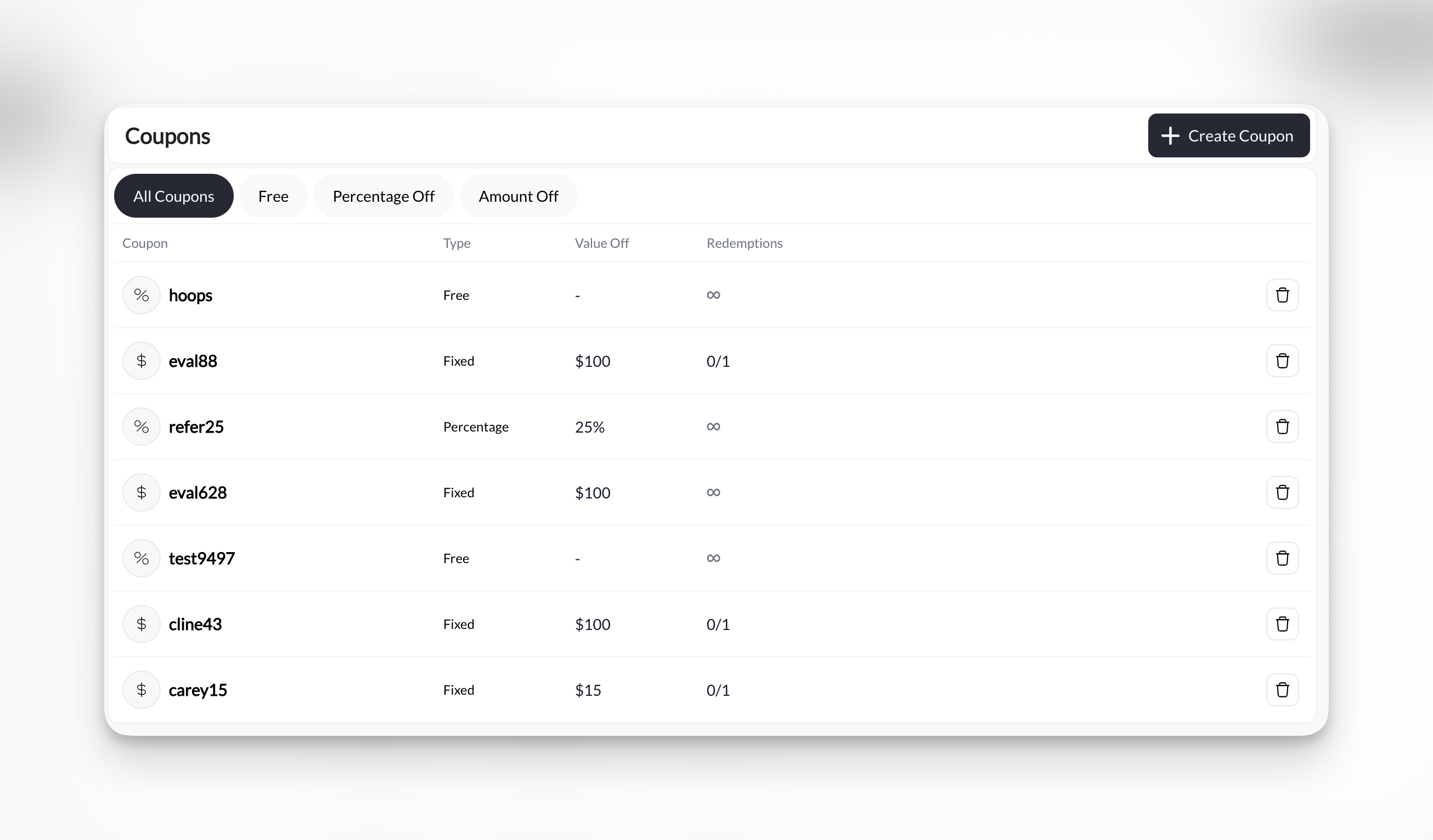 **Page displays:**
* Coupon code
* Discount type (Free, Percentage, Amount)
* Value off
* Redemption count
* Date created
* Active/Inactive status
**Available actions:**
* Create new coupon
* Edit existing coupon
* Delete/archive coupon
* View redemption details
## Three coupon types
**100% off - No payment required**
Product becomes free when coupon applied.
**When to use:**
* Promotional giveaways
* Scholarship access
* Sponsor/donor complimentary sessions
* Contest prizes
**Example:** FREESESSION code makes \$75 session free
Free coupons still require checkout process to capture client info and issue credits.
**Discount by percentage**
Reduces price by specified percentage.
**When to use:**
* Promotional campaigns (25% off sale)
* Referral rewards (20% off for referrals)
* Seasonal discounts
* Member benefits (10% member discount)
**Examples:**
* 10OFF = 10% discount
* SPRING25 = 25% off
* HALF = 50% discount
Percentage discounts scale with product price. $100 product with 25% off = $25 discount. $200 product with 25% off = $50 discount.
**Fixed dollar discount**
Reduces price by specific dollar amount.
**When to use:**
* Fixed-value promotions (\$10 off any purchase)
* Bundle discounts (\$50 off packages)
* Retention offers (\$25 off return visit)
**Examples:**
* SAVE10 = \$10 off
* BUNDLE50 = \$50 off
* TWENTYFIVE = \$25 off
Amount-off coupons can't reduce price below $0. $10 off a $5 product results in $0 charge, not negative.
## Common use cases
Limited-time sales, seasonal offers, launch discounts
Reward clients who refer friends with discount codes
Corporate codes, sponsor access, organization discounts
Win-back offers, loyalty rewards, comeback incentives
Unique codes for social media promoters and affiliates
Service recovery, issue compensation, goodwill gestures
## Coupon vs. Access Code product
**Two ways to offer special access:**
**Discount applied to existing product**
* Create one coupon
* Works with any product
* Client selects product, then applies coupon
* More flexible - one coupon for multiple products
**Example:** SUMMER25 code gives 25% off any product
**Separate product requiring code**
* Create Access Code product type
* Works only for that specific product
* Client enters code to see/purchase product
* More controlled - specific product with specific code
**Example:** CORPORATE2025 unlocks "Corporate Partner Sessions" product
[Learn about Access Code products →](/payments/product-types)
**General promotions:** Use coupons (one code for many products)
**Specific partnerships:** Use Access Code products (controlled access to dedicated product)
## How clients use coupons
Client goes to booking page or product purchase and selects what they want.
At checkout, client finds "Coupon Code" or "Promo Code" field and enters code.
Price updates immediately to reflect discount.
Client sees:
* Original price (strikethrough)
* Discount amount
* New total
**Page displays:**
* Coupon code
* Discount type (Free, Percentage, Amount)
* Value off
* Redemption count
* Date created
* Active/Inactive status
**Available actions:**
* Create new coupon
* Edit existing coupon
* Delete/archive coupon
* View redemption details
## Three coupon types
**100% off - No payment required**
Product becomes free when coupon applied.
**When to use:**
* Promotional giveaways
* Scholarship access
* Sponsor/donor complimentary sessions
* Contest prizes
**Example:** FREESESSION code makes \$75 session free
Free coupons still require checkout process to capture client info and issue credits.
**Discount by percentage**
Reduces price by specified percentage.
**When to use:**
* Promotional campaigns (25% off sale)
* Referral rewards (20% off for referrals)
* Seasonal discounts
* Member benefits (10% member discount)
**Examples:**
* 10OFF = 10% discount
* SPRING25 = 25% off
* HALF = 50% discount
Percentage discounts scale with product price. $100 product with 25% off = $25 discount. $200 product with 25% off = $50 discount.
**Fixed dollar discount**
Reduces price by specific dollar amount.
**When to use:**
* Fixed-value promotions (\$10 off any purchase)
* Bundle discounts (\$50 off packages)
* Retention offers (\$25 off return visit)
**Examples:**
* SAVE10 = \$10 off
* BUNDLE50 = \$50 off
* TWENTYFIVE = \$25 off
Amount-off coupons can't reduce price below $0. $10 off a $5 product results in $0 charge, not negative.
## Common use cases
Limited-time sales, seasonal offers, launch discounts
Reward clients who refer friends with discount codes
Corporate codes, sponsor access, organization discounts
Win-back offers, loyalty rewards, comeback incentives
Unique codes for social media promoters and affiliates
Service recovery, issue compensation, goodwill gestures
## Coupon vs. Access Code product
**Two ways to offer special access:**
**Discount applied to existing product**
* Create one coupon
* Works with any product
* Client selects product, then applies coupon
* More flexible - one coupon for multiple products
**Example:** SUMMER25 code gives 25% off any product
**Separate product requiring code**
* Create Access Code product type
* Works only for that specific product
* Client enters code to see/purchase product
* More controlled - specific product with specific code
**Example:** CORPORATE2025 unlocks "Corporate Partner Sessions" product
[Learn about Access Code products →](/payments/product-types)
**General promotions:** Use coupons (one code for many products)
**Specific partnerships:** Use Access Code products (controlled access to dedicated product)
## How clients use coupons
Client goes to booking page or product purchase and selects what they want.
At checkout, client finds "Coupon Code" or "Promo Code" field and enters code.
Price updates immediately to reflect discount.
Client sees:
* Original price (strikethrough)
* Discount amount
* New total
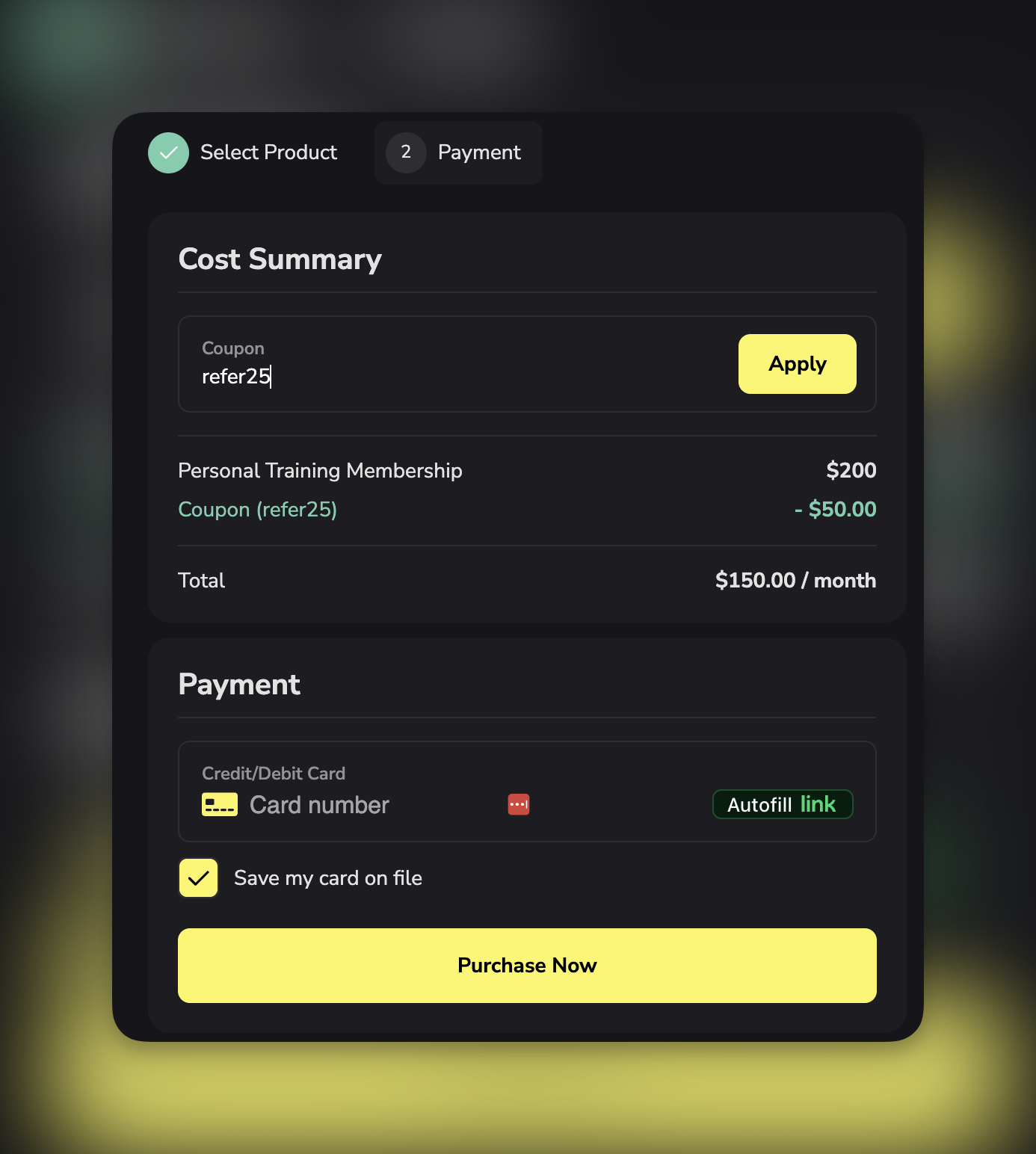 Client pays discounted amount and receives product/credits.
## Coupon list columns explained
**Code**: Exact text client must enter
* Case sensitive by default
* No spaces allowed
* Letters, numbers, and hyphens OK
**Type**: Free, Percentage Off, or Amount Off
**Value Off**:
* Free: 100%
* Percentage: 10%, 25%, 50%, etc.
* Amount: $10, $25, \$50, etc.
**Redemptions**: Number of times coupon has been used
* Tracks usage count
* Compares against limit (if set)
* Example: 15/100 = 15 uses out of 100 limit
**Date Created**: When you created the coupon
**Status**: Active (clients can use) or Inactive (disabled)
## Filter and search coupons
**Filter by type:**
* All coupons
* Free only
* Percentage off only
* Amount off only
**Search:** Type code name to find specific coupon
## Coupon limitations and controls
**Redemption limits:**
* Unlimited uses (default)
* Limited total uses (50, 100, 500, etc.)
* One use per customer (coming soon)
## Coupons and subscriptions
When a coupon is applied to a subscription product, the discount applies to every billing cycle for as long as the athlete remains subscribed.
To remove the coupon after the initial purchase, find the athlete's subscription in Stripe and remove the coupon from there.
## Creating your first coupon
Ready to create a discount code?
1. Go to Payments → Coupons
2. Click + Create Coupon
3. Choose coupon type (Free, Percentage, Amount)
4. Set code name (what clients enter)
5. Configure discount value
6. Set redemption limits (optional)
7. Save coupon
## Tracking coupon performance
**Metrics to monitor:**
**Redemption count:** How many times used
**Revenue impact:** Total discount given away
**Conversion rate:** Coupon uses / Coupon impressions
**Most popular codes:** Which coupons clients use most
**Least used codes:** Which promotions aren't working
Use redemption data to:
* Measure campaign success
* Adjust discount amounts
* Identify effective channels
* Plan future promotions
## Best practices
**Code naming:**
* Make codes memorable (SPRING25, not XJ7H2K9)
* Include discount in name when possible (25OFF)
* Match campaign (REFER20 for referral program)
* Keep them short (under 15 characters)
**Discount sizing:**
* Test different amounts to find sweet spot
* Too small: Doesn't motivate action
* Too large: Erodes margins unnecessarily
* Common sweet spot: 20-30% for percentage, $25-$50 for amount
**Promotion timing:**
* Limited time creates urgency (48-hour sale)
* Seasonal alignment (SUMMER, NEWYEAR)
* Event-based (GRANDOPENING, ANNIVERSARY)
**Communication:**
* Clearly state terms (expires, limits, restrictions)
* Make codes easy to find and share
* Remind clients of expiration dates
* Celebrate redemptions (thank clients who use codes)
## Related articles
* [Product Types Explained](/payments/product-types)
* [Product Overview](/payments/product-overview)
* [Product Builder](/payments/product-builder)
Client pays discounted amount and receives product/credits.
## Coupon list columns explained
**Code**: Exact text client must enter
* Case sensitive by default
* No spaces allowed
* Letters, numbers, and hyphens OK
**Type**: Free, Percentage Off, or Amount Off
**Value Off**:
* Free: 100%
* Percentage: 10%, 25%, 50%, etc.
* Amount: $10, $25, \$50, etc.
**Redemptions**: Number of times coupon has been used
* Tracks usage count
* Compares against limit (if set)
* Example: 15/100 = 15 uses out of 100 limit
**Date Created**: When you created the coupon
**Status**: Active (clients can use) or Inactive (disabled)
## Filter and search coupons
**Filter by type:**
* All coupons
* Free only
* Percentage off only
* Amount off only
**Search:** Type code name to find specific coupon
## Coupon limitations and controls
**Redemption limits:**
* Unlimited uses (default)
* Limited total uses (50, 100, 500, etc.)
* One use per customer (coming soon)
## Coupons and subscriptions
When a coupon is applied to a subscription product, the discount applies to every billing cycle for as long as the athlete remains subscribed.
To remove the coupon after the initial purchase, find the athlete's subscription in Stripe and remove the coupon from there.
## Creating your first coupon
Ready to create a discount code?
1. Go to Payments → Coupons
2. Click + Create Coupon
3. Choose coupon type (Free, Percentage, Amount)
4. Set code name (what clients enter)
5. Configure discount value
6. Set redemption limits (optional)
7. Save coupon
## Tracking coupon performance
**Metrics to monitor:**
**Redemption count:** How many times used
**Revenue impact:** Total discount given away
**Conversion rate:** Coupon uses / Coupon impressions
**Most popular codes:** Which coupons clients use most
**Least used codes:** Which promotions aren't working
Use redemption data to:
* Measure campaign success
* Adjust discount amounts
* Identify effective channels
* Plan future promotions
## Best practices
**Code naming:**
* Make codes memorable (SPRING25, not XJ7H2K9)
* Include discount in name when possible (25OFF)
* Match campaign (REFER20 for referral program)
* Keep them short (under 15 characters)
**Discount sizing:**
* Test different amounts to find sweet spot
* Too small: Doesn't motivate action
* Too large: Erodes margins unnecessarily
* Common sweet spot: 20-30% for percentage, $25-$50 for amount
**Promotion timing:**
* Limited time creates urgency (48-hour sale)
* Seasonal alignment (SUMMER, NEWYEAR)
* Event-based (GRANDOPENING, ANNIVERSARY)
**Communication:**
* Clearly state terms (expires, limits, restrictions)
* Make codes easy to find and share
* Remind clients of expiration dates
* Celebrate redemptions (thank clients who use codes)
## Related articles
* [Product Types Explained](/payments/product-types)
* [Product Overview](/payments/product-overview)
* [Product Builder](/payments/product-builder)