> ## Documentation Index
> Fetch the complete documentation index at: https://help.coachiq.io/llms.txt
> Use this file to discover all available pages before exploring further.
# Credits & Products
> Understand how session credits work with products in CoachIQ's payment system
**Where to configure credits**: Payments → Products → \[Product] → Section 3 (Credits)
## What credits are
Credits are pre-purchased session bookings that work like punch cards or class passes.
**How it works:**
1. Client buys a product that includes credits
2. Credits appear in their account
3. Client uses credits to book sessions
4. Credit count decreases with each booking
Credits let clients pay upfront for multiple sessions instead of paying per booking.
## Credits are configured in products
Enable credits when creating or editing a product:
**Product Builder → Section 3: Credits**
* Toggle credits ON
* Specify number of credits (e.g., 10 credits)
* Set expiration (30 days, 90 days, never, etc.)
* Choose which schedulers accept these credits (Section 4)
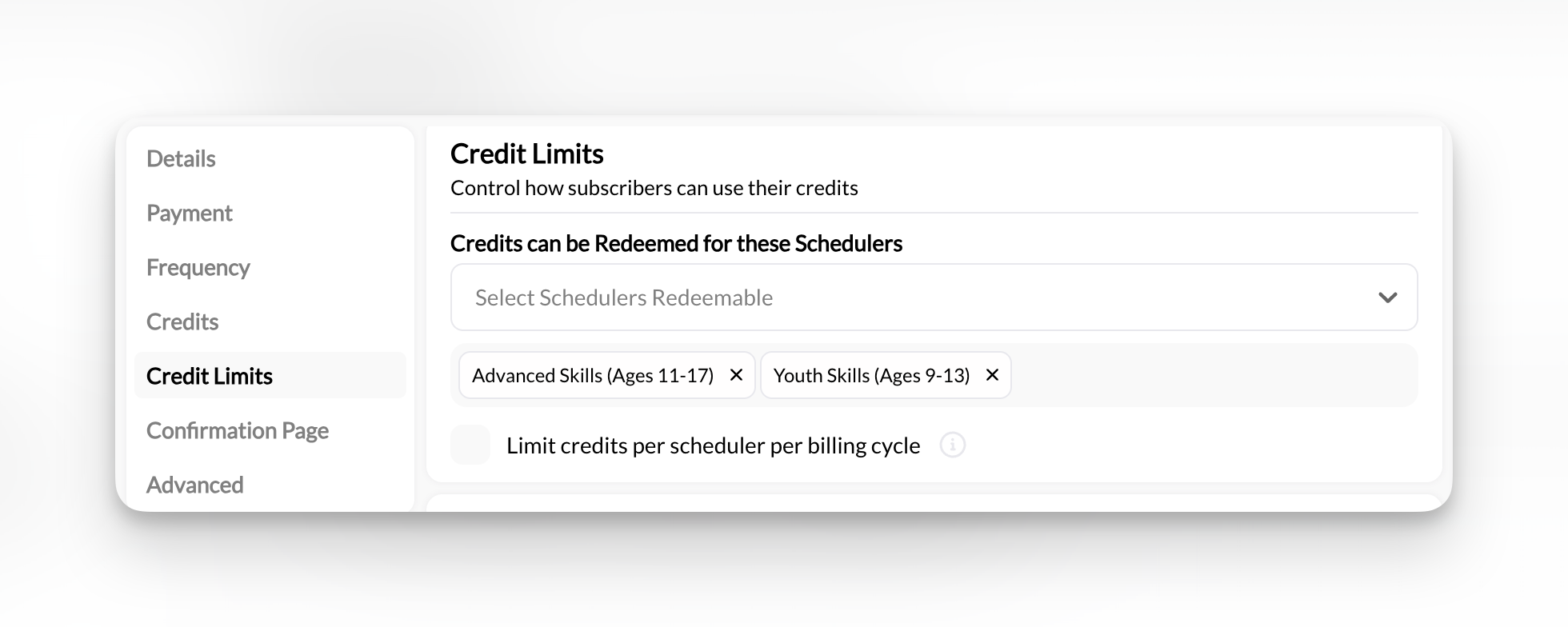 Credits are optional. Not every product needs to issue credits. Many coaches use products for payment-only without credit systems.
## Two types of credits
**Can be used for any session**
* No scheduler restrictions
* Maximum flexibility for clients
* Most common type
Credits are optional. Not every product needs to issue credits. Many coaches use products for payment-only without credit systems.
## Two types of credits
**Can be used for any session**
* No scheduler restrictions
* Maximum flexibility for clients
* Most common type
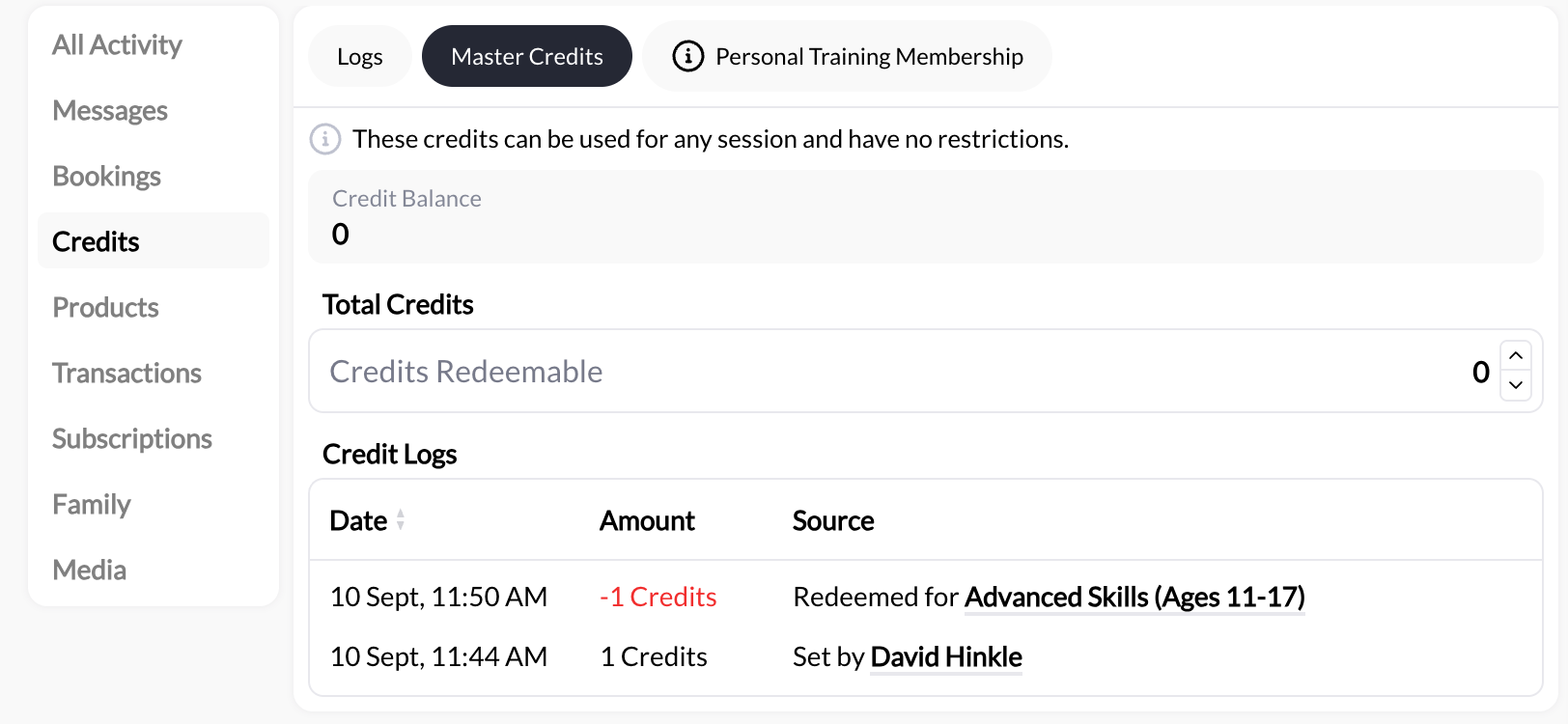 **Configure:**
* Can only be set under a person's account under the credit tab
**Can be set up to function like Master Credits**
* No scheduler specific limitations
* Can be used to book any session
* Difference from Master Credits is that these credits live under the product specific credit bank
**Can be restricted to certain schedulers**
* Work only for designated session types
* Prevent credits from being used incorrectly
* Better for specialized packages
**Configure:**
* Can only be set under a person's account under the credit tab
**Can be set up to function like Master Credits**
* No scheduler specific limitations
* Can be used to book any session
* Difference from Master Credits is that these credits live under the product specific credit bank
**Can be restricted to certain schedulers**
* Work only for designated session types
* Prevent credits from being used incorrectly
* Better for specialized packages
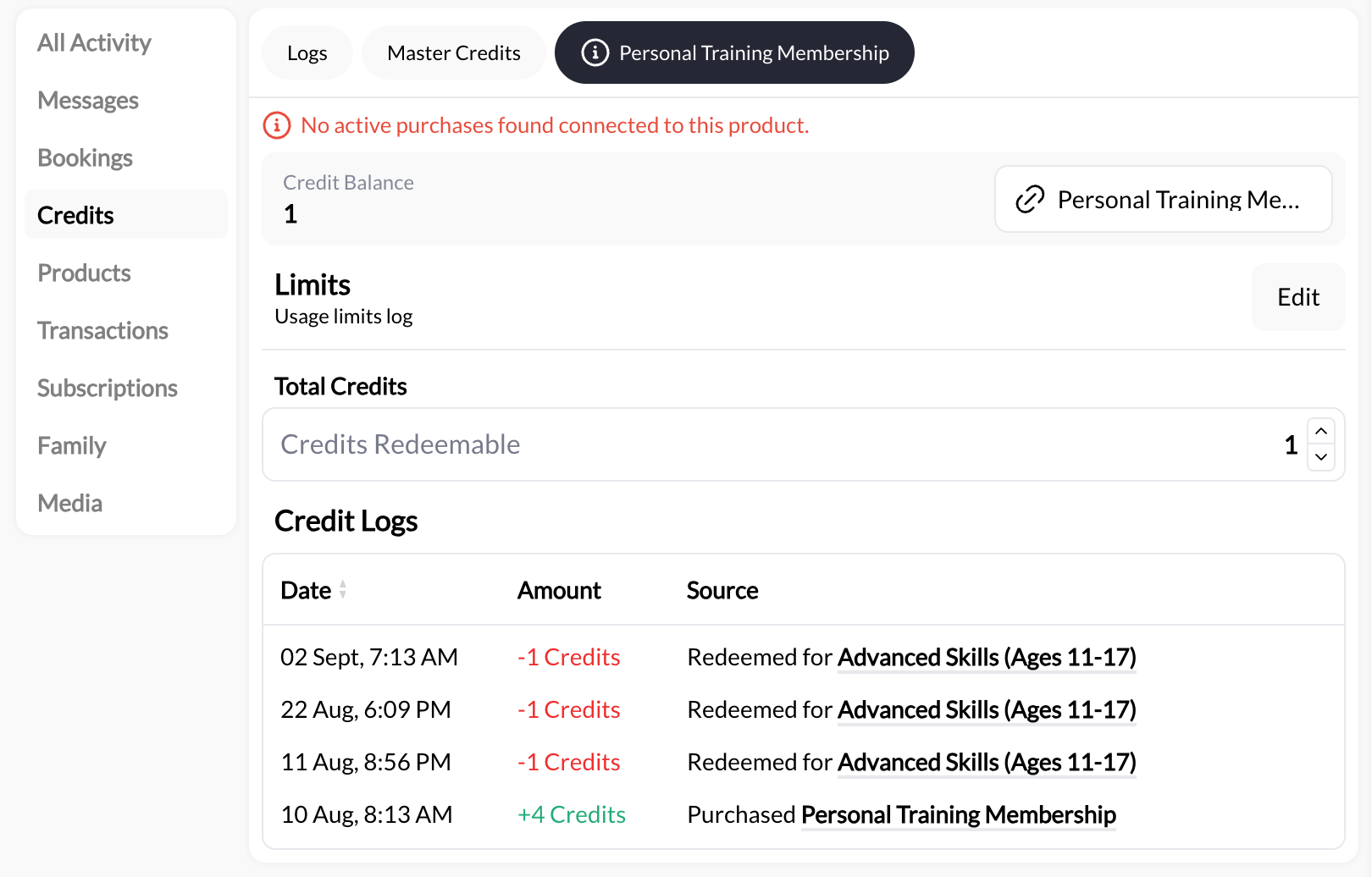 **Configure certain scheduler restrictions:**
* Select specific schedulers in "Usage Limits" section
**Example:** "Youth Training Package" credits only work for youth sessions, not adult sessions.
## Credit notation
Credits display with special notation in client profiles:
**Basic format:**
* `5` = 5 credits available
* `0` = No credits remaining
* `∞` = Unlimited credits
**Product-specific format:**
* `3/∞ Rising Stars` = 3 of unlimited credits for "Rising Stars" scheduler
* `5/10 Youth Training` = 5 of 10 credits for "Youth Training" scheduler
This notation appears in client profiles under the Credits tab and during booking flows.
## How clients use credits
Client buys "10-Session Package" for \$650. Receives 10 credits.
Client goes to booking page and selects session type.
Instead of paying, client sees "Use 1 Credit" option.
**Configure certain scheduler restrictions:**
* Select specific schedulers in "Usage Limits" section
**Example:** "Youth Training Package" credits only work for youth sessions, not adult sessions.
## Credit notation
Credits display with special notation in client profiles:
**Basic format:**
* `5` = 5 credits available
* `0` = No credits remaining
* `∞` = Unlimited credits
**Product-specific format:**
* `3/∞ Rising Stars` = 3 of unlimited credits for "Rising Stars" scheduler
* `5/10 Youth Training` = 5 of 10 credits for "Youth Training" scheduler
This notation appears in client profiles under the Credits tab and during booking flows.
## How clients use credits
Client buys "10-Session Package" for \$650. Receives 10 credits.
Client goes to booking page and selects session type.
Instead of paying, client sees "Use 1 Credit" option.
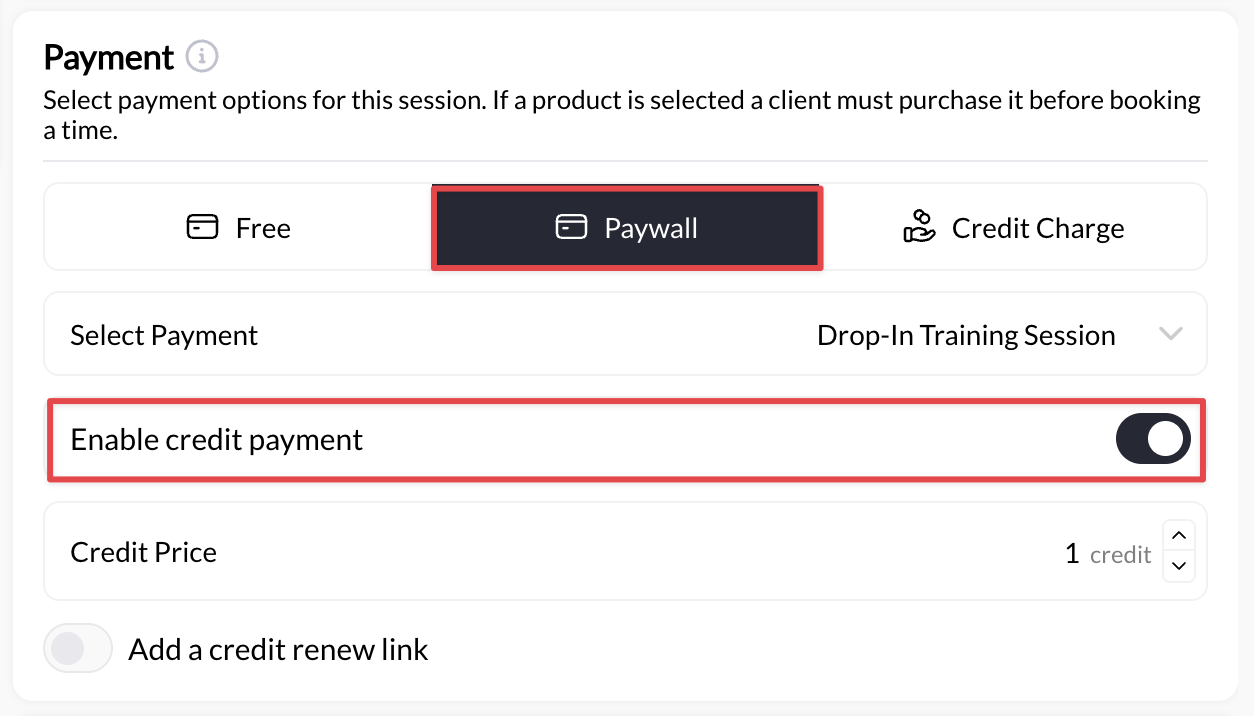 Client clicks "Use Credits & Book". Credit count decreases by 1.
Booking confirmed without payment. Client now has 9 credits remaining.
## Credit management happens in Schedule section of the Help Center
While credits are **configured** in Products, they're **managed** in the **Schedule** section:
**For complete credit documentation, see:**
* Viewing client credit balances
* Manually adding or removing credits
* Credit expiration tracking
* Credit usage reports
* Troubleshooting credit issues
**Important:** This Payments section covers credit configuration in products only. For viewing balances, manual adjustments, usage tracking, and troubleshooting, see the Schedule section of the help center.
## Common credit configurations
**10-Session Package**
**Product setup:**
* Type: One-Time
* Price: \$650
* Credits: 10
* Expiration: 90 days
* Usage: Master Credits (any scheduler)
Client pays \$650 once, gets 10 sessions over 3 months.
**Unlimited Monthly Training**
**Product setup:**
* Type: Subscription
* Price: \$200/month
* Credits: Unlimited credits per month
* Expiration: End of billing period
* Usage: Master Credits
Client pays \$200/month, gets unlimited sessions while subscribed.
**Youth Training Package**
**Product setup:**
* Type: One-Time
* Price: \$500
* Credits: 8
* Expiration: 60 days
* Usage: Youth Training scheduler only
Client pays \$500, gets 8 sessions but can only book youth training sessions.
## Credits vs. direct payment
**With credits:**
* Client pays upfront for multiple sessions
* Reduces friction at booking time
* Encourages package purchases
* Creates commitment to training
**Without credits (payment-only products):**
* Client pays per booking
* No credit tracking needed
* Simpler system if you don't want credit management
Many coaches offer both: single-session products (no credits) and package products (with credits). Gives clients choice.
## Key points about credits
**Credits are product-based:** Enable credits in Product Builder when creating products
**Optional feature:** Not required. Products don't have to award credits at all
**Expiration matters:** Set realistic expiration dates. Too short frustrates clients, too long reduces urgency
**Subscription credits renew:** Subscription products issue new credits each billing period
**Master vs. restricted:** Choose based on whether you want maximum flexibility or controlled usage
**Management lives elsewhere:** View balances, make adjustments, and troubleshoot in Schedule section
## When NOT to use credits
**Skip credits if:**
* You only offer single sessions (direct payment is simpler)
* You don't want to track credit balances
* Your pricing is too variable for packages
* You prefer pay-per-session model
* Clients are set up on the same recurring schedule (client purchases membership plan but create recurring booking on your calendar as an admin)
Credits add complexity. Only use them if packages benefit your business model.
## Next steps
**Configure credits in products:** [Product Builder →](/payments/product-builder)
**Manage credit system:** See Schedule section for:
* Viewing client balances
* Manual credit adjustments
* Usage tracking and reports
**Attach products to schedulers:** [Attach Products →](/payments/attach-products)
## Related articles
* [Product Builder: Complete Reference](/payments/product-builder)
* [Product Types Explained](/payments/product-types)
Client clicks "Use Credits & Book". Credit count decreases by 1.
Booking confirmed without payment. Client now has 9 credits remaining.
## Credit management happens in Schedule section of the Help Center
While credits are **configured** in Products, they're **managed** in the **Schedule** section:
**For complete credit documentation, see:**
* Viewing client credit balances
* Manually adding or removing credits
* Credit expiration tracking
* Credit usage reports
* Troubleshooting credit issues
**Important:** This Payments section covers credit configuration in products only. For viewing balances, manual adjustments, usage tracking, and troubleshooting, see the Schedule section of the help center.
## Common credit configurations
**10-Session Package**
**Product setup:**
* Type: One-Time
* Price: \$650
* Credits: 10
* Expiration: 90 days
* Usage: Master Credits (any scheduler)
Client pays \$650 once, gets 10 sessions over 3 months.
**Unlimited Monthly Training**
**Product setup:**
* Type: Subscription
* Price: \$200/month
* Credits: Unlimited credits per month
* Expiration: End of billing period
* Usage: Master Credits
Client pays \$200/month, gets unlimited sessions while subscribed.
**Youth Training Package**
**Product setup:**
* Type: One-Time
* Price: \$500
* Credits: 8
* Expiration: 60 days
* Usage: Youth Training scheduler only
Client pays \$500, gets 8 sessions but can only book youth training sessions.
## Credits vs. direct payment
**With credits:**
* Client pays upfront for multiple sessions
* Reduces friction at booking time
* Encourages package purchases
* Creates commitment to training
**Without credits (payment-only products):**
* Client pays per booking
* No credit tracking needed
* Simpler system if you don't want credit management
Many coaches offer both: single-session products (no credits) and package products (with credits). Gives clients choice.
## Key points about credits
**Credits are product-based:** Enable credits in Product Builder when creating products
**Optional feature:** Not required. Products don't have to award credits at all
**Expiration matters:** Set realistic expiration dates. Too short frustrates clients, too long reduces urgency
**Subscription credits renew:** Subscription products issue new credits each billing period
**Master vs. restricted:** Choose based on whether you want maximum flexibility or controlled usage
**Management lives elsewhere:** View balances, make adjustments, and troubleshoot in Schedule section
## When NOT to use credits
**Skip credits if:**
* You only offer single sessions (direct payment is simpler)
* You don't want to track credit balances
* Your pricing is too variable for packages
* You prefer pay-per-session model
* Clients are set up on the same recurring schedule (client purchases membership plan but create recurring booking on your calendar as an admin)
Credits add complexity. Only use them if packages benefit your business model.
## Next steps
**Configure credits in products:** [Product Builder →](/payments/product-builder)
**Manage credit system:** See Schedule section for:
* Viewing client balances
* Manual credit adjustments
* Usage tracking and reports
**Attach products to schedulers:** [Attach Products →](/payments/attach-products)
## Related articles
* [Product Builder: Complete Reference](/payments/product-builder)
* [Product Types Explained](/payments/product-types)