> ## Documentation Index
> Fetch the complete documentation index at: https://help.coachiq.io/llms.txt
> Use this file to discover all available pages before exploring further.
# Guest Checkout
> Allow clients to purchase products without creating a CoachIQ account
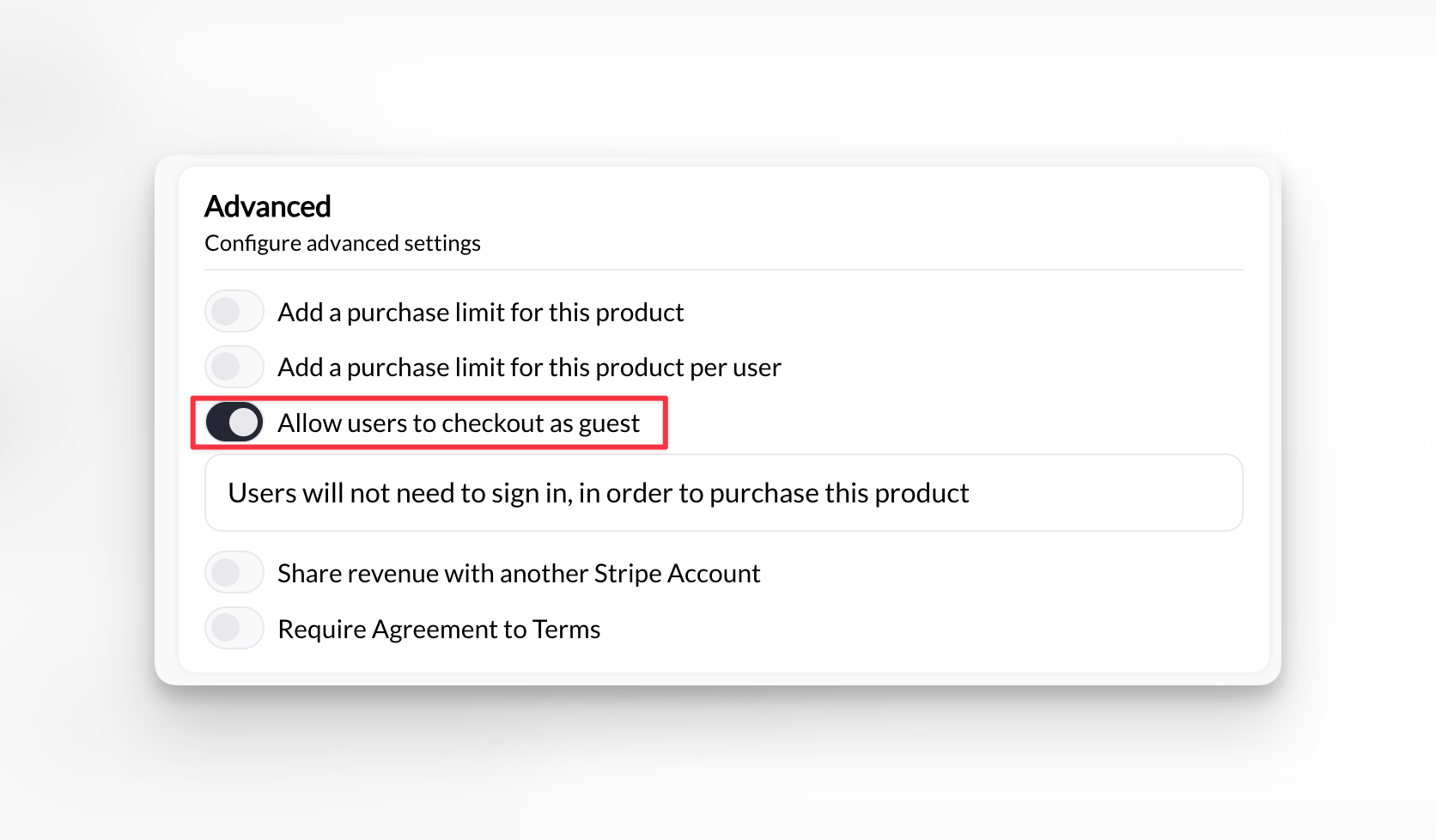
**Where to find this**: Product Builder → Section 6 (Advanced Settings) → Guest Checkout
## What guest checkout is
Guest checkout lets people buy products with just email and payment info - no account creation required.
**With guest checkout enabled:**
* Client enters email
* Client enters payment details
* Purchase completes
* No password or profile created
**With guest checkout disabled (default):**
* Client must create CoachIQ account
* Account required before checkout
* Client gets Athlete Portal access
## When to enable guest checkout
**Products that don't require ongoing access:**
✅ **Merchandise or equipment sales**
* T-shirts, gear, supplements
* One-time physical products
* No need for portal access
✅ **One-time workshops or events**
* Single-session clinics
* Drop-in classes
* Public seminars
✅ **Non-client purchases**
* Community members
* One-time visitors
* People who won't book again
✅ **Gift purchases**
* Someone buying for another person
* No need for buyer to have account
Enable guest checkout when you're selling to general public, not just your established client base.
**Products requiring account access:**
❌ **Session bookings**
* Clients need account to view calendar
* Must schedule specific time slots
* Requires Athlete Portal access
❌ **Subscriptions or memberships**
* Ongoing access to portal
* Credit tracking over time
* Recurring billing management
❌ **Program access**
* Need account to view content
* Videos, documents, workouts
* Progress tracking
❌ **Multi-session packages**
* Credits require account
* Must book sessions over time
* Need to track usage
If product issues credits or grants program access, guest checkout won't work properly. Guests can't use credits or access portal content.
## Enable guest checkout
Go to **Payments → Products** and either:
* Click **+ Create Product** for new product
* Click existing product to edit
Scroll to **Section 6: Advanced Settings**
Find **Guest Checkout** toggle and switch to ON.
 Click **Create.**
**Guest checkout enabled.** Clients can purchase without creating account.
## What guests provide at checkout
**Required information:**
* Email address
* Name
* Payment method (credit card)
**NOT required:**
* Password
* Phone Number
* Account creation
* Profile setup
Minimal friction checkout. Faster for one-time buyers who don't need ongoing access.
## What guests receive
**After purchase:**
✅ **Email receipt**
* Payment confirmation
* Purchase details
* Transaction amount
✅ **Product or access (if applicable)**
* Event confirmation if workshop/clinic
❌ **No Athlete Portal access**
* Can't log into CoachIQ
* Can't view purchase history
* Can't manage account
❌ **No credits**
* Even if product issues credits
* Credits require account to track and use
❌ **No session booking**
* Can't schedule appointments
* Can't view calendar
## What you see
**In your Transactions:**
* Guest purchases appear normally
* Transaction recorded with email
* Payment processed successfully
**In your client list:**
* Guest does NOT appear as client
* No profile created
* Email captured but not as full client record
Guest transactions tracked for your records, but guest doesn't become full client in your system.
## Guest checkout flow
Guest finds product on your booking page or website.
Clicks purchase or buy button.
Checkout form asks for email address.
No "create password" field appears.
Guest provides credit card details.
Standard Stripe payment form.
Transaction processes immediately.
Guest receives email receipt.
**Purchase complete.** Guest paid, you received money, no account created
## Guest vs. account checkout comparison
| Feature | Guest Checkout | Account Checkout |
| -------------------- | ------------------------ | ----------------------- |
| **Speed** | Faster (email + payment) | Slower (create account) |
| **Portal access** | No | Yes |
| **Purchase history** | No | Yes |
| **Session booking** | No | Yes |
| **Credits** | No | Yes |
| **Subscriptions** | No | Yes |
| **Programs** | No | Yes |
| **Best for** | One-time sales | Ongoing services |
## Next steps
1. [Product Builder](/payments/product-builder) - Complete Product Builder guide
2. [Processing fees](/payments/processing-fee) - Configure who pays Stripe fees
## Related articles
* [Processing Fees Configuration](/payments/processing-fee)
* [Revenue Sharing](/payments/sharing-rev)
* [Learn about issuing refunds](/payments/issuing-refunds)
Click **Create.**
**Guest checkout enabled.** Clients can purchase without creating account.
## What guests provide at checkout
**Required information:**
* Email address
* Name
* Payment method (credit card)
**NOT required:**
* Password
* Phone Number
* Account creation
* Profile setup
Minimal friction checkout. Faster for one-time buyers who don't need ongoing access.
## What guests receive
**After purchase:**
✅ **Email receipt**
* Payment confirmation
* Purchase details
* Transaction amount
✅ **Product or access (if applicable)**
* Event confirmation if workshop/clinic
❌ **No Athlete Portal access**
* Can't log into CoachIQ
* Can't view purchase history
* Can't manage account
❌ **No credits**
* Even if product issues credits
* Credits require account to track and use
❌ **No session booking**
* Can't schedule appointments
* Can't view calendar
## What you see
**In your Transactions:**
* Guest purchases appear normally
* Transaction recorded with email
* Payment processed successfully
**In your client list:**
* Guest does NOT appear as client
* No profile created
* Email captured but not as full client record
Guest transactions tracked for your records, but guest doesn't become full client in your system.
## Guest checkout flow
Guest finds product on your booking page or website.
Clicks purchase or buy button.
Checkout form asks for email address.
No "create password" field appears.
Guest provides credit card details.
Standard Stripe payment form.
Transaction processes immediately.
Guest receives email receipt.
**Purchase complete.** Guest paid, you received money, no account created
## Guest vs. account checkout comparison
| Feature | Guest Checkout | Account Checkout |
| -------------------- | ------------------------ | ----------------------- |
| **Speed** | Faster (email + payment) | Slower (create account) |
| **Portal access** | No | Yes |
| **Purchase history** | No | Yes |
| **Session booking** | No | Yes |
| **Credits** | No | Yes |
| **Subscriptions** | No | Yes |
| **Programs** | No | Yes |
| **Best for** | One-time sales | Ongoing services |
## Next steps
1. [Product Builder](/payments/product-builder) - Complete Product Builder guide
2. [Processing fees](/payments/processing-fee) - Configure who pays Stripe fees
## Related articles
* [Processing Fees Configuration](/payments/processing-fee)
* [Revenue Sharing](/payments/sharing-rev)
* [Learn about issuing refunds](/payments/issuing-refunds)