> ## Documentation Index
> Fetch the complete documentation index at: https://help.coachiq.io/llms.txt
> Use this file to discover all available pages before exploring further.
# Issuing Refunds
> Process full and partial refunds for one-time purchases and subscription payments
**Where to find this**: Payments → Transactions → Click transaction → Refund
## When to issue refunds
Common refund scenarios:
**Client request:**
* Changed their mind
* Can't attend purchased session
* Dissatisfied with service
* Duplicate charge
**Business error:**
* Charged wrong amount
* Charged wrong client
* Product misconfigured
* Technical error
**Goodwill:**
* Service issue compensation
* Retention gesture
* Promotional adjustment
Refund policies vary by coach. Define your refund policy clearly in terms and conditions.
## Full vs. partial refunds
**Return entire payment amount**
Client receives 100% of what they paid.
**When to use:**
* Complete cancellation before service
* Major service failure
* Accidental duplicate charge
* Client never received product/access
**Example:** \$75 session → Refund \$75
**Return portion of payment**
Client receives specific dollar amount, less than full charge.
**When to use:**
* Prorated cancellation mid-period
* Partial service failure
* Processing fee adjustment
* Custom settlement amount
**Example:** 200 monthly membership, cancel on day 15 → Refund 100 (half month)
Calculate prorated refunds: (Amount / Days in period) × Days unused
## How to issue a refund
Go to **Payments → Transactions** and locate the transaction to refund.
Search by client name, amount, or date if needed.
Redirects to transcation on Stripe
Button appears in the top right corner (if transaction eligible for refund).
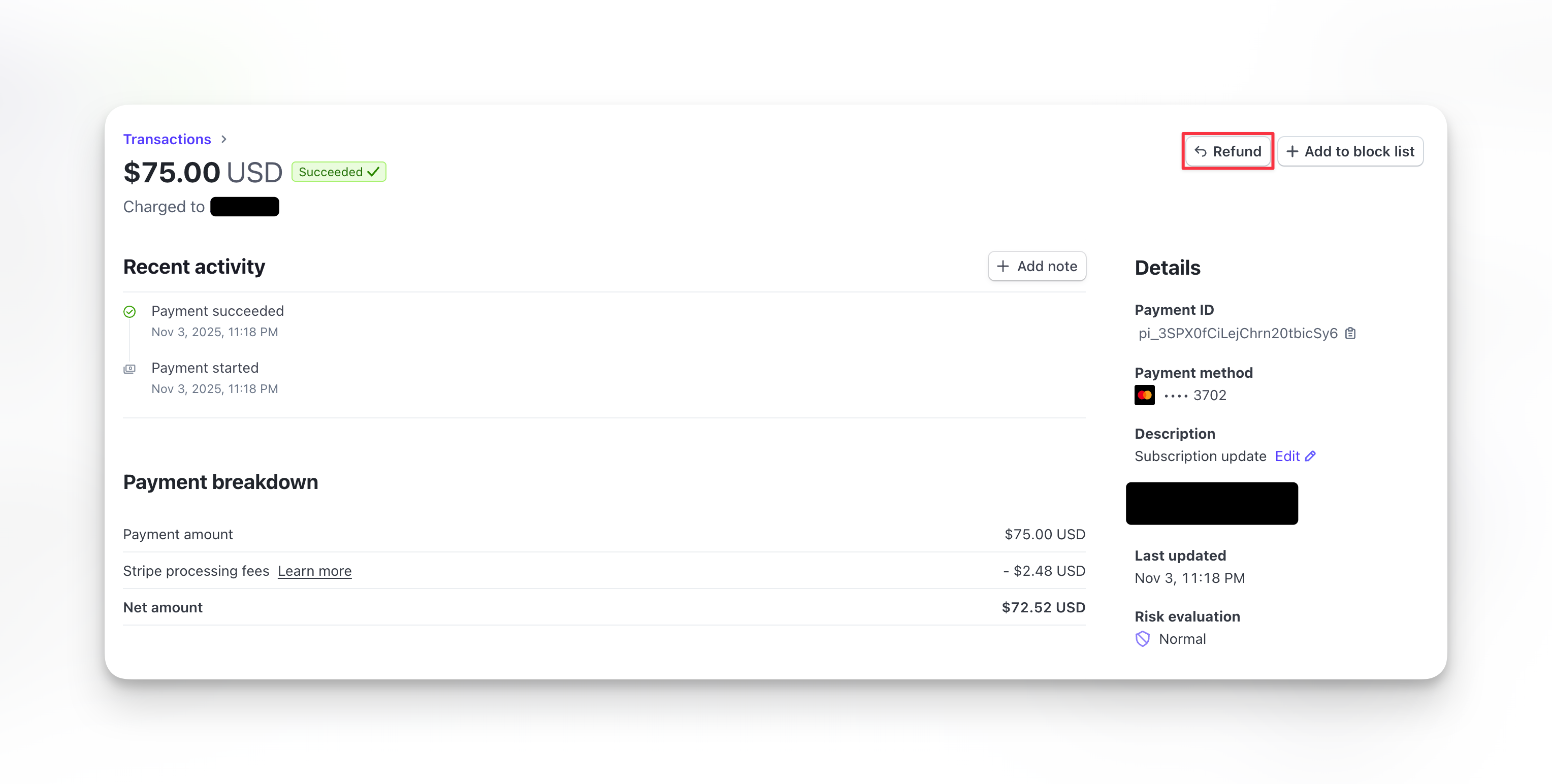 Refund button only appears for successful, non-refunded transactions. Failed or already-refunded transactions can't be refunded.
**Full refund:** Leave default amount (entire transaction)
**Partial refund:** Enter specific dollar amount to refund
Amount must be less than or equal to original charge.
Refund button only appears for successful, non-refunded transactions. Failed or already-refunded transactions can't be refunded.
**Full refund:** Leave default amount (entire transaction)
**Partial refund:** Enter specific dollar amount to refund
Amount must be less than or equal to original charge.
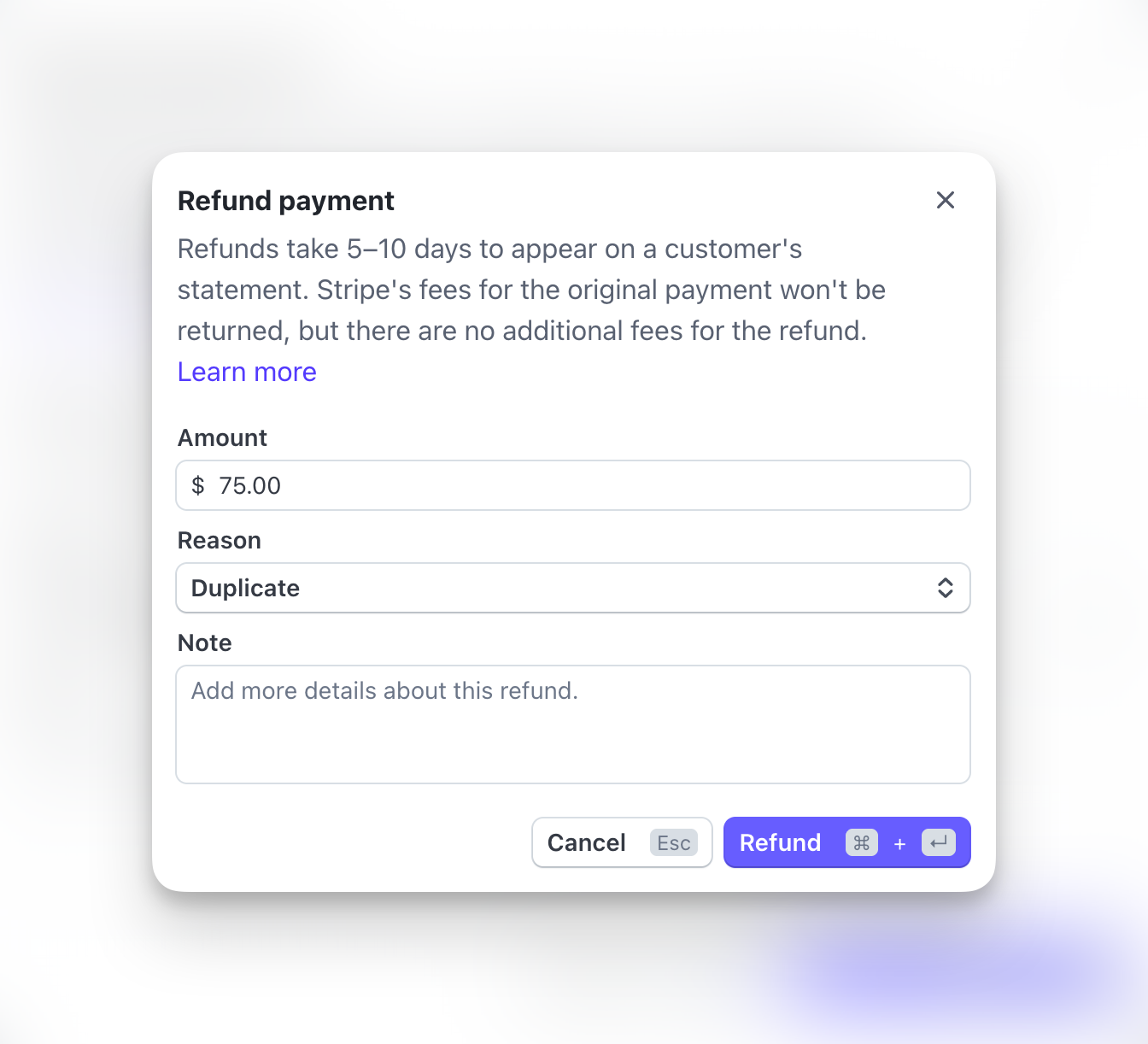 Note why you're issuing refund:
* Client request
* Service issue
* Duplicate charge
* Other
Internal note only - client doesn't see this.
Review details and click **Confirm Refund**.
**Refund processing.** Money returns to client's original payment method within 5-10 business days.
## What happens after refund
**Immediate:**
* Refund appears in Transactions list with negative amount
* Transaction status updates to "Refunded"
* CoachIQ records refund
**Within 24 hours:**
* Client receives refund confirmation email
* Stripe processes refund
* Funds deducted from your Stripe balance
**Within 5-10 business days:**
* Money appears in client's bank account
* Timeline depends on client's bank
Refund timeline is controlled by banks, not CoachIQ or Stripe. You can't speed it up.
## Refunding subscription payments
When refunding subscription charges, additional options appear:
**Issue refund, keep subscription active**
Money returned but subscription continues billing.
**When to use:**
* Service issue compensation
* Billing adjustment
* Goodwill gesture without cancellation
Client retains access, credits don't expire, future charges continue.
**Issue refund and end subscription**
Money returned AND subscription canceled.
**Options:**
* Cancel at period end (access until current period expires)
* Cancel immediately (access ends now)
**When to use:**
* Client canceling due to dissatisfaction
* Full service cancellation
* Client no longer wants service
Most common choice. Refunding usually means client wants to end relationship.
## Refund limitations
**Time limits:**
* Stripe allows refunds up to 180 days after charge
* After 180 days, contact Stripe support for special handling
**Amount limits:**
* Can't refund more than original charge
* Can refund less (partial refund)
* Can issue multiple partial refunds until full amount refunded
**Already refunded:**
* Can't refund same transaction twice
* Can't reverse a refund once processed
**Failed payments:**
* Can't refund payments that failed
* No money was collected, so nothing to refund
Refunds are final. You cannot cancel or reverse a refund once confirmed.
## Refund fees
**Stripe processing fees:**
**Original charge:** You paid 2.9% + \$0.30
**After refund:**
* Transaction fee NOT refunded by Stripe
* You lose the fee even though client got money back
**Example:**
* Client pays \$100
* Stripe takes \$3.20 in fees
* You receive \$96.80
* You refund \$100 to client
* Stripe charges you \$100
* Net loss: 103.20 (original 100 + \$3.20 fees)
Factor fees into refund policies. Some coaches deduct Stripe fees from refunds to avoid this loss.
## Partial refund calculations
**Common scenarios:**
**Prorated monthly cancellation:**
* \$200/month subscription
* Client cancels on day 15 of 30-day month
* Unused: 15 days
* Refund: $200 × (15/30) = $ 100
**Session package partial use:**
* 10-session package for \$650
* Client used 3 sessions
* Remaining: 7 sessions
* Refund: $650 × (7/10) = $ 455
**Processing fee deduction:**
* \$100 charge
* Stripe fee: \$3.20
* Refund after fee: \$96.80
Be consistent with refund calculations. Document your policy and apply it uniformly.
## Refund policies
**Elements of clear refund policy:**
**Time window:**
* How long after purchase can client request refund?
* Example: "30-day money-back guarantee" or "No refunds after 48 hours"
**Conditions:**
* What qualifies for refund?
* What doesn't qualify?
* Example: "Unused sessions only" or "Cancel 24 hours before session"
**Process:**
* How does client request refund?
* How long does approval take?
* Example: "Email requests processed within 2 business days"
**Exceptions:**
* Emergency situations
* Injury or illness
* Special circumstances
**Display policy:**
* On checkout page
* In terms and conditions
* In confirmation emails
Clearly communicate refund policy BEFORE purchase. Reduces disputes and chargebacks.
## Handling refund requests
**Best practices:**
Understand why they want refund. Sometimes issue can be resolved without refund.
Does request qualify based on your terms?
Before refunding, consider:
* Rescheduling session
* Transferring credits to friend/family
* Service credit for future use
* Discounted makeup session
If refund warranted, process within 24-48 hours. Delays increase frustration.
Explain what to expect:
* Refund amount
* Processing timeline (5-10 days)
* Account changes (credits removed, access ended)
After refund processes, check in to ensure client satisfied with resolution.
## Refunds vs. chargebacks
**Refund (you initiate):**
* You control timing and amount
* No additional fees
* Maintains client relationship
* Professional resolution
**Chargeback (client disputes with bank):**
* Bank controls outcome
* \$15 chargeback fee even if you win
* Damages relationship
* Affects Stripe account health
Always offer to refund if client unhappy. Prevents chargebacks and maintains goodwill.
## Common refund scenarios
**Your options:**
1. Reschedule session (no refund needed)
2. Issue credit for future use
3. Issue full refund if within policy window
**Recommendation:** Reschedule first, refund only if client insists or outside policy.
**Process:**
1. Issue full refund for incorrect product
2. Client purchases correct product
3. Or manually adjust credits if appropriate
**Note:** Two separate transactions - refund one, new charge for correct product.
**Process:**
1. Verify duplicate (check transactions)
2. Issue full refund for one charge
3. Keep other charge active
4. Apologize for error
Act fast on duplicate charges. Client may dispute with bank if you delay.
**Process:**
1. Calculate unused portion of period
2. Issue partial refund for prorated amount
3. Cancel subscription (at period end or immediately)
**Example:** 300/month, cancel on day 10 of 30 = refund 200 (20 days unused)
**Steps:**
1. Understand specific issue
2. Offer to remedy (makeup session, different coach, etc.)
3. If unresolvable, issue refund per policy
4. Document for quality improvement
Service refunds are judgment calls. Balance policy with customer satisfaction.
## Tracking refunds
**Monitor refund metrics:**
**Refund rate:** (Refunds / Total transactions) × 100
**Average refund amount:** Total refunded / Number of refunds
**Refund reasons:** Track most common causes
**Refund cost:** Total revenue lost to refunds + fees
**Use data to:**
* Identify problem areas (policies, products, services)
* Improve client satisfaction
* Reduce refund requests
* Adjust policies if needed
Healthy refund rate: Under 5% of total transactions. Higher rates indicate issues needing attention.
## Related articles
* [Transactions Dashboard](/payments/transactions)
* [Managing Subscriptions](/payments/manage-subscriptions)
* [Failed Payments](/payments/failed-payments)
Note why you're issuing refund:
* Client request
* Service issue
* Duplicate charge
* Other
Internal note only - client doesn't see this.
Review details and click **Confirm Refund**.
**Refund processing.** Money returns to client's original payment method within 5-10 business days.
## What happens after refund
**Immediate:**
* Refund appears in Transactions list with negative amount
* Transaction status updates to "Refunded"
* CoachIQ records refund
**Within 24 hours:**
* Client receives refund confirmation email
* Stripe processes refund
* Funds deducted from your Stripe balance
**Within 5-10 business days:**
* Money appears in client's bank account
* Timeline depends on client's bank
Refund timeline is controlled by banks, not CoachIQ or Stripe. You can't speed it up.
## Refunding subscription payments
When refunding subscription charges, additional options appear:
**Issue refund, keep subscription active**
Money returned but subscription continues billing.
**When to use:**
* Service issue compensation
* Billing adjustment
* Goodwill gesture without cancellation
Client retains access, credits don't expire, future charges continue.
**Issue refund and end subscription**
Money returned AND subscription canceled.
**Options:**
* Cancel at period end (access until current period expires)
* Cancel immediately (access ends now)
**When to use:**
* Client canceling due to dissatisfaction
* Full service cancellation
* Client no longer wants service
Most common choice. Refunding usually means client wants to end relationship.
## Refund limitations
**Time limits:**
* Stripe allows refunds up to 180 days after charge
* After 180 days, contact Stripe support for special handling
**Amount limits:**
* Can't refund more than original charge
* Can refund less (partial refund)
* Can issue multiple partial refunds until full amount refunded
**Already refunded:**
* Can't refund same transaction twice
* Can't reverse a refund once processed
**Failed payments:**
* Can't refund payments that failed
* No money was collected, so nothing to refund
Refunds are final. You cannot cancel or reverse a refund once confirmed.
## Refund fees
**Stripe processing fees:**
**Original charge:** You paid 2.9% + \$0.30
**After refund:**
* Transaction fee NOT refunded by Stripe
* You lose the fee even though client got money back
**Example:**
* Client pays \$100
* Stripe takes \$3.20 in fees
* You receive \$96.80
* You refund \$100 to client
* Stripe charges you \$100
* Net loss: 103.20 (original 100 + \$3.20 fees)
Factor fees into refund policies. Some coaches deduct Stripe fees from refunds to avoid this loss.
## Partial refund calculations
**Common scenarios:**
**Prorated monthly cancellation:**
* \$200/month subscription
* Client cancels on day 15 of 30-day month
* Unused: 15 days
* Refund: $200 × (15/30) = $ 100
**Session package partial use:**
* 10-session package for \$650
* Client used 3 sessions
* Remaining: 7 sessions
* Refund: $650 × (7/10) = $ 455
**Processing fee deduction:**
* \$100 charge
* Stripe fee: \$3.20
* Refund after fee: \$96.80
Be consistent with refund calculations. Document your policy and apply it uniformly.
## Refund policies
**Elements of clear refund policy:**
**Time window:**
* How long after purchase can client request refund?
* Example: "30-day money-back guarantee" or "No refunds after 48 hours"
**Conditions:**
* What qualifies for refund?
* What doesn't qualify?
* Example: "Unused sessions only" or "Cancel 24 hours before session"
**Process:**
* How does client request refund?
* How long does approval take?
* Example: "Email requests processed within 2 business days"
**Exceptions:**
* Emergency situations
* Injury or illness
* Special circumstances
**Display policy:**
* On checkout page
* In terms and conditions
* In confirmation emails
Clearly communicate refund policy BEFORE purchase. Reduces disputes and chargebacks.
## Handling refund requests
**Best practices:**
Understand why they want refund. Sometimes issue can be resolved without refund.
Does request qualify based on your terms?
Before refunding, consider:
* Rescheduling session
* Transferring credits to friend/family
* Service credit for future use
* Discounted makeup session
If refund warranted, process within 24-48 hours. Delays increase frustration.
Explain what to expect:
* Refund amount
* Processing timeline (5-10 days)
* Account changes (credits removed, access ended)
After refund processes, check in to ensure client satisfied with resolution.
## Refunds vs. chargebacks
**Refund (you initiate):**
* You control timing and amount
* No additional fees
* Maintains client relationship
* Professional resolution
**Chargeback (client disputes with bank):**
* Bank controls outcome
* \$15 chargeback fee even if you win
* Damages relationship
* Affects Stripe account health
Always offer to refund if client unhappy. Prevents chargebacks and maintains goodwill.
## Common refund scenarios
**Your options:**
1. Reschedule session (no refund needed)
2. Issue credit for future use
3. Issue full refund if within policy window
**Recommendation:** Reschedule first, refund only if client insists or outside policy.
**Process:**
1. Issue full refund for incorrect product
2. Client purchases correct product
3. Or manually adjust credits if appropriate
**Note:** Two separate transactions - refund one, new charge for correct product.
**Process:**
1. Verify duplicate (check transactions)
2. Issue full refund for one charge
3. Keep other charge active
4. Apologize for error
Act fast on duplicate charges. Client may dispute with bank if you delay.
**Process:**
1. Calculate unused portion of period
2. Issue partial refund for prorated amount
3. Cancel subscription (at period end or immediately)
**Example:** 300/month, cancel on day 10 of 30 = refund 200 (20 days unused)
**Steps:**
1. Understand specific issue
2. Offer to remedy (makeup session, different coach, etc.)
3. If unresolvable, issue refund per policy
4. Document for quality improvement
Service refunds are judgment calls. Balance policy with customer satisfaction.
## Tracking refunds
**Monitor refund metrics:**
**Refund rate:** (Refunds / Total transactions) × 100
**Average refund amount:** Total refunded / Number of refunds
**Refund reasons:** Track most common causes
**Refund cost:** Total revenue lost to refunds + fees
**Use data to:**
* Identify problem areas (policies, products, services)
* Improve client satisfaction
* Reduce refund requests
* Adjust policies if needed
Healthy refund rate: Under 5% of total transactions. Higher rates indicate issues needing attention.
## Related articles
* [Transactions Dashboard](/payments/transactions)
* [Managing Subscriptions](/payments/manage-subscriptions)
* [Failed Payments](/payments/failed-payments)