> ## Documentation Index
> Fetch the complete documentation index at: https://help.coachiq.io/llms.txt
> Use this file to discover all available pages before exploring further.
# Processing Fees Configuration
> Configure who pays Stripe transaction fees - absorb costs or pass them to clients
**Where to find this**: Product Builder → Section 2 (Payment Options) → Processing Fee
## What processing fees are
Every successful transaction through Stripe incurs fees:
**US standard rates:**
* 2.9% of transaction amount
* Plus \$0.30 per transaction
**Example:**
* \$100 charge
* Stripe fee: (100 × 0.029) + 0.30 = \$3.20
* You receive: \$96.80
Fees set by Stripe, not CoachIQ. International cards and currency conversions may have additional fees.
## Who pays the fees
You decide who covers Stripe's processing fees:
**Default option - You pay the fees**
Client pays product price. You receive product price minus Stripe fees.
**Example:**
* Product price: \$100
* Client pays: \$100
* Stripe fee: \$3.20
* You receive: \$96.80
**Pros:**
* Simpler pricing
* Better client experience
* Standard industry practice
**Cons:**
* Reduces your revenue per sale
* Fees add up over time
* You lose 2.9%+ on every sale
**Pass fees to client**
Stripe fees added as separate line item at checkout. You receive full product price.
**Example:**
* Product price: \$100
* Stripe fee: \$3.20
* Client pays: \$103.20
* You receive: \$100.00
**Pros:**
* You receive full product price
* No revenue lost to fees
* More accurate pricing
**Cons:**
* Higher price may reduce conversions
* Adds complexity at checkout
* Some clients resistant to fees
* State regulations may restrict this
Some US states restrict credit card surcharges. Check local laws before passing fees to clients.
## Configure processing fees
Go to **Payments → Products** and either:
* Click **+ Create Product** for new product
* Click existing product to edit
Scroll to **Section 2: Payment Options**
Choose to toggle processing fee on or off
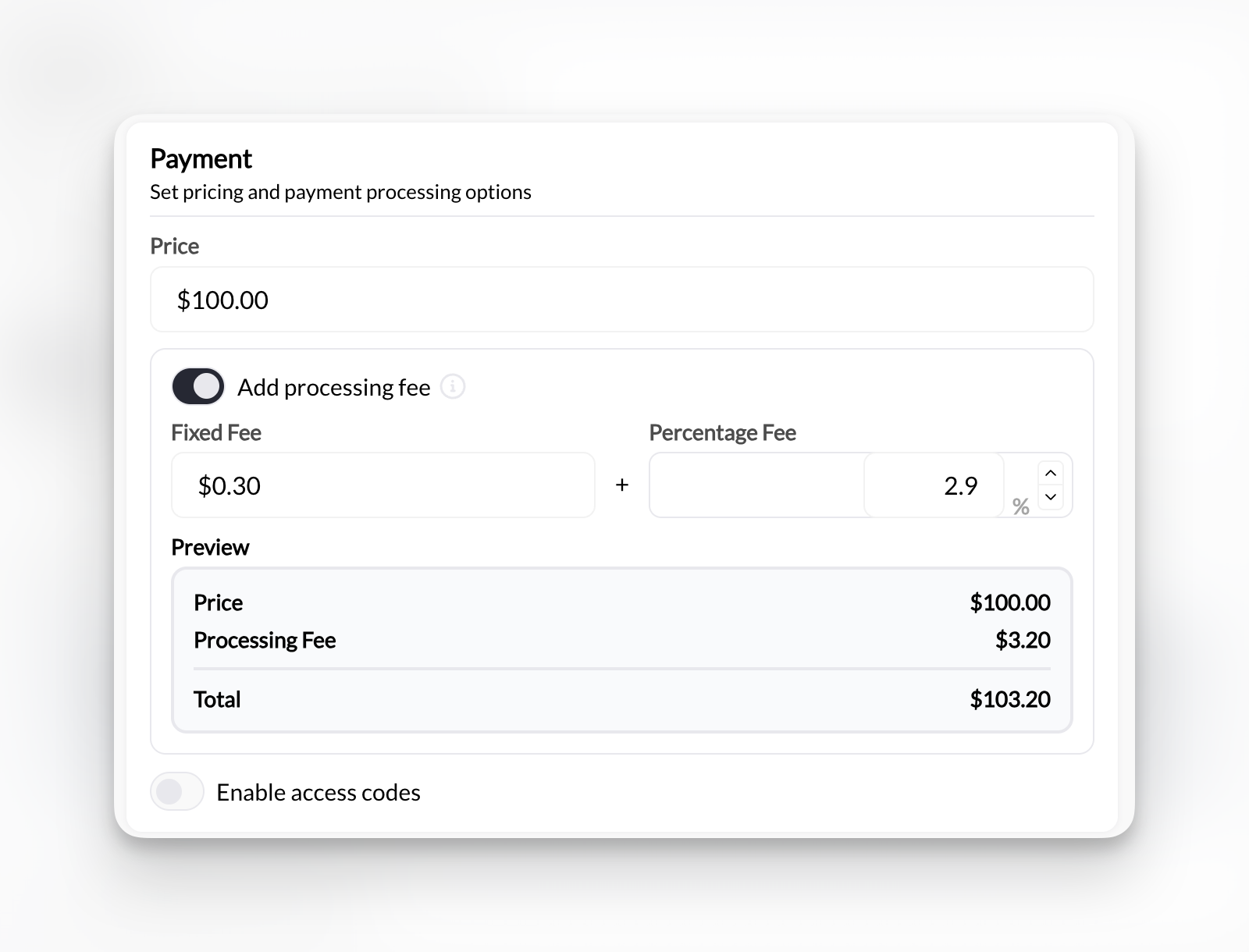 Choose whether you or client pays Stripe fees.
If you select **Add processing fee**, additional fields appear.
**Two fields appear:**
**Fixed amount:** \$0.30 (Stripe's fixed fee)
**Percentage:** 2.9% (Stripe's percentage fee)
These default to Stripe's standard US rates. Adjust if your Stripe rates differ.
Check your actual Stripe rates in Stripe Dashboard. Rates may differ based on processing volume, country, or negotiated pricing.
Click **Create Product**.
**Fee configuration saved.** Applies to all future purchases of this product.
## How clients see fees
**Simple checkout - Client sees product price only**
```
Product: 60-Minute Session
Price: $75.00
─────────────────────
Total: $75.00
```
Clean, simple. Client pays exactly what's advertised.
**Checkout shows fee as separate line item**
```
Product: 60-Minute Session
Price: $75.00
Processing Fee: $2.48
─────────────────────
Total: $77.48
```
Transparent breakdown showing fee separately.
Processing fee labeled clearly so client understands the additional charge.
## Calculating fee amounts
**Stripe's standard formula:**
Fee = (Transaction amount × 0.029) + \$0.30
**Examples:**
| Product Price | Stripe Fee | You Absorb | Client Pays |
| ------------- | ---------- | ---------------- | -------------------- |
| \$50 | \$1.75 | You get \$48.25 | Client pays \$51.75 |
| \$100 | \$3.20 | You get \$96.80 | Client pays \$103.20 |
| \$200 | \$6.10 | You get \$193.90 | Client pays \$206.10 |
| \$500 | \$14.80 | You get \$485.20 | Client pays \$514.80 |
These calculations use 2.9% + \$0.30. Your actual rates may differ based on your Stripe account.
## Custom fee structures
Some coaches configure custom fee amounts:
**Higher than Stripe fees:**
* Cover additional costs (bookkeeping, software)
* Flat \$5 processing fee instead of calculated amount
* Markup percentage (3.5% instead of 2.9%)
**Lower than Stripe fees:**
* Split costs with client (1.5% + \$0.15 each)
* Absorb fixed fee, pass percentage only
* Subsidize to reduce client price impact
Be transparent about fees. Unexpected charges damage trust and may violate consumer protection laws in some areas.
## Legal considerations
**Before passing fees to clients, check:**
**State regulations:**
* Some states prohibit credit card surcharges
* Others require specific disclosures
* Rules vary by location
**Stripe's terms:**
* Must comply with Stripe's surcharging requirements
* Proper labeling required
* Card brand rules apply
**Disclosure requirements:**
* Must inform clients before purchase
* Can't hide fees in fine print
* Clear explanation of what fee covers
Consult legal counsel about surcharging regulations in your jurisdiction before implementing.
## Impact on pricing strategy
**Build fees into your base price**
If you absorb fees, increase base price to maintain margins:
* Target: \$100 profit per session
* Stripe fee: \~3%
* Set price: \$103 + to net \$100
Client sees: \$103 (clean price)You receive: \~\$100 after fees
**Price products at target, add fees**
If clients pay fees, price at exact target:
* Target: \$100 profit per session
* Set price: \$100
* Fee added: \~\$3.20
Client sees: $100 + $3.20 fee = $103.20
You receive: $100
**Result:** Similar final cost to client either way. Choose based on market expectations and legal compliance.
## International and special fees
**Additional Stripe fees may apply for:**
**International cards:**
* Additional 1% for non-US cards
* Configure: 3.9% + \$0.30 for international
**Currency conversion:**
* Additional 1% for currency conversion
* Applies when charge currency differs from payout currency
**Disputed charges:**
* \$15 chargeback fee
* Separate from processing fees
* Usually not passed to clients
Most coaches use standard 2.9% + \$0.30 for US cards and absorb international card fees rather than configuring multiple fee structures.
## Changing fee configuration
**Existing products:**
* Edit product → Section 2 → Update processing fee settings
* Changes apply to future purchases only
* Doesn't affect past transactions
**Active subscriptions:**
* Fee configuration locked at subscription creation
* Can't change mid-subscription
* Applies to new subscriptions only
Changing who pays fees mid-campaign may confuse clients. Communicate changes clearly.
## Best practices
**Be transparent:**
* Clearly state who pays fees in product descriptions
* Don't surprise clients at checkout
* Explain fee purpose if passing to clients
**Stay consistent:**
* Apply same fee policy across similar products
* Don't switch approaches frequently
* Document your policy
**Comply with laws:**
* Research local surcharging regulations
* Follow Stripe's requirements
* Consult legal if uncertain
**Monitor impact:**
* Track conversion rates by fee approach
* Gather client feedback
* Adjust based on data, not assumptions
## Next steps
1. [Revenue sharing](sharing-rev) - Split revenue with partners or contractors
2. [Guest checkout](/payments/guest-checkout) - Allow purchases without accounts
3. [Product Builder reference](/payments/product-builder) - Complete Product Builder guide
Choose whether you or client pays Stripe fees.
If you select **Add processing fee**, additional fields appear.
**Two fields appear:**
**Fixed amount:** \$0.30 (Stripe's fixed fee)
**Percentage:** 2.9% (Stripe's percentage fee)
These default to Stripe's standard US rates. Adjust if your Stripe rates differ.
Check your actual Stripe rates in Stripe Dashboard. Rates may differ based on processing volume, country, or negotiated pricing.
Click **Create Product**.
**Fee configuration saved.** Applies to all future purchases of this product.
## How clients see fees
**Simple checkout - Client sees product price only**
```
Product: 60-Minute Session
Price: $75.00
─────────────────────
Total: $75.00
```
Clean, simple. Client pays exactly what's advertised.
**Checkout shows fee as separate line item**
```
Product: 60-Minute Session
Price: $75.00
Processing Fee: $2.48
─────────────────────
Total: $77.48
```
Transparent breakdown showing fee separately.
Processing fee labeled clearly so client understands the additional charge.
## Calculating fee amounts
**Stripe's standard formula:**
Fee = (Transaction amount × 0.029) + \$0.30
**Examples:**
| Product Price | Stripe Fee | You Absorb | Client Pays |
| ------------- | ---------- | ---------------- | -------------------- |
| \$50 | \$1.75 | You get \$48.25 | Client pays \$51.75 |
| \$100 | \$3.20 | You get \$96.80 | Client pays \$103.20 |
| \$200 | \$6.10 | You get \$193.90 | Client pays \$206.10 |
| \$500 | \$14.80 | You get \$485.20 | Client pays \$514.80 |
These calculations use 2.9% + \$0.30. Your actual rates may differ based on your Stripe account.
## Custom fee structures
Some coaches configure custom fee amounts:
**Higher than Stripe fees:**
* Cover additional costs (bookkeeping, software)
* Flat \$5 processing fee instead of calculated amount
* Markup percentage (3.5% instead of 2.9%)
**Lower than Stripe fees:**
* Split costs with client (1.5% + \$0.15 each)
* Absorb fixed fee, pass percentage only
* Subsidize to reduce client price impact
Be transparent about fees. Unexpected charges damage trust and may violate consumer protection laws in some areas.
## Legal considerations
**Before passing fees to clients, check:**
**State regulations:**
* Some states prohibit credit card surcharges
* Others require specific disclosures
* Rules vary by location
**Stripe's terms:**
* Must comply with Stripe's surcharging requirements
* Proper labeling required
* Card brand rules apply
**Disclosure requirements:**
* Must inform clients before purchase
* Can't hide fees in fine print
* Clear explanation of what fee covers
Consult legal counsel about surcharging regulations in your jurisdiction before implementing.
## Impact on pricing strategy
**Build fees into your base price**
If you absorb fees, increase base price to maintain margins:
* Target: \$100 profit per session
* Stripe fee: \~3%
* Set price: \$103 + to net \$100
Client sees: \$103 (clean price)You receive: \~\$100 after fees
**Price products at target, add fees**
If clients pay fees, price at exact target:
* Target: \$100 profit per session
* Set price: \$100
* Fee added: \~\$3.20
Client sees: $100 + $3.20 fee = $103.20
You receive: $100
**Result:** Similar final cost to client either way. Choose based on market expectations and legal compliance.
## International and special fees
**Additional Stripe fees may apply for:**
**International cards:**
* Additional 1% for non-US cards
* Configure: 3.9% + \$0.30 for international
**Currency conversion:**
* Additional 1% for currency conversion
* Applies when charge currency differs from payout currency
**Disputed charges:**
* \$15 chargeback fee
* Separate from processing fees
* Usually not passed to clients
Most coaches use standard 2.9% + \$0.30 for US cards and absorb international card fees rather than configuring multiple fee structures.
## Changing fee configuration
**Existing products:**
* Edit product → Section 2 → Update processing fee settings
* Changes apply to future purchases only
* Doesn't affect past transactions
**Active subscriptions:**
* Fee configuration locked at subscription creation
* Can't change mid-subscription
* Applies to new subscriptions only
Changing who pays fees mid-campaign may confuse clients. Communicate changes clearly.
## Best practices
**Be transparent:**
* Clearly state who pays fees in product descriptions
* Don't surprise clients at checkout
* Explain fee purpose if passing to clients
**Stay consistent:**
* Apply same fee policy across similar products
* Don't switch approaches frequently
* Document your policy
**Comply with laws:**
* Research local surcharging regulations
* Follow Stripe's requirements
* Consult legal if uncertain
**Monitor impact:**
* Track conversion rates by fee approach
* Gather client feedback
* Adjust based on data, not assumptions
## Next steps
1. [Revenue sharing](sharing-rev) - Split revenue with partners or contractors
2. [Guest checkout](/payments/guest-checkout) - Allow purchases without accounts
3. [Product Builder reference](/payments/product-builder) - Complete Product Builder guide