> ## Documentation Index
> Fetch the complete documentation index at: https://help.coachiq.io/llms.txt
> Use this file to discover all available pages before exploring further.
# Matching Clients Between Stripe and CoachIQ
> Find and verify client payment records across both platforms when subscription status doesn't match or payments seem missing
**When to use this guide**: A client says they're subscribed but can't access your calendar, you see duplicate subscriptions in Stripe, or payment status doesn't match between systems.
## How CoachIQ and Stripe connect
Every client who makes a payment through CoachIQ gets a record in both systems:
| System | What it stores |
| ----------- | ------------------------------------------------------ |
| **CoachIQ** | Client profile, subscription status, credits, bookings |
| **Stripe** | Payment method, charge history, subscription billing |
These systems sync automatically, but occasionally they can get out of alignment—especially after card changes, failed payments, or manual adjustments.
***
## Finding a client in both systems
Go to **People → Clients** and find the client. Open their profile.
Note their **email address**—this is the key identifier that links both systems.
Click the **Subscriptions** tab on their profile.
Look for:
* **Active** subscriptions (green) = Should have access
* **Canceled** subscriptions (gray) = Should not have access
* **Past Due** subscriptions (yellow) = Payment failed, may have limited access
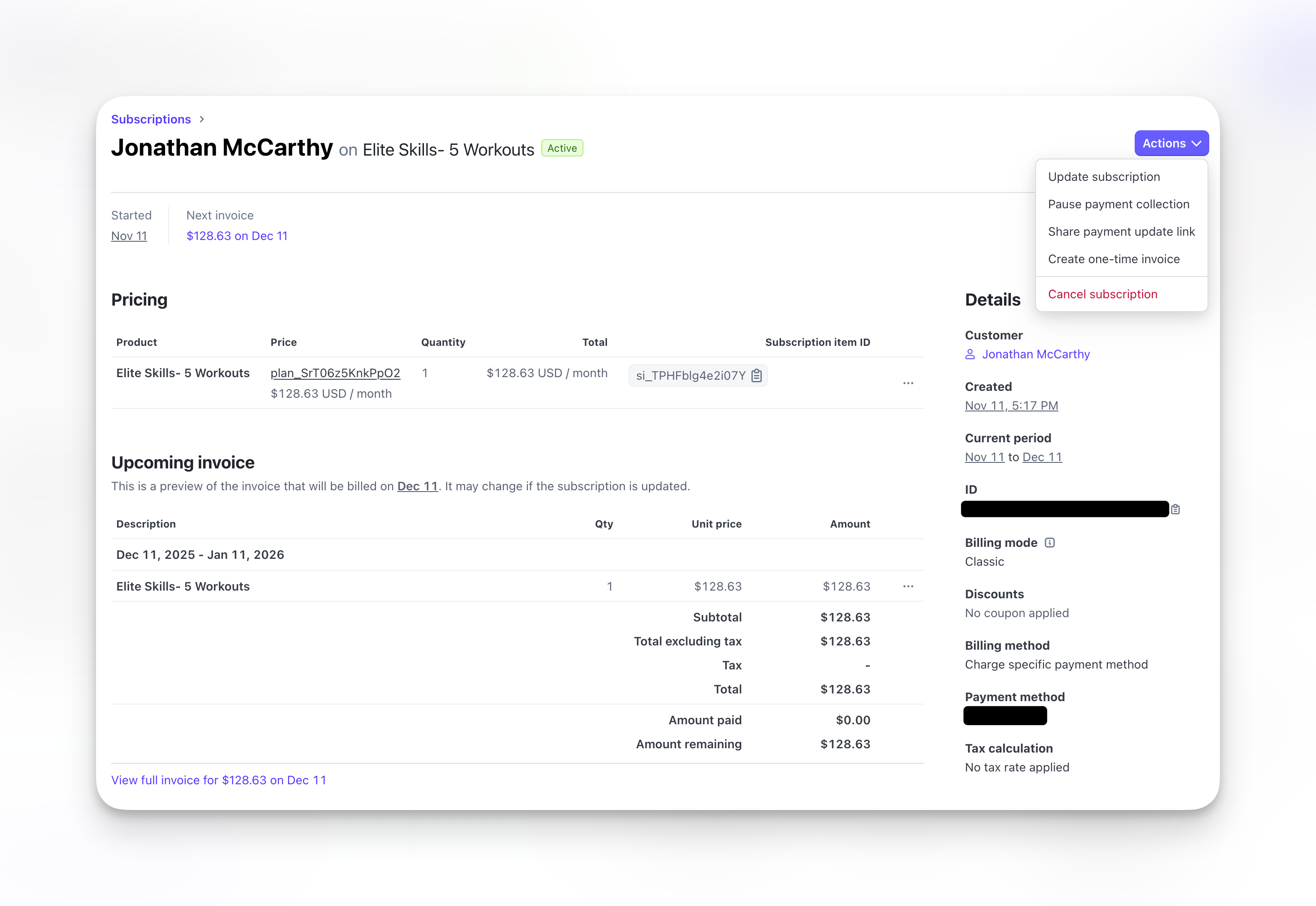
 From the client's Subscriptions tab, click **Open** under the Source column. This takes you directly to that subscription in Stripe.
Alternatively, go to [Stripe Dashboard → Customers](https://dashboard.stripe.com/customers) and search by the client's email.
The **Subscription ID** appears near the top of the subscription page in Stripe. It always starts with `sub_` — for example: `sub_1THsYnEaz2FLsdZq8qwVLKtt`. You'll need this ID if you're manually linking a subscription to CoachIQ.
In Stripe, verify:
* **Status** matches CoachIQ (Active, Canceled, Past Due)
* **Current period** dates are correct
* **Payment method** is valid (not expired)
From the client's Subscriptions tab, click **Open** under the Source column. This takes you directly to that subscription in Stripe.
Alternatively, go to [Stripe Dashboard → Customers](https://dashboard.stripe.com/customers) and search by the client's email.
The **Subscription ID** appears near the top of the subscription page in Stripe. It always starts with `sub_` — for example: `sub_1THsYnEaz2FLsdZq8qwVLKtt`. You'll need this ID if you're manually linking a subscription to CoachIQ.
In Stripe, verify:
* **Status** matches CoachIQ (Active, Canceled, Past Due)
* **Current period** dates are correct
* **Payment method** is valid (not expired)
 ***
## Common mismatch scenarios
**The subscription exists but access isn't working.**
**Check these in CoachIQ:**
1. **Subscriptions tab**: Is the subscription showing as Active here too?
2. **Products tab**: Does the subscription product appear in their purchased products?
3. **Credits tab**: If the product grants credits, do they have a balance?
**Most common cause**: The subscription in Stripe isn't linked to their CoachIQ profile. This happens when:
* Client used a different email in Stripe than CoachIQ
* Subscription was created manually in Stripe (not through CoachIQ checkout)
* Client created a new account instead of logging in
**Fix**: Verify the email addresses match exactly in both systems. If different, update the CoachIQ profile email to match Stripe.
**Duplicate subscriptions in Stripe.**
This happens when a client accidentally subscribes twice, often because:
* Payment failed, they retried with a new card, creating a second subscription
* They clicked "Subscribe" multiple times during checkout
* Card was replaced after compromise, and they resubscribed instead of updating
**How to fix:**
1. Go to Stripe Dashboard → Subscriptions
2. Search by client email
3. Compare the two subscriptions:
* Which one has recent successful payments?
* Which one is the client actually using?
4. Cancel the duplicate (the one without recent activity)
5. Verify only one Active subscription remains
Cancel the wrong one and your client loses access. Always check payment history before canceling.
**CoachIQ shows Active but Stripe shows Canceled.**
**Why this happens:**
The subscription was canceled directly in Stripe (not through CoachIQ), so CoachIQ didn't receive the cancellation webhook.
**How to fix:**
1. In CoachIQ, go to **Payments → Subscriptions**
2. Find the subscription
3. Click to view details
4. If status is wrong, contact CoachIQ support to resync
**Prevent this**: Always cancel subscriptions through CoachIQ, not directly in Stripe.
**Payment succeeded but subscription never activated.**
**Why this happens:**
The initial setup didn't complete properly. The charge went through but the subscription status got stuck.
**How to verify:**
1. In Stripe → Payments, search for the client's email
2. Find the charge—did it succeed?
3. If yes, check Stripe → Subscriptions for "Incomplete" or "Incomplete Expired" status
**How to fix:**
If payment succeeded but subscription is Incomplete:
1. In Stripe, cancel the incomplete subscription
2. Have client purchase again through CoachIQ
3. Or manually add the product to their CoachIQ profile (People → Client → Products tab → Add Product)
**Client's card was compromised, they got a new one, and now things are messy.**
This is a common scenario. Here's the correct workflow:
**What the client should have done:**
1. Log into Athlete Portal
2. Go to Billing settings
3. Update payment method
4. Existing subscription continues with new card
**What often happens instead:**
1. Client can't figure out how to update card
2. Client purchases subscription again with new card
3. Now they have two subscriptions
**How to fix:**
1. Identify which subscription is the "real" one (usually the older one with more payment history)
2. Cancel the duplicate in Stripe
3. Ensure the remaining subscription has the new card attached
4. Verify CoachIQ shows only one Active subscription
***
## Quick reference: Where to find what
| Information | Where to find it |
| ----------------------------- | ----------------------------------------------------- |
| Client subscription status | CoachIQ → People → Client → Subscriptions tab |
| Subscription payment history | Stripe Dashboard → Subscriptions → Click subscription |
| Client's saved payment method | Stripe Dashboard → Customers → Search by email |
| All charges for a client | Stripe Dashboard → Payments → Search by email |
| Whether credits were issued | CoachIQ → People → Client → Credits tab |
| Products client has purchased | CoachIQ → People → Client → Products tab |
***
## Check for unsynced subscriptions
If you suspect subscriptions aren't connected to Stripe — especially after a transfer or bulk import — use the **Unsynced filter** on the Subscriptions dashboard to find them all at once.
[How to check for unsynced subscriptions →](/payments/subscriptions-dashboard#check-for-unsynced-subscriptions)
***
## When to contact support
Contact CoachIQ support if:
* Subscription status is different between systems and won't sync
* Client was charged but product/credits never appeared
* You need to merge duplicate client accounts
* Webhook errors are preventing sync (you'll see repeated issues)
**Include in your support request:**
* Client's email address
* Screenshot of CoachIQ subscription status
* Screenshot of Stripe subscription status
* Description of what's not matching
***
## Preventing future mismatches
**Best practices to avoid sync issues:**
1. **Always use CoachIQ** for subscription management (not Stripe directly)
2. **Train clients** to update payment methods in Athlete Portal, not resubscribe
3. **Check both systems** when investigating payment issues
4. **Use the same email** in CoachIQ and Stripe for each client
***
## Related articles
* [Subscriptions Dashboard](/payments/subscriptions-dashboard)
* [Managing Subscriptions](/payments/manage-subscriptions)
* [Failed Payments](/payments/failed-payments)
* [Stripe Dashboard Basics](/payments/stripe-dashboard)
***
## Common mismatch scenarios
**The subscription exists but access isn't working.**
**Check these in CoachIQ:**
1. **Subscriptions tab**: Is the subscription showing as Active here too?
2. **Products tab**: Does the subscription product appear in their purchased products?
3. **Credits tab**: If the product grants credits, do they have a balance?
**Most common cause**: The subscription in Stripe isn't linked to their CoachIQ profile. This happens when:
* Client used a different email in Stripe than CoachIQ
* Subscription was created manually in Stripe (not through CoachIQ checkout)
* Client created a new account instead of logging in
**Fix**: Verify the email addresses match exactly in both systems. If different, update the CoachIQ profile email to match Stripe.
**Duplicate subscriptions in Stripe.**
This happens when a client accidentally subscribes twice, often because:
* Payment failed, they retried with a new card, creating a second subscription
* They clicked "Subscribe" multiple times during checkout
* Card was replaced after compromise, and they resubscribed instead of updating
**How to fix:**
1. Go to Stripe Dashboard → Subscriptions
2. Search by client email
3. Compare the two subscriptions:
* Which one has recent successful payments?
* Which one is the client actually using?
4. Cancel the duplicate (the one without recent activity)
5. Verify only one Active subscription remains
Cancel the wrong one and your client loses access. Always check payment history before canceling.
**CoachIQ shows Active but Stripe shows Canceled.**
**Why this happens:**
The subscription was canceled directly in Stripe (not through CoachIQ), so CoachIQ didn't receive the cancellation webhook.
**How to fix:**
1. In CoachIQ, go to **Payments → Subscriptions**
2. Find the subscription
3. Click to view details
4. If status is wrong, contact CoachIQ support to resync
**Prevent this**: Always cancel subscriptions through CoachIQ, not directly in Stripe.
**Payment succeeded but subscription never activated.**
**Why this happens:**
The initial setup didn't complete properly. The charge went through but the subscription status got stuck.
**How to verify:**
1. In Stripe → Payments, search for the client's email
2. Find the charge—did it succeed?
3. If yes, check Stripe → Subscriptions for "Incomplete" or "Incomplete Expired" status
**How to fix:**
If payment succeeded but subscription is Incomplete:
1. In Stripe, cancel the incomplete subscription
2. Have client purchase again through CoachIQ
3. Or manually add the product to their CoachIQ profile (People → Client → Products tab → Add Product)
**Client's card was compromised, they got a new one, and now things are messy.**
This is a common scenario. Here's the correct workflow:
**What the client should have done:**
1. Log into Athlete Portal
2. Go to Billing settings
3. Update payment method
4. Existing subscription continues with new card
**What often happens instead:**
1. Client can't figure out how to update card
2. Client purchases subscription again with new card
3. Now they have two subscriptions
**How to fix:**
1. Identify which subscription is the "real" one (usually the older one with more payment history)
2. Cancel the duplicate in Stripe
3. Ensure the remaining subscription has the new card attached
4. Verify CoachIQ shows only one Active subscription
***
## Quick reference: Where to find what
| Information | Where to find it |
| ----------------------------- | ----------------------------------------------------- |
| Client subscription status | CoachIQ → People → Client → Subscriptions tab |
| Subscription payment history | Stripe Dashboard → Subscriptions → Click subscription |
| Client's saved payment method | Stripe Dashboard → Customers → Search by email |
| All charges for a client | Stripe Dashboard → Payments → Search by email |
| Whether credits were issued | CoachIQ → People → Client → Credits tab |
| Products client has purchased | CoachIQ → People → Client → Products tab |
***
## Check for unsynced subscriptions
If you suspect subscriptions aren't connected to Stripe — especially after a transfer or bulk import — use the **Unsynced filter** on the Subscriptions dashboard to find them all at once.
[How to check for unsynced subscriptions →](/payments/subscriptions-dashboard#check-for-unsynced-subscriptions)
***
## When to contact support
Contact CoachIQ support if:
* Subscription status is different between systems and won't sync
* Client was charged but product/credits never appeared
* You need to merge duplicate client accounts
* Webhook errors are preventing sync (you'll see repeated issues)
**Include in your support request:**
* Client's email address
* Screenshot of CoachIQ subscription status
* Screenshot of Stripe subscription status
* Description of what's not matching
***
## Preventing future mismatches
**Best practices to avoid sync issues:**
1. **Always use CoachIQ** for subscription management (not Stripe directly)
2. **Train clients** to update payment methods in Athlete Portal, not resubscribe
3. **Check both systems** when investigating payment issues
4. **Use the same email** in CoachIQ and Stripe for each client
***
## Related articles
* [Subscriptions Dashboard](/payments/subscriptions-dashboard)
* [Managing Subscriptions](/payments/manage-subscriptions)
* [Failed Payments](/payments/failed-payments)
* [Stripe Dashboard Basics](/payments/stripe-dashboard)