> ## Documentation Index
> Fetch the complete documentation index at: https://help.coachiq.io/llms.txt
> Use this file to discover all available pages before exploring further.
# Get Your Own Branded App in the App Store
> Launch a custom-branded iOS app for your training business with your logo, colors, and identity
Clients open **your** app, see **your** brand—not a generic platform. With a Personalized App, your business gets its own presence in the Apple App Store, fully branded with your name, logo, and colors.
**How it works**: CoachIQ builds and maintains the app. You provide your branding. The app is published under your Apple Developer account, so it's truly yours.
## What is a Personalized App?
A Personalized App is a custom-branded version of CoachIQ published to the App Store under your business name. Your clients download **your** app—not CoachIQ—and experience your brand from the moment they open it.
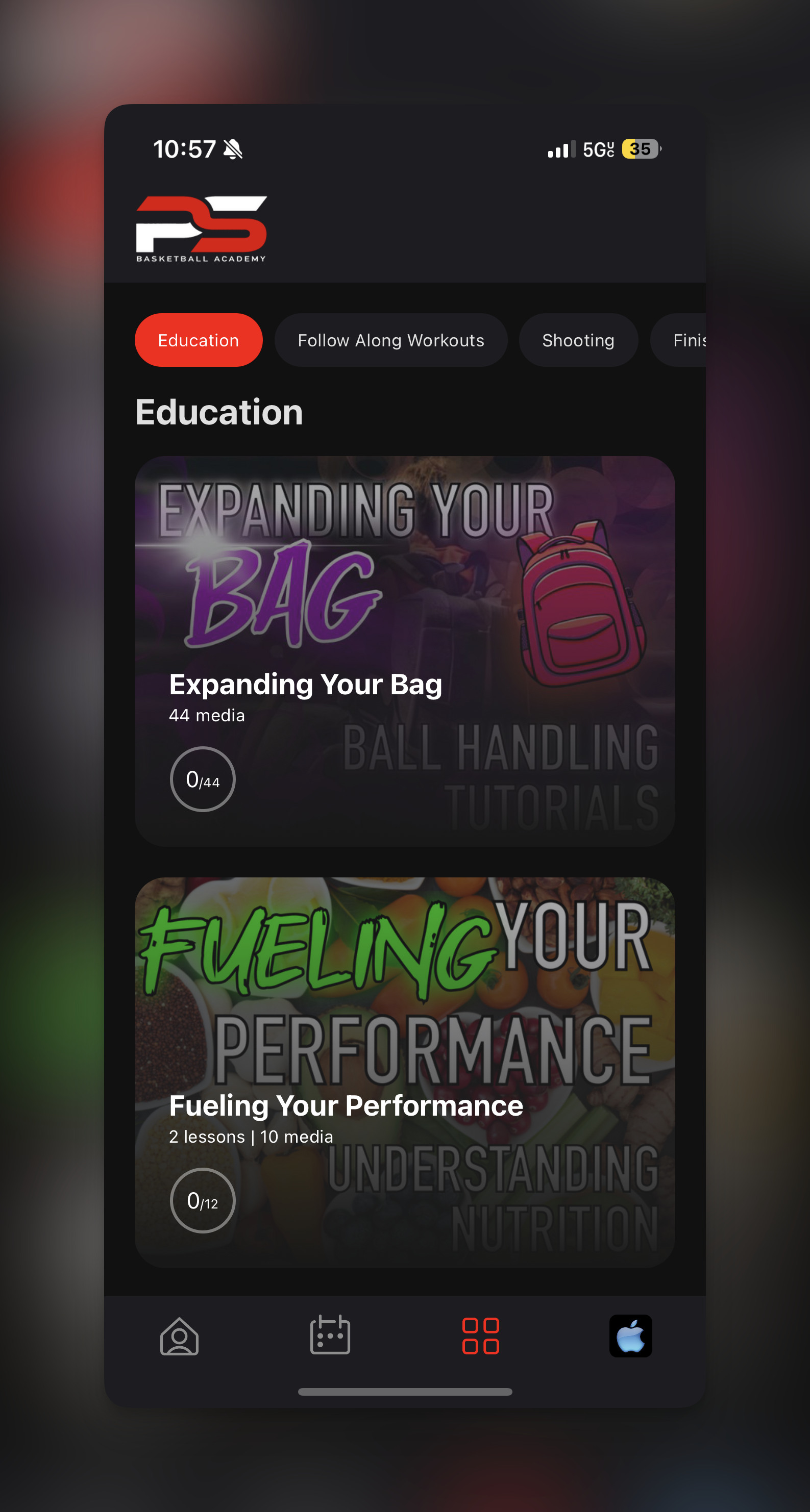 **What's customized:**
* App name (your business name in the App Store)
* App icon (your logo)
* In-app colors and theming
* Splash screen
* App Store listing (description, screenshots—we design these with you)
**What stays the same:**
* All CoachIQ features (scheduling, payments, programs, messaging, etc.)
* Automatic updates as CoachIQ releases new functionality
* Ongoing maintenance and support
**Currently available for iOS only.** Android personalized apps are not yet available.
## Key Benefits
Your own App Store presence creates instant credibility—parents and athletes trust businesses with dedicated apps. Your icon lives on their home screen, keeping your brand visible every day. Push notifications reach them directly, and everything they need is one tap away.
For you, it means higher engagement, better retention, and a professional edge over competitors still using generic platforms.
## What You'll Need
Before getting started, have these ready:
* A credit card for the Apple Developer Program fee (\$99/year, paid directly to Apple)
* Your business's legal name and D-U-N-S number (required for Organization enrollment)
* Your coaching brand assets: high-resolution logo, brand colors (hex codes), app icon
* Access to your business email
## Setup Process
In your CoachIQ admin, go to **Power-Ups** in the bottom-left sidebar. Find the **Personalized App** card and click **Request**.
**What's customized:**
* App name (your business name in the App Store)
* App icon (your logo)
* In-app colors and theming
* Splash screen
* App Store listing (description, screenshots—we design these with you)
**What stays the same:**
* All CoachIQ features (scheduling, payments, programs, messaging, etc.)
* Automatic updates as CoachIQ releases new functionality
* Ongoing maintenance and support
**Currently available for iOS only.** Android personalized apps are not yet available.
## Key Benefits
Your own App Store presence creates instant credibility—parents and athletes trust businesses with dedicated apps. Your icon lives on their home screen, keeping your brand visible every day. Push notifications reach them directly, and everything they need is one tap away.
For you, it means higher engagement, better retention, and a professional edge over competitors still using generic platforms.
## What You'll Need
Before getting started, have these ready:
* A credit card for the Apple Developer Program fee (\$99/year, paid directly to Apple)
* Your business's legal name and D-U-N-S number (required for Organization enrollment)
* Your coaching brand assets: high-resolution logo, brand colors (hex codes), app icon
* Access to your business email
## Setup Process
In your CoachIQ admin, go to **Power-Ups** in the bottom-left sidebar. Find the **Personalized App** card and click **Request**.
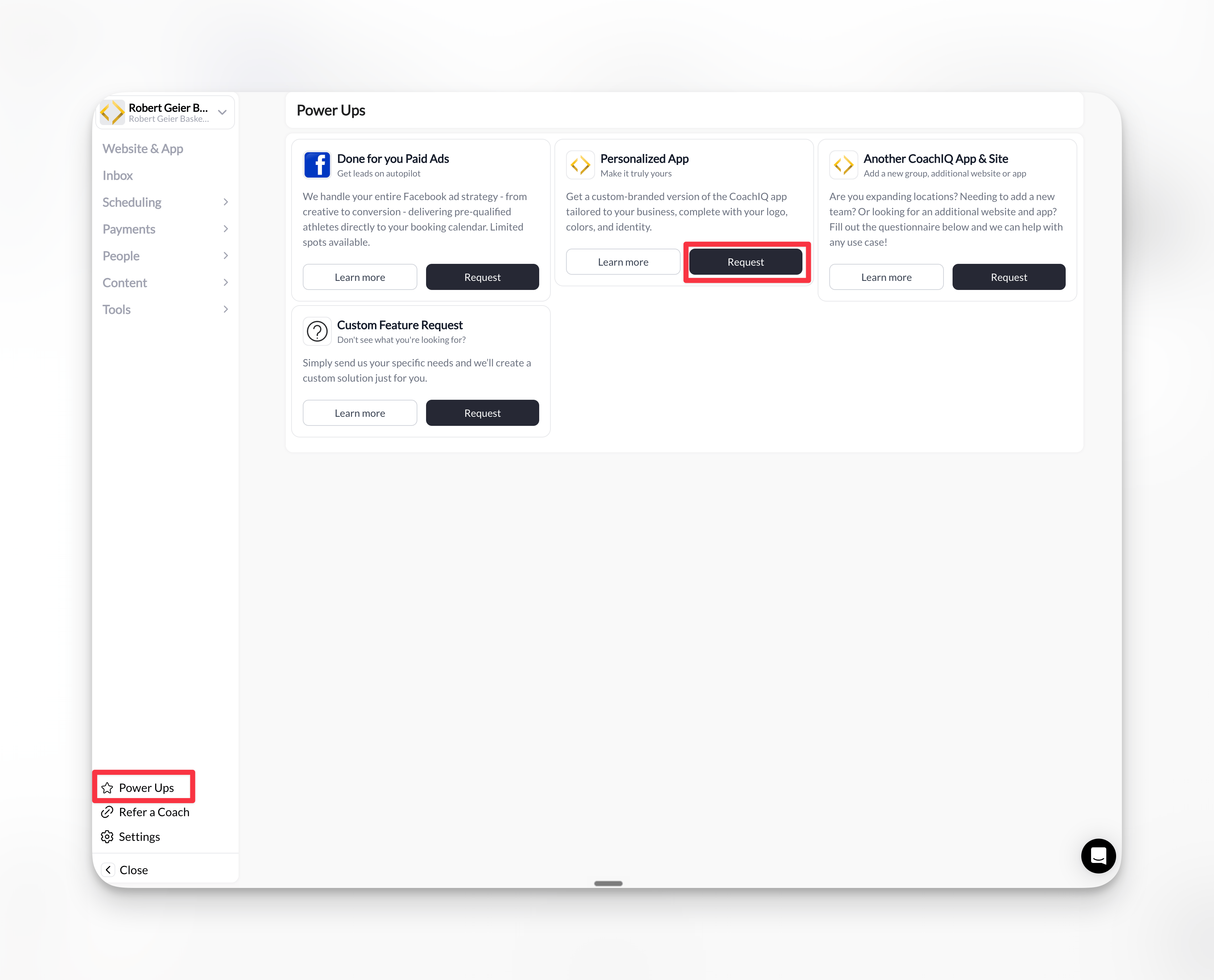 Have your brand colors (hex codes), high-resolution logo, and app store description ready before submitting your request.
You'll need an Apple Developer account enrolled as an **Organization** (not Individual) to publish your branded app.
### Enrollment steps
1. **Create a free Apple Developer account**: Go to [developer.apple.com](https://developer.apple.com/), click **Account**, and sign in with your Apple ID
2. **Enroll in the program** (\$99/year): Click **Join Apple Developer Program** → **Enroll** → **Start Enrollment**
3. **Select Organization** as your entity type: Enter your company information and submit your application
4. **Wait for Apple's approval**: Apple will verify your information and send an email with your enrollment status
5. **Complete your enrollment**: After approval, log in to [Apple Developer](https://developer.apple.com/) and access [App Store Connect](https://appstoreconnect.apple.com/)
**Important**: Enable auto-renewal for your Apple Developer membership to prevent app interruptions. Complete any verification steps Apple requests after enrollment.
Need detailed guidance? Review Apple's official [Enrolling as an Organization](https://developer.apple.com/support/app-account/#organization) guide before starting.
Grant CoachIQ the access needed to build and publish your app.
### How to send the invitation
1. Sign in to [developer.apple.com](https://developer.apple.com/) with your Apple ID
2. Click the **Account** tab, then select **Users and Access** from the sidebar
3. Click the **+** button to add a new user
4. Enter the CoachIQ developer email: **[dev@coachiq.io](mailto:dev@coachiq.io)**
5. Configure the following permissions:
* **Role**: Admin
* **Access to Certificates, Identifiers & Profiles**: ✓ Enabled
6. Click **Invite** to send the invitation
**Invitation sent!** CoachIQ will receive an email from Apple and accept the invitation to begin building your app.
Our team will reach out to collect:
* Your logo (high-resolution)
* Brand colors (hex codes if you have them)
* Business name as you want it to appear
* A brief description of your business
We'll handle the rest, including designing your App Store screenshots and listing.
## What Happens Next
After you complete the steps above:
1. **We build your app** — Our team creates your branded iOS app using your submitted assets
2. **You review the test version** — We'll push a test build directly to your device for approval
3. **App Store submission** — Once you approve, we submit your app to Apple for review
4. **Launch** — After Apple approves (typically 1–3 days), your app goes live on the App Store
**Timeline**: The complete process takes approximately 30 days from request to live app.
## What's Included
Once your app is live, CoachIQ continues to manage everything behind the scenes:
* **Automatic updates**: New CoachIQ features are pushed to your app automatically
* **Ongoing maintenance**: We handle technical updates and Apple requirements
* **Support**: Our team is available if any issues arise
You focus on coaching—we handle the tech.
## Migrating Existing Clients
If you're already using CoachIQ, your existing data transfers seamlessly to your new Personalized App. Current clients can switch to your branded app, and all future clients will use it from day one.
## Common Questions
Yes. The app is published under your Apple Developer account, so it belongs to you.
Organization accounts allow you to transfer app ownership, add team members, and present your business professionally in the App Store. Individual accounts are tied to a single person and have limitations for business use.
A D-U-N-S number is a unique nine-digit identifier for businesses issued by Dun & Bradstreet. Apple requires this for Organization enrollments. You can [request a free D-U-N-S number](https://developer.apple.com/support/D-U-N-S/) through Apple's lookup tool if you don't have one.
Personalized Apps are currently iOS-only. We'll announce Android availability when it's ready.
Yes. If you rebrand or want to refresh your look, contact CoachIQ support to request an update. Minor changes (colors, text) can be pushed quickly. Major changes (app name, icon) require a new App Store review.
Contact our team for current pricing. You'll also pay Apple's \$99/year Developer account fee directly to Apple.
Go to **Users and Access** in your Apple Developer account. If the status shows "Pending" next to [dev@coachiq.io](mailto:dev@coachiq.io), the invite hasn't been accepted yet. Allow 1–2 business days for our team to accept.
Existing clients will need to download your new branded app. All their data and history will be there when they log in.
Your app will be removed from the App Store until you renew. Enable auto-renewal in your Apple Developer account to prevent interruptions.
The app is powered by CoachIQ's platform. If you cancel your CoachIQ subscription, the app would no longer function—but you retain ownership of the app listing in your Developer account.
## Troubleshooting
Common reasons include: mismatched business name with D-U-N-S records, incomplete business registration, or missing verification documents. Contact [Apple Developer Support](https://developer.apple.com/contact/) for specific guidance on your rejection.
Ensure you're signed in at [developer.apple.com](https://developer.apple.com/) (not App Store Connect) and that your enrollment is fully approved. The Users and Access option only appears after your membership is active.
Double-check you entered **[dev@coachiq.io](mailto:dev@coachiq.io)** exactly. If the issue persists, contact CoachIQ support and we'll provide an alternative email address.
Have your brand colors (hex codes), high-resolution logo, and app store description ready before submitting your request.
You'll need an Apple Developer account enrolled as an **Organization** (not Individual) to publish your branded app.
### Enrollment steps
1. **Create a free Apple Developer account**: Go to [developer.apple.com](https://developer.apple.com/), click **Account**, and sign in with your Apple ID
2. **Enroll in the program** (\$99/year): Click **Join Apple Developer Program** → **Enroll** → **Start Enrollment**
3. **Select Organization** as your entity type: Enter your company information and submit your application
4. **Wait for Apple's approval**: Apple will verify your information and send an email with your enrollment status
5. **Complete your enrollment**: After approval, log in to [Apple Developer](https://developer.apple.com/) and access [App Store Connect](https://appstoreconnect.apple.com/)
**Important**: Enable auto-renewal for your Apple Developer membership to prevent app interruptions. Complete any verification steps Apple requests after enrollment.
Need detailed guidance? Review Apple's official [Enrolling as an Organization](https://developer.apple.com/support/app-account/#organization) guide before starting.
Grant CoachIQ the access needed to build and publish your app.
### How to send the invitation
1. Sign in to [developer.apple.com](https://developer.apple.com/) with your Apple ID
2. Click the **Account** tab, then select **Users and Access** from the sidebar
3. Click the **+** button to add a new user
4. Enter the CoachIQ developer email: **[dev@coachiq.io](mailto:dev@coachiq.io)**
5. Configure the following permissions:
* **Role**: Admin
* **Access to Certificates, Identifiers & Profiles**: ✓ Enabled
6. Click **Invite** to send the invitation
**Invitation sent!** CoachIQ will receive an email from Apple and accept the invitation to begin building your app.
Our team will reach out to collect:
* Your logo (high-resolution)
* Brand colors (hex codes if you have them)
* Business name as you want it to appear
* A brief description of your business
We'll handle the rest, including designing your App Store screenshots and listing.
## What Happens Next
After you complete the steps above:
1. **We build your app** — Our team creates your branded iOS app using your submitted assets
2. **You review the test version** — We'll push a test build directly to your device for approval
3. **App Store submission** — Once you approve, we submit your app to Apple for review
4. **Launch** — After Apple approves (typically 1–3 days), your app goes live on the App Store
**Timeline**: The complete process takes approximately 30 days from request to live app.
## What's Included
Once your app is live, CoachIQ continues to manage everything behind the scenes:
* **Automatic updates**: New CoachIQ features are pushed to your app automatically
* **Ongoing maintenance**: We handle technical updates and Apple requirements
* **Support**: Our team is available if any issues arise
You focus on coaching—we handle the tech.
## Migrating Existing Clients
If you're already using CoachIQ, your existing data transfers seamlessly to your new Personalized App. Current clients can switch to your branded app, and all future clients will use it from day one.
## Common Questions
Yes. The app is published under your Apple Developer account, so it belongs to you.
Organization accounts allow you to transfer app ownership, add team members, and present your business professionally in the App Store. Individual accounts are tied to a single person and have limitations for business use.
A D-U-N-S number is a unique nine-digit identifier for businesses issued by Dun & Bradstreet. Apple requires this for Organization enrollments. You can [request a free D-U-N-S number](https://developer.apple.com/support/D-U-N-S/) through Apple's lookup tool if you don't have one.
Personalized Apps are currently iOS-only. We'll announce Android availability when it's ready.
Yes. If you rebrand or want to refresh your look, contact CoachIQ support to request an update. Minor changes (colors, text) can be pushed quickly. Major changes (app name, icon) require a new App Store review.
Contact our team for current pricing. You'll also pay Apple's \$99/year Developer account fee directly to Apple.
Go to **Users and Access** in your Apple Developer account. If the status shows "Pending" next to [dev@coachiq.io](mailto:dev@coachiq.io), the invite hasn't been accepted yet. Allow 1–2 business days for our team to accept.
Existing clients will need to download your new branded app. All their data and history will be there when they log in.
Your app will be removed from the App Store until you renew. Enable auto-renewal in your Apple Developer account to prevent interruptions.
The app is powered by CoachIQ's platform. If you cancel your CoachIQ subscription, the app would no longer function—but you retain ownership of the app listing in your Developer account.
## Troubleshooting
Common reasons include: mismatched business name with D-U-N-S records, incomplete business registration, or missing verification documents. Contact [Apple Developer Support](https://developer.apple.com/contact/) for specific guidance on your rejection.
Ensure you're signed in at [developer.apple.com](https://developer.apple.com/) (not App Store Connect) and that your enrollment is fully approved. The Users and Access option only appears after your membership is active.
Double-check you entered **[dev@coachiq.io](mailto:dev@coachiq.io)** exactly. If the issue persists, contact CoachIQ support and we'll provide an alternative email address.