> ## Documentation Index
> Fetch the complete documentation index at: https://help.coachiq.io/llms.txt
> Use this file to discover all available pages before exploring further.
# Scheduler Defaults
> Set the timing, booking window, booking rules, and limits that every new scheduler starts with, so you configure them once instead of on each session.
**Where to find this**: **Scheduling → Setup → Defaults**
## What defaults do
Every scheduler carries the same set of timing and booking rules. The **Defaults** tab ("Defaults for every new scheduler") is where you set the starting values, so each new scheduler you create is already right for how you run your business. **Create scheduler** preloads these settings, and you can still override any of them on an individual scheduler under its **Advanced settings**. Click **Save defaults** to apply your changes.
Defaults apply to schedulers you create **after** you change them. Existing schedulers keep their own values.
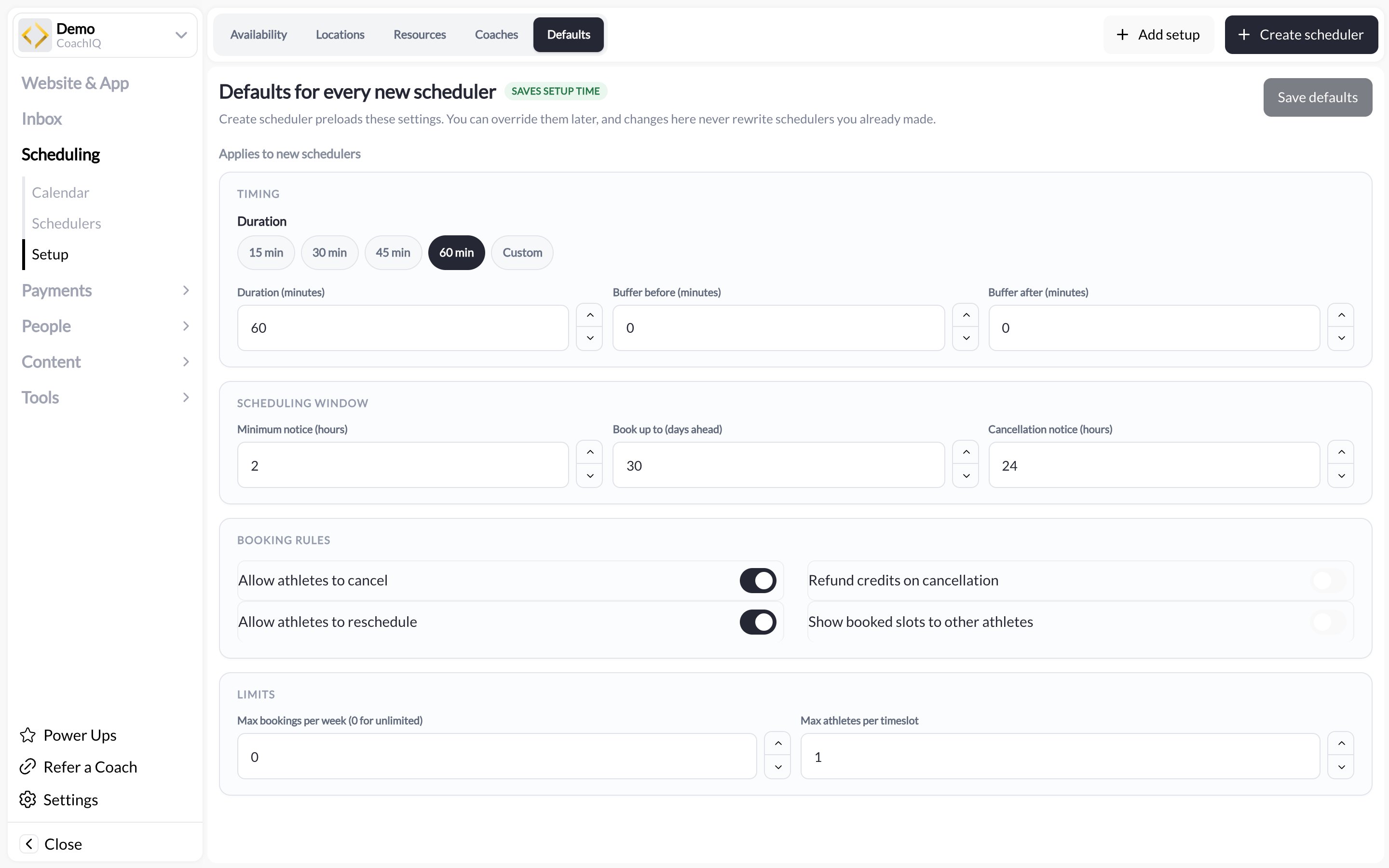 ## The four groups
### Timing
| Setting | What it does |
| --------------------------- | ----------------------------------------------------------------------------------------------------------------- |
| **Duration** | Session length: **15 min**, **30 min**, **45 min**, **60 min**, or **Custom** with a **Duration (minutes)** field |
| **Buffer before (minutes)** | Minutes blocked before each session, for setup or travel |
| **Buffer after (minutes)** | Minutes blocked after each session, for notes or cleanup |
Buffers reduce how many slots fit in a day. A 60-minute lesson with a 15-minute buffer after it uses 75 minutes of availability.
### Scheduling window
| Setting | What it does |
| ------------------------------- | --------------------------------------------------------------------------------------------------------------------------------------- |
| **Minimum notice (hours)** | How close to the start time an athlete can still book. 24 means nothing can be booked less than a day ahead |
| **Book up to (days ahead)** | How far into the future athletes can see and book slots |
| **Cancellation notice (hours)** | How long before a session an athlete can still cancel themselves. Inside this window, cancel and reschedule are blocked for the athlete |
### Booking rules
| Setting | What it does |
| --------------------------------------- | ---------------------------------------------------------------------------------------------------------------- |
| **Allow athletes to cancel** | Athletes can cancel their own bookings (outside the cancellation notice window) |
| **Refund credits on cancellation** | When a credit-paid booking is canceled in time, the credit goes back to the athlete |
| **Allow athletes to reschedule** | Athletes can move their booking to another open slot |
| **Show booked slots to other athletes** | Other athletes can see that a slot is taken (and, on group sessions, who is in it). Turn off for private lessons |
### Limits
| Setting | What it does |
| ----------------------------- | ----------------------------------------------------------------------------------------------- |
| **Max bookings per week** | Cap on how many sessions one athlete can book per week on this scheduler. **0** means unlimited |
| **Max athletes per timeslot** | Capacity of each slot. 1 for private lessons, higher for groups |
## Recommended starting points
| Business | Duration | Min notice | Cancel notice | Per timeslot |
| -------------------- | -------- | ---------- | ------------- | ------------ |
| Private lessons | 60 min | 12 h | 24 h | 1 |
| Small-group training | 60 min | 4 h | 12 h | 4 to 8 |
| Open gym or drop-in | 90 min | 1 h | 2 h | 20 or more |
| Camps and clinics | Custom | 48 h | 72 h | roster size |
These are a place to begin. Tighten the cancellation notice if late cancels are hurting revenue; loosen minimum notice if athletes complain they cannot book same-day.
## Overriding on one scheduler
Open the scheduler and expand **Advanced settings**. The same fields appear, pre-filled with your defaults. Change what you need for that session only. Full detail in [Advanced scheduler settings](/scheduling/advanced-scheduler-settings) and [Scheduler settings, limits, and permissions](/scheduling/scheduler-settings-limits-and-permissions).
## Common questions
Defaults are copied into a scheduler when it is created. Edit the existing scheduler's Advanced settings to update it.
The athlete cannot cancel from the portal. You can still cancel for them from the calendar, and decide whether to refund the credit. See [Canceling bookings](/scheduling/canceling-bookings).
It hides slots beyond that horizon from athletes only. You can still see and book any date from the admin calendar.
## Related articles
Every per-scheduler override explained
How refund-on-cancel interacts with credits
Where sessions happen
Who takes bookings, and when
## The four groups
### Timing
| Setting | What it does |
| --------------------------- | ----------------------------------------------------------------------------------------------------------------- |
| **Duration** | Session length: **15 min**, **30 min**, **45 min**, **60 min**, or **Custom** with a **Duration (minutes)** field |
| **Buffer before (minutes)** | Minutes blocked before each session, for setup or travel |
| **Buffer after (minutes)** | Minutes blocked after each session, for notes or cleanup |
Buffers reduce how many slots fit in a day. A 60-minute lesson with a 15-minute buffer after it uses 75 minutes of availability.
### Scheduling window
| Setting | What it does |
| ------------------------------- | --------------------------------------------------------------------------------------------------------------------------------------- |
| **Minimum notice (hours)** | How close to the start time an athlete can still book. 24 means nothing can be booked less than a day ahead |
| **Book up to (days ahead)** | How far into the future athletes can see and book slots |
| **Cancellation notice (hours)** | How long before a session an athlete can still cancel themselves. Inside this window, cancel and reschedule are blocked for the athlete |
### Booking rules
| Setting | What it does |
| --------------------------------------- | ---------------------------------------------------------------------------------------------------------------- |
| **Allow athletes to cancel** | Athletes can cancel their own bookings (outside the cancellation notice window) |
| **Refund credits on cancellation** | When a credit-paid booking is canceled in time, the credit goes back to the athlete |
| **Allow athletes to reschedule** | Athletes can move their booking to another open slot |
| **Show booked slots to other athletes** | Other athletes can see that a slot is taken (and, on group sessions, who is in it). Turn off for private lessons |
### Limits
| Setting | What it does |
| ----------------------------- | ----------------------------------------------------------------------------------------------- |
| **Max bookings per week** | Cap on how many sessions one athlete can book per week on this scheduler. **0** means unlimited |
| **Max athletes per timeslot** | Capacity of each slot. 1 for private lessons, higher for groups |
## Recommended starting points
| Business | Duration | Min notice | Cancel notice | Per timeslot |
| -------------------- | -------- | ---------- | ------------- | ------------ |
| Private lessons | 60 min | 12 h | 24 h | 1 |
| Small-group training | 60 min | 4 h | 12 h | 4 to 8 |
| Open gym or drop-in | 90 min | 1 h | 2 h | 20 or more |
| Camps and clinics | Custom | 48 h | 72 h | roster size |
These are a place to begin. Tighten the cancellation notice if late cancels are hurting revenue; loosen minimum notice if athletes complain they cannot book same-day.
## Overriding on one scheduler
Open the scheduler and expand **Advanced settings**. The same fields appear, pre-filled with your defaults. Change what you need for that session only. Full detail in [Advanced scheduler settings](/scheduling/advanced-scheduler-settings) and [Scheduler settings, limits, and permissions](/scheduling/scheduler-settings-limits-and-permissions).
## Common questions
Defaults are copied into a scheduler when it is created. Edit the existing scheduler's Advanced settings to update it.
The athlete cannot cancel from the portal. You can still cancel for them from the calendar, and decide whether to refund the credit. See [Canceling bookings](/scheduling/canceling-bookings).
It hides slots beyond that horizon from athletes only. You can still see and book any date from the admin calendar.
## Related articles
Every per-scheduler override explained
How refund-on-cancel interacts with credits
Where sessions happen
Who takes bookings, and when