> ## Documentation Index
> Fetch the complete documentation index at: https://help.coachiq.io/llms.txt
> Use this file to discover all available pages before exploring further.
# What Are Schedulers? (And Why You Need Them)
> Learn what schedulers are, how they differ from sessions, and when to create multiple scheduler types
## What a scheduler actually is
A **scheduler** is your bookable service configuration—a template that defines what athletes can book, at what price, with what rules.
Think of a scheduler like a product listing in a store:
* **The product listing** = The scheduler (what's for sale, price, description)
* **Individual items on the shelf** = Available time slots (when it can be purchased)
* **Items in shopping carts** = Bookings (actual purchases)
**Simple definition**: A scheduler is a session type that athletes can book. It defines the "what" (service details) while availability defines the "when" (time windows).
## Scheduling terminology in CoachIQ
The biggest source of confusion in CoachIQ scheduling is understanding these three related but different concepts:
**What it is**: The configuration/template for a bookable service
**What it defines**:
* Session name and description
* Duration (30, 45, 60 minutes)
* Price or credit cost
* Capacity (1-on-1 or group)
* Booking rules and limits
* Which availability it uses
**Analogy**: A product listing on Amazon
**Example**: "60-Minute Private Training - \$75 - Max 1 athlete"
**How many exist**: You create 1-20+ schedulers depending on your business
**Visibility**: Athletes see scheduler name, description, price when deciding what to book
**What it is**: An available time slot OR a confirmed booking
**What it includes**:
* Specific date and time
* Duration (inherited from scheduler)
* Which scheduler it came from
* Participant(s) if booked
**Analogy**: A specific showing time at a movie theater
**Example**: "Monday, Oct 2 at 4:00 PM - 60-Minute Private Training"
**How many exist**: Hundreds or thousands, automatically generated by CoachIQ
**Visibility**: Athletes see available sessions as time slots they can click to book
**Confusing part**: "Session" refers to BOTH available time slots (before booking) AND confirmed bookings (after booking). Context determines which meaning.
**What it is**: A confirmed reservation by an athlete for a specific session
**What it includes**:
* Athlete name
* Specific date/time
* Which scheduler/session type
* Payment or credit transaction
* Status (upcoming, past, canceled)
**Analogy**: A confirmed movie ticket with your name on it
**Example**: "Jake Smith - Monday, Oct 2 at 4:00 PM - 60-Minute Private Training"
**How many exist**: Depends on how many athletes book
**Visibility**: Appears on your calendar and athlete's schedule
**Key insight**: Booking is a session that has an athlete assigned to it. Before booking, it's an available session. After booking, it's a confirmed booking.
## How they work together: The complete flow
Configure: "60-Minute Private Training"
* Duration: 60 minutes
* Price: \$75
* Capacity: 1 athlete
* Connected to your M/W/F 3-8 PM availability
This is the **template** for a bookable service.
Based on your scheduler + availability, CoachIQ automatically creates bookable time slots:
**Generated sessions**:
* Monday, Oct 2 at 3:00 PM
* Monday, Oct 2 at 4:00 PM
* Monday, Oct 2 at 5:00 PM
* Wednesday, Oct 4 at 3:00 PM
* Wednesday, Oct 4 at 4:00 PM
* (continues for all M/W/F slots)
These are **available sessions** (not yet booked).
**You don't manually create these**: CoachIQ does this math automatically. Your 5-hour availability window + 60-min duration + 15-min buffer = specific number of slots per day.
When athlete visits your booking page, they see:
* "60-Minute Private Training - \$75"
* Available times: Oct 2 at 3:00 PM, 4:00 PM, 5:00 PM...
* Click a time to book
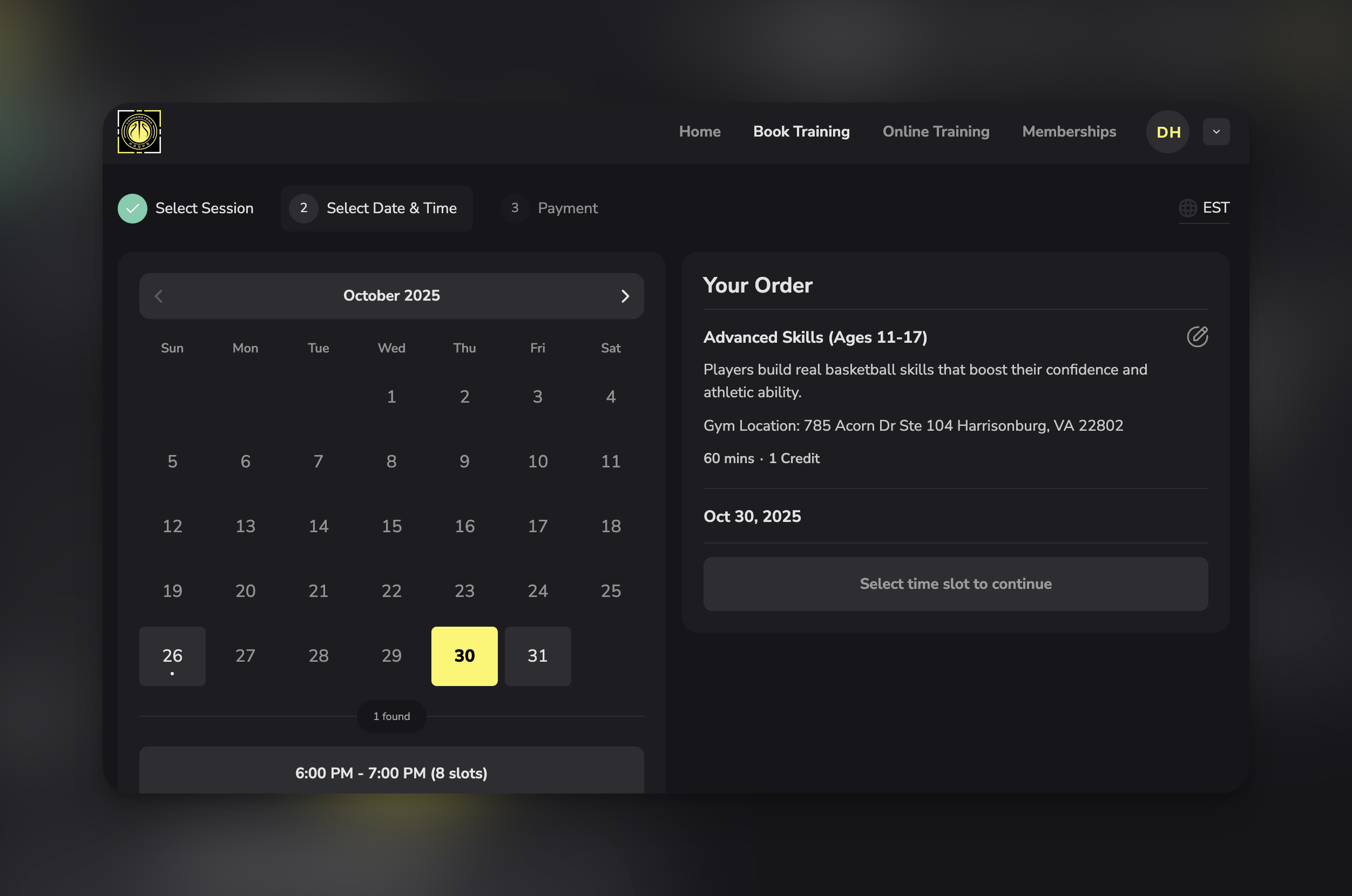 Jake selects Monday, Oct 2 at 4:00 PM and completes booking.
This creates a **booking** (confirmed reservation):
* Jake Smith
* Monday, Oct 2 at 4:00 PM
* 60-Minute Private Training
* Paid \$75
* Status: Upcoming
After Jake's booking:
* Oct 2 at 4:00 PM is no longer available to other athletes
* Oct 2 at 3:00 PM and 5:00 PM remain available
* Your calendar shows Jake's confirmed booking
**Complete cycle**: Scheduler (template) → Available Sessions (time slots) → Booking (confirmed reservation)
## Visual comparison: Scheduler vs Session vs Booking
| **Aspect** | **Scheduler** | **Session** | **Booking** |
| -------------- | --------------------------------------- | -------------------------------------------------- | --------------------------- |
| **What it is** | Template/configuration | Time slot (before or after booking) | Confirmed reservation |
| **How many** | 1-20+ per business | Hundreds/thousands | As many as athletes book |
| **Created by** | You (coach) | CoachIQ (automatically) | Athlete or coach |
| **Visibility** | Athletes see when choosing what to book | Athletes see as available times | Only booked athlete sees |
| **Example** | "60-Min Private Training" | "Monday 4:00 PM" | "Jake - Monday 4:00 PM" |
| **Contains** | Rules, pricing, duration | Date/time, from which scheduler | Athlete name, payment info |
| **You manage** | Configuration, settings | Indirectly via availability and scheduler settings | Cancellations, rescheduling |
**The relationship**: One scheduler generates many sessions. Some sessions become bookings when athletes book them.
## Why you need schedulers (not just one "training session")
New coaches often ask: "Why do I need multiple schedulers? Can't I just have one 'Training Session' that athletes book?"
Here's why schedulers matter:
### Reason 1: Different durations need different schedulers
**The problem**: You offer 30-minute, 45-minute, and 60-minute sessions, all at different prices.
**Why one scheduler won't work**:
* A scheduler has ONE duration setting
* Athletes booking "30 minutes" vs "60 minutes" need different options
**Solution**: Create three schedulers:
* "30-Minute Quick Session - \$50"
* "45-Minute Standard Session - \$70"
* "60-Minute Deep Dive - \$90"
**Result**: Athletes choose their preferred duration, you charge appropriately.
### Reason 2: Different pricing requires different schedulers
**The problem**: You charge 75 for private sessions & 40 for group sessions.
**Why one scheduler won't work**:
* A scheduler has ONE price
* Different session types have different value
**Solution**: Create separate schedulers:
* "Private 1-on-1 Session - \$75"
* "Small Group Session - \$40 per person"
**Result**: Correct pricing, clear differentiation.
### Reason 3: Different capacities need different schedulers
**The problem**: Private sessions allow 1 athlete, group sessions allow 6 athletes.
**Why one scheduler won't work**:
* A scheduler has ONE capacity setting
* Can't have both "max 1" and "max 6" in same scheduler
**Solution**: Different schedulers per format:
* "Private Training - 1 athlete max"
* "Small Group Training - 6 athletes max"
**Result**: Proper capacity management, no overbooking.
### Reason 4: Different services have different rules
**The problem**: Free assessments have no cancellation restrictions, paid sessions require 24-hour notice.
**Why one scheduler won't work**:
* A scheduler has ONE set of booking rules
* Different services warrant different policies
**Solution**: Service-specific schedulers:
* "Free Assessment - No cancellation restrictions"
* "Paid Session - 24hr cancellation required"
**Result**: Appropriate policies per service type.
**Bottom line**: Schedulers give you the flexibility to offer diverse services with different configurations. One scheduler = one set of rules. Multiple services = multiple schedulers.
## When NOT to create separate schedulers
Don't create multiple schedulers when:
❌ **Same service, different athletes**
* Bad: "Session for Jake", "Session for Sarah"
* Better: One "Private Training" scheduler that all athletes book
❌ **Same everything except date**
* Bad: "October Sessions", "November Sessions"
* Better: One scheduler with ongoing availability
❌ **Minor description variations**
* Bad: "Hitting Practice", "Batting Practice" (same service, different words)
* Better: One "Hitting/Batting Practice" scheduler
❌ **You just want organization**
* Bad: Creating 10 schedulers to categorize types
* Better: Use program groupings for organization
❌ **Different athletes should pay different amounts**
* Bad: "Premium Athlete Session", "Standard Athlete Session"
* Better: One scheduler with custom pricing at booking time OR use access codes
**Scheduler bloat**: Creating too many schedulers confuses athletes and makes your system harder to manage. Only create a new scheduler when there's a functional difference in duration, price, capacity, or rules.
## Scheduler naming best practices
The name athletes see matters. Good naming helps athletes understand what they're booking instantly.
### Formula for effective scheduler names
**Pattern 1: Duration + Service + Price**
* "60-Min Private Training - \$75"
* "30-Min Quick Session - \$45"
* "90-Min Intensive Training - \$120"
**Pattern 2: Service + Details + Price**
* "Small Group Strength Class (Max 8) - \$30"
* "1-on-1 Speed Development - \$85"
* "Team Practice Session - Contact for pricing"
**Pattern 3: Service + Coach + Price**
* "Private Training with Coach Mike - \$90"
* "Youth Development with Coach Emma - \$60"
* "Speed Training with Coach Sarah - \$80"
**Pattern 4: Service + Age/Level + Price**
* "Youth Skills (Ages 8-12) - \$50"
* "Advanced Training (High School+) - \$85"
* "Beginner Strength Class - \$25"
### What to include in scheduler names
**Always include**:
* ✅ Clear service type (what they're getting)
* ✅ Price or "Free" (no surprises)
* ✅ Duration (if not obvious from context)
**Consider including**:
* Coach name (if coach-specific)
* Age range or skill level (if service is targeted)
* Group size or capacity (if relevant to value)
* Location (if you have multiple facilities)
**Avoid**:
* ❌ Internal codes ("PT-60-A")
* ❌ Vague terms ("Session 1")
* ❌ Overly long descriptions (save for description field)
* ❌ All caps or excessive punctuation
**Test your names**: Show your scheduler names to someone unfamiliar with your business. Can they understand what each scheduler is within 3 seconds? If not, simplify.
## Common scheduler mistakes
**Avoid these common pitfalls:**
**Mistake**: 20+ schedulers with minor variations
**Problem**: Athletes overwhelmed by choices, can't decide what to book
**Example of excess**:
* "Monday Morning Session"
* "Tuesday Morning Session"
* "Wednesday Morning Session"
* (Separate scheduler per day)
**Better approach**: One "Morning Training Session" with availability covering all morning days
**Rule of thumb**: If the only difference is WHEN (not what/price/rules), don't create separate schedulers.
**Mistake**: One "Training Session" for everything
**Problem**: Can't differentiate pricing, capacity, or duration
**Example of inadequate**:
* Only "Training Session" but you offer 30-min, 60-min, private, and group
**Better approach**: At minimum:
* "30-Min Private - \$50"
* "60-Min Private - \$85"
* "Group Class - \$30"
**Rule of thumb**: If services have different prices, durations, or capacities, they need separate schedulers.
**Mistake**: "Session A", "PT-1", "Training 60"
**Problem**: Athletes don't understand what they're booking
**Why it happens**: Using internal shorthand instead of customer-facing language
**Better approach**:
* "60-Minute Private Training"
* "Small Group Strength Class"
* "Free Assessment Session"
**Rule of thumb**: If athlete's grandparent couldn't understand the name, it's too unclear.
**Mistake**: 10+ schedulers in random order with no categorization
**Problem**: Athletes scroll through unorganized list, analysis paralysis
**Better approach**: Use program groupings:
* "Private Training" group (3 schedulers)
* "Group Classes" group (4 schedulers)
* "Specialty Services" group (2 schedulers)
**Rule of thumb**: Once you have 5+ schedulers, implement program groupings.
**Mistake**: Same service type but different settings across schedulers
**Example**:
* "Private Training - Coach Mike" has 15-min buffer
* "Private Training - Coach Sarah" has 30-min buffer
* Causes scheduling conflicts and confusion
**Better approach**: Standardize settings across similar schedulers
* All private sessions: 15-min buffer
* All group classes: 20-min buffer
* All assessments: 30-min buffer
**Rule of thumb**: Create configuration standards and document them.
## How schedulers connect to other CoachIQ features
Schedulers don't exist in isolation—they integrate with the broader platform:
**Connection**: Schedulers pull from availability templates
**Relationship**: One availability template can power multiple schedulers
**Example**: "Weekday Availability" powers both "30-Min Session" and "60-Min Session" schedulers
**Connection**: Schedulers link to payment products or credit packages
**Relationship**: Scheduler specifies which product athletes must purchase or how many credits to redeem
**Example**: "Private Training" scheduler charges 1 credit OR \$75 direct payment
**Connection**: Booked sessions from schedulers appear on calendar
**Relationship**: Each booking shows which scheduler it came from
**Example**: Calendar displays "Jake - 60-Min Private Training - 3:00 PM" (scheduler name visible)
**Connection**: Schedulers specify credit cost per booking
**Relationship**: Scheduler determines how many credits are deducted when athlete books
**Example**: "Premium Session" costs 2 credits, "Standard Session" costs 1 credit
**Connection**: Embed specific schedulers on your website
**Relationship**: Choose which schedulers appear on which website pages
**Example**: Homepage shows "Free Assessment", Services page shows all paid schedulers
**Connection**: Athletes view and book schedulers through portal
**Relationship**: Schedulers appear as bookable options in athlete's app
**Example**: Athlete opens app, sees all schedulers they're eligible to book
**Connection**: Configure automated reminders per scheduler
**Relationship**: Each scheduler has its own reminder settings
**Example**: "Premium Sessions" get 24-hour reminder, "Group Classes" get 1-hour reminder
**Connection**: Group schedulers into logical categories
**Relationship**: Program groupings organize multiple schedulers for easier athlete navigation
**Example**: "Private Training" program contains 3 related schedulers
## What's next
Now that you understand what schedulers are and when to create them, you're ready to build your first scheduler:
Complete step-by-step guide to building your first bookable scheduler
Configure free, paid, or credit-based scheduling
Configure limits, permissions, and booking rules
## Related articles
Complete overview of the three-layer system
Understand the foundation layer
10-minute guide to first bookable session
How credits work with schedulers
**Questions about planning your scheduler structure?** Our support team can help you design the optimal setup for your coaching services. [Contact Support](https://coachiq.com/support)
Jake selects Monday, Oct 2 at 4:00 PM and completes booking.
This creates a **booking** (confirmed reservation):
* Jake Smith
* Monday, Oct 2 at 4:00 PM
* 60-Minute Private Training
* Paid \$75
* Status: Upcoming
After Jake's booking:
* Oct 2 at 4:00 PM is no longer available to other athletes
* Oct 2 at 3:00 PM and 5:00 PM remain available
* Your calendar shows Jake's confirmed booking
**Complete cycle**: Scheduler (template) → Available Sessions (time slots) → Booking (confirmed reservation)
## Visual comparison: Scheduler vs Session vs Booking
| **Aspect** | **Scheduler** | **Session** | **Booking** |
| -------------- | --------------------------------------- | -------------------------------------------------- | --------------------------- |
| **What it is** | Template/configuration | Time slot (before or after booking) | Confirmed reservation |
| **How many** | 1-20+ per business | Hundreds/thousands | As many as athletes book |
| **Created by** | You (coach) | CoachIQ (automatically) | Athlete or coach |
| **Visibility** | Athletes see when choosing what to book | Athletes see as available times | Only booked athlete sees |
| **Example** | "60-Min Private Training" | "Monday 4:00 PM" | "Jake - Monday 4:00 PM" |
| **Contains** | Rules, pricing, duration | Date/time, from which scheduler | Athlete name, payment info |
| **You manage** | Configuration, settings | Indirectly via availability and scheduler settings | Cancellations, rescheduling |
**The relationship**: One scheduler generates many sessions. Some sessions become bookings when athletes book them.
## Why you need schedulers (not just one "training session")
New coaches often ask: "Why do I need multiple schedulers? Can't I just have one 'Training Session' that athletes book?"
Here's why schedulers matter:
### Reason 1: Different durations need different schedulers
**The problem**: You offer 30-minute, 45-minute, and 60-minute sessions, all at different prices.
**Why one scheduler won't work**:
* A scheduler has ONE duration setting
* Athletes booking "30 minutes" vs "60 minutes" need different options
**Solution**: Create three schedulers:
* "30-Minute Quick Session - \$50"
* "45-Minute Standard Session - \$70"
* "60-Minute Deep Dive - \$90"
**Result**: Athletes choose their preferred duration, you charge appropriately.
### Reason 2: Different pricing requires different schedulers
**The problem**: You charge 75 for private sessions & 40 for group sessions.
**Why one scheduler won't work**:
* A scheduler has ONE price
* Different session types have different value
**Solution**: Create separate schedulers:
* "Private 1-on-1 Session - \$75"
* "Small Group Session - \$40 per person"
**Result**: Correct pricing, clear differentiation.
### Reason 3: Different capacities need different schedulers
**The problem**: Private sessions allow 1 athlete, group sessions allow 6 athletes.
**Why one scheduler won't work**:
* A scheduler has ONE capacity setting
* Can't have both "max 1" and "max 6" in same scheduler
**Solution**: Different schedulers per format:
* "Private Training - 1 athlete max"
* "Small Group Training - 6 athletes max"
**Result**: Proper capacity management, no overbooking.
### Reason 4: Different services have different rules
**The problem**: Free assessments have no cancellation restrictions, paid sessions require 24-hour notice.
**Why one scheduler won't work**:
* A scheduler has ONE set of booking rules
* Different services warrant different policies
**Solution**: Service-specific schedulers:
* "Free Assessment - No cancellation restrictions"
* "Paid Session - 24hr cancellation required"
**Result**: Appropriate policies per service type.
**Bottom line**: Schedulers give you the flexibility to offer diverse services with different configurations. One scheduler = one set of rules. Multiple services = multiple schedulers.
## When NOT to create separate schedulers
Don't create multiple schedulers when:
❌ **Same service, different athletes**
* Bad: "Session for Jake", "Session for Sarah"
* Better: One "Private Training" scheduler that all athletes book
❌ **Same everything except date**
* Bad: "October Sessions", "November Sessions"
* Better: One scheduler with ongoing availability
❌ **Minor description variations**
* Bad: "Hitting Practice", "Batting Practice" (same service, different words)
* Better: One "Hitting/Batting Practice" scheduler
❌ **You just want organization**
* Bad: Creating 10 schedulers to categorize types
* Better: Use program groupings for organization
❌ **Different athletes should pay different amounts**
* Bad: "Premium Athlete Session", "Standard Athlete Session"
* Better: One scheduler with custom pricing at booking time OR use access codes
**Scheduler bloat**: Creating too many schedulers confuses athletes and makes your system harder to manage. Only create a new scheduler when there's a functional difference in duration, price, capacity, or rules.
## Scheduler naming best practices
The name athletes see matters. Good naming helps athletes understand what they're booking instantly.
### Formula for effective scheduler names
**Pattern 1: Duration + Service + Price**
* "60-Min Private Training - \$75"
* "30-Min Quick Session - \$45"
* "90-Min Intensive Training - \$120"
**Pattern 2: Service + Details + Price**
* "Small Group Strength Class (Max 8) - \$30"
* "1-on-1 Speed Development - \$85"
* "Team Practice Session - Contact for pricing"
**Pattern 3: Service + Coach + Price**
* "Private Training with Coach Mike - \$90"
* "Youth Development with Coach Emma - \$60"
* "Speed Training with Coach Sarah - \$80"
**Pattern 4: Service + Age/Level + Price**
* "Youth Skills (Ages 8-12) - \$50"
* "Advanced Training (High School+) - \$85"
* "Beginner Strength Class - \$25"
### What to include in scheduler names
**Always include**:
* ✅ Clear service type (what they're getting)
* ✅ Price or "Free" (no surprises)
* ✅ Duration (if not obvious from context)
**Consider including**:
* Coach name (if coach-specific)
* Age range or skill level (if service is targeted)
* Group size or capacity (if relevant to value)
* Location (if you have multiple facilities)
**Avoid**:
* ❌ Internal codes ("PT-60-A")
* ❌ Vague terms ("Session 1")
* ❌ Overly long descriptions (save for description field)
* ❌ All caps or excessive punctuation
**Test your names**: Show your scheduler names to someone unfamiliar with your business. Can they understand what each scheduler is within 3 seconds? If not, simplify.
## Common scheduler mistakes
**Avoid these common pitfalls:**
**Mistake**: 20+ schedulers with minor variations
**Problem**: Athletes overwhelmed by choices, can't decide what to book
**Example of excess**:
* "Monday Morning Session"
* "Tuesday Morning Session"
* "Wednesday Morning Session"
* (Separate scheduler per day)
**Better approach**: One "Morning Training Session" with availability covering all morning days
**Rule of thumb**: If the only difference is WHEN (not what/price/rules), don't create separate schedulers.
**Mistake**: One "Training Session" for everything
**Problem**: Can't differentiate pricing, capacity, or duration
**Example of inadequate**:
* Only "Training Session" but you offer 30-min, 60-min, private, and group
**Better approach**: At minimum:
* "30-Min Private - \$50"
* "60-Min Private - \$85"
* "Group Class - \$30"
**Rule of thumb**: If services have different prices, durations, or capacities, they need separate schedulers.
**Mistake**: "Session A", "PT-1", "Training 60"
**Problem**: Athletes don't understand what they're booking
**Why it happens**: Using internal shorthand instead of customer-facing language
**Better approach**:
* "60-Minute Private Training"
* "Small Group Strength Class"
* "Free Assessment Session"
**Rule of thumb**: If athlete's grandparent couldn't understand the name, it's too unclear.
**Mistake**: 10+ schedulers in random order with no categorization
**Problem**: Athletes scroll through unorganized list, analysis paralysis
**Better approach**: Use program groupings:
* "Private Training" group (3 schedulers)
* "Group Classes" group (4 schedulers)
* "Specialty Services" group (2 schedulers)
**Rule of thumb**: Once you have 5+ schedulers, implement program groupings.
**Mistake**: Same service type but different settings across schedulers
**Example**:
* "Private Training - Coach Mike" has 15-min buffer
* "Private Training - Coach Sarah" has 30-min buffer
* Causes scheduling conflicts and confusion
**Better approach**: Standardize settings across similar schedulers
* All private sessions: 15-min buffer
* All group classes: 20-min buffer
* All assessments: 30-min buffer
**Rule of thumb**: Create configuration standards and document them.
## How schedulers connect to other CoachIQ features
Schedulers don't exist in isolation—they integrate with the broader platform:
**Connection**: Schedulers pull from availability templates
**Relationship**: One availability template can power multiple schedulers
**Example**: "Weekday Availability" powers both "30-Min Session" and "60-Min Session" schedulers
**Connection**: Schedulers link to payment products or credit packages
**Relationship**: Scheduler specifies which product athletes must purchase or how many credits to redeem
**Example**: "Private Training" scheduler charges 1 credit OR \$75 direct payment
**Connection**: Booked sessions from schedulers appear on calendar
**Relationship**: Each booking shows which scheduler it came from
**Example**: Calendar displays "Jake - 60-Min Private Training - 3:00 PM" (scheduler name visible)
**Connection**: Schedulers specify credit cost per booking
**Relationship**: Scheduler determines how many credits are deducted when athlete books
**Example**: "Premium Session" costs 2 credits, "Standard Session" costs 1 credit
**Connection**: Embed specific schedulers on your website
**Relationship**: Choose which schedulers appear on which website pages
**Example**: Homepage shows "Free Assessment", Services page shows all paid schedulers
**Connection**: Athletes view and book schedulers through portal
**Relationship**: Schedulers appear as bookable options in athlete's app
**Example**: Athlete opens app, sees all schedulers they're eligible to book
**Connection**: Configure automated reminders per scheduler
**Relationship**: Each scheduler has its own reminder settings
**Example**: "Premium Sessions" get 24-hour reminder, "Group Classes" get 1-hour reminder
**Connection**: Group schedulers into logical categories
**Relationship**: Program groupings organize multiple schedulers for easier athlete navigation
**Example**: "Private Training" program contains 3 related schedulers
## What's next
Now that you understand what schedulers are and when to create them, you're ready to build your first scheduler:
Complete step-by-step guide to building your first bookable scheduler
Configure free, paid, or credit-based scheduling
Configure limits, permissions, and booking rules
## Related articles
Complete overview of the three-layer system
Understand the foundation layer
10-minute guide to first bookable session
How credits work with schedulers
**Questions about planning your scheduler structure?** Our support team can help you design the optimal setup for your coaching services. [Contact Support](https://coachiq.com/support)