> ## Documentation Index
> Fetch the complete documentation index at: https://help.coachiq.io/llms.txt
> Use this file to discover all available pages before exploring further.
# Legal Pages (Privacy, Terms, Disclaimers)
> Create and customize privacy policies, terms of service, and disclaimers using CoachIQ's built-in templates. Legal compliance made simple for coaches.
**Where to find this**: Dashboard → Website Builder → Add New Page → Templates
## What you'll accomplish
Create professional legal pages (privacy policy, terms of service, and disclaimers) for your coaching website using CoachIQ's built-in templates, customize them for your business, and publish them to your footer navigation.
## Why legal pages matter for coaches
Essential legal pages protect your coaching business and build trust with potential clients. These legal documents are especially important when you're:
* Collecting personal information through forms
* Processing payments and storing billing data
* Working with minors (requiring waivers)
* Operating in multiple states or countries
### When legal pages become legally required
Legal pages aren't just best practice—they're often required by law:
* **Privacy policies**: Required when collecting any personal data (names, emails, phone numbers)
* **Terms of service**: Required for payment processing and subscription services
* **Disclaimers**: Essential for liability protection in fitness and sports coaching
**Compliance note**: Most payment processors (including Stripe) require privacy policies and terms of service before processing payments for your coaching business.
**Legal disclaimer**: These templates provide a starting point but should be reviewed by a qualified attorney for your specific business needs and jurisdiction.
## Available legal page templates
CoachIQ provides three essential legal page templates:
How you collect, use, and protect visitor data
Rules and agreements for using your services
Liability limitations for your coaching services
## CoachIQ templates vs. hiring a lawyer
**Best for**: New coaches, straightforward businesses, quick setup
* ✅ Free and included with your subscription
* ✅ Sports coaching specific language
* ✅ Ready to customize in 15-20 minutes
* ✅ Cover essential legal requirements
* ❌ May need attorney review for complex situations
**Best for**: Established facilities, complex services, high-risk activities
* ✅ Tailored to your exact business and location
* ✅ Comprehensive liability protection
* ✅ Professional legal review included
* ❌ \$500-2000+ cost
* ❌ 1-2 week turnaround time
**Recommended approach**: Start with CoachIQ templates to get legal protection immediately, then upgrade to custom documents as your coaching business grows and revenue increases.
## Creating your privacy policy
From your Website Builder, click **Add New Page** and select **Templates** from the dropdown.
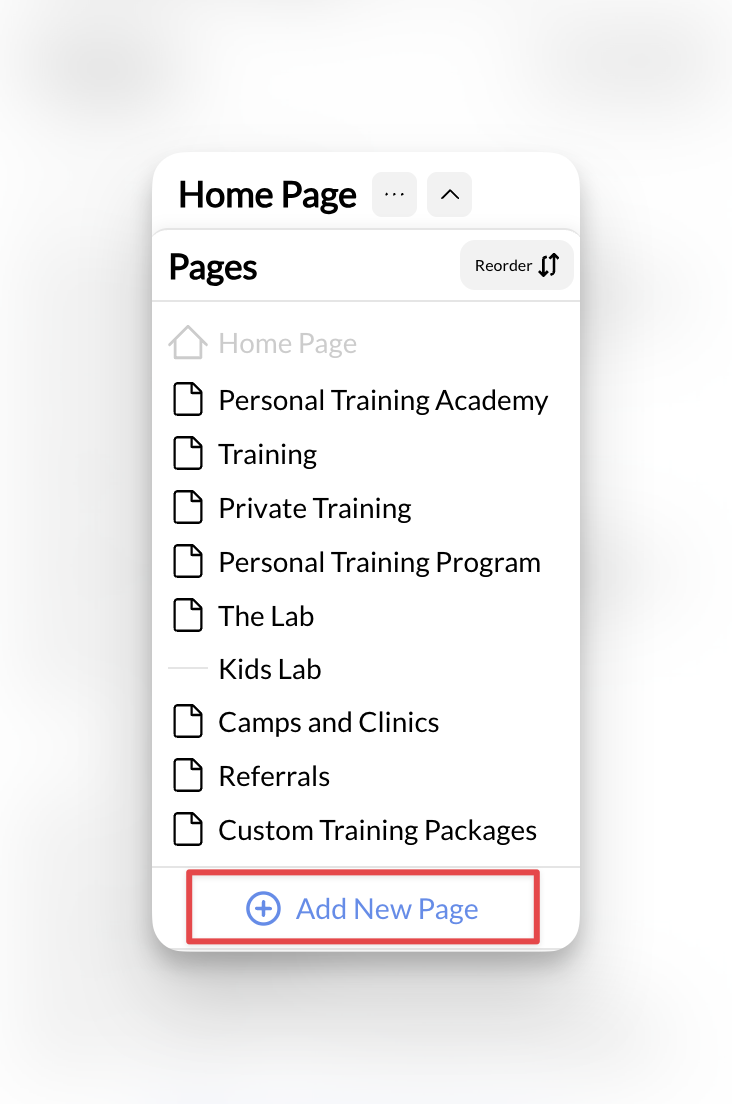 Choose **Privacy Policy** from the available templates. This will:
* Set the page title automatically
* Generate a URL slug (yoursite.com/privacy-policy)
* Load the template content for customization
Click **Create New Page** to begin editing. The template includes standard privacy policy sections that you'll need to customize:
### Privacy Policy Customization Checklist
* **Business Name**: Replace all placeholder business names
* **Contact Information**: Add your business address, phone, email
* **Data Collection**: List what information you actually collect (names, emails, payment info, etc.)
* **Third-Party Services**: Update with your actual integrations (Stripe, Google Analytics, email tools)
* **Data Retention**: Specify how long you keep customer information
* **Creation Date**: Add today's date as the effective date
**Important**: Review every section carefully. The template is a starting point - you must adapt it to your specific business practices and data handling.
Include the date you created or last updated your privacy policy. This is legally important and shows clients your policy is current.
Your privacy policy is now customized and ready to publish.
## Creating terms & conditions
Return to **Add New Page** → **Templates** and select **Terms & Conditions**.
Choose **Privacy Policy** from the available templates. This will:
* Set the page title automatically
* Generate a URL slug (yoursite.com/privacy-policy)
* Load the template content for customization
Click **Create New Page** to begin editing. The template includes standard privacy policy sections that you'll need to customize:
### Privacy Policy Customization Checklist
* **Business Name**: Replace all placeholder business names
* **Contact Information**: Add your business address, phone, email
* **Data Collection**: List what information you actually collect (names, emails, payment info, etc.)
* **Third-Party Services**: Update with your actual integrations (Stripe, Google Analytics, email tools)
* **Data Retention**: Specify how long you keep customer information
* **Creation Date**: Add today's date as the effective date
**Important**: Review every section carefully. The template is a starting point - you must adapt it to your specific business practices and data handling.
Include the date you created or last updated your privacy policy. This is legally important and shows clients your policy is current.
Your privacy policy is now customized and ready to publish.
## Creating terms & conditions
Return to **Add New Page** → **Templates** and select **Terms & Conditions**.
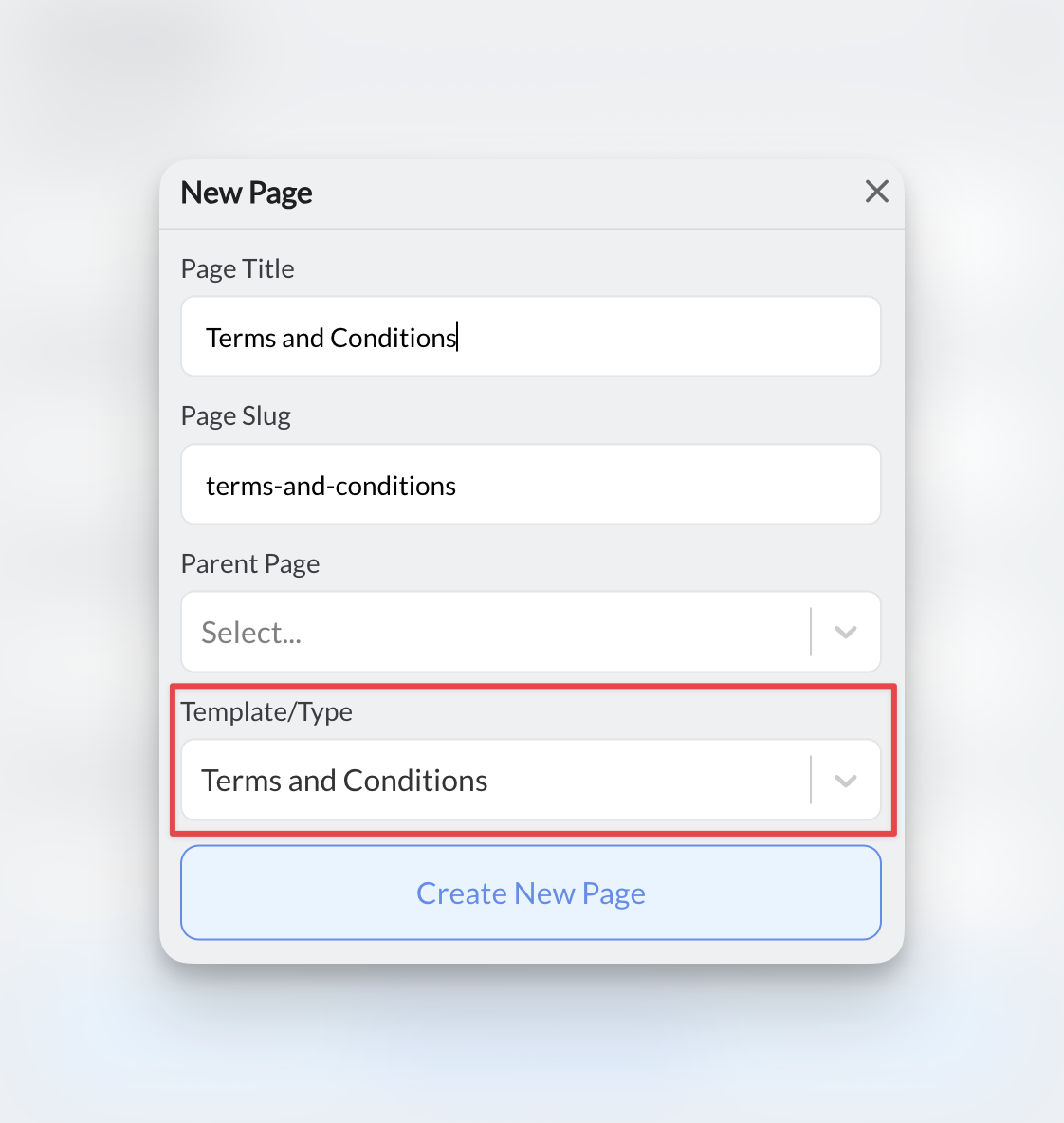 Focus on these sections that are crucial for coaching businesses:
### Terms & Conditions Customization Checklist
* **Service Description**: Detail your specific coaching services (1-on-1 training, group sessions, online programs)
* **Payment Terms**: Session costs, package pricing, accepted payment methods
* **Cancellation Policies**: How much notice required, fees for late cancellations
* **No-Show Policies**: Whether you charge for missed sessions
* **Rescheduling Rules**: How far in advance clients can reschedule
* **Liability Limitations**: Essential protection for physical training
* **Age Requirements**: Policies for training minors, parental consent requirements
* **Equipment Usage**: Rules for using your gym equipment or facilities
**Success metric**: Coaches with clear cancellation policies in their terms reduce payment disputes by 60% and improve client relationships.
**Coaching-specific tip**: Be especially detailed about cancellation policies and no-show fees to avoid payment disputes. Most successful coaches require 24-hour notice for cancellations.
## Creating disclaimers
Choose **Disclaimer** from the template options.
Adapt the disclaimer to your specific coaching discipline and include these essential liability protections:
### Disclaimer Customization by Coaching Type
* Physical injury risks and medical clearance requirements
* Equipment usage safety and proper form warnings
* Pre-existing condition disclosures
* Emergency medical treatment consent
* Facility liability limitations
* Equipment safety and maintenance requirements
* Skill progression and injury risk warnings
* Weather/playing condition considerations
* Competition and contact sport liability
* Equipment inspection responsibilities
* Parental supervision requirements
* Medical information and emergency contacts
* Photo/video release for training purposes
* Transportation liability limitations
* Background check and safety protocol references
* Equipment and space safety for home workouts
* Internet connection and technology requirements
* Self-supervision and form execution warnings
* Medical clearance for unsupervised exercise
* Limitation of virtual instruction vs. in-person guidance
**Critical for liability**: Disclaimers are your first line of legal defense. 78% of successful coaching businesses report that clear disclaimers helped resolve disputes without legal action.
## Publishing your legal pages
Before publishing, delete any template instructions or placeholder text that starts with phrases like "Please customize this section..."
These instruction sections are meant to guide your customization, not appear on your live website.
Click **Publish** for each legal page to make them live on your website.
To make your legal pages easily accessible:
1. Scroll to the **Footer** section in Website Builder
2. Under **Navigation**, click **Add Link**
3. Set the name (e.g., "Privacy Policy")
4. Set the destination to your legal page
5. Repeat for all legal pages
Focus on these sections that are crucial for coaching businesses:
### Terms & Conditions Customization Checklist
* **Service Description**: Detail your specific coaching services (1-on-1 training, group sessions, online programs)
* **Payment Terms**: Session costs, package pricing, accepted payment methods
* **Cancellation Policies**: How much notice required, fees for late cancellations
* **No-Show Policies**: Whether you charge for missed sessions
* **Rescheduling Rules**: How far in advance clients can reschedule
* **Liability Limitations**: Essential protection for physical training
* **Age Requirements**: Policies for training minors, parental consent requirements
* **Equipment Usage**: Rules for using your gym equipment or facilities
**Success metric**: Coaches with clear cancellation policies in their terms reduce payment disputes by 60% and improve client relationships.
**Coaching-specific tip**: Be especially detailed about cancellation policies and no-show fees to avoid payment disputes. Most successful coaches require 24-hour notice for cancellations.
## Creating disclaimers
Choose **Disclaimer** from the template options.
Adapt the disclaimer to your specific coaching discipline and include these essential liability protections:
### Disclaimer Customization by Coaching Type
* Physical injury risks and medical clearance requirements
* Equipment usage safety and proper form warnings
* Pre-existing condition disclosures
* Emergency medical treatment consent
* Facility liability limitations
* Equipment safety and maintenance requirements
* Skill progression and injury risk warnings
* Weather/playing condition considerations
* Competition and contact sport liability
* Equipment inspection responsibilities
* Parental supervision requirements
* Medical information and emergency contacts
* Photo/video release for training purposes
* Transportation liability limitations
* Background check and safety protocol references
* Equipment and space safety for home workouts
* Internet connection and technology requirements
* Self-supervision and form execution warnings
* Medical clearance for unsupervised exercise
* Limitation of virtual instruction vs. in-person guidance
**Critical for liability**: Disclaimers are your first line of legal defense. 78% of successful coaching businesses report that clear disclaimers helped resolve disputes without legal action.
## Publishing your legal pages
Before publishing, delete any template instructions or placeholder text that starts with phrases like "Please customize this section..."
These instruction sections are meant to guide your customization, not appear on your live website.
Click **Publish** for each legal page to make them live on your website.
To make your legal pages easily accessible:
1. Scroll to the **Footer** section in Website Builder
2. Under **Navigation**, click **Add Link**
3. Set the name (e.g., "Privacy Policy")
4. Set the destination to your legal page
5. Repeat for all legal pages
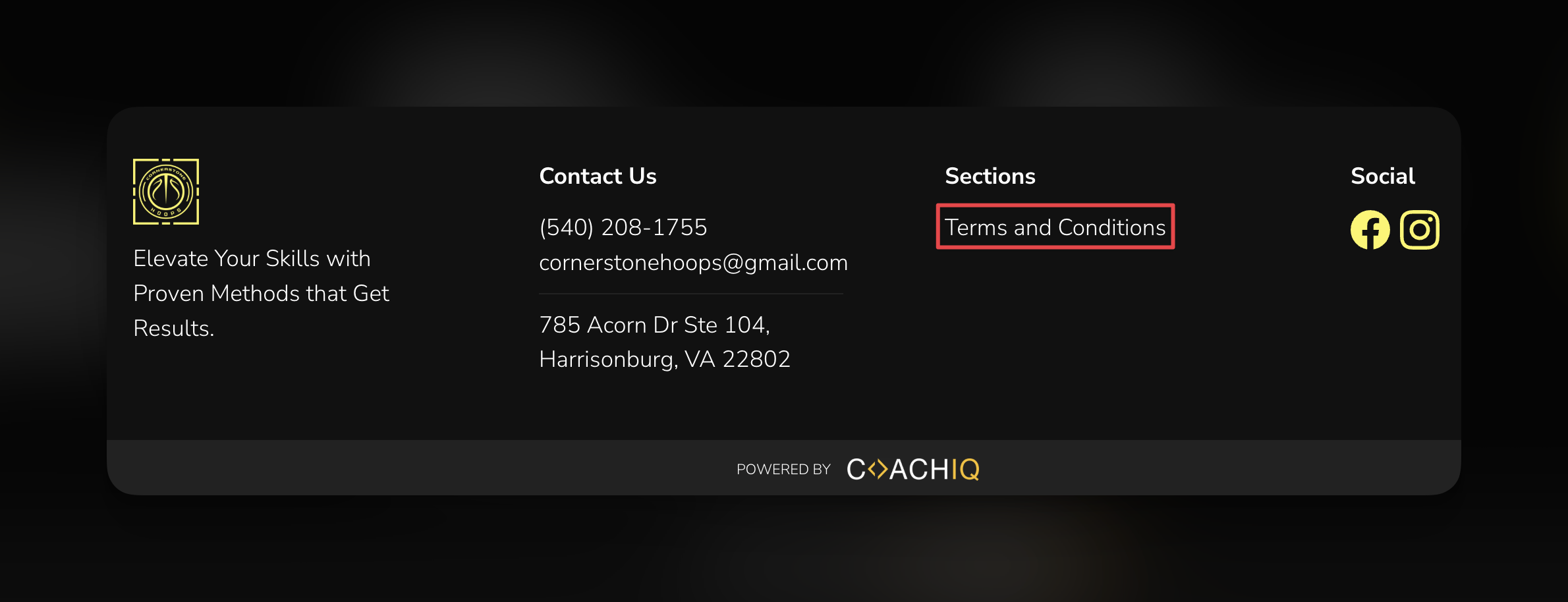 After publishing, visit your website and check that all legal page links work correctly from your footer.
Your legal pages are now live and accessible to visitors in your footer navigation.
## Best practices for legal pages
**Keep them updated**: Review and update your legal pages whenever you change business practices, add new services, or integrate new tools. Set a calendar reminder for quarterly reviews.
**Make them accessible**: Always link legal pages in your footer so visitors can easily find them on any page of your website. This also improves SEO and builds trust.
**Use clear language**: While legal documents can be complex, try to use language your clients can understand. Avoid excessive legal jargon that confuses potential clients.
**Success metric**: Coaching businesses with easily accessible legal pages see 23% higher conversion rates from website visitors to paying clients, as legal pages build trust and professionalism.
### Legal page maintenance schedule
* **Monthly**: Check that all legal page links work correctly
* **Quarterly**: Review content for business practice changes
* **Annually**: Complete legal page audit and update effective dates
* **When needed**: Update immediately after adding new services, tools, or changing policies
## Common questions
At minimum, most coaching businesses need: **Privacy Policy** (required for data collection), **Terms of Service** (required for payments), and **Liability Disclaimer** (essential for physical training). Additional documents like liability waivers, photo releases, and medical clearance forms may be needed depending on your services.
**Privacy Policy** is required if you collect any personal information (names, emails, etc.). **Terms & Conditions** are essential for payment processing and service agreements. **Disclaimers** are critical if you provide physical training or work with minors.
Review them at least annually or whenever you make significant changes to your services, pricing, or data collection practices. Always update the "last modified" date when you make changes.
You may need location-specific legal pages if you operate in different states or countries with varying laws. Consult with an attorney familiar with your jurisdictions.
Legal pages on your website complement but don't replace physical liability waivers. You may still need clients to sign separate waiver forms before participating in physical activities.
The templates are primarily based on US law. If you serve international clients or operate outside the US, consult with an attorney familiar with applicable international privacy laws (like GDPR).
## Troubleshooting legal pages
Ensure you've published both the legal page and your website. Check that the footer link destination is set correctly to your legal page (not an external URL).
This is normal - templates use placeholder text. You must customize every section to reflect your actual business practices and policies.
Make sure you're clicking **Add New Page** → **Templates** (not trying to add a section to an existing page). Legal templates appear alongside other page templates.
## Related articles
* [Page Templates](/website/pages-navigation/page-templates) - Learn about all available page templates
* [URL Slugs & Page Management](/website/pages-navigation/url-slugs-page-management) - Customize your legal page URLs
* [Footer Customization](/website/sections/backgrounds-styling) - Style your footer navigation
* [Forms Integration](/website/section-types/forms) - Understand data collection that requires privacy policies
After publishing, visit your website and check that all legal page links work correctly from your footer.
Your legal pages are now live and accessible to visitors in your footer navigation.
## Best practices for legal pages
**Keep them updated**: Review and update your legal pages whenever you change business practices, add new services, or integrate new tools. Set a calendar reminder for quarterly reviews.
**Make them accessible**: Always link legal pages in your footer so visitors can easily find them on any page of your website. This also improves SEO and builds trust.
**Use clear language**: While legal documents can be complex, try to use language your clients can understand. Avoid excessive legal jargon that confuses potential clients.
**Success metric**: Coaching businesses with easily accessible legal pages see 23% higher conversion rates from website visitors to paying clients, as legal pages build trust and professionalism.
### Legal page maintenance schedule
* **Monthly**: Check that all legal page links work correctly
* **Quarterly**: Review content for business practice changes
* **Annually**: Complete legal page audit and update effective dates
* **When needed**: Update immediately after adding new services, tools, or changing policies
## Common questions
At minimum, most coaching businesses need: **Privacy Policy** (required for data collection), **Terms of Service** (required for payments), and **Liability Disclaimer** (essential for physical training). Additional documents like liability waivers, photo releases, and medical clearance forms may be needed depending on your services.
**Privacy Policy** is required if you collect any personal information (names, emails, etc.). **Terms & Conditions** are essential for payment processing and service agreements. **Disclaimers** are critical if you provide physical training or work with minors.
Review them at least annually or whenever you make significant changes to your services, pricing, or data collection practices. Always update the "last modified" date when you make changes.
You may need location-specific legal pages if you operate in different states or countries with varying laws. Consult with an attorney familiar with your jurisdictions.
Legal pages on your website complement but don't replace physical liability waivers. You may still need clients to sign separate waiver forms before participating in physical activities.
The templates are primarily based on US law. If you serve international clients or operate outside the US, consult with an attorney familiar with applicable international privacy laws (like GDPR).
## Troubleshooting legal pages
Ensure you've published both the legal page and your website. Check that the footer link destination is set correctly to your legal page (not an external URL).
This is normal - templates use placeholder text. You must customize every section to reflect your actual business practices and policies.
Make sure you're clicking **Add New Page** → **Templates** (not trying to add a section to an existing page). Legal templates appear alongside other page templates.
## Related articles
* [Page Templates](/website/pages-navigation/page-templates) - Learn about all available page templates
* [URL Slugs & Page Management](/website/pages-navigation/url-slugs-page-management) - Customize your legal page URLs
* [Footer Customization](/website/sections/backgrounds-styling) - Style your footer navigation
* [Forms Integration](/website/section-types/forms) - Understand data collection that requires privacy policies