> ## Documentation Index
> Fetch the complete documentation index at: https://help.coachiq.io/llms.txt
> Use this file to discover all available pages before exploring further.
# URL Slugs & Page Management - CoachIQ
> Learn how to customize and clean up your website page URLs in CoachIQ's Website Builder. Create professional, SEO-friendly URLs for your coaching site.
**Where to find this**: Dashboard → Website Builder → Select any page → Page Settings panel
## What you'll accomplish
Customize your page URLs to look professional and improve SEO by removing auto-generated numbers and creating clean, memorable links.
**Time required**: 2-3 minutes per page
## Understanding URL slugs
The **slug** is the part of your website URL that comes after your domain:
* Your domain: `yourcoachingsite.com`
* Page slug: `/about`
* Full URL: `yourcoachingsite.com/about`
### Why clean URLs matter for coaches
* **Professional credibility**: `coachsmith.com/basketball-training` looks more trustworthy than `coachsmith.com/page-1755106901008`
* **Easy sharing**: Parents can easily remember and share `yoursite.com/camps` with other parents
* **Better SEO**: Search engines prefer descriptive URLs with relevant keywords
## How to update your URL slugs
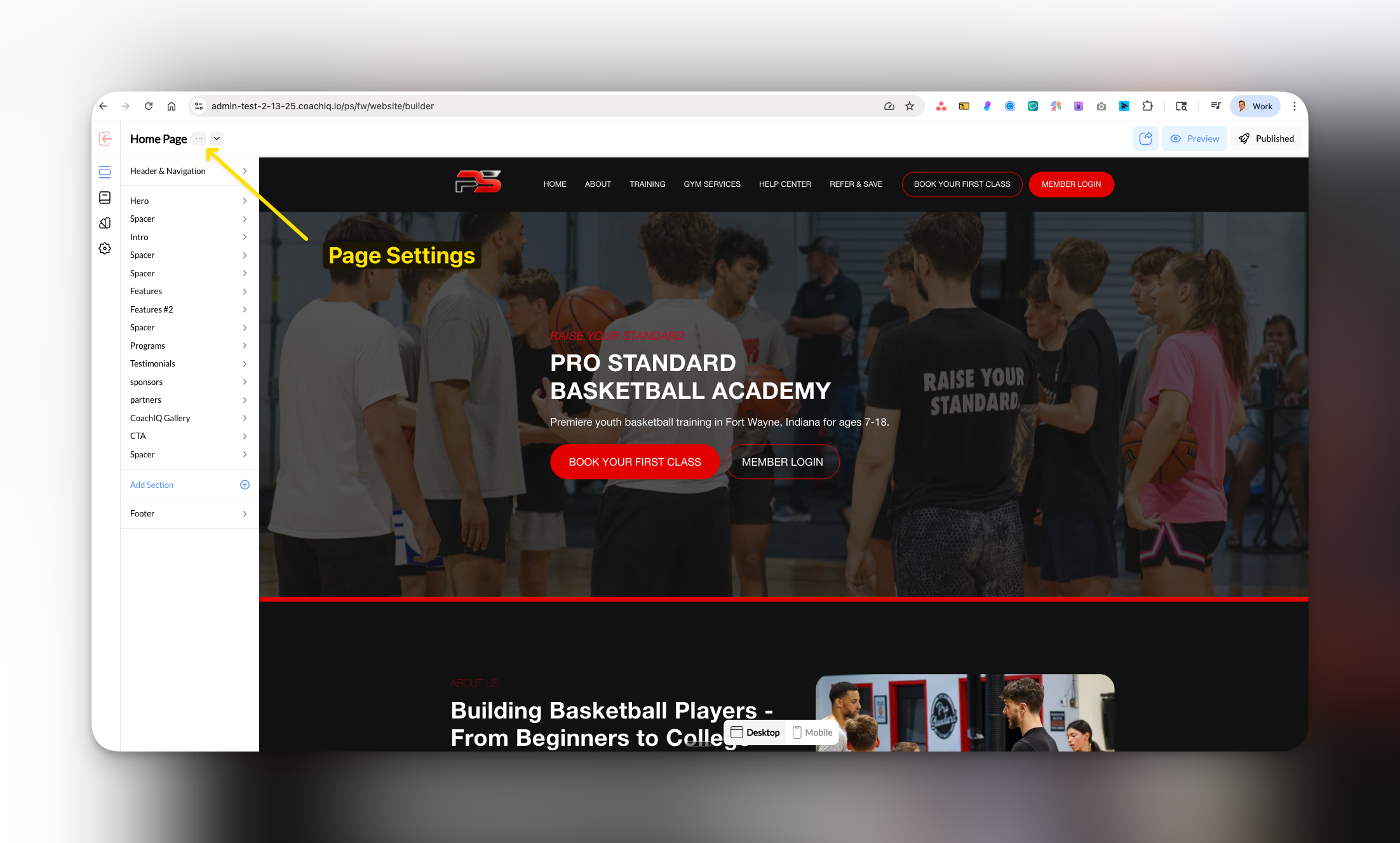
In Website Builder, select the page you want to edit and click **Page Settings** in the left panel.
 In the Page Settings panel, find the **Slug** field. You'll see the current URL (which may have numbers like `about-1755106901008`).
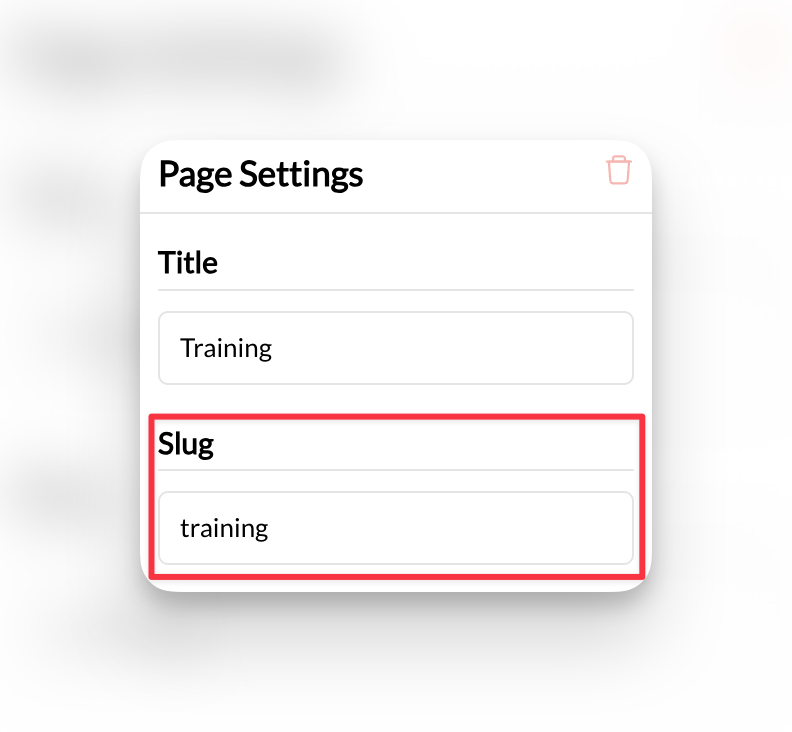 CoachIQ automatically adds numbers to prevent duplicate URLs, but you can customize these for better branding.
Delete the existing slug and type your preferred URL. Best practices:
* Keep it short and descriptive: `about`, `training-programs`, `contact`
* Use hyphens (not spaces): `basketball-training` not `basketball training`
* Include keywords when relevant: `youth-basketball-camps`
**Pro tip**: Match your slug to your page title for consistency and better SEO.
Click **Publish** to make your new URL live.
Your page now has a clean, professional URL that's easy to share and remember.
## Common URL slug examples for coaches
* `/basketball-training`
* `/group-sessions`
* `/private-coaching`
* `/summer-camps`
* `/about`
* `/contact`
* `/pricing`
* `/testimonials`
## Removing auto-generated numbers
**Why numbers appear**: When you create pages with similar names, CoachIQ adds numbers to prevent URL conflicts.
**How to clean them up**:
1. Replace `about-1755106901008` with simply `about`
2. Change `training-programs-2` to `training-programs`
3. Update `contact-3` to `contact`
**Important**: Don't use a slug that's already taken by another page. CoachIQ will show an error if there's a conflict.
## Best practices
**Keep URLs short**: Aim for 2-4 words maximum for better user experience and sharing.
**Use keywords**: Include relevant coaching terms that your clients might search for.
**Stay consistent**: Use the same format across all pages (all lowercase, hyphens for spaces).
## Common questions
The old URL will no longer work. If you've shared links or have the page bookmarked, you'll need to update those with the new URL.
No, each page must have a unique slug. CoachIQ will show an error if you try to use a duplicate slug.
Yes! Clean URLs like `yoursite.com/basketball-camps` look more professional when shared on Facebook, Instagram, or in text messages. They're also easier for parents to type and remember.
Yes, if it's relevant. URLs like `/basketball-training` or `/soccer-camps` are more descriptive and SEO-friendly than generic terms like `/training` or `/camps`.
## Related articles
* [Legal Pages](/website/pages-navigation/legal-pages) - Set up professional legal page URLs
* [Page Templates](/website/pages-navigation/page-templates) - Learn about available page types
* [SEO & Marketing](/website/seo-marketing/seo-marketing) - Optimize your URLs for search engines
CoachIQ automatically adds numbers to prevent duplicate URLs, but you can customize these for better branding.
Delete the existing slug and type your preferred URL. Best practices:
* Keep it short and descriptive: `about`, `training-programs`, `contact`
* Use hyphens (not spaces): `basketball-training` not `basketball training`
* Include keywords when relevant: `youth-basketball-camps`
**Pro tip**: Match your slug to your page title for consistency and better SEO.
Click **Publish** to make your new URL live.
Your page now has a clean, professional URL that's easy to share and remember.
## Common URL slug examples for coaches
* `/basketball-training`
* `/group-sessions`
* `/private-coaching`
* `/summer-camps`
* `/about`
* `/contact`
* `/pricing`
* `/testimonials`
## Removing auto-generated numbers
**Why numbers appear**: When you create pages with similar names, CoachIQ adds numbers to prevent URL conflicts.
**How to clean them up**:
1. Replace `about-1755106901008` with simply `about`
2. Change `training-programs-2` to `training-programs`
3. Update `contact-3` to `contact`
**Important**: Don't use a slug that's already taken by another page. CoachIQ will show an error if there's a conflict.
## Best practices
**Keep URLs short**: Aim for 2-4 words maximum for better user experience and sharing.
**Use keywords**: Include relevant coaching terms that your clients might search for.
**Stay consistent**: Use the same format across all pages (all lowercase, hyphens for spaces).
## Common questions
The old URL will no longer work. If you've shared links or have the page bookmarked, you'll need to update those with the new URL.
No, each page must have a unique slug. CoachIQ will show an error if you try to use a duplicate slug.
Yes! Clean URLs like `yoursite.com/basketball-camps` look more professional when shared on Facebook, Instagram, or in text messages. They're also easier for parents to type and remember.
Yes, if it's relevant. URLs like `/basketball-training` or `/soccer-camps` are more descriptive and SEO-friendly than generic terms like `/training` or `/camps`.
## Related articles
* [Legal Pages](/website/pages-navigation/legal-pages) - Set up professional legal page URLs
* [Page Templates](/website/pages-navigation/page-templates) - Learn about available page types
* [SEO & Marketing](/website/seo-marketing/seo-marketing) - Optimize your URLs for search engines