> ## Documentation Index
> Fetch the complete documentation index at: https://help.coachiq.io/llms.txt
> Use this file to discover all available pages before exploring further.
# How to Use Website Sections
> Learn how to add, customize, and manage website sections in CoachIQ's Website Builder. Step-by-step guide for coaches to build professional sites.
## What are website sections?
Website sections are the customizable building blocks that make up the main content area of your CoachIQ website. They sit between your header and footer, allowing you to organize and present your coaching content exactly how you want it.
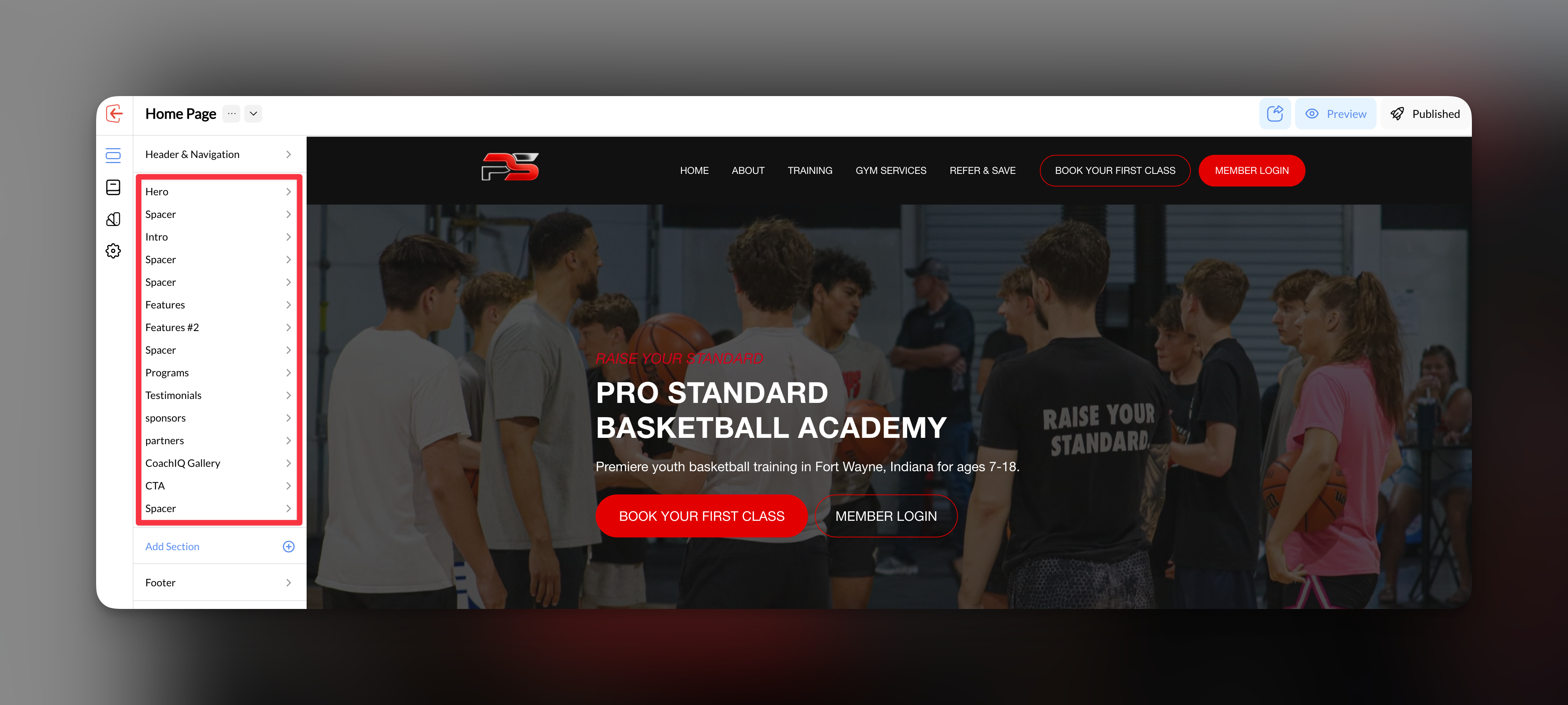 Each section serves a specific purpose - from showcasing your training programs to collecting leads through contact forms. You can add, reorder, and customize sections to create the perfect layout for your sports coaching business.
## Section management essentials
CoachIQ's Website Builder provides three core areas for managing your website sections effectively:
Master the fundamentals: add new sections, reorder them for optimal flow, hide sections temporarily, and remove sections you no longer need.
Transform your sections visually with background colors, images, spacing controls, width settings, and professional styling options.
Create compelling call-to-actions within your sections to guide visitors toward booking sessions, joining programs, or contacting your business.
## Why section management matters
Proper section organization directly impacts your coaching website's effectiveness:
* **User Experience**: Well-structured sections guide visitors naturally toward booking sessions
* **Conversion Optimization**: Strategic placement of forms and CTAs increases lead generation
* **Professional Appearance**: Consistent styling across sections builds trust with potential clients
* **Mobile Performance**: Properly configured sections ensure your site looks great on all devices
## Getting started with sections
Before adding sections, sketch out your ideal page flow. Consider what action you want visitors to take first, second, and third.
Start with essential sections like Hero (introduction), About/Services, and Contact/Booking sections.
Use the backgrounds and styling options to match your coaching brand and create visual consistency.
Place strategic buttons and call-to-actions throughout your sections to drive conversions.
## Build your professional coaching website
Once you master these section fundamentals, you'll be ready to explore the advanced section types available in CoachIQ - from embedding live schedulers to creating dynamic pricing tables and client testimonials.
**Next step**: Start with [Working with Sections](/website/sections/working-with-sections) to learn the basics, then explore [Section Types](/website/section-types/section-types) for advanced capabilities specific to sports coaching businesses.
Each section serves a specific purpose - from showcasing your training programs to collecting leads through contact forms. You can add, reorder, and customize sections to create the perfect layout for your sports coaching business.
## Section management essentials
CoachIQ's Website Builder provides three core areas for managing your website sections effectively:
Master the fundamentals: add new sections, reorder them for optimal flow, hide sections temporarily, and remove sections you no longer need.
Transform your sections visually with background colors, images, spacing controls, width settings, and professional styling options.
Create compelling call-to-actions within your sections to guide visitors toward booking sessions, joining programs, or contacting your business.
## Why section management matters
Proper section organization directly impacts your coaching website's effectiveness:
* **User Experience**: Well-structured sections guide visitors naturally toward booking sessions
* **Conversion Optimization**: Strategic placement of forms and CTAs increases lead generation
* **Professional Appearance**: Consistent styling across sections builds trust with potential clients
* **Mobile Performance**: Properly configured sections ensure your site looks great on all devices
## Getting started with sections
Before adding sections, sketch out your ideal page flow. Consider what action you want visitors to take first, second, and third.
Start with essential sections like Hero (introduction), About/Services, and Contact/Booking sections.
Use the backgrounds and styling options to match your coaching brand and create visual consistency.
Place strategic buttons and call-to-actions throughout your sections to drive conversions.
## Build your professional coaching website
Once you master these section fundamentals, you'll be ready to explore the advanced section types available in CoachIQ - from embedding live schedulers to creating dynamic pricing tables and client testimonials.
**Next step**: Start with [Working with Sections](/website/sections/working-with-sections) to learn the basics, then explore [Section Types](/website/section-types/section-types) for advanced capabilities specific to sports coaching businesses.