> ## Documentation Index
> Fetch the complete documentation index at: https://help.coachiq.io/llms.txt
> Use this file to discover all available pages before exploring further.
# Google My Business Setup & Optimization
> Set up and optimize your Google My Business profile to attract more athletes. Complete guide for sports coaches to dominate local search results and get found online.
**Where to find this**: This guide helps you set up Google My Business, which works alongside your CoachIQ website to maximize your online visibility.
## Why Google My Business matters for coaches
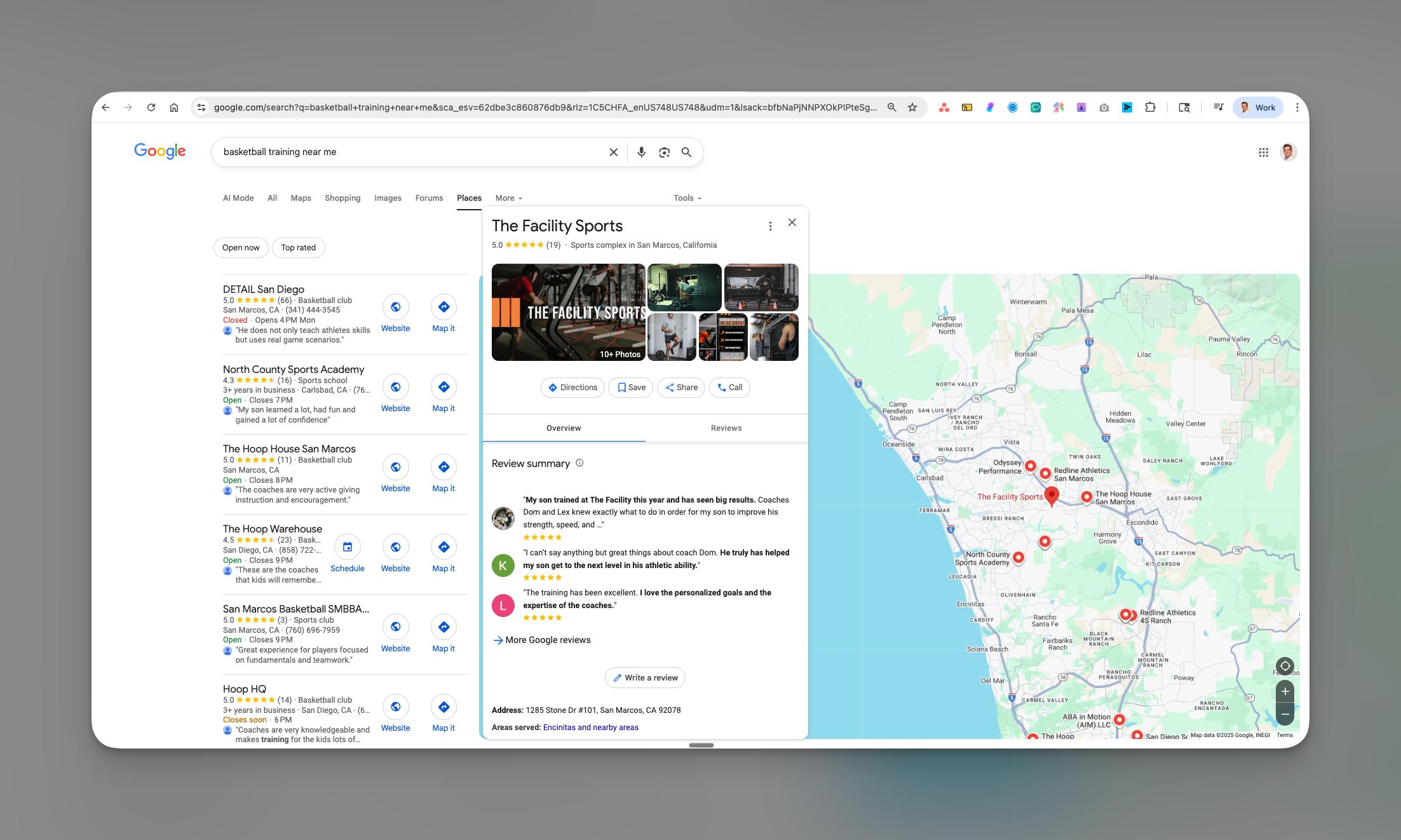
When parents search for "basketball training near me" or "soccer coach \[your city]," Google My Business (GMB) determines whether they find you or your competition. Your GMB profile appears in three critical places:
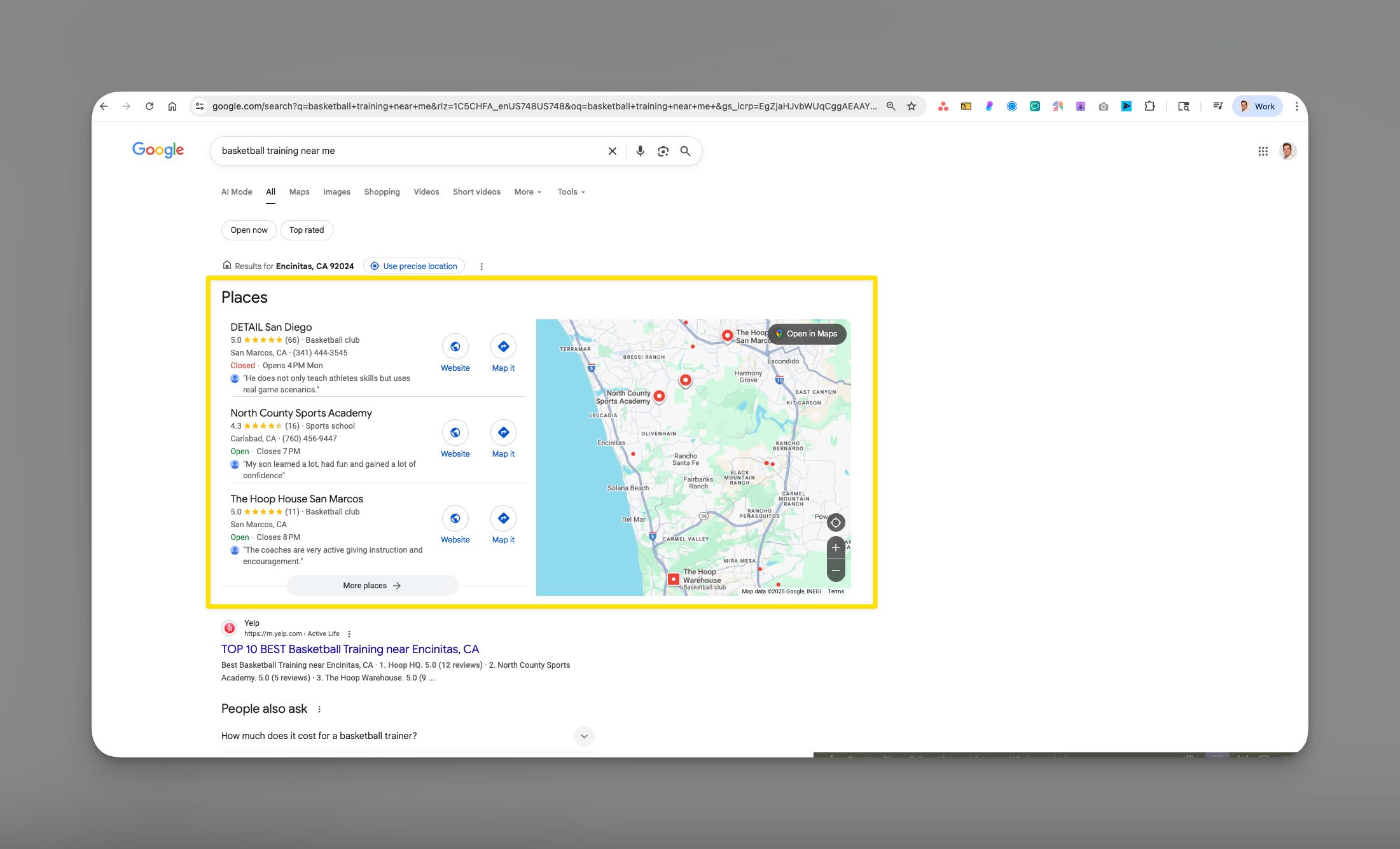 1. **Google Maps** - Where parents look for nearby training facilities
2. **Local Pack** - The top 3 businesses shown in search results
3. **Knowledge Panel** - The info box that appears when someone searches your business name
**The reality**: 86% of people look up business locations on Google Maps, and 76% of local searches result in a visit within 24 hours. Without GMB, you're invisible to most potential clients.
## How GMB drives new athlete signups
Your Google My Business profile acts as your 24/7 sales rep:
* **Instant credibility**: Reviews and ratings build trust before parents even visit your website
* **Direct bookings**: Athletes can click to call, visit your website, or get directions immediately
* **Free advertising**: Posts and updates appear directly in search results at no cost
* **Competitive edge**: Most coaches ignore GMB, giving you a massive advantage
**CoachIQ Integration**: Your GMB profile links directly to your CoachIQ website, creating a seamless journey from discovery to booking. Parents find you on Google, click through to your professional website, and book sessions—all in minutes.
## Setting up your Google My Business profile
1. **Google Maps** - Where parents look for nearby training facilities
2. **Local Pack** - The top 3 businesses shown in search results
3. **Knowledge Panel** - The info box that appears when someone searches your business name
**The reality**: 86% of people look up business locations on Google Maps, and 76% of local searches result in a visit within 24 hours. Without GMB, you're invisible to most potential clients.
## How GMB drives new athlete signups
Your Google My Business profile acts as your 24/7 sales rep:
* **Instant credibility**: Reviews and ratings build trust before parents even visit your website
* **Direct bookings**: Athletes can click to call, visit your website, or get directions immediately
* **Free advertising**: Posts and updates appear directly in search results at no cost
* **Competitive edge**: Most coaches ignore GMB, giving you a massive advantage
**CoachIQ Integration**: Your GMB profile links directly to your CoachIQ website, creating a seamless journey from discovery to booking. Parents find you on Google, click through to your professional website, and book sessions—all in minutes.
## Setting up your Google My Business profile
 Visit [business.google.com](https://business.google.com) and sign in with a Google account.
**If you're brand new:**
* Click "Add your business to Google"
* Enter your exact business name (e.g., "Elite Basketball Training LLC")
**If your business might exist:**
* Search for your business name
* If found, click "Claim this business"
* If not found, click "Add your business to Google"
Never create duplicate listings. If you find an existing listing for your business, always claim it rather than creating a new one.
Select the option that best fits your coaching business:
* **Have a physical location customers visit** - If you have a dedicated gym or facility
* **Deliver services to customers** - If you travel to athletes or use various locations
If you train at multiple locations (parks, school gyms, clients' homes), choose "Deliver services" and set your service area.
Fill in these critical details exactly as they appear on your CoachIQ website:
**Business Name**: Use your official coaching business name **Category**: Start typing and select the most specific option:
* First choice: "Basketball coach" or "\[Your sport] coach"
* Alternative: "Sports coaching" or "Athletic training"
* Add secondary categories later for more visibility
**Service Area** (if applicable): Add all zip codes or cities you serve **Phone Number**: Use your primary business number **Website**: Your CoachIQ website URL (e.g., yourname.coachiq.io or your custom domain)
Google needs to confirm you're the real owner. Verification options:
1. **Postcard by mail** (most common) - Takes 5-14 days
2. **Phone verification** (if eligible) - Instant
3. **Email verification** (if eligible) - Within 24 hours
4. **Video verification** (select businesses) - 5 business days
While waiting for verification, you can still complete your profile. You just can't publish it publicly until verified.
## Optimizing your profile for maximum visibility
### Essential information to complete
**Hours of Operation**
* List your actual training availability
* Include "Special hours" for camps or clinics
* Update for holidays to maintain accuracy
**Attributes** Select all that apply:
* "Appointment required"
* "Good for kids"
* "Wheelchair accessible" (if applicable)
* "Online classes offered" (for virtual training)
**Business Description** (750 characters) Include:
* Your coaching specialties
* Years of experience
* Notable achievements
* Training philosophy
* Call-to-action with CoachIQ booking link
Example: "Elite basketball skills training for athletes ages 8-18. Coach Mike brings 15+ years of experience developing college-bound players. Specializing in shooting mechanics, ball handling, and game IQ. Former D1 player and certified strength coach. Private and small group sessions available. Book your free assessment at \[your website]. Join 200+ athletes who've elevated their game!"
**Required Photos** (minimum 10 for best results):
1. **Profile Photo**: Professional headshot or logo
2. **Cover Photo**: Action shot of you coaching
3. **Facility Photos**: Your training space from multiple angles
4. **Action Shots**: Athletes in training (with permission)
5. **Equipment**: Show your professional setup
6. **Before/After**: Progress photos or testimonials
7. **Team Photos**: Group training or camp photos
8. **Certificates**: Coaching credentials displayed
Photos get 35% more clicks and 42% more direction requests. Upload new photos weekly to show Google your profile is active.
List each service as a separate item with descriptions and prices:
* **Private Training** (\$75-150/session) "One-on-one skill development customized to your athlete's goals"
* **Small Group Training** (\$40-60/athlete) "2-4 athletes working on similar skills in competitive environment"
* **Team Training** (\$200-400/session) "Full team skill work and conditioning"
* **Summer Camps** (\$150-500/week) "Week-long intensive training camps"
* **Virtual Training** (\$50-75/session) "Remote coaching via video analysis"
Link each service to the corresponding booking page on your CoachIQ site.
### Creating posts that drive bookings
Google Posts appear directly in your search results and GMB profile. Post 2-3 times weekly:
**Post Types & Examples**:
"Early Bird Special: Book 10 sessions, get 2 free! Limited spots for January. Sign up through our CoachIQ scheduling system."
"New session times available! We've added evening slots Monday-Thursday. Check availability on our website."
"Spring Break Basketball Camp - March 18-22. Ages 10-14. Register now through our online portal. Only 20 spots!"
"New! Monthly Unlimited Training Package. Train as much as you want for one flat rate. Details on our website."
## Building a 5-star review strategy
### The 90-day review acceleration plan
1. Create a direct review link:
* Go to your GMB dashboard
* Click "Get more reviews"
* Copy your short URL
2. Add to CoachIQ automations:
* Create an automation that triggers 24 hours after session completion
* Include your review link in the message
* Personalize with the athlete's name
Message template: "Hi \[Parent Name]! Thanks for trusting me with \[Athlete's] development. If you're happy with our progress, I'd really appreciate a quick Google review: \[review link]. Your feedback helps other families find quality training!"
**Physical triggers at your facility:**
* QR code poster at exit ("Rate your session!")
* Business cards with QR code
* Sign on equipment area
**Digital triggers:**
* Email signature with review link
* Post-payment confirmation screen
* Monthly progress reports with review request
Run a review campaign:
* "Review & Reward": Leave a review, get 10% off next package
* "Monthly Drawing": All reviewers entered to win free month
* "Team Challenge": If team gets 10 reviews, everyone gets free session
Never buy reviews or offer cash for reviews. Google will penalize or remove your listing.
### Responding to reviews like a pro
**5-Star Review Response Template**: "Thanks so much, \[Name]! It's been amazing watching \[specific achievement mentioned in review]. We're excited to keep pushing \[athlete's name] to the next level! 🏀"
**3-4 Star Review Response Template**: "Thank you for the honest feedback, \[Name]. We appreciate you highlighting \[positive aspect]. We'd love to discuss \[concern] and see how we can earn that 5th star. Please reach out at \[phone] so we can make this right!"
**1-2 Star Review Response Template**: "Thank you for sharing your experience, \[Name]. This isn't the standard we aim for, and I'd like to make this right immediately. Please contact me directly at \[phone/email] so we can resolve this and ensure every athlete gets our best."
Respond to ALL reviews within 24-48 hours. This shows you're engaged and care about feedback, which encourages more reviews.
## Tracking your GMB success
### Key metrics to monitor weekly
Access your GMB Insights to track:
* **Direct searches**: People searching your business name (brand awareness)
* **Discovery searches**: People finding you through "basketball training" searches
* **Growth rate**: Are searches increasing month-over-month?
Target: 20% monthly growth in discovery searches
* **Website visits**: Clicks to your CoachIQ site
* **Phone calls**: Direct call button clicks
* **Direction requests**: People getting directions
* **Photo views**: Engagement with your content
Target: 50+ website visits per month minimum
* **Maps vs Search**: Understand your traffic source
* **Peak times**: When people search for you
* **Popular queries**: What terms bring people to you
Use this data to optimize your CoachIQ website content
### Monthly optimization checklist
* Add 3-5 new photos
* Create 8-10 posts (2-3 per week)
* Respond to all reviews
* Update hours for holidays/camps
* Check and respond to questions
* Review insights and adjust strategy
* Verify NAP consistency across all platforms
* Add any new services or programs
## Common questions
Yes! If you train at different facilities, you can create separate listings for each location. However, if you're mobile and travel to clients, use one listing with service areas instead.
Most coaches see increased visibility within 2-4 weeks of optimization. Reviews and regular posts speed this up significantly. Expect 3-6 months for full local domination.
First, respond professionally. Then flag it for Google if it violates policies (fake, spam, or from competitor). Document everything and consider having satisfied clients leave positive reviews to offset it.
GMB is free and should be optimized first. Once you're getting consistent results, Google Ads can amplify your reach, especially for competitive keywords or seasonal camps.
Focus on what you can control: more reviews, fresher content (posts/photos), complete profile information, and consistent NAP across the web. Newer businesses can outrank established ones with better optimization.
## Pro tips for coaches
**The Secret Weapon**: Most coaches set up GMB once and forget it. Post 2-3 times weekly and you'll outrank 90% of competitors within 90 days.
**Review Timing**: Request reviews immediately after breakthrough moments—first successful game, personal record, or skill milestone. Parents are most motivated to share when emotions are high.
**Local Partnership Strategy**: Partner with local sports stores, physical therapists, or schools. Have them link to your GMB profile from their websites for increased authority.
**Seasonal Optimization**: Update your services and posts 6-8 weeks before each sports season. Parents start searching early for training options.
## Take action today
Your Google My Business profile is too valuable to ignore. Here's your immediate action plan:
1. **Right now** (5 minutes): Check if your business exists on Google
2. **Today** (30 minutes): Complete or claim your profile
3. **This week** (1 hour): Add photos, services, and description
4. **This month** (ongoing): Get your first 10 reviews
Remember: Your GMB profile works 24/7 to bring you new athletes. Combined with your CoachIQ website and booking system, it creates an unstoppable online presence that converts searchers into paying clients.
## Related articles
* [SEO & Marketing Overview](/website/seo-marketing/seo-marketing)
* [Additional Business Listings](/website/seo-marketing/additional-business-listings)
* [Website Analytics Setup](/website/analytics-tracking/google-analytics)
Visit [business.google.com](https://business.google.com) and sign in with a Google account.
**If you're brand new:**
* Click "Add your business to Google"
* Enter your exact business name (e.g., "Elite Basketball Training LLC")
**If your business might exist:**
* Search for your business name
* If found, click "Claim this business"
* If not found, click "Add your business to Google"
Never create duplicate listings. If you find an existing listing for your business, always claim it rather than creating a new one.
Select the option that best fits your coaching business:
* **Have a physical location customers visit** - If you have a dedicated gym or facility
* **Deliver services to customers** - If you travel to athletes or use various locations
If you train at multiple locations (parks, school gyms, clients' homes), choose "Deliver services" and set your service area.
Fill in these critical details exactly as they appear on your CoachIQ website:
**Business Name**: Use your official coaching business name **Category**: Start typing and select the most specific option:
* First choice: "Basketball coach" or "\[Your sport] coach"
* Alternative: "Sports coaching" or "Athletic training"
* Add secondary categories later for more visibility
**Service Area** (if applicable): Add all zip codes or cities you serve **Phone Number**: Use your primary business number **Website**: Your CoachIQ website URL (e.g., yourname.coachiq.io or your custom domain)
Google needs to confirm you're the real owner. Verification options:
1. **Postcard by mail** (most common) - Takes 5-14 days
2. **Phone verification** (if eligible) - Instant
3. **Email verification** (if eligible) - Within 24 hours
4. **Video verification** (select businesses) - 5 business days
While waiting for verification, you can still complete your profile. You just can't publish it publicly until verified.
## Optimizing your profile for maximum visibility
### Essential information to complete
**Hours of Operation**
* List your actual training availability
* Include "Special hours" for camps or clinics
* Update for holidays to maintain accuracy
**Attributes** Select all that apply:
* "Appointment required"
* "Good for kids"
* "Wheelchair accessible" (if applicable)
* "Online classes offered" (for virtual training)
**Business Description** (750 characters) Include:
* Your coaching specialties
* Years of experience
* Notable achievements
* Training philosophy
* Call-to-action with CoachIQ booking link
Example: "Elite basketball skills training for athletes ages 8-18. Coach Mike brings 15+ years of experience developing college-bound players. Specializing in shooting mechanics, ball handling, and game IQ. Former D1 player and certified strength coach. Private and small group sessions available. Book your free assessment at \[your website]. Join 200+ athletes who've elevated their game!"
**Required Photos** (minimum 10 for best results):
1. **Profile Photo**: Professional headshot or logo
2. **Cover Photo**: Action shot of you coaching
3. **Facility Photos**: Your training space from multiple angles
4. **Action Shots**: Athletes in training (with permission)
5. **Equipment**: Show your professional setup
6. **Before/After**: Progress photos or testimonials
7. **Team Photos**: Group training or camp photos
8. **Certificates**: Coaching credentials displayed
Photos get 35% more clicks and 42% more direction requests. Upload new photos weekly to show Google your profile is active.
List each service as a separate item with descriptions and prices:
* **Private Training** (\$75-150/session) "One-on-one skill development customized to your athlete's goals"
* **Small Group Training** (\$40-60/athlete) "2-4 athletes working on similar skills in competitive environment"
* **Team Training** (\$200-400/session) "Full team skill work and conditioning"
* **Summer Camps** (\$150-500/week) "Week-long intensive training camps"
* **Virtual Training** (\$50-75/session) "Remote coaching via video analysis"
Link each service to the corresponding booking page on your CoachIQ site.
### Creating posts that drive bookings
Google Posts appear directly in your search results and GMB profile. Post 2-3 times weekly:
**Post Types & Examples**:
"Early Bird Special: Book 10 sessions, get 2 free! Limited spots for January. Sign up through our CoachIQ scheduling system."
"New session times available! We've added evening slots Monday-Thursday. Check availability on our website."
"Spring Break Basketball Camp - March 18-22. Ages 10-14. Register now through our online portal. Only 20 spots!"
"New! Monthly Unlimited Training Package. Train as much as you want for one flat rate. Details on our website."
## Building a 5-star review strategy
### The 90-day review acceleration plan
1. Create a direct review link:
* Go to your GMB dashboard
* Click "Get more reviews"
* Copy your short URL
2. Add to CoachIQ automations:
* Create an automation that triggers 24 hours after session completion
* Include your review link in the message
* Personalize with the athlete's name
Message template: "Hi \[Parent Name]! Thanks for trusting me with \[Athlete's] development. If you're happy with our progress, I'd really appreciate a quick Google review: \[review link]. Your feedback helps other families find quality training!"
**Physical triggers at your facility:**
* QR code poster at exit ("Rate your session!")
* Business cards with QR code
* Sign on equipment area
**Digital triggers:**
* Email signature with review link
* Post-payment confirmation screen
* Monthly progress reports with review request
Run a review campaign:
* "Review & Reward": Leave a review, get 10% off next package
* "Monthly Drawing": All reviewers entered to win free month
* "Team Challenge": If team gets 10 reviews, everyone gets free session
Never buy reviews or offer cash for reviews. Google will penalize or remove your listing.
### Responding to reviews like a pro
**5-Star Review Response Template**: "Thanks so much, \[Name]! It's been amazing watching \[specific achievement mentioned in review]. We're excited to keep pushing \[athlete's name] to the next level! 🏀"
**3-4 Star Review Response Template**: "Thank you for the honest feedback, \[Name]. We appreciate you highlighting \[positive aspect]. We'd love to discuss \[concern] and see how we can earn that 5th star. Please reach out at \[phone] so we can make this right!"
**1-2 Star Review Response Template**: "Thank you for sharing your experience, \[Name]. This isn't the standard we aim for, and I'd like to make this right immediately. Please contact me directly at \[phone/email] so we can resolve this and ensure every athlete gets our best."
Respond to ALL reviews within 24-48 hours. This shows you're engaged and care about feedback, which encourages more reviews.
## Tracking your GMB success
### Key metrics to monitor weekly
Access your GMB Insights to track:
* **Direct searches**: People searching your business name (brand awareness)
* **Discovery searches**: People finding you through "basketball training" searches
* **Growth rate**: Are searches increasing month-over-month?
Target: 20% monthly growth in discovery searches
* **Website visits**: Clicks to your CoachIQ site
* **Phone calls**: Direct call button clicks
* **Direction requests**: People getting directions
* **Photo views**: Engagement with your content
Target: 50+ website visits per month minimum
* **Maps vs Search**: Understand your traffic source
* **Peak times**: When people search for you
* **Popular queries**: What terms bring people to you
Use this data to optimize your CoachIQ website content
### Monthly optimization checklist
* Add 3-5 new photos
* Create 8-10 posts (2-3 per week)
* Respond to all reviews
* Update hours for holidays/camps
* Check and respond to questions
* Review insights and adjust strategy
* Verify NAP consistency across all platforms
* Add any new services or programs
## Common questions
Yes! If you train at different facilities, you can create separate listings for each location. However, if you're mobile and travel to clients, use one listing with service areas instead.
Most coaches see increased visibility within 2-4 weeks of optimization. Reviews and regular posts speed this up significantly. Expect 3-6 months for full local domination.
First, respond professionally. Then flag it for Google if it violates policies (fake, spam, or from competitor). Document everything and consider having satisfied clients leave positive reviews to offset it.
GMB is free and should be optimized first. Once you're getting consistent results, Google Ads can amplify your reach, especially for competitive keywords or seasonal camps.
Focus on what you can control: more reviews, fresher content (posts/photos), complete profile information, and consistent NAP across the web. Newer businesses can outrank established ones with better optimization.
## Pro tips for coaches
**The Secret Weapon**: Most coaches set up GMB once and forget it. Post 2-3 times weekly and you'll outrank 90% of competitors within 90 days.
**Review Timing**: Request reviews immediately after breakthrough moments—first successful game, personal record, or skill milestone. Parents are most motivated to share when emotions are high.
**Local Partnership Strategy**: Partner with local sports stores, physical therapists, or schools. Have them link to your GMB profile from their websites for increased authority.
**Seasonal Optimization**: Update your services and posts 6-8 weeks before each sports season. Parents start searching early for training options.
## Take action today
Your Google My Business profile is too valuable to ignore. Here's your immediate action plan:
1. **Right now** (5 minutes): Check if your business exists on Google
2. **Today** (30 minutes): Complete or claim your profile
3. **This week** (1 hour): Add photos, services, and description
4. **This month** (ongoing): Get your first 10 reviews
Remember: Your GMB profile works 24/7 to bring you new athletes. Combined with your CoachIQ website and booking system, it creates an unstoppable online presence that converts searchers into paying clients.
## Related articles
* [SEO & Marketing Overview](/website/seo-marketing/seo-marketing)
* [Additional Business Listings](/website/seo-marketing/additional-business-listings)
* [Website Analytics Setup](/website/analytics-tracking/google-analytics)