> ## Documentation Index
> Fetch the complete documentation index at: https://help.coachiq.io/llms.txt
> Use this file to discover all available pages before exploring further.
# Google Says "No Information Available" for Your Page
> If Google search results show "No information is available for this page," your pages are likely hidden in the Sitemap Builder. Here's how to fix it.
**Where to find this**: Dashboard → Website Builder → Settings (gear icon) → Sitemap Builder → View/Edit
## What this means
When Google shows **"No information is available for this page"** beneath your website link in search results, it means Google has found your site but cannot crawl or read the page content.
The most common cause in CoachIQ: **all pages are set to hidden in the Sitemap Builder.**
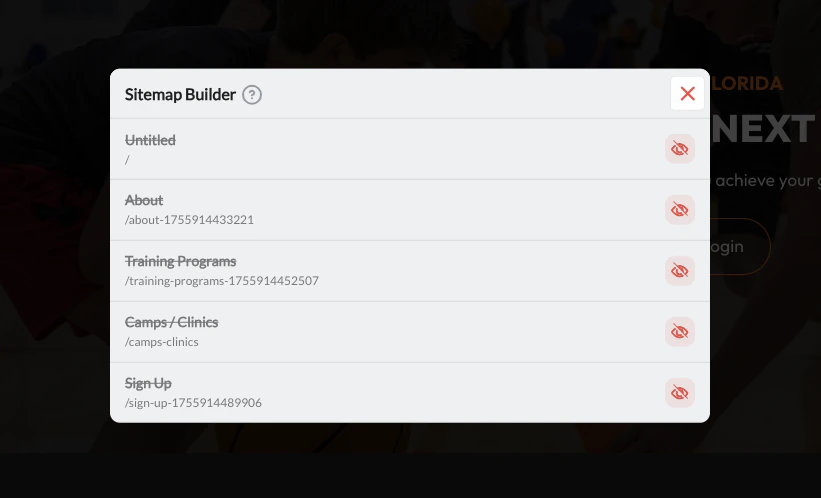 When every page shows the crossed-out eye icon (as shown above), Google treats your entire site as uncrawlable. No meta descriptions, titles, or content will appear in search results until pages are made visible.
## How to fix it
In the Website Builder, click the **Settings** gear icon in the left sidebar.
Scroll to **Sitemap Builder** and click **View/Edit**. A modal opens showing all your pages.
Review each page. If the eye icon is crossed out, the page is hidden from Google.
Click the **eye icon** on each page you want Google to index. The icon will change to a solid eye, meaning it is now visible and crawlable.
Your core pages — **Home, About, Programs, Pricing, and Contact** — should almost always be visible. Only hide pages like thank-you confirmations, draft pages, or private content.
Close the modal and click **Publish** to update your sitemap.
## After unhiding your pages
Once your pages are visible in the sitemap, submit your sitemap to Google Search Console so Google re-crawls your site faster. Google typically picks up changes within a few days to two weeks.
See: [Get Your CoachIQ Website Indexed on Google](/website/seo-marketing/seo-google-search-console)
Unhiding your pages in the Sitemap Builder does not make previously private pages public — it only tells Google it is allowed to crawl them. Anyone with a direct link could always visit those pages regardless of sitemap visibility.
## Related articles
* [Sitemap Builder](/website/seo-marketing/sitemap-builder)
* [Meta Titles, Descriptions & Keywords](/website/seo-marketing/meta-titles-descriptions)
* [Get Your CoachIQ Website Indexed on Google](/website/seo-marketing/seo-google-search-console)
When every page shows the crossed-out eye icon (as shown above), Google treats your entire site as uncrawlable. No meta descriptions, titles, or content will appear in search results until pages are made visible.
## How to fix it
In the Website Builder, click the **Settings** gear icon in the left sidebar.
Scroll to **Sitemap Builder** and click **View/Edit**. A modal opens showing all your pages.
Review each page. If the eye icon is crossed out, the page is hidden from Google.
Click the **eye icon** on each page you want Google to index. The icon will change to a solid eye, meaning it is now visible and crawlable.
Your core pages — **Home, About, Programs, Pricing, and Contact** — should almost always be visible. Only hide pages like thank-you confirmations, draft pages, or private content.
Close the modal and click **Publish** to update your sitemap.
## After unhiding your pages
Once your pages are visible in the sitemap, submit your sitemap to Google Search Console so Google re-crawls your site faster. Google typically picks up changes within a few days to two weeks.
See: [Get Your CoachIQ Website Indexed on Google](/website/seo-marketing/seo-google-search-console)
Unhiding your pages in the Sitemap Builder does not make previously private pages public — it only tells Google it is allowed to crawl them. Anyone with a direct link could always visit those pages regardless of sitemap visibility.
## Related articles
* [Sitemap Builder](/website/seo-marketing/sitemap-builder)
* [Meta Titles, Descriptions & Keywords](/website/seo-marketing/meta-titles-descriptions)
* [Get Your CoachIQ Website Indexed on Google](/website/seo-marketing/seo-google-search-console)