> ## Documentation Index
> Fetch the complete documentation index at: https://help.coachiq.io/llms.txt
> Use this file to discover all available pages before exploring further.
# Sitemap Builder
> Control which pages appear in search engines using the Sitemap Builder. Learn how to hide pages from Google or make them discoverable.
**Where to find this**: Dashboard → Website Builder → Settings (gear icon) → Sitemap Builder → View/Edit
## What is a sitemap?
A sitemap is a file that tells search engines (like Google) which pages exist on your website. When Google crawls your site, it uses the sitemap to discover and index your pages.
Think of it as a table of contents for search engines - if a page isn't in your sitemap, Google might not find it (or might take longer to discover it).
## Why control your sitemap?
Not every page should appear in Google search results. You might want to hide:
* **Thank you pages** after form submissions
* **Landing pages** for specific ad campaigns
* **Duplicate content** pages
* **Pages under construction** that aren't ready yet
* **Private pages** meant only for existing clients
Hiding a page from the sitemap doesn't make it inaccessible - people with the direct link can still visit it. It just tells Google not to index it in search results.
## Using the Sitemap Builder
In the Website Builder, click the **Settings** gear icon in the left sidebar.
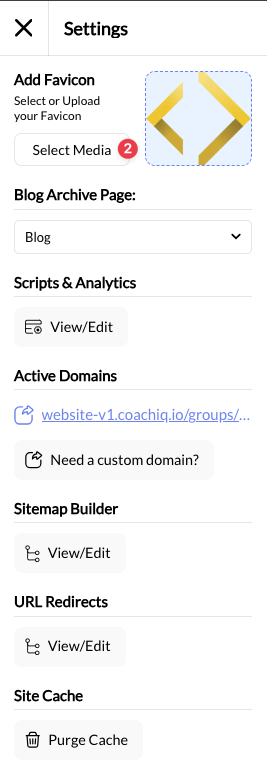 Scroll to **Sitemap Builder** and click **View/Edit**. A modal opens showing all your pages.
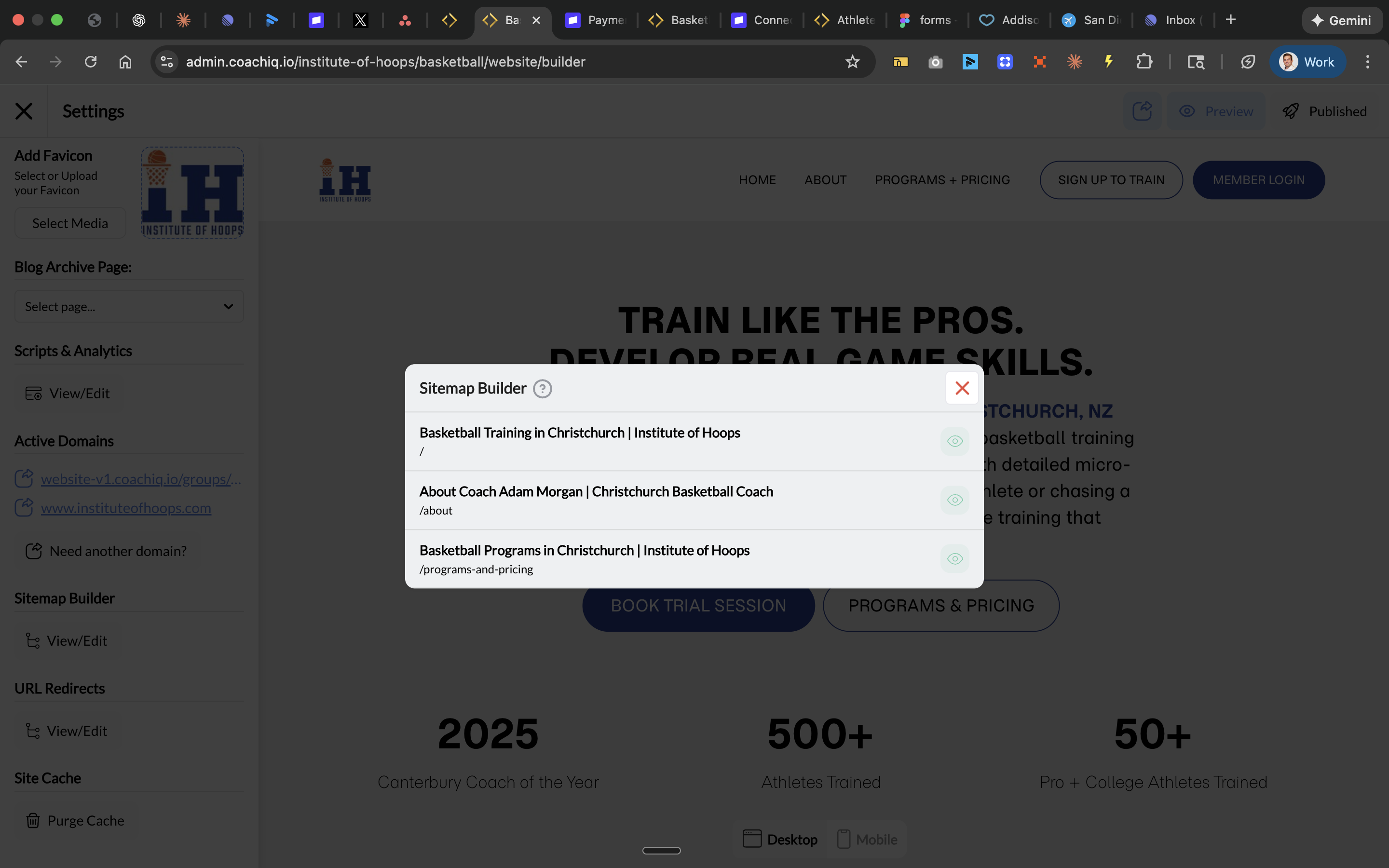 Each page shows:
* **Page title** (what appears in search results)
* **URL slug** (the page path like `/about`)
* **Eye icon** (visibility toggle)
Click the **eye icon** to toggle visibility:
* **Eye visible** = Page IS included in sitemap (Google can index it)
* **Eye crossed out** = Page is NOT in sitemap (hidden from Google)
Each page shows:
* **Page title** (what appears in search results)
* **URL slug** (the page path like `/about`)
* **Eye icon** (visibility toggle)
Click the **eye icon** to toggle visibility:
* **Eye visible** = Page IS included in sitemap (Google can index it)
* **Eye crossed out** = Page is NOT in sitemap (hidden from Google)
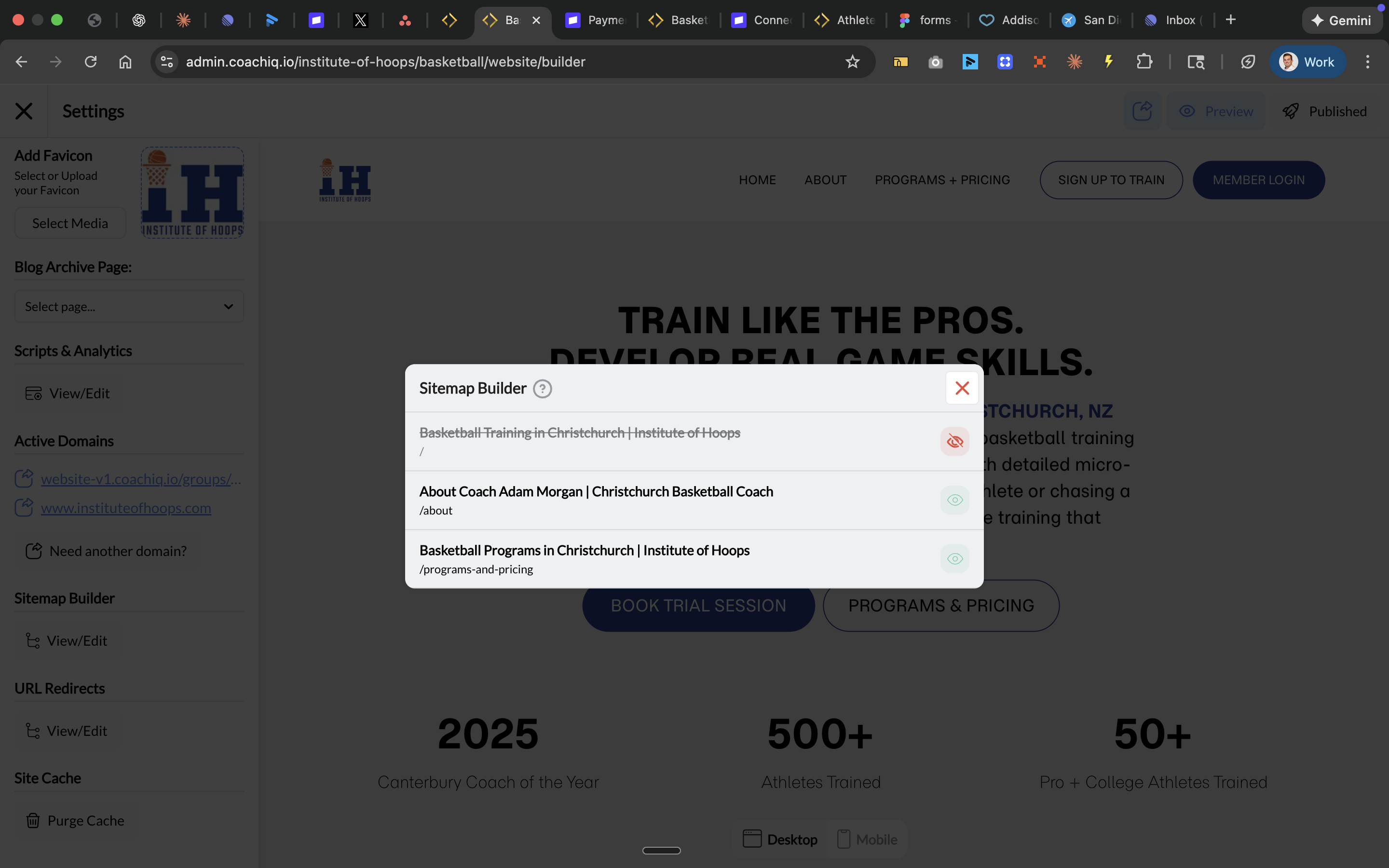 Close the modal and click **Publish** to update your sitemap.
## When to hide pages from sitemap
| Page Type | Hide from Sitemap? | Why |
| --------------------- | ------------------ | ----------------------------------- |
| Home, About, Services | No | Core pages should be indexed |
| Contact, Pricing | No | People search for these |
| Thank You pages | Yes | No search value, clutters results |
| Ad landing pages | Sometimes | Depends if you want organic traffic |
| Test/draft pages | Yes | Not ready for public |
| Duplicate pages | Yes | Avoid SEO penalties |
## Common questions
No. Anyone with the direct link can still visit the page. Sitemap visibility only affects search engine indexing. For truly private pages, you'd need authentication/login requirements.
Google typically re-crawls sitemaps within days to weeks. You can speed this up by submitting your sitemap in Google Search Console.
No. Removing a page from your sitemap tells Google to stop including it, but existing indexed pages may remain in search results for weeks until Google re-crawls your site.
Generally no - blog posts are great for SEO and bringing organic traffic. Only hide them if they're outdated or no longer relevant.
Your sitemap is automatically generated at `yourdomain.com/sitemap.xml`. You can visit this URL to see exactly what Google sees.
## Pro tip: Submit your sitemap to Google
After making changes, submit your sitemap to Google Search Console for faster indexing:
1. Go to [Google Search Console](https://search.google.com/search-console)
2. Select your property
3. Navigate to **Sitemaps** in the left menu
4. Enter `sitemap.xml` and click **Submit**
See our [Google Search Console guide](/website/seo-marketing/seo-google-search-console) for detailed setup instructions.
## Related articles
* [Google Search Console Setup](/website/seo-marketing/seo-google-search-console)
* [Website SEO Basics](/website/seo-marketing/website-seo-basics)
* [URL Redirects](/website/seo-marketing/url-redirects)
* [Meta Titles & Keywords](/website/seo-marketing/meta-titles-descriptions)
Close the modal and click **Publish** to update your sitemap.
## When to hide pages from sitemap
| Page Type | Hide from Sitemap? | Why |
| --------------------- | ------------------ | ----------------------------------- |
| Home, About, Services | No | Core pages should be indexed |
| Contact, Pricing | No | People search for these |
| Thank You pages | Yes | No search value, clutters results |
| Ad landing pages | Sometimes | Depends if you want organic traffic |
| Test/draft pages | Yes | Not ready for public |
| Duplicate pages | Yes | Avoid SEO penalties |
## Common questions
No. Anyone with the direct link can still visit the page. Sitemap visibility only affects search engine indexing. For truly private pages, you'd need authentication/login requirements.
Google typically re-crawls sitemaps within days to weeks. You can speed this up by submitting your sitemap in Google Search Console.
No. Removing a page from your sitemap tells Google to stop including it, but existing indexed pages may remain in search results for weeks until Google re-crawls your site.
Generally no - blog posts are great for SEO and bringing organic traffic. Only hide them if they're outdated or no longer relevant.
Your sitemap is automatically generated at `yourdomain.com/sitemap.xml`. You can visit this URL to see exactly what Google sees.
## Pro tip: Submit your sitemap to Google
After making changes, submit your sitemap to Google Search Console for faster indexing:
1. Go to [Google Search Console](https://search.google.com/search-console)
2. Select your property
3. Navigate to **Sitemaps** in the left menu
4. Enter `sitemap.xml` and click **Submit**
See our [Google Search Console guide](/website/seo-marketing/seo-google-search-console) for detailed setup instructions.
## Related articles
* [Google Search Console Setup](/website/seo-marketing/seo-google-search-console)
* [Website SEO Basics](/website/seo-marketing/website-seo-basics)
* [URL Redirects](/website/seo-marketing/url-redirects)
* [Meta Titles & Keywords](/website/seo-marketing/meta-titles-descriptions)