

Where to find this: click Power Ups at the bottom of the sidebar.
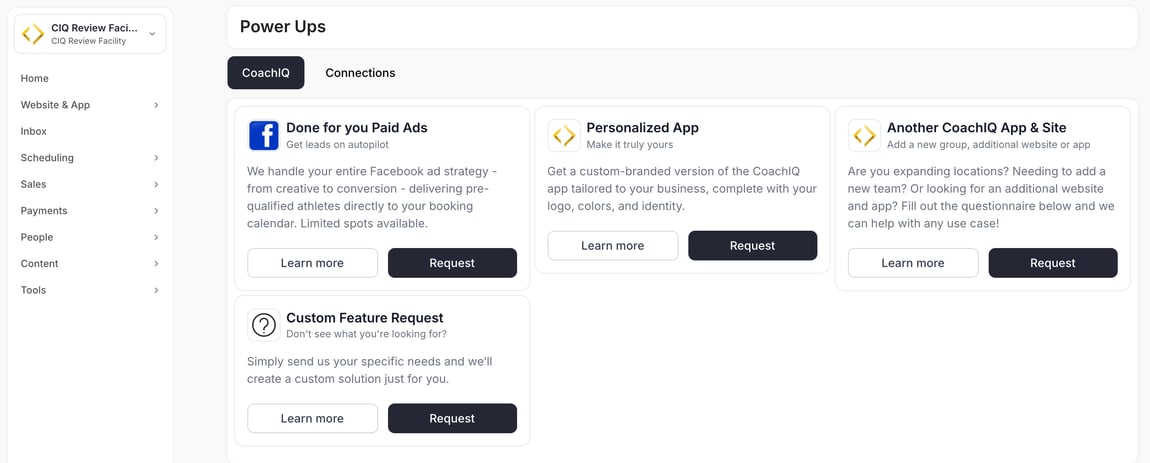
Power Ups, on the CoachIQ tab.
How to request a Power-Up
- Open Power Ups. The CoachIQ tab lists what you can request.
- Click Learn more on a card for the details, or Request to ask for it.
- Request opens a short form for that Power-Up. Answer the questions (the ones marked * are required) and click Complete Request.
- The CoachIQ team reviews your request and gets in touch about next steps and pricing.
Available Power-Ups
Done-for-You Paid Ads
Get leads on autopilot. We manage your entire Facebook ad strategy—from creative to conversion—delivering pre-qualified athletes directly to your booking calendar.
Personalized App
Make it truly yours. Get custom-branded iOS and Android apps featuring your logo, colors, and identity.
Another CoachIQ App & Site
Expand your reach. Add a new location, team, website, or app as your business grows.
User Limit Expansion
Outgrowing 400 athletes? Raise the cap on athletes and on announcement, SMS, and email recipients so one send reaches your whole organization. Its card appears once your organization gets close to 400 athletes.
Custom Feature Request
Don’t see what you need? Tell us your specific requirements and we’ll build a custom solution just for you.
Who Are Power-Ups For?
Growing Coaches
Ready to scale beyond word-of-mouth and attract a consistent flow of new athletes.
Established Facilities
Looking to expand locations, add teams, or create a more professional brand presence.
Unique Operations
Need custom solutions that go beyond standard platform features.
Limited availability: Some Power-Ups have limited spots to ensure quality delivery. Submit your request early to secure your place.