

The Bottom Line
You’re a coach, not a marketer. This guide cuts through the noise and tells you exactly what’s worth your time. Jeff Schmidt at Schmidt Performance in Northern Colorado has seven coaches, two gyms, and a goal of 120 members. He’s never spent a dollar on ads. His summary of where the business stands is the one almost every facility owner eventually says out loud: “I have the coaches. I have the gyms. I just need the clients now.” This guide is for that moment.Start Here
Compounds Over Time
For Growth Phase
How Parents Actually Find Coaches
When a parent searches “basketball training near me” or “youth soccer coach Dallas,” Google decides whether they find you or your competitor. Understanding this search journey helps you show up at the right moment.The Parent Search Journey
1
Research Phase
Parent realizes their child needs training. They search broad terms like “basketball training for kids” or “how to improve soccer skills.” They’re gathering information, not ready to book.
2
Comparison Phase
Parent searches with local intent: “basketball coach Austin” or “best youth soccer training near me.” They’re looking at Google Maps, reading reviews, comparing options.This is where you win or lose.
3
Decision Phase
Parent has narrowed to 2-3 options. They visit websites, check reviews one more time, and look for trust signals. Then they book.
The Numbers That Matter
Why local search is the whole game for coaches:
- Parents search with a place attached: “near me,” a city, a suburb. Almost nobody searches for a coach without one.
- The map results sit above the regular results on a phone. Most parents never scroll past them.
- Reviews are read before anyone calls. A parent picking between two facilities picks the one other parents vouch for.
- Facility owners in the CoachIQ community consistently name Google as their top source of new families after word of mouth.
The Three Pillars of Local Search
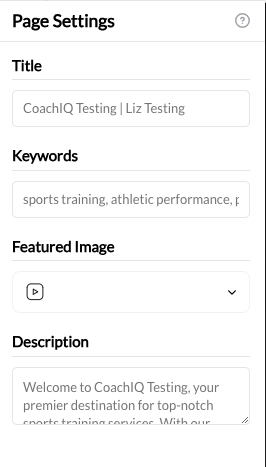
Your visibility comes from three sources working together:What CoachIQ handles for you: Your website generates its sitemap,
robots.txt, canonical tags, structured data, social share tags and llms.txt automatically, on secure, mobile-friendly pages. See the full list.Learn more: Website SEO Basics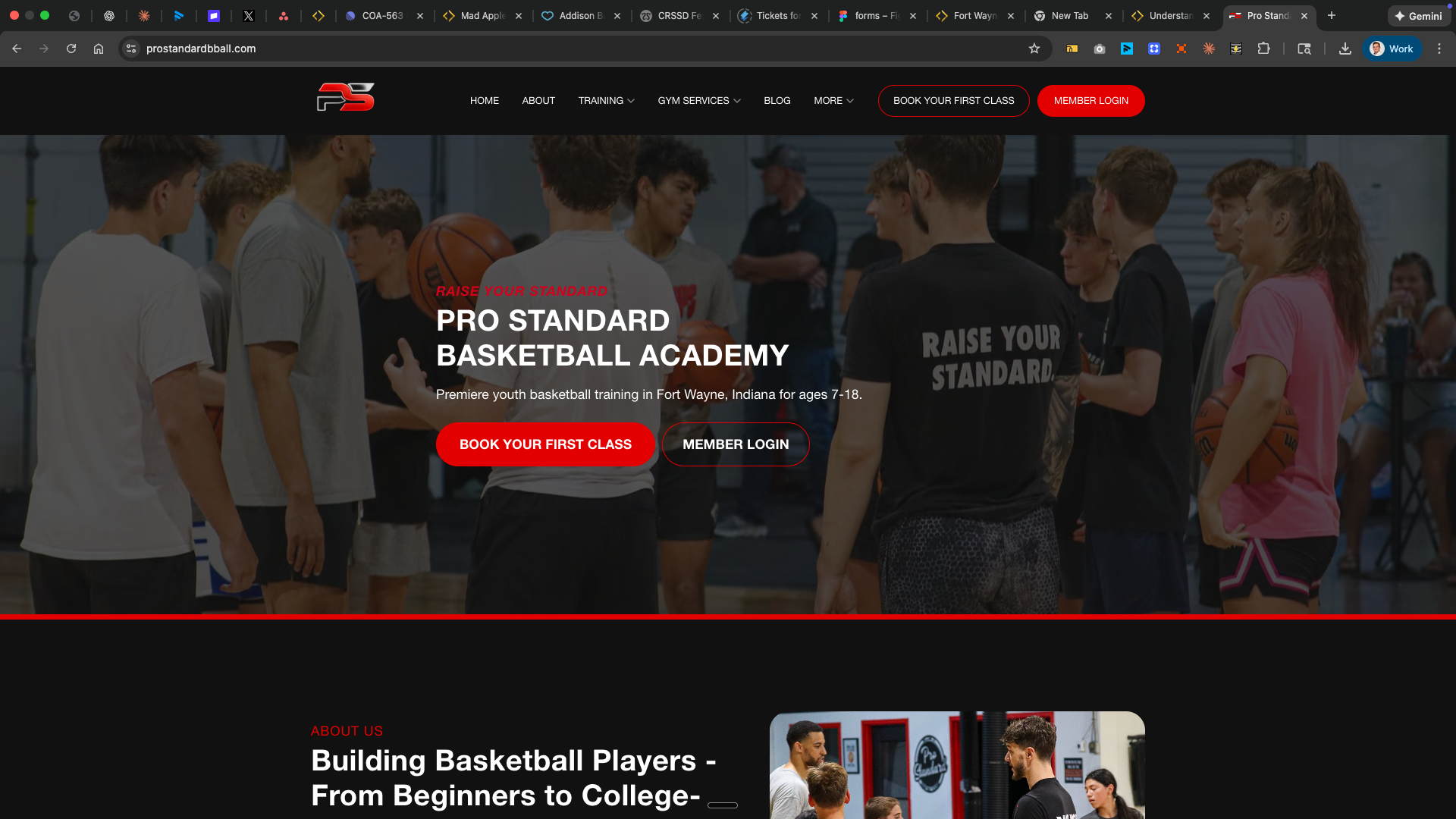
Part 1: The Only Three Things That Actually Matter
If you have zero time, do these three things and stop. They’re where local visibility starts.1. Google Business Profile (Your Most Important Asset)
When parents search “basketball training near me,” the first thing they see is the Google Map Pack—three local businesses with reviews, photos, and contact info. Your Google Business Profile determines whether you’re in that pack or invisible.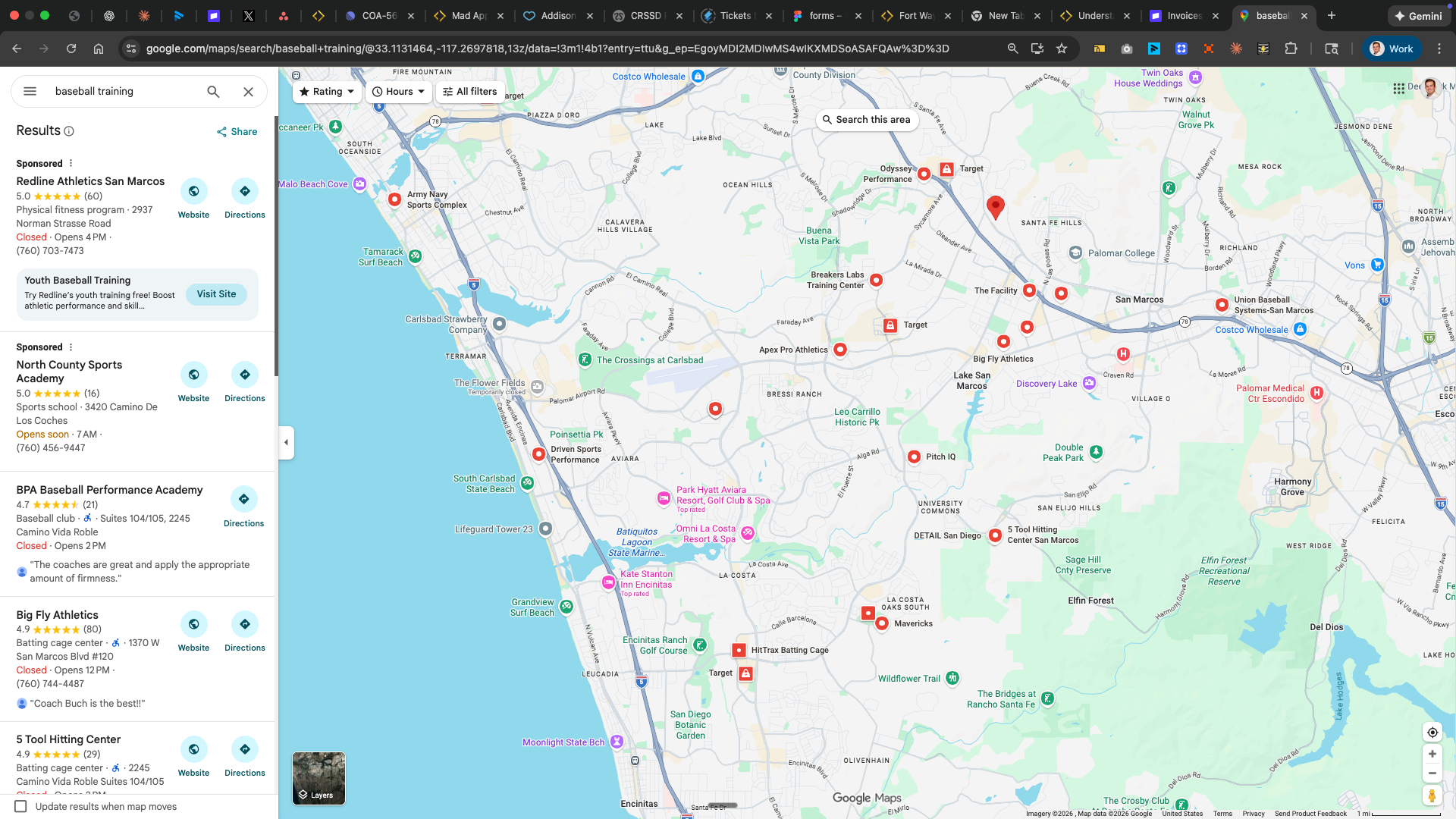
The reality: Parents look up the facility on Google Maps before they ever open your website. Without a Google Business Profile, you’re invisible at the exact moment they’re deciding who to call.
1
Claim or Create Your Profile
Go to business.google.com. Search for your business—if it exists, claim it. If not, create it.
2
Choose the Right Category
Be specific. “Basketball coach” or “Soccer coach” ranks better than generic “Sports coaching.”Your primary category directly affects which searches you appear in. Add secondary categories for additional visibility.
3
Complete Every Field
- Exact business name (as it appears on your CoachIQ site)
- Phone number
- Website URL (your CoachIQ site)
- Service area (all cities/zip codes you serve)
- Hours of operation
- Business description (750 characters—include your specialties, experience, and a call-to-action)
4
Add Photos
Profiles with real photos get more calls and direction requests than profiles without them. Parents want to see the space their kid will train in.Upload at least 10 photos:
- Professional headshot or logo
- Action shots of you coaching
- Your training space
- Athletes in training (with permission)
- Certifications displayed
5
Verify Your Business
Google shows you the verification options for your business, such as a video, phone, email or postcard. Timing varies. You can complete your profile while waiting.
- Post something once a week (upcoming camp, training tip, athlete success)
- Respond to any new reviews within 48 hours
- Upload 1-2 new photos
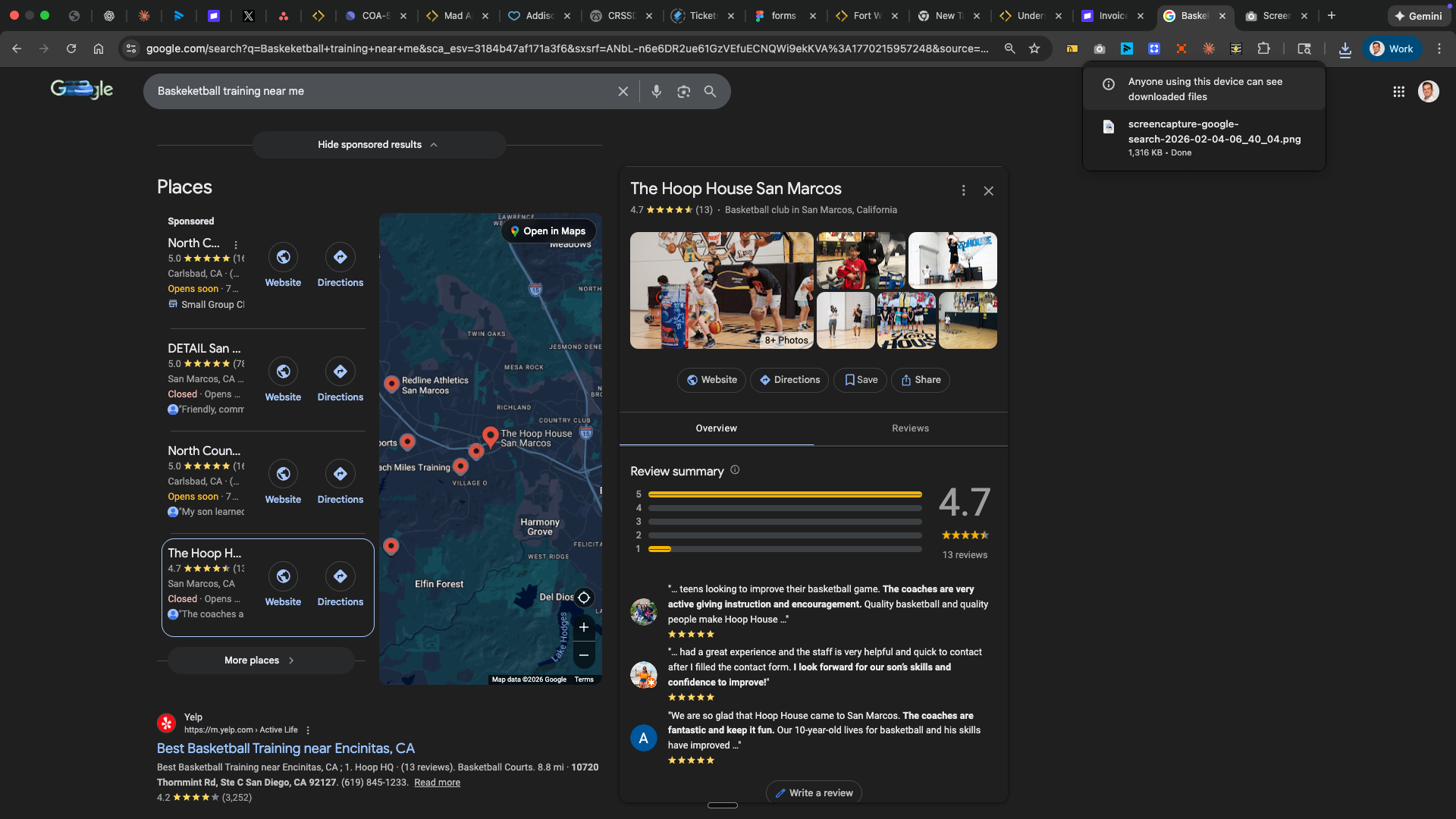
2. Reviews (Your 24/7 Sales Team)
Reviews do three things: they build trust before parents visit your website, they directly influence your Google ranking, and they provide social proof that converts browsers into bookers.The math: A facility with 50 reviews averaging 4.5 stars will almost always outrank one with 5 reviews averaging 5 stars. Volume and recency matter more than a perfect score.
- First successful game after training
- Personal record achieved
- Skill milestone reached
- End of a successful camp
- In Person
- Automated
After a great session: “I’m so glad [athlete] is making progress! If you have a minute, a Google review would really help other families find us.”
- Go to your Google Business Profile dashboard
- Click Ask for reviews (shown as Get more reviews in some versions)
- Copy the short link
- Use this link in all review requests
Set up automated review requests: The booking-ended trigger is the one to use for any “after the session” follow-up. See the Triggers & Actions Reference for the trigger and the conditions you can add to it.
3. NAP Consistency (The Foundation)
NAP stands for Name, Address, Phone number. When your business information is identical everywhere online, Google trusts you more and ranks you higher. When it’s inconsistent, Google gets confused. The One-Hour Fix: Make sure these five listings have identical information:- Google Business Profile (most important)
- Apple Maps (register.apple.com/business)
- Your CoachIQ website
- Facebook Business Page
- Yelp (biz.yelp.com)
Part 2: If You Have More Time (The Accelerators)
These tactics compound over time. They’re not urgent, but they separate coaches who dominate local search from those who just show up.Create Separate Service Pages
Instead of one “Services” page listing everything, create individual pages for each offering:/private-training— “Private Basketball Training Austin”/group-training— “Small Group Basketball Sessions Austin”/summer-camps— “Summer Basketball Camps Austin 2026”/team-training— “Team Basketball Training Austin”
Local Content That Gets Indexed
Here’s an insight most coaches miss: any content that mentions your local area gets indexed for local searches. This applies to:- Blog posts
- YouTube video titles and descriptions
- Video transcripts (YouTube auto-generates these)
- Instagram captions
- Facebook posts
[Helpful Content] + [Your City/Area] = Local SEO ValueContent Ideas That Work:
You’re not “doing SEO”—you’re making content that naturally includes local context. The video transcript gets indexed. The blog post gets indexed. Your Instagram caption gets indexed.
Encourage User-Generated Content
A parent trusts another parent’s post far more than anything you publish. When athletes and parents post about training, you get:- Free content you didn’t create
- Social proof that builds trust
- Location tags that help discoverability
- Create an Instagram-worthy moment at your facility (logo wall, achievement board)
- Ask athletes to tag your location when posting training clips
- Repost their content (with permission) to your own channels
- Run a monthly “tag us to win” contest
Expand Your Listings (When You Have Time)
Beyond the essential five, these listings add incremental value:Bing Places for Business
Bing Places for Business
Powers Bing, Yahoo, Alexa, and Cortana. Popular with older demographics.Shortcut: Import directly from Google Business Profile at bingplaces.com
Nextdoor Business
Nextdoor Business
Hyperlocal platform where neighbors recommend services. Great for “looking for a coach” posts.Create at nextdoor.com → Business section
Local Directories
Local Directories
- Chamber of Commerce ($200-500/year, adds credibility)
- City Parks & Recreation “approved vendors” list
- Local parenting magazines/websites
- Youth league websites
Instagram Location
Instagram Location
Create a location tag for your training facility so athletes can tag it in posts.Open Instagram → Create post → Add Location → Search → Add if not found
- Verify NAP is identical across all platforms
- Update hours for holidays or seasonal changes
- Respond to any reviews on Yelp or Facebook
Sampling Events for SEO + Leads
Camps, skills clinics, and “Bring a Friend Day” events serve double duty:- Generate leads directly — New families experience your coaching
- Create content opportunities — Photos, testimonials, local coverage
- Give you something to post — Fresh content for Google Business Profile
Part 3: For the Ambitious (Advanced Tactics)
These tactics require more effort but can significantly accelerate growth when you’re ready to scale.Building Local Authority Through Backlinks
When other websites link to yours, Google sees it as a vote of confidence. Local backlinks are especially valuable for local search rankings. Partnership Opportunities:
How to approach:
“Hi [Name], I provide professional [sport] training for youth athletes in [area]. Many of your [customers/players/patients] already train with me. Would you be open to adding my business to your recommended resources? Happy to do the same for you.”Event Sponsorship: Sponsor local charity runs, tournaments, or school events. Organizers typically link to sponsors from their official pages.
Google Search Console
Google Search Console shows you exactly how Google sees your site—what searches you appear in, your average position, and any technical issues. Monthly check-in (5 minutes):- Go to search.google.com/search-console
- Check Performance → See which searches bring traffic
- Check Coverage → Fix any errors Google found
Local Partnerships That Generate Ongoing Value
The best partnerships create ongoing SEO value, not just one-time links:Complementary Businesses
Schools & Leagues
Local Media
Community Events
Part 4: The Long Game (Expectations & Timeline)
SEO is not instant. Setting realistic expectations helps you stay consistent instead of giving up too early.Realistic Timelines
These are rough ranges, not guarantees. Google and other platforms set the pace.Google Business Profile delivers fastest results. If you only have time for one thing, this is it. Organic website ranking takes longer but compounds over time.
What to Measure
Monthly:- Google Business Profile Performance (views, searches, calls, website clicks, direction requests)
- New reviews received
- “How did you hear about us?” responses on intake forms
- Google Search Console (which searches bring traffic)
- Overall inquiry volume compared to previous quarter
- Daily ranking changes (they fluctuate naturally)
- Vanity metrics (website visits without conversions)
- Competitor rankings (focus on your own growth)
Your Action Plan
This Week (2-3 hours total)
1
Claim Google Business Profile
Go to business.google.com and claim or create your listing. Complete every field.
2
Add 10+ Photos
Upload professional photos of you coaching, your space, and athletes training.
3
Verify NAP Consistency
Check Google, Apple Maps, Facebook, Yelp, and your CoachIQ site. Make them identical.
4
Set Up Review Request
Create your direct review link. Set up a CoachIQ automation or draft a template message.
Ongoing (15 min/week)
- Post once on Google Business Profile
- Respond to all new reviews
- Ask 2-3 happy clients for reviews
- Upload 1-2 new photos
When You Have More Time
- Create separate service pages on your website
- Write one local-focused blog post per month
- Claim additional business listings
- Build one local partnership
Quick Reference: What CoachIQ Handles
You don’t need to worry about these—CoachIQ has you covered:
See What your site includes automatically for details.
What you focus on:
- Google Business Profile
- Reviews
- NAP consistency
- Local content (when you have time)
Common Questions
How long until I show up in Google?
How long until I show up in Google?
There is no guaranteed timeline. A verified Google Business Profile often starts showing within a few weeks; website rankings usually take months of consistent effort. Google Business Profile results appear much faster than organic—prioritize it.
Do I need a blog for SEO?
Do I need a blog for SEO?
A blog helps if you’ll consistently publish local, relevant content. Writing about local tournaments, training tips for area schools, and seasonal programs boosts rankings. Random or infrequent posts won’t help. Don’t start a blog unless you’ll post at least monthly.
What's more important—website SEO or Google Business Profile?
What's more important—website SEO or Google Business Profile?
Google Business Profile drives more immediate local traffic. Website SEO provides long-term authority. Do both, but prioritize your Business Profile if you must choose. CoachIQ handles the technical side of website SEO, so your time goes to the profile.
Should I pay for ads?
Should I pay for ads?
Your Business Profile is free and should be optimized first. Once you’re getting consistent organic results, paid ads can amplify your reach—especially for competitive keywords or seasonal camps. Start organic, add paid when you’re ready to scale.When you do, the ad is the easy part. Coach Stefano Soccer ran a Facebook campaign that delivered 662 clicks at 25 cents each, then converted 3% of them. The team’s own diagnosis: “It should be closer to 20%. So there’s something when people land on our landing page here that is throwing them off.” The fix they landed on applies to every coach: “I think there was too much information on the landing page. I think the landing page needs to be, hey, five-star reviews, trust us, no commitment, come try it out. Simple as that.” One offer, your reviews, one button.If you’d rather not run ads yourself, see the Done-For-You Paid Ads power-up.
How do I compete with established coaches who have more reviews?
How do I compete with established coaches who have more reviews?
Focus on what you can control: post weekly on your Business Profile, respond to every review, upload fresh photos, and keep NAP consistent. Newer businesses regularly outrank established ones whose profiles have gone quiet.
Related Resources
Google Business Profile Setup
Business Listings
Website SEO Basics
Google Search Console
Last reviewed: September 2026.