

Where to find this: Dashboard → Website Builder → Settings (gear icon) → Sitemap Builder → View/Edit
What this means
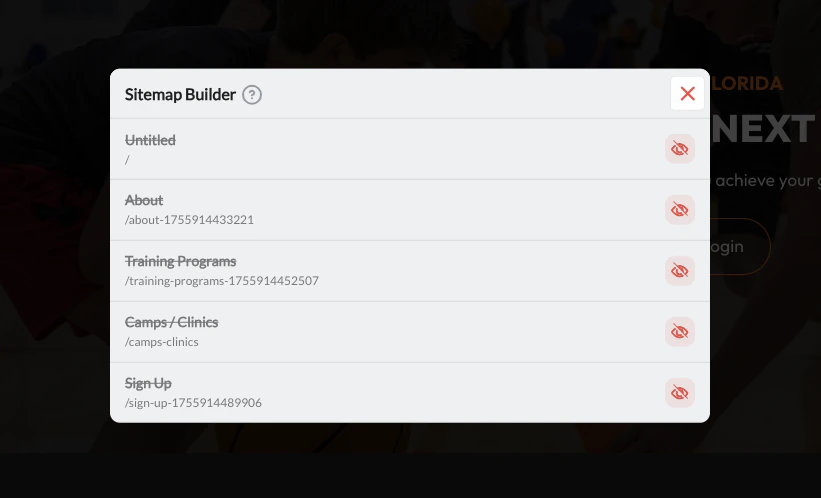
When Google shows “No information is available for this page” beneath your website link in search results, it means Google has found your site but cannot crawl or read the page content. The most common cause in CoachIQ: the page is hidden in the Sitemap Builder. Hidden pages are blocked in your site’srobots.txt, so Google can still show the link (for example, when another site links to it) but isn’t allowed to read the page.
How to fix it
1
Open Website Settings
In the Website Builder, click the Settings gear icon in the left sidebar.
2
Open Sitemap Builder
Scroll to Sitemap Builder and click View/Edit. A modal opens showing all your pages.
3
Unhide your pages
Review each page. If the eye icon is crossed out, the page is hidden from Google.Click the eye icon on each page you want Google to index. The icon will change to a solid eye, meaning it is now visible and crawlable.Your core pages — Home, About, Programs, Pricing, and Contact — should almost always be visible. Only hide pages like thank-you confirmations, draft pages, or private content.
4
Publish
Close the modal and click Publish to update your sitemap.
After unhiding your pages
Once your pages are visible in the sitemap, submit your sitemap to Google Search Console so Google re-crawls your site faster. Google picks up changes on its own schedule, often within days to a few weeks. See: Get Your CoachIQ Website Indexed on GoogleHidden pages were never private. Anyone with a direct link could always visit them. Unhiding a page adds it back to your sitemap, removes the
robots.txt block and the noindex tag, so Google is allowed to crawl and list it.