

Where to find this: People in the left sidebar. It opens to Clients, Staff and Sign-up & Profile. When Teams is on for your organization, Teams sits as its own item directly under People.
What’s in People
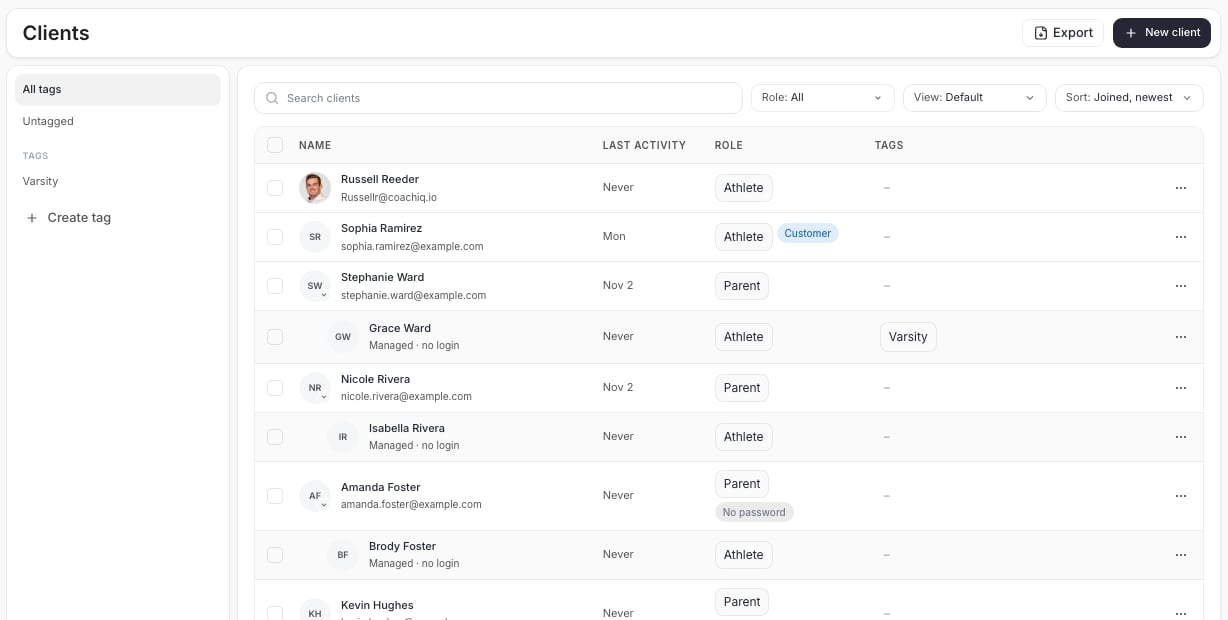
Clients, roles and families
Clients is the umbrella for everyone in your People list. Each person has a role in your business:
A Customer label appears next to the role of anyone who has bought something from you.
Families. A parent and their athletes show together in the Clients list, with the athletes indented under the parent. An athlete with Managed · no login has no email or password of their own: the parent books, pays and gets the messages for them. You can give them their own login later from the parent’s Family section. See Family on the client profile.
Who can use People
- Admins see every page in People, add staff, change roles and set staff access.
- Coaches see the pages their staff access allows. A coach limited to clients with certain tags sees only those clients, and the Clients page reads Showing your clients. Coaches never see the Staff page.
- Clients never see other clients. In your app they see only their own account and the athletes they manage.
Common questions
Can someone be both a client and staff?
Can someone be both a client and staff?
Each person has one role in your business. A coach who also trains with you is a Coach, and you can still book them into sessions and sell them products from their profile.
How do I export my client list?
How do I export my client list?
On People › Clients, click Export. The file is named “Clients” and includes the people your current search and filters show. See Export your client list.
What happens when I remove a client?
What happens when I remove a client?
Remove client takes them out of your business. Their account, past bookings and payments stay on record, and you can add them again later. To stop someone from rejoining, block them instead. See Block or remove a client. Cancel any active subscription first: removing a client doesn’t stop their billing.
Where's the sales pipeline?
Where's the sales pipeline?
People who haven’t joined yet (trials, tryouts, renewals) are tracked in Sales › Pipeline. See Pipeline.
Related articles
Add and edit clients
New client, import, client details and custom fields
Client profiles
Every section of a client’s profile
Staff access
Choose which pages and clients each coach sees
Inbox
Message one client, a tag or a team