

Where to find this: Payments → Coupons
What coupons are
Coupons are discount codes that reduce product prices at checkout:- Percentage discounts (10%, 25%, 50% off)
- Fixed amount discounts ($10, $25 off)
- Free access (100% off)
The Coupons page
Navigate to Payments → Coupons to view all discount codes. Page displays:- Coupon code
- Discount type (Free, Percentage, Amount)
- Value off
- Redemption count
- Membership discount duration
- Eligibility and selected products
- Create new coupon
- Delete a coupon using its row action
Three coupon types
- Free
- Percentage Off
- Amount Off
100% off - No payment requiredProduct becomes free when coupon applied.When to use:
- Promotional giveaways
- Scholarship access
- Sponsor/donor complimentary sessions
- Contest prizes
Free coupons still require checkout process to capture client info and issue credits.
Common use cases
Promotions
Limited-time sales, seasonal offers, launch discounts
Referrals
Reward clients who refer friends with discount codes
Partnerships
Corporate codes, sponsor access, organization discounts
Retention
Win-back offers, loyalty rewards, comeback incentives
Influencer
Unique codes for social media promoters and affiliates
Apology
Service recovery, issue compensation, goodwill gestures
Coupon vs. Access Code product
Two ways to offer special access:- Coupon
- Access Code Product
Discount applied to existing product
- Create one coupon
- Works with any product
- Client selects product, then applies coupon
- More flexible - one coupon for multiple products
How clients use coupons
1
Client selects product
Client goes to booking page or product purchase and selects what they want.
2
Client enters coupon code
At checkout, client finds “Coupon Code” or “Promo Code” field and enters code.
3
Discount applies
Price updates immediately to reflect discount.Client sees: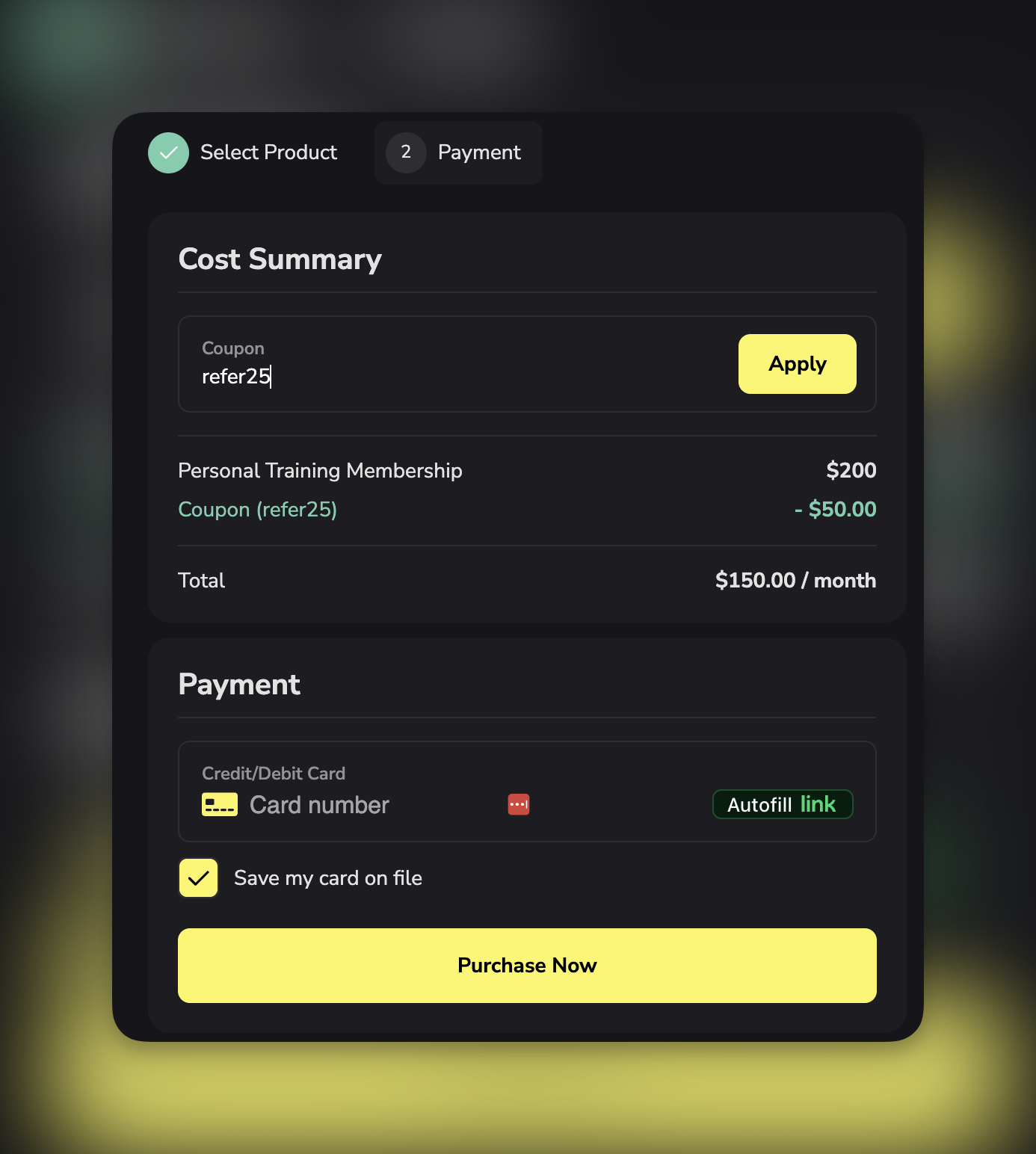
- Original price (strikethrough)
- Discount amount
- New total
4
Client completes purchase
Client pays discounted amount and receives product/credits.
Coupon list columns explained
Code: Exact text client must enter Enter or share the code exactly as created. Type: Free, Percentage Off, or Amount Off Value Off:- Free: 100%
- Percentage: 10%, 25%, 50%, etc.
- Amount: $10, $25, $50, etc.
- Tracks usage count
- Compares against limit (if set)
- Example: 15/100 = 15 uses out of 100 limit
Filter coupons
Filter by type:- All coupons
- Free only
- Percentage off only
- Amount off only
Coupon limitations and controls
Redemption limits:- Unlimited uses (default)
- Limited total uses (50, 100, 500, etc.)
- One use per client (requires sign-in)
- First purchase only (no previous purchases in this business, including free orders)
- An expiration date for new redemptions
- A minimum order amount
- Selected products only
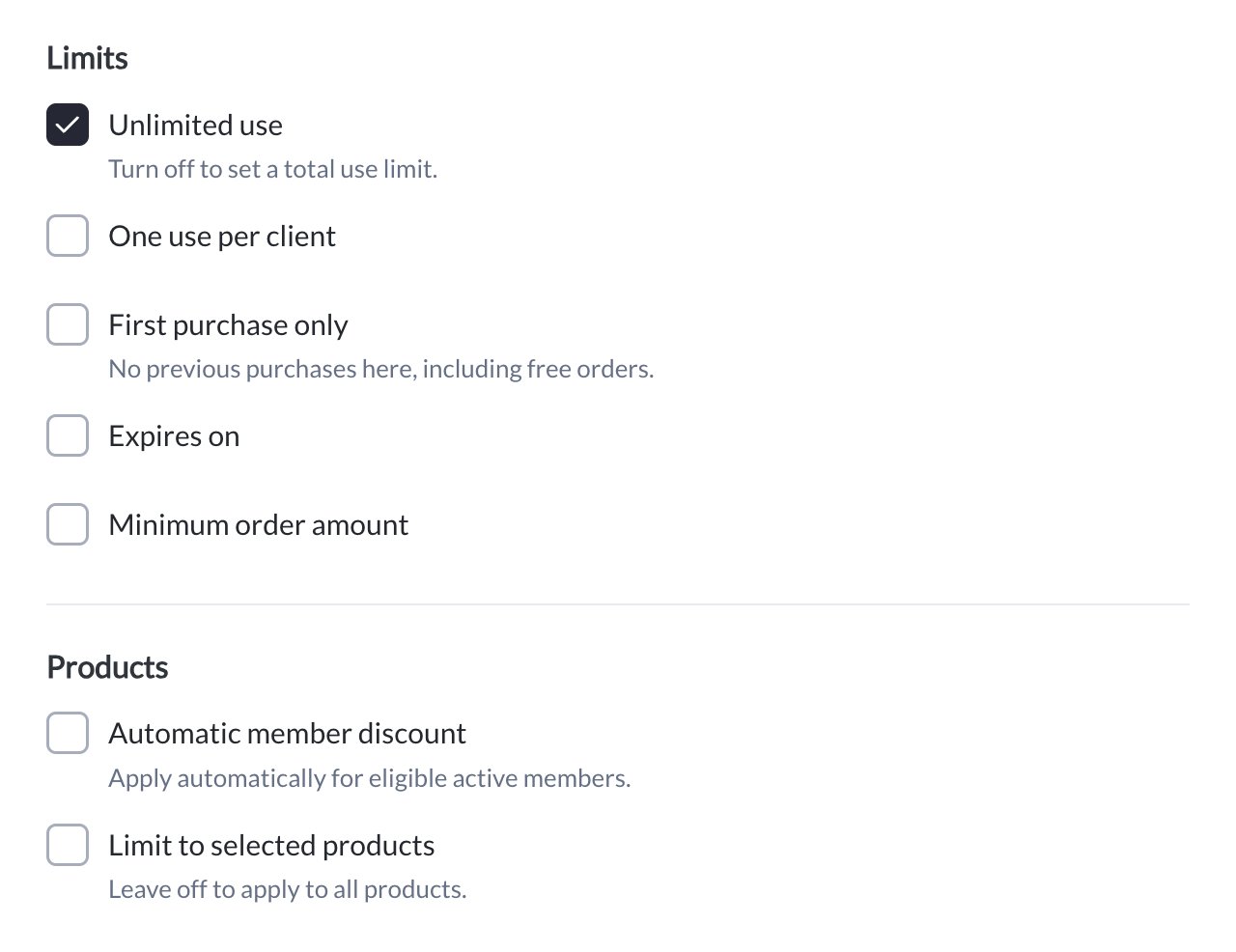
Use Limits to control redemption, then choose whether the coupon applies to all products or selected products.
Coupons and subscriptions
Choose how long the discount applies when creating the coupon:
One-time products receive their discount once. Checkout shows the introductory amount and later renewal price. An expiration date controls when a code can be redeemed; it is separate from the duration of a discount already applied to a membership.
Initial fees are discounted too. If the membership has an initial down payment, the coupon can reduce that up-front fee as well as eligible recurring charges within its discount duration. A 100%-off code on a month-to-month membership therefore makes the first payment genuinely free, rather than free on the recurring price only.
Use First payment only for an introductory offer instead of planning to remove a recurring discount manually. Automatic member discounts keep their ongoing membership rules.
Check the initial payment and renewal price
After a membership purchase, Orders shows the full Initial payment, including any discounted down payment, separately from the recurring rate. Billing also distinguishes the initial amount when it differs. A First payment only coupon reduces the initial eligible invoice, then the membership displays the normal renewal rate. Every payment keeps the eligible recurring discount. For a limited-duration coupon, check its end before explaining future renewals. Payment examples.Member discounts
Member discounts are automatic: anyone who holds a specific membership pays less for your other products, with no code to enter. Set them up when facilities want team members to get member pricing on camps, clinics, rentals, or add-on memberships. How it works- Open Payments → Coupons → Create coupon and set the discount.
- Turn on Automatic member discount and choose the qualifying memberships. Anyone with one of them active gets the discount.
- Choose which products it applies to: selected products, or all products. The list can include other memberships and one-time products.
- Select Create coupon. From then on, when an active member checks out on one of those products, the discount is applied automatically and shown in the price breakdown.
Creating your first coupon
- Open Payments → Coupons → Create coupon.
- Enter the Coupon code, then choose Free, Percentage off, or Amount off. Enter the percentage or amount when required.
- Under On memberships, this discount applies to, choose First payment only, A set number of months, or Every payment. Enter 1–36 months for a limited duration.
- Under Limits, leave Unlimited use on or turn it off to set a total use limit. Add any per-client, first-purchase, expiry, or minimum-order restrictions.
- Under Products, leave Limit to selected products off for all products, or turn it on and choose the eligible products. Use Automatic member discount only for a membership-based offer.
- Review the code, discount, duration, and restrictions, then click Create coupon. Cancel closes an unsaved example.
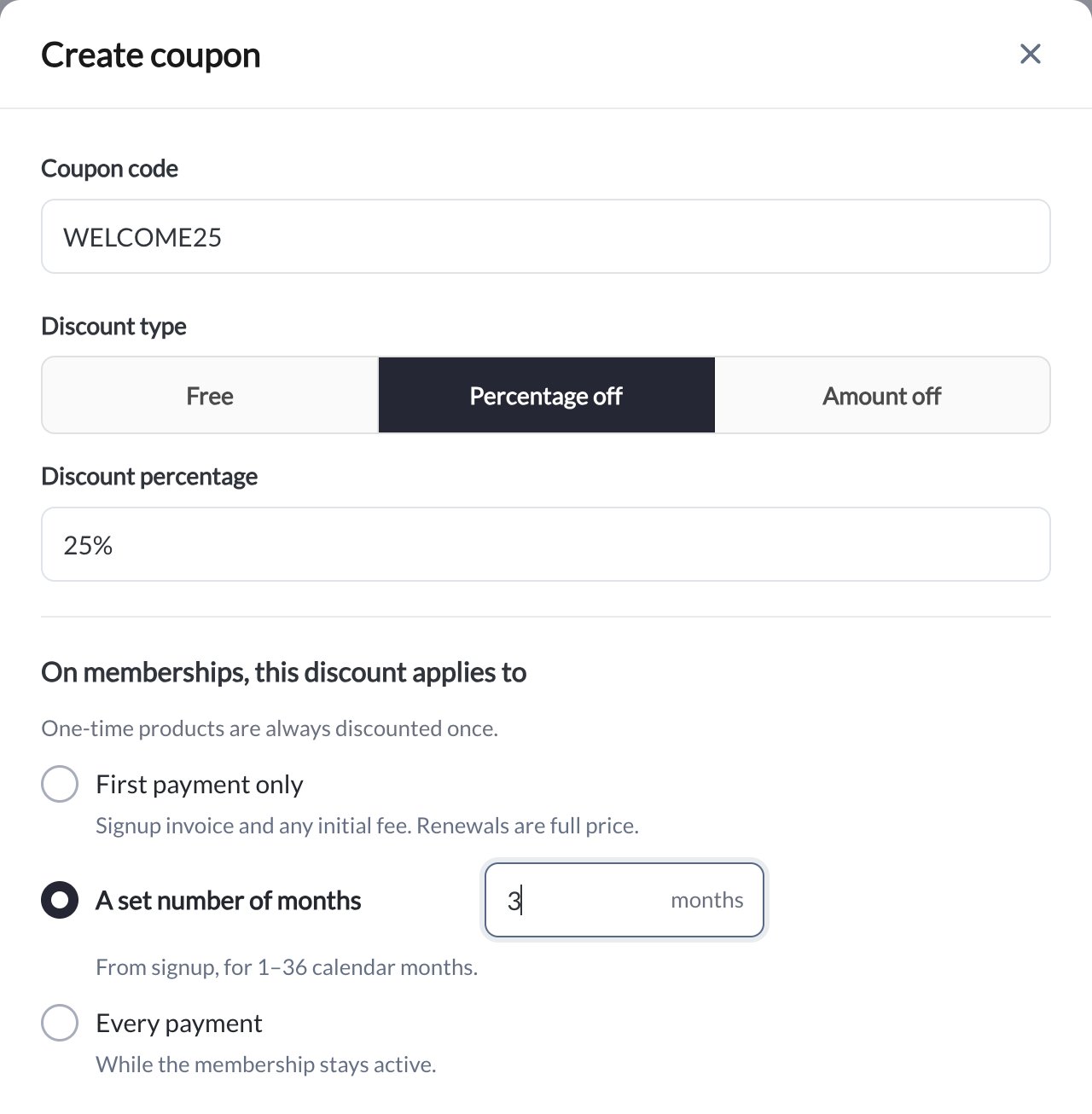
Example: WELCOME25 gives 25% off during the first three calendar months. This screenshot shows an unsaved example, not an active promotional code.
Tracking coupon performance
Metrics to monitor: Redemption count: How many times used Revenue impact: Total discount given away Conversion rate: Coupon uses / Coupon impressions Most popular codes: Which coupons clients use most Least used codes: Which promotions aren’t working Use redemption data to:- Measure campaign success
- Adjust discount amounts
- Identify effective channels
- Plan future promotions
Best practices
Code naming:- Make codes memorable (SPRING25, not XJ7H2K9)
- Include discount in name when possible (25OFF)
- Match campaign (REFER20 for referral program)
- Keep them short (under 15 characters)
- Test different amounts to find sweet spot
- Too small: Doesn’t motivate action
- Too large: Erodes margins unnecessarily
- Common sweet spot: 20-30% for percentage, $25-$50 for amount
- Limited time creates urgency (48-hour sale)
- Seasonal alignment (SUMMER, NEWYEAR)
- Event-based (GRANDOPENING, ANNIVERSARY)
- Clearly state terms (expires, limits, restrictions)
- Make codes easy to find and share
- Remind clients of expiration dates
- Celebrate redemptions (thank clients who use codes)