

Where to find this: Dashboard → Website Builder → Select any page → Header & Navigation section (in left sidebar)
Configuring header and footer navigation
Setting up header navigation
1
Access header navigation settings
Look for Header & Navigation in your Website Builder interface.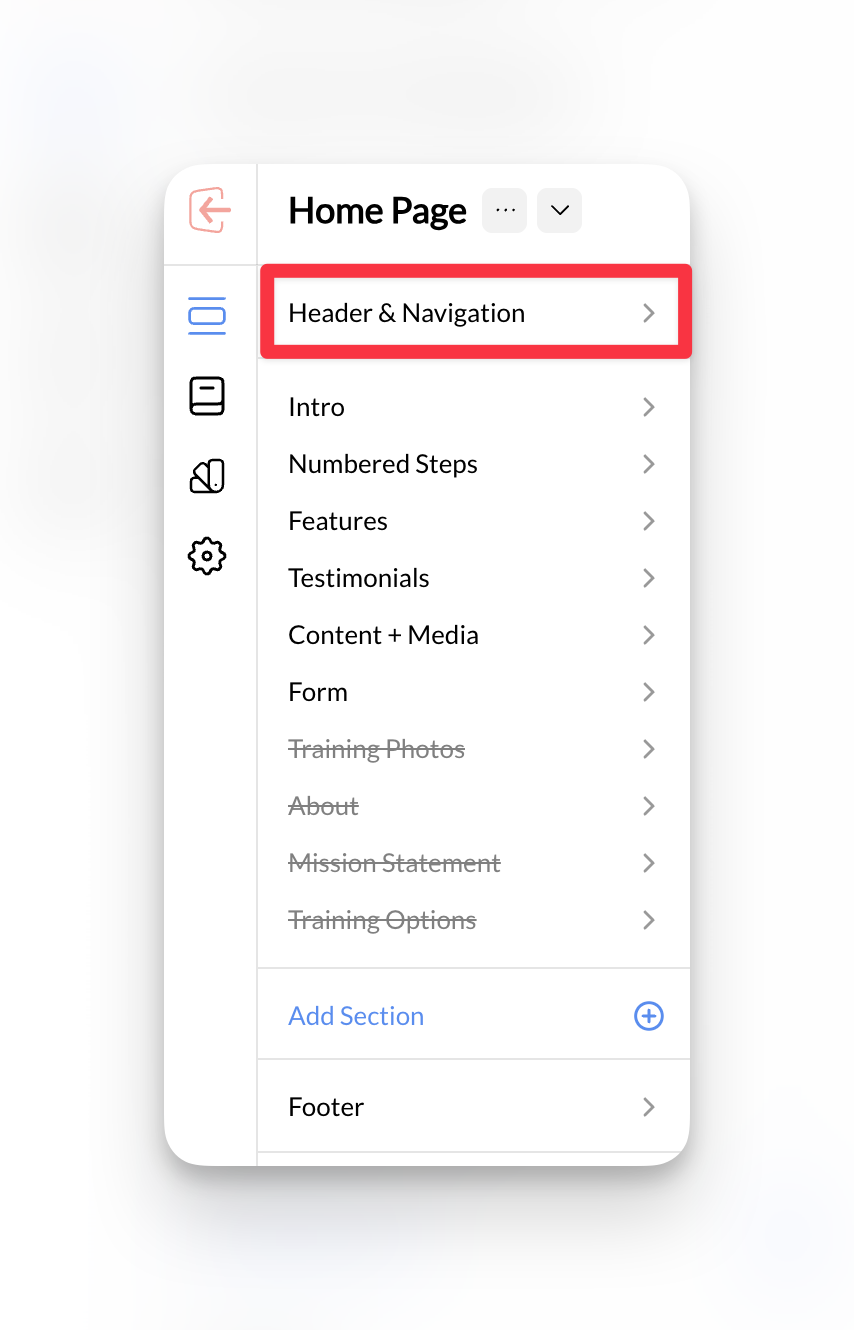
2
Add main navigation items
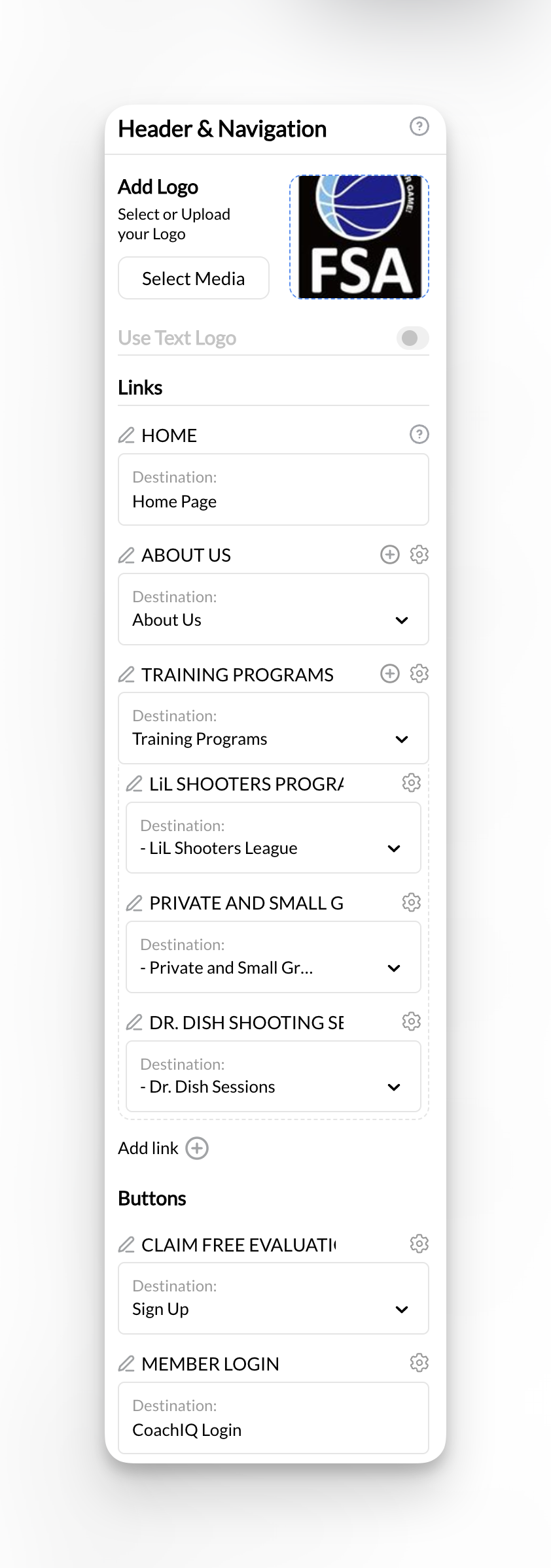
- Home
- About
- Training Programs (or Services)
- Contact
- Shop (example of a page that can be linked externally from your website)
3
Configure dropdown menus
For parent pages with subpages, set up dropdown navigation:
- Select “Training Programs” in navigation settings
- Add submenu items linking to each subpage:
- In-Person Training → Link to in-person training page
- Online Coaching → Link to online coaching page
- Group Sessions → Link to group sessions page
Dropdown best practices: Use dropdowns sparingly and ensure they work well on mobile devices where most parents browse.
4
Add call-to-action buttons
Include prominent action buttons in your header:
- “Book Session” or “Schedule Training”
- “Free Consultation”
- “Get Started”
Navigation complete: Visitors can now easily navigate to all your coaching services and take action to book training.
Reorder navigation links
Open the header’s navigation links and drag a link to its new position in the list, or move it with the keyboard. Publish the page to save the order, then check both desktop navigation and the mobile menu. You do not need to delete and recreate links to move them.- Home stays first in the list.
- Sub-links move with their parent link. You can reorder sub-links within their parent.
- The link you selected is the one that moves, including right after you add a sub-link.
Member Login opens in a new tab
Member Login in the header, footer and phone menu always opens the member sign-in in a new tab, so your website stays open behind it. In the builder, its destination shows as Member login (new tab). There’s no separate new-tab switch to set.Header buttons
The header can show two action buttons. When a button is switched off, its switch is labeled Primary Button or Secondary Button so you can tell them apart. Turning a switch on shows that button’s saved text.How the menu works on phones
On phones, the Menu button opens every navigation link and the header buttons, including on the Compact Header. A second tap, or Escape on a keyboard, closes it. On touch screens, the first tap on a link with a dropdown opens its submenu and the second tap follows the link. While the menu is open, keyboard focus stays inside it and the page behind doesn’t scroll.Setting up footer navigation
1
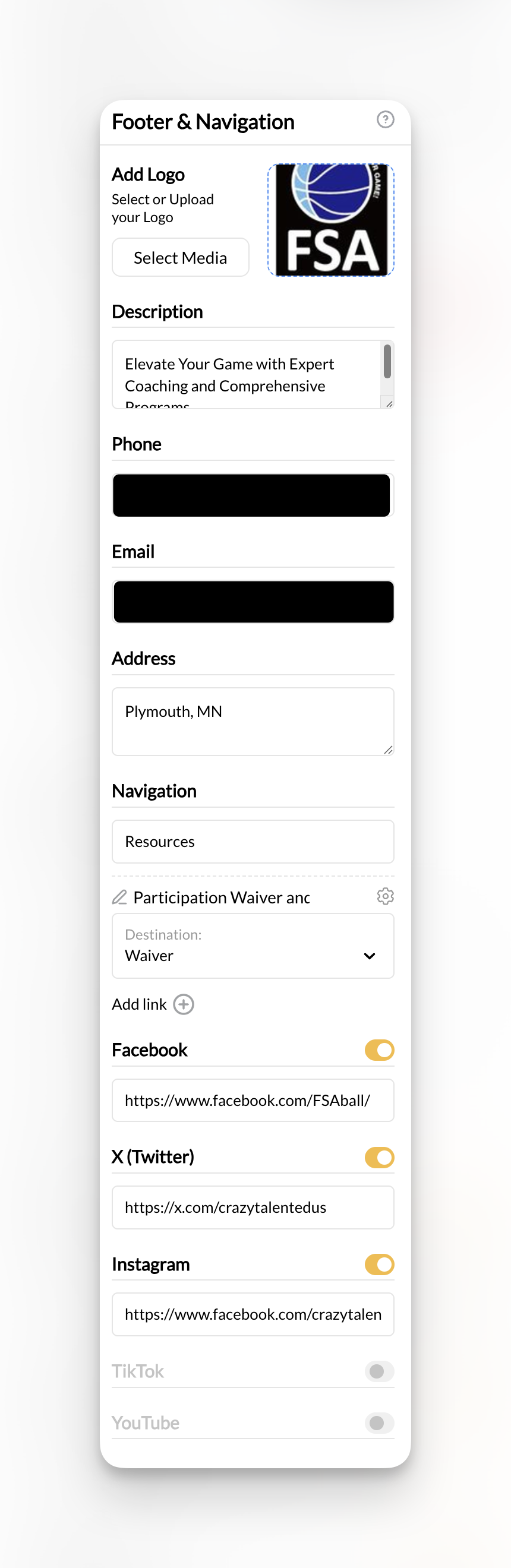
Access footer settings
Find the Footer section in your Website Builder, typically listed in the main sections or site structure.
2
Add footer navigation links
In a generated Footer, use its bottom-bar link fields for legal links. The layout places social icons under the logo and description, with a divider and an All Rights Reserved line above the bottom bar. A footer link you delete stays deleted after you publish.Include secondary navigation items in your footer:
- Privacy Policy
- Terms of Service
- Blog or News (if applicable)
- Additional service pages
Footer purpose: Footer navigation is perfect for legal pages, secondary content, and links that support your main navigation without cluttering it.
3
Include contact information
Add essential contact details to your footer:
- Phone number
- Email address
- Training location/address
- Business hours
4
Add social media links
Connect your social media profiles:
- Instagram (great for training videos and athlete highlights)
- Facebook (community building and parent communication)
- YouTube (coaching tutorials and testimonials)
- TikTok (if relevant for your target audience)
Website navigation best practices for coaches
Use descriptive, action-oriented page names
Use descriptive, action-oriented page names
Instead of generic names, use specific coaching terms that clearly communicate value:
- “Basketball Skills Training” vs “Services”
- “Coach Biography & Experience” vs “About”
- “Schedule Your First Session” vs “Contact”
Organize by user intent and journey
Organize by user intent and journey
Structure your pages around what parents and athletes want to accomplish:
- Learning phase: About, Philosophy, Credentials
- Evaluation phase: Services, Training Types, Testimonials
- Decision phase: Schedule, Contact, Pricing, Programs
Optimize for local search
Optimize for local search
Include location-based pages and navigation items if you serve specific areas:
- “Basketball Training in [City Name]”
- “Youth Sports Coaching [Region]”
- Location-specific landing pages
Hide the header or footer on a page
You can hide your site’s header, footer, or both on any individual page — useful for focused landing pages, sales pages, or onboarding flows where you want visitors to stay on task without navigation.Where to find this: Website Builder → select a page → Page Settings panel
- Open the page and scroll the left sidebar to the Page Settings panel.
- Toggle on Hide site header on this page and/or Hide site footer on this page.
- Publish the page.