

New to credits? Think of them like punch cards or arcade tokens—athletes buy credits upfront, then redeem them for sessions instead of paying each time.
Where to configure credits: Payments → Products → [Product] → Credits section. Credits are optional—many coaches use products for payment only and never issue credits.
What are credits?
Credits are a pre-paid booking currency that athletes purchase in packages and redeem when booking sessions with you. Instead of paying 50 each time they book, an athlete might buy a “10-Credit Package” for 450 upfront, then use 1 credit per session. Real-world analogy: Like a gym membership punch card or Starbucks rewards—pay once, use credits multiple times.The basic credit flow
1
Athlete purchases credits
Athlete buys a credit package from you:
- “10-Credit Package - $450”
- “20-Credit Package - $800”
- “Monthly Unlimited - 8 Credits/month”
2
Athlete books sessions
When booking, athlete chooses to pay with credits: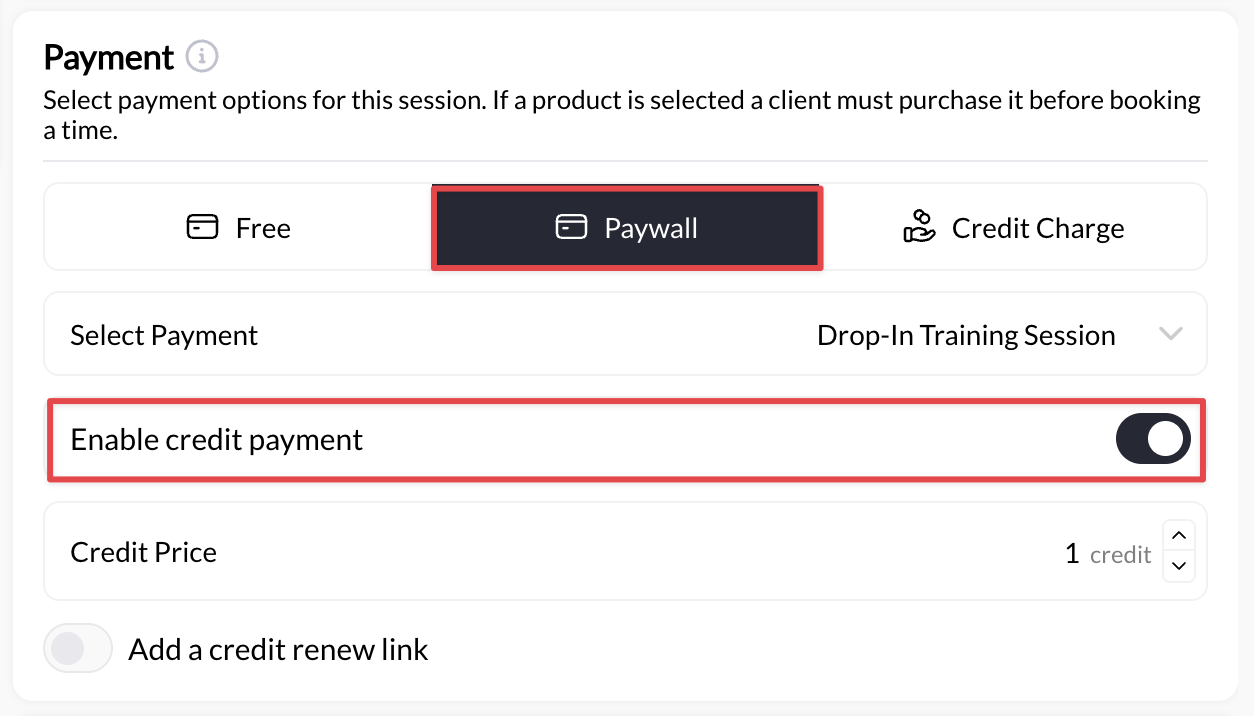
- Selects “60-Min Private Training” (costs 1 credit)
- Clicks “Book with Credits” instead of paying $50
- 1 credit deducted from their balance
3
Athlete uses remaining credits
Athlete continues booking sessions using their credit balance:
- Books again next week (8 credits left)
- Books again (7 credits left)
- Continues until credits run out
4
Athlete runs out, buys more
When credits run low, athlete purchases another package:
- Receives low-balance notification
- Buys new 10-credit package
- Balance replenished, continues training
Why use credits instead of direct payment?
- For Your Business
- For Athletes
- Common Misconceptions
Financial benefits:✅ Upfront cash flow: Get paid 450 today instead of 50 × 10 over 10 weeks
✅ Higher commitment: Athletes who buy packages stick around longer (80%+ retention vs 50% pay-per-session)
✅ Predictable revenue: Know exactly how much money is “in the bank” via sold credits
✅ Reduced transaction fees: 1 transaction for 10 sessions instead of 10 separate charges
✅ Package discounts: Sell 10 credits for 450 (45/credit) vs 50 per session—athlete saves, you secure $450 upfrontOperational benefits:✅ Faster booking: No payment processing at booking time (credit already owned)
✅ Fewer no-shows: Athletes less likely to waste pre-paid credits
✅ Flexible offerings: Different credit packages for different athlete types
✅ Easier refunds: Refund credits instead of money (keeps cash in business)
✅ Subscription compatibility: Combine with monthly credit subscriptions for recurring revenue
✅ Higher commitment: Athletes who buy packages stick around longer (80%+ retention vs 50% pay-per-session)
✅ Predictable revenue: Know exactly how much money is “in the bank” via sold credits
✅ Reduced transaction fees: 1 transaction for 10 sessions instead of 10 separate charges
✅ Package discounts: Sell 10 credits for 450 (45/credit) vs 50 per session—athlete saves, you secure $450 upfrontOperational benefits:✅ Faster booking: No payment processing at booking time (credit already owned)
✅ Fewer no-shows: Athletes less likely to waste pre-paid credits
✅ Flexible offerings: Different credit packages for different athlete types
✅ Easier refunds: Refund credits instead of money (keeps cash in business)
✅ Subscription compatibility: Combine with monthly credit subscriptions for recurring revenue
Bottom line: Credits improve cash flow, increase retention, and reduce administrative overhead.
How credits work in CoachIQ
Credit packages (Products)
Credits are sold through Products in CoachIQ’s payment system. There are two ways to issue credits: Product Types That Issue Credits:- One-Time Payment Products
- Subscription Products
How it works: Single purchase, all credits issued immediatelyExample: “10-Credit Package - $450”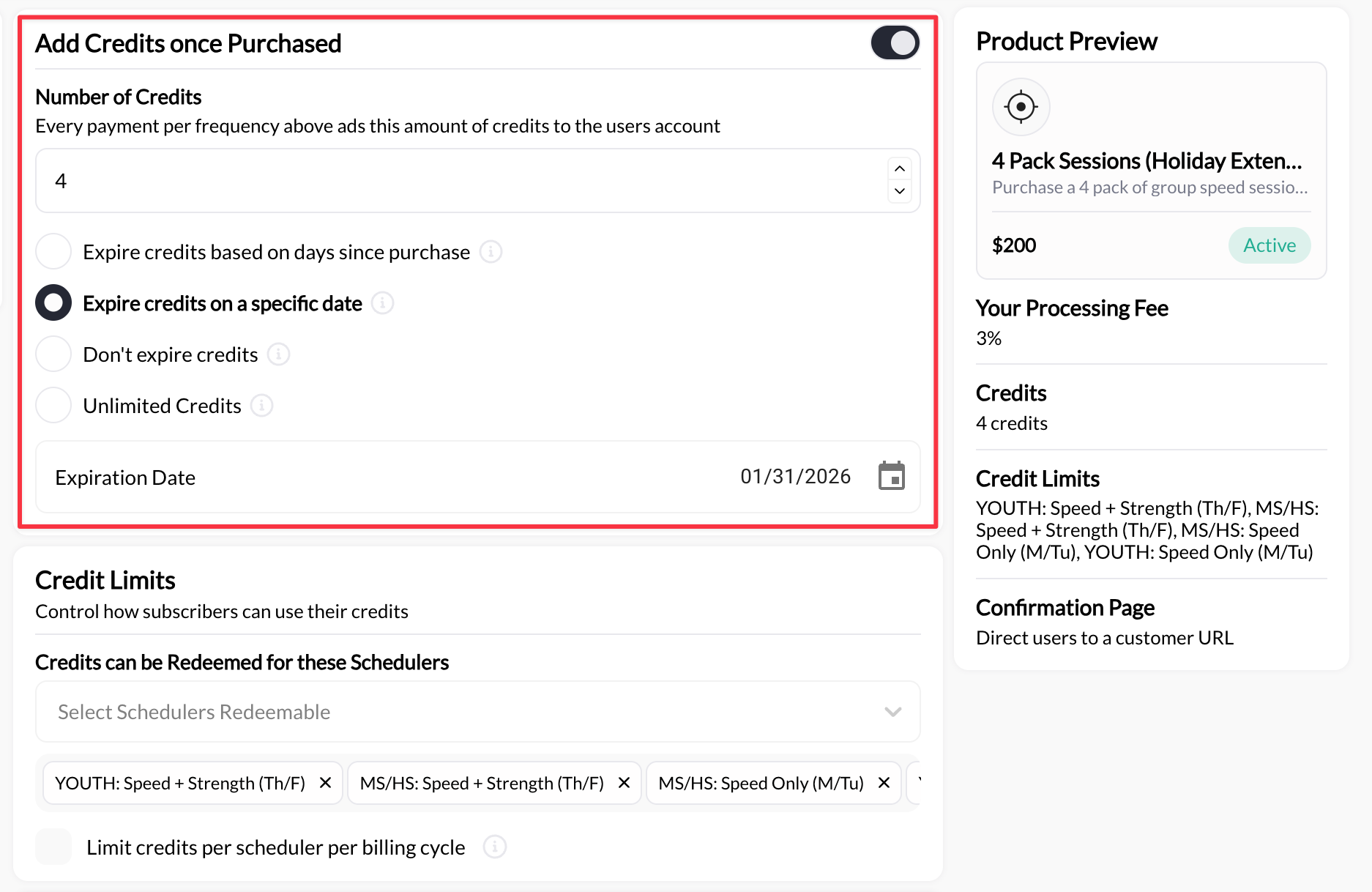
- Athlete pays $450 once
- Receives 10 credits instantly
- Uses credits until depleted
- Purchases another package when ready
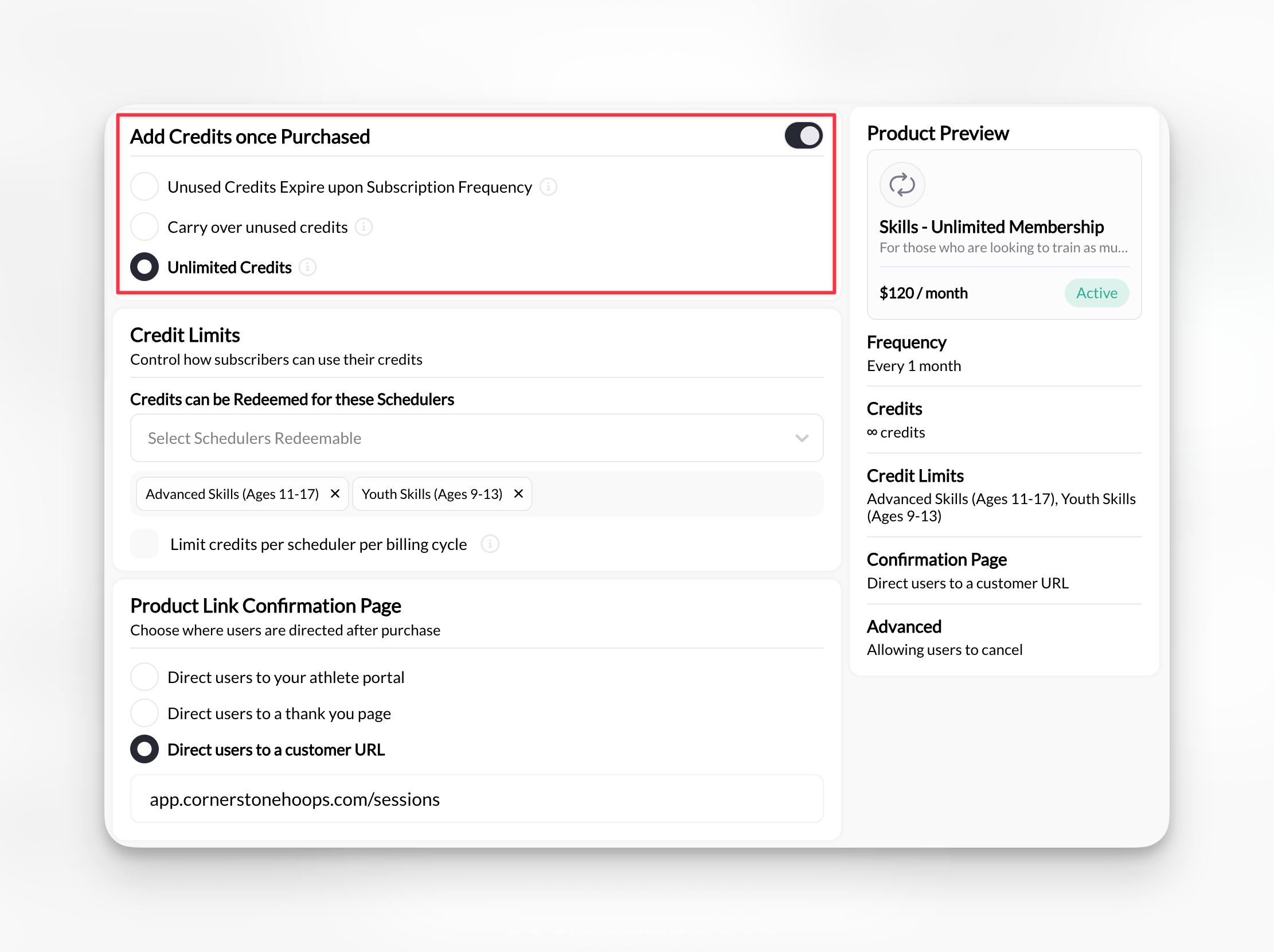
- Toggle credits ON (“Add credits once purchased”)
- Number of credits issued (e.g., 10 credits)
- Expiration (30 days, 90 days, never, etc.)
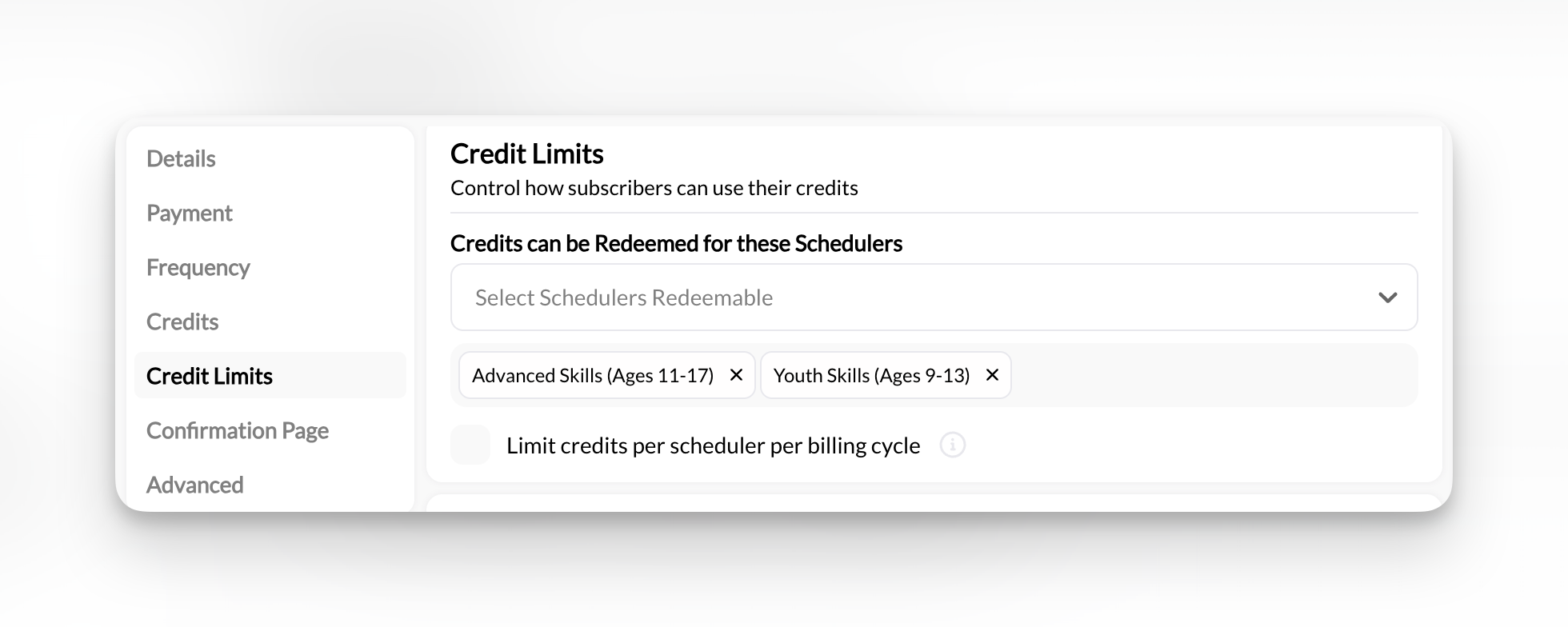
- Which schedulers accept these credits (Usage Limits → Redeemable Schedulers)
- Credits added to their account balance immediately after purchase
- Ability to use credits when booking schedulers that accept them
- Credit balance tracked in Athlete Portal and mobile app
Important: You create credit-issuing products in Payments → Products, then configure schedulers to accept those credits in Schedule → Schedulers. It’s a two-way linkage—both sides must be configured. Step-by-step: Setting up credit-based sessions.
Two types of credits
CoachIQ has two distinct credit types that work together:- Master Credits (Universal)
- Scheduler-Specific Credits
What they are: Credits that can be used for ANY credit-enabled schedulerHow they work: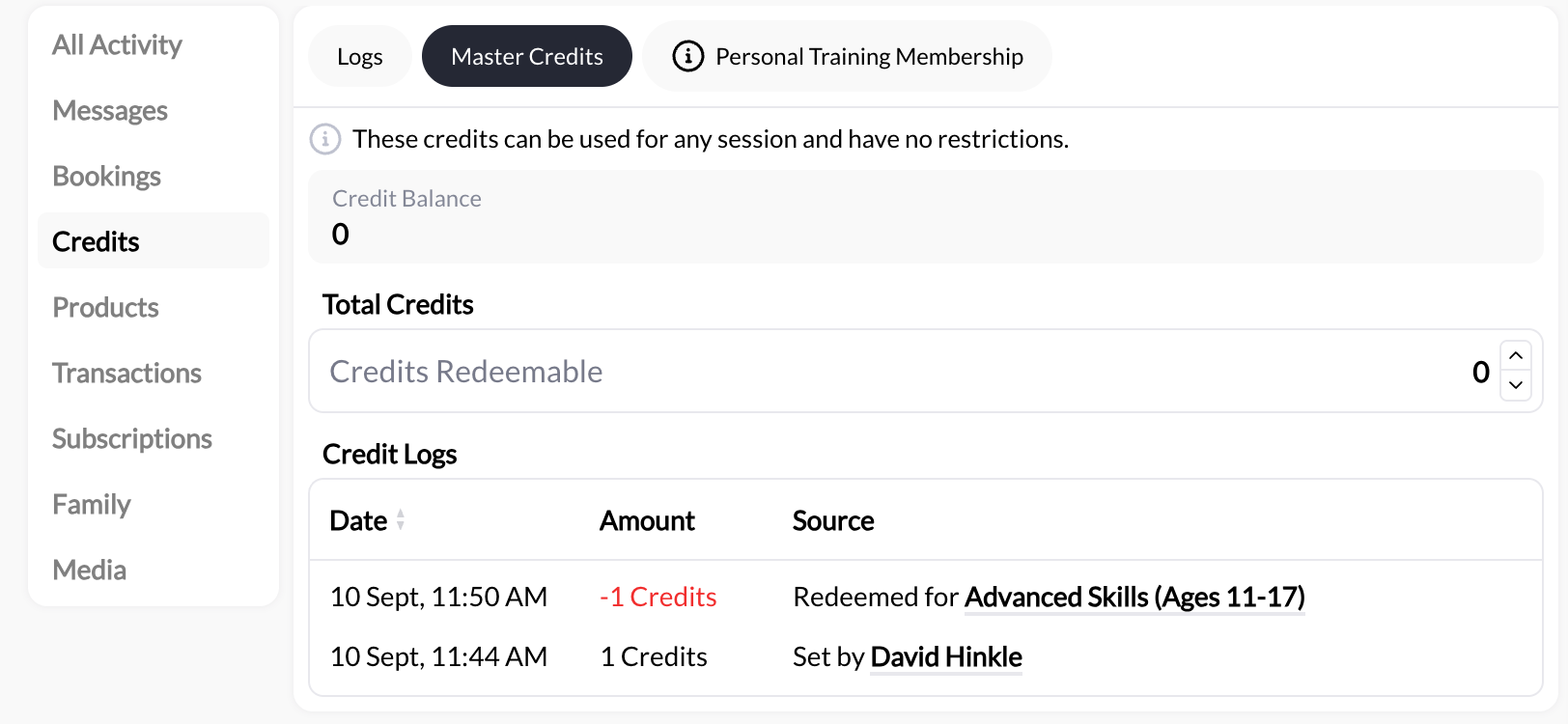
- No restrictions on which sessions they can book
- Used LAST (after scheduler-specific credits are exhausted)
- Displayed as “Master Credits” in athlete profile
- General-purpose credit packages
- Flexibility for athlete to book any service
- Simple credit system without restrictions
- “Master Credits: 10”
- “These credits can be used for any session and have no restrictions”
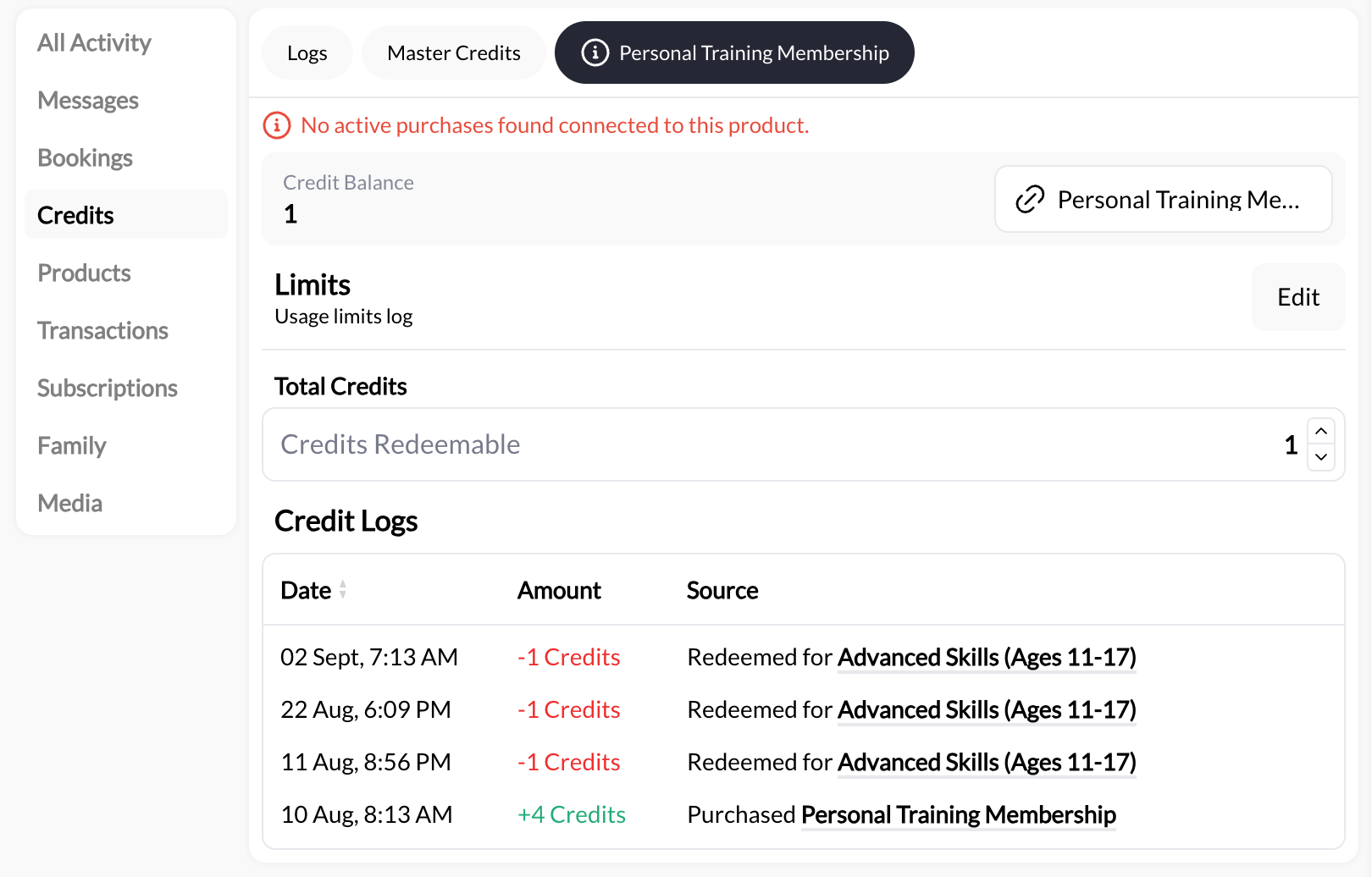
- First: Master Credits
- Then: product credits that can pay for this session. Unlimited credits come first, then the credits that expire soonest
- Last: product credits that never expire
Credit-enabled schedulers
Once athletes have credits, they need schedulers configured to accept them. Scheduler pricing options:- Credit-Only
- Hybrid (Credit OR Direct Payment)
- Direct Payment Only
- Free
Configuration: Session costs 1 credit (or 2, or 3, etc.)Athlete requirement: Must have credits to book (no direct payment option)When to use:
- Package-deal businesses
- Want to enforce credit purchases
- Simplify booking (credits only, no payment decisions)
Credit balance and tracking
Athletes can see their credit balance within the Billing section of the athlete portal How to navigate as an athlete:- Log into your respective athlete portal
- Click or press the profile icon at the top right hand corner of the page
- Visit **Billing **to view your credit balance
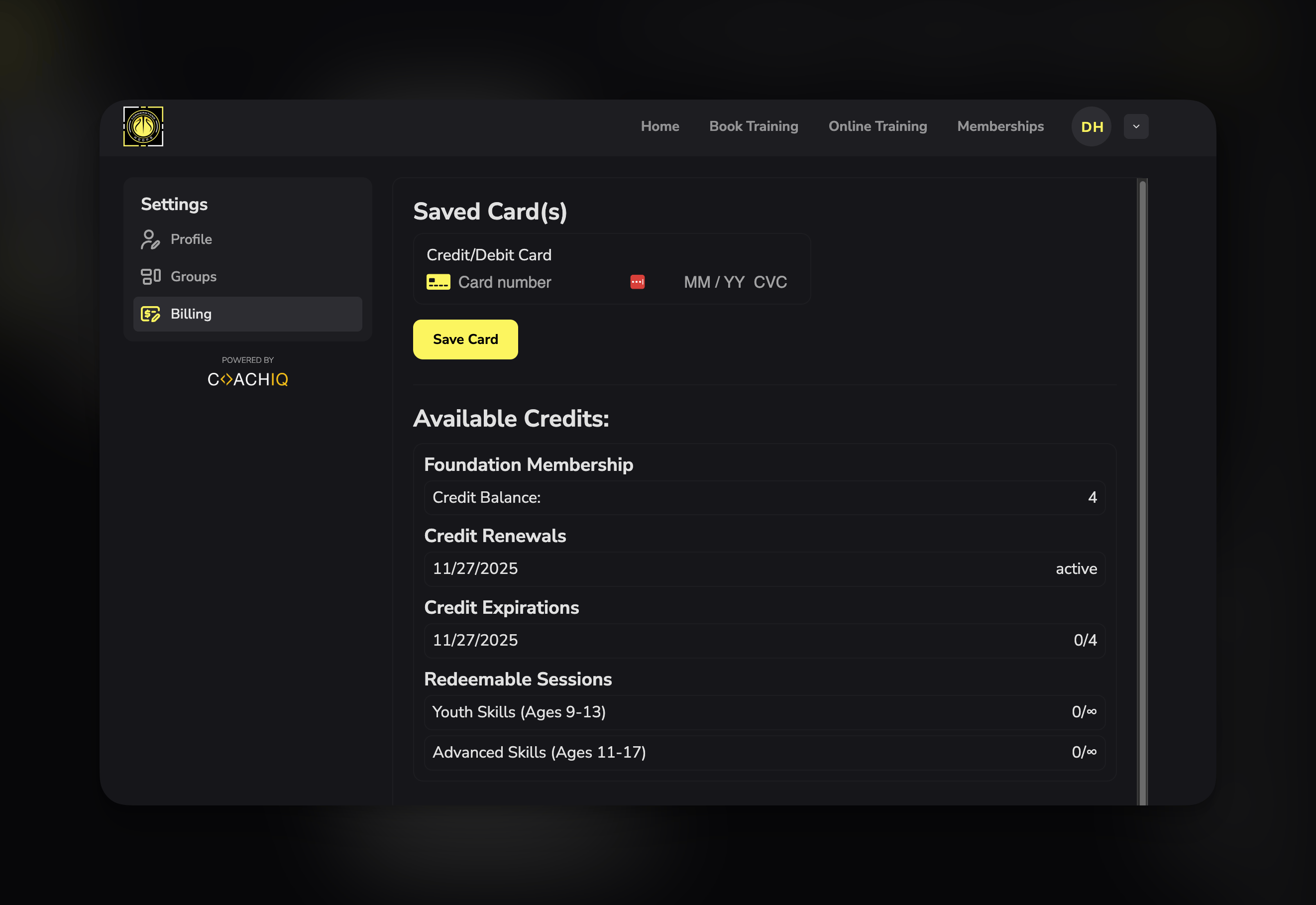
Available Credits section
Available Credits section
Lists all active credit sources:
- “10-Credit Package” - Balance: 6 credits
- “Monthly Membership” - Balance: ∞ (unlimited this period)
- “Master Credits” - Balance: 3 credits
Credit Renewals
Credit Renewals
Shows when subscription credits renew:
- “10/18/2025 (active)”
- Indicates next billing date for credit refresh
Credit Expirations
Credit Expirations
Tracks expiring credits:
- “10/18/2025 (0/5)”
- Meaning: 0 credits expired out of 5 total issued
- Helps athletes know if they need to use credits soon
Redeemable Sessions
Redeemable Sessions
Shows which schedulers accept current credits:
- “Rising Stars Class: 0/∞” (unlimited available for this scheduler)
- “Elite Class: 0/∞” (unlimited available for this scheduler)
- “Private Sessions: 6” (6 credits available for redemption during the current billing cycle)
Membership(s)
Membership(s)
Active subscriptions that issue credits:
- “Monthly Rising Stars Membership - $250/month”
- Next renewal date and status
- Individual athlete credit balances (in athlete profile → Credits tab)
- Separate tabs for each credit source (Master Credits tab, product-specific tabs)
- Total credits outstanding (all athletes combined)
- Credit usage trends and analytics
- Low-balance athletes (proactive outreach opportunity)
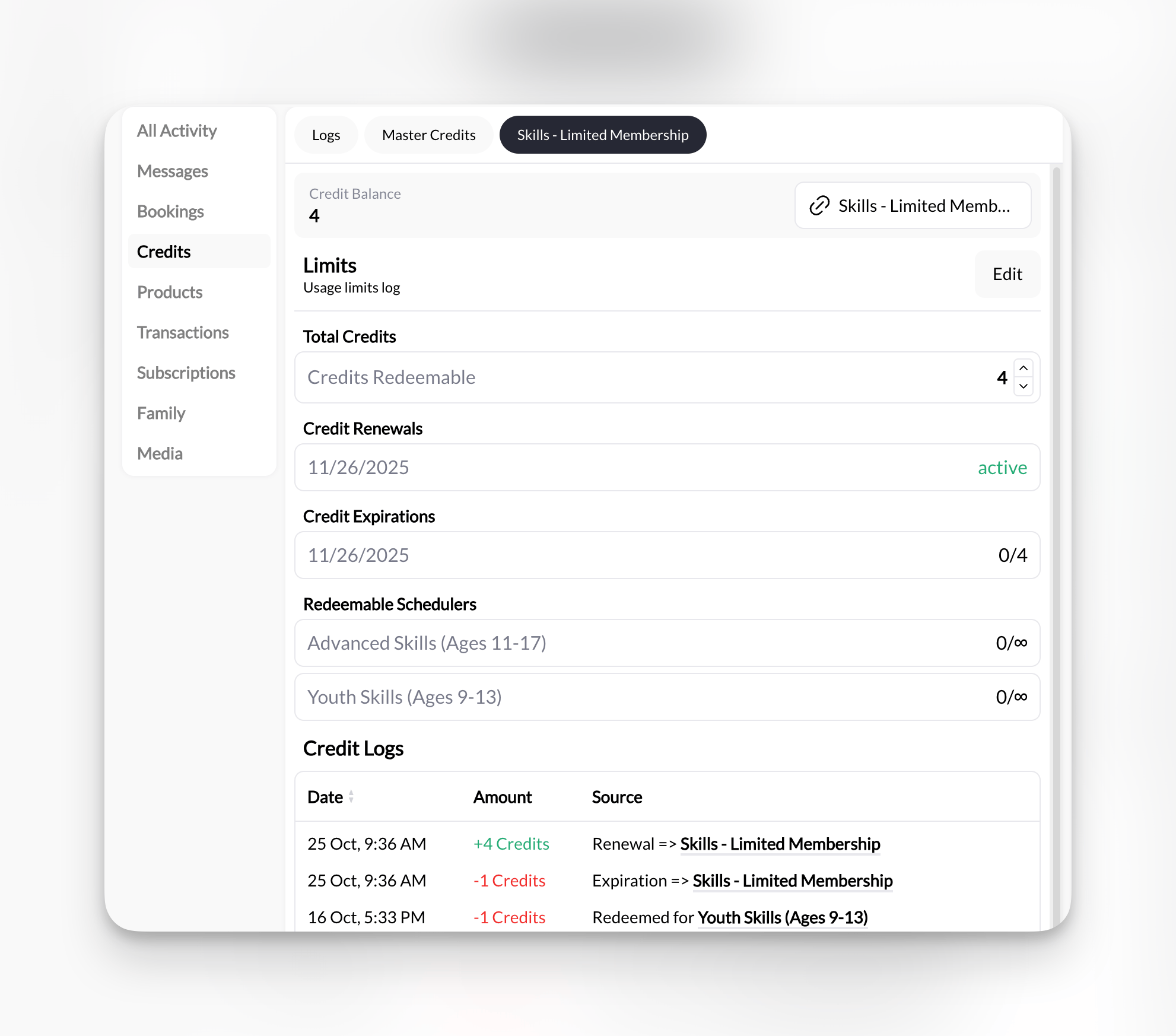
Configured vs. managed: Credits are configured in Products, but day-to-day they’re managed on the athlete’s profile—viewing balances, manually adding or removing credits, tracking expirations, reviewing usage logs, and troubleshooting. See Managing Athlete Credits.
Understanding credit display notation
Athletes will see specific symbols and formats in their credit balance:
Product-specific format: When credits are restricted to a scheduler, the scheduler name follows the count—
3/∞ Rising Stars (3 used of unlimited for “Rising Stars”) or 5/10 Youth Training (5 of 10 for “Youth Training”). The same notation appears in the athlete’s profile under the Credits tab and during booking flows.
Examples in context:
Scenario 1: One-time package
- Athlete bought “10-Credit Package”
- Display: “Credit Balance: 6”
- Meaning: 6 credits remaining from original 10
- Athlete has “Unlimited Monthly Membership”
- Display: “Credit Balance: ∞”
- Meaning: Can book unlimited sessions this month, resets next month
- Athlete used 3 sessions from monthly unlimited
- Display: “Credit Balance: 3/∞”
- Meaning: Used 3 this month, unlimited remaining until renewal
- Athlete has “Rising Stars Membership”
- Display under Redeemable Sessions:
- “Rising Stars Class: 0/∞”
- “Rising Stars Shooting Lab: 0/4”
- Meaning: Unlimited bookings for Rising Stars Class and only 4 more bookings available for Rising Stars Shooting Lab this month
Credit package strategy
Pricing your packages
The discount formula: Calculate your per-session price, then offer tiered discounts based on package size. Example pricing structure:
Why this works:
- Small discount for small package = low barrier to entry
- Larger discount for larger package = incentive to commit
- Pay-per-session stays highest price = drives package sales
Package sizing recommendations
5-Credit Starter Package
5-Credit Starter Package
Best for: New athletes, trial periods, testing your serviceTypical duration: 2-3 weeks (2x/week training) or 1 month (1-2x/week training)Pricing strategy: Small discount (5-8% off)Why it works: Low commitment, easy “yes” for trying you outExample: “$240 for 5 Credits - Try before you commit!”
10-Credit Standard Package
10-Credit Standard Package
Best for: Most athletes, 1-2 month commitmentsTypical duration: 5 weeks (2x/week) or 10 weeks (1x/week)Pricing strategy: Meaningful discount (10-12% off)Why it works: Enough sessions to see results, not overwhelming commitmentExample: “$450 for 10 Credits - Our most popular package!”
Recommended: Make this your flagship package. Most coaches sell 60-70% of credits in 10-packs.
Unlimited Monthly Subscription
Unlimited Monthly Subscription
Best for: High-frequency athletes, predictable revenueStructure: Fixed monthly fee, set number of credits per month (e.g., $400/month = 12 credits)Pricing strategy: Significant savings for frequent athletesWhy it works: Predictable recurring revenue, athlete locks inExample: “$400/month Unlimited - 12 Credits/month (up to 3x/week)”See Subscription Scheduling for full details.
Common credit configurations
Three product setups that cover most coaching businesses:- Simple session package
- Monthly membership
- Specialized package
10-Session PackageProduct setup:
- Type: One-Time
- Price: $650
- Credits: 10
- Expiration: 90 days
- Usage: Any credit-enabled scheduler (no restrictions)
Advanced credit concepts
Credit expiration
Should credits expire? Depends on your business model.- No Expiration
- Day/Month After Purchase Expiration
Policy: Credits never expireBenefits:
- Athlete-friendly, removes pressure
- Simpler to manage
- No refund disputes
- Better for seasonal athletes (ski coaches, summer camps)
Credit refunds and transfers
Common scenarios:Athlete wants refund on unused credits
Athlete wants refund on unused credits
Your options:
- Full refund: Return unused credits as money (minus transaction fees)
- Partial refund: Refund minus a processing/admin fee
- No refunds: Credits are final sale (most common)
- Credit freeze: Pause expiration for athlete on extended break
Athlete wants to transfer credits to friend
Athlete wants to transfer credits to friend
Your options:
- Allow transfers: Build goodwill, potential new athlete acquisition
- No transfers: Protect against credit resale market
- Conditional transfers: Allow with admin fee or approval
Coach cancels session, credit already used
Coach cancels session, credit already used
Standard practice: Refund credit back to athlete’s balanceSystem should handle automatically: CoachIQ refunds credits when coach cancelsNo cash refund needed: Credit goes back into athlete’s account for future use
Multi-credit sessions
When to use multiple credits per session: ✅ Longer sessions: 90-min session = 1.5 credits or 2 credits✅ Premium services: Video analysis session = 2 credits
✅ Group training value: Small group (max 4) = 1 credit, but individual value maintained
✅ Specialty add-ons: Nutrition consult = 0.5 credits Configuration in CoachIQ:
- Set scheduler to require 2 credits (or 1.5, 0.5, etc.)
- System automatically deducts correct amount at booking
- Athlete sees credit cost before confirming
- 30-min session = 0.5 credits
- 60-min session = 1 credit
- 90-min session = 1.5 credits
- 120-min intensive = 2 credits
Credit-based vs subscription scheduling
Understanding the difference:
Can combine both: Offer packages for some athletes, subscriptions for others.
See Subscription Scheduling for full comparison.
Credit system best practices
Start Simple
Price to Incentivize
Communicate Value
Track Credit Economics
Seasonal Adjustments
Common questions
What if athlete books but doesn't have enough credits?
What if athlete books but doesn't have enough credits?
System behavior: CoachIQ prevents booking if insufficient creditsAthlete sees (if credit renewal link is enabled): “Add more credits”Your action: None required (system handles automatically)
Can I offer both credits AND direct payment for same session?
Can I offer both credits AND direct payment for same session?
Yes! This is the “hybrid” model.Configuration: Set scheduler to accept “1 Credit OR $50”Athlete experience: Chooses payment method at booking timeWhy do this: Flexibility for new athletes, while incentivizing packages for regulars
How do credits work with recurring bookings?
How do credits work with recurring bookings?
Important: If a client is only on recurring booking then credits are not needed. Simply collect their payment with a one time or monthly product and create their recurring booking.See Recurring Bookings for full details.
What happens to unused credits if athlete stops training?
What happens to unused credits if athlete stops training?
Financially: This is your profit margin bufferExplanation: Some unused credits offset administrative costs, marketing, and credit card feesTypical unused rate: 10-20% of credits go unused (industry standard)To minimize:
- Send re-engagement campaigns to inactive athletes
- Offer credit transfer to friends
- Allow gifting unused credits
- No expiration policy keeps athletes willing to return later
What's the difference between Master Credits and Scheduler-Specific Credits?
What's the difference between Master Credits and Scheduler-Specific Credits?
Master Credits:
- Added manually by an admin/coach
- Universal—can be used for any credit-enabled scheduler
- Used FIRST when they can pay for the session
- Credits that are added when a user makes a product purchase (one time or subscription)
- Non Scheduler Specifc: Universal—can be used for any credit-enabled scheduler
- Scheduler Specific: Restricted to designated schedulers only
- Used after Master Credits, soonest-expiring first; credits that never expire are used last
- Great for tiered memberships and program-specific packages
Decision guide: Should you use credits?
- Great fit for credits
- Maybe skip credits
- Hybrid approach
Your business has these traits:✅ You want upfront cash flow
✅ You want clients to be able to book their own sessions
✅ You offer packages or programs (not just drop-ins)
✅ Athletes train regularly (2+ times per month)
✅ You want higher commitment from athletes
✅ You’re comfortable with package sales conversations
✅ You can handle some administrative overhead (credit tracking)Athlete types that love credits:
✅ You want clients to be able to book their own sessions
✅ You offer packages or programs (not just drop-ins)
✅ Athletes train regularly (2+ times per month)
✅ You want higher commitment from athletes
✅ You’re comfortable with package sales conversations
✅ You can handle some administrative overhead (credit tracking)Athlete types that love credits:
- Committed long-term athletes
- Athletes on structured programs
- Those who value convenience
- Package/deal shoppers
Related articles
Setting Up Credit-Based Sessions
Product Builder: Credits
Credits on a Scheduler
Managing Athlete Credits
Credit Usage Limits
Creating Schedulers
Manual Booking
You now understand: What credits are, why they benefit your business, how they work in CoachIQ, the two credit types (Master vs Scheduler-Specific), and whether they’re right for your coaching model.
Ready to implement credits? Continue to Setting up credit-based sessions for step-by-step setup instructions, or contact support for personalized credit strategy consultation. Contact Support