

What a scheduler actually is
A scheduler is your bookable service configuration—a template that defines what athletes can book, at what price, with what rules. Think of a scheduler like a product listing in a store:- The product listing = The scheduler (what’s for sale, price, description)
- Individual items on the shelf = Available time slots (when it can be purchased)
- Items in shopping carts = Bookings (actual purchases)
Simple definition: A scheduler is a session type that athletes can book. It defines the “what” (service details) while availability defines the “when” (time windows).
Scheduling terminology in CoachIQ
The biggest source of confusion in CoachIQ scheduling is understanding these three related but different concepts:- Scheduler
- Session
- Booking
What it is: The configuration/template for a bookable serviceWhat it defines:
- Session name and description
- Duration (30, 45, 60 minutes)
- Price or credit cost
- Capacity (1-on-1 or group)
- Booking rules and limits
- Which availability it uses
How they work together: The complete flow
1
You create a scheduler
Configure: “60-Minute Private Training”
- Duration: 60 minutes
- Price: $75
- Capacity: 1 athlete
- Connected to your M/W/F 3-8 PM availability
2
CoachIQ generates sessions
Based on your scheduler + availability, CoachIQ automatically creates bookable time slots:Generated sessions:
- Monday, Oct 2 at 3:00 PM
- Monday, Oct 2 at 4:00 PM
- Monday, Oct 2 at 5:00 PM
- Wednesday, Oct 4 at 3:00 PM
- Wednesday, Oct 4 at 4:00 PM
- (continues for all M/W/F slots)
3
Athlete views available sessions
When athlete visits your booking page, they see: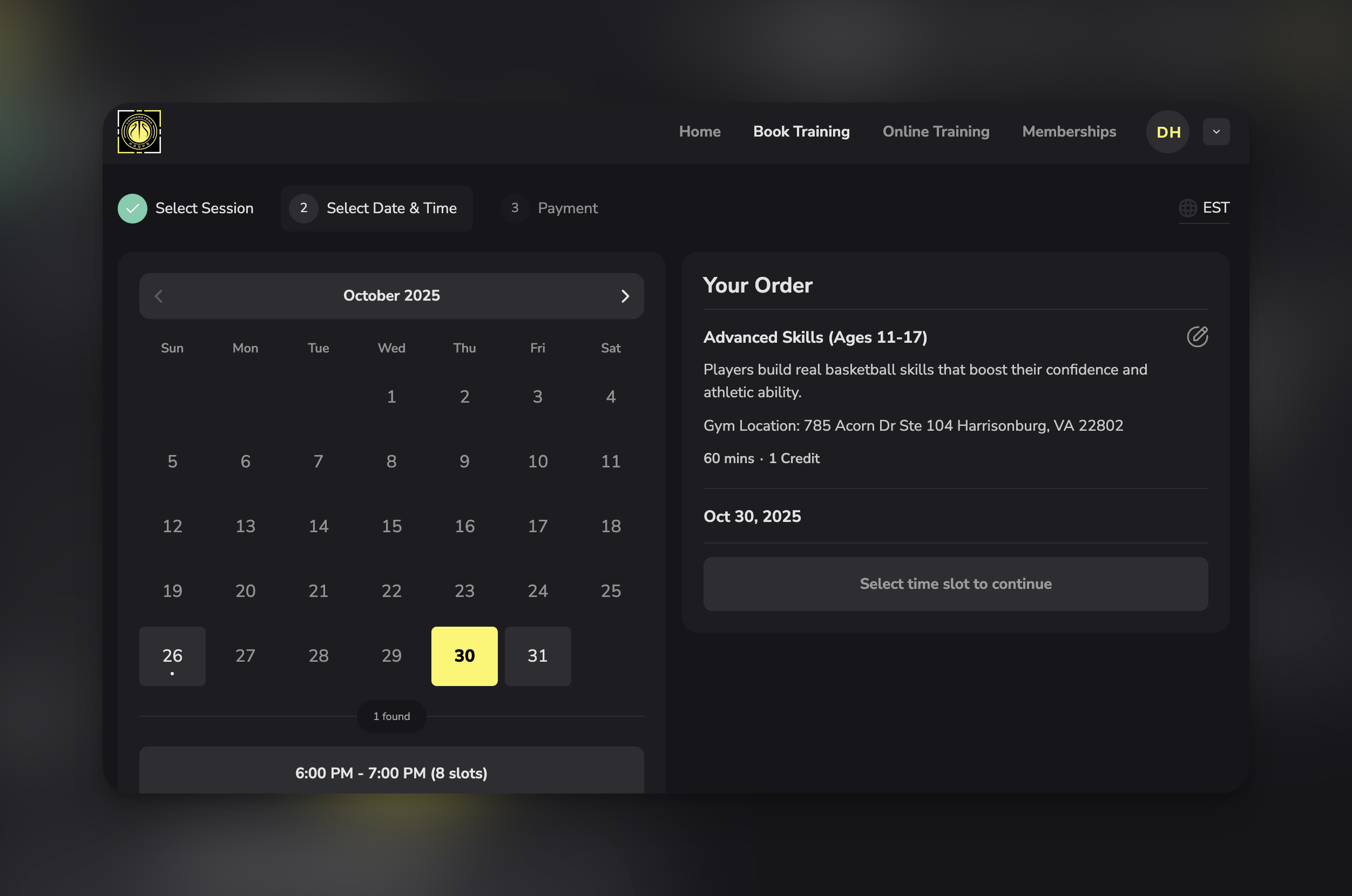
- “60-Minute Private Training - $75”
- Available times: Oct 2 at 3:00 PM, 4:00 PM, 5:00 PM…
- Click a time to book
4
Athlete books a session
Jake selects Monday, Oct 2 at 4:00 PM and completes booking.This creates a booking (confirmed reservation):
- Jake Smith
- Monday, Oct 2 at 4:00 PM
- 60-Minute Private Training
- Paid $75
- Status: Upcoming
5
That time slot becomes unavailable
After Jake’s booking:
- Oct 2 at 4:00 PM is no longer available to other athletes
- Oct 2 at 3:00 PM and 5:00 PM remain available
- Your calendar shows Jake’s confirmed booking
Complete cycle: Scheduler (template) → Available Sessions (time slots) → Booking (confirmed reservation)
Visual comparison: Scheduler vs Session vs Booking
The relationship: One scheduler generates many sessions. Some sessions become bookings when athletes book them.
Why you need schedulers (not just one “training session”)
New coaches often ask: “Why do I need multiple schedulers? Can’t I just have one ‘Training Session’ that athletes book?” Here’s why schedulers matter:Reason 1: Different durations need different schedulers
The problem: You offer 30-minute, 45-minute, and 60-minute sessions, all at different prices. Why one scheduler won’t work:- A scheduler has ONE duration setting
- Athletes booking “30 minutes” vs “60 minutes” need different options
- “30-Minute Quick Session - $50”
- “45-Minute Standard Session - $70”
- “60-Minute Deep Dive - $90”
Reason 2: Different pricing requires different schedulers
The problem: You charge 75 for private sessions & 40 for group sessions. Why one scheduler won’t work:- A scheduler has ONE price
- Different session types have different value
- “Private 1-on-1 Session - $75”
- “Small Group Session - $40 per person”
Reason 3: Different capacities need different schedulers
The problem: Private sessions allow 1 athlete, group sessions allow 6 athletes. Why one scheduler won’t work:- A scheduler has ONE capacity setting
- Can’t have both “max 1” and “max 6” in same scheduler
- “Private Training - 1 athlete max”
- “Small Group Training - 6 athletes max”
Reason 4: Different services have different rules
The problem: Free assessments have no cancellation restrictions, paid sessions require 24-hour notice. Why one scheduler won’t work:- A scheduler has ONE set of booking rules
- Different services warrant different policies
- “Free Assessment - No cancellation restrictions”
- “Paid Session - 24hr cancellation required”
Bottom line: Schedulers give you the flexibility to offer diverse services with different configurations. One scheduler = one set of rules. Multiple services = multiple schedulers.
When NOT to create separate schedulers
Don’t create multiple schedulers when: ❌ Same service, different athletes- Bad: “Session for Jake”, “Session for Sarah”
- Better: One “Private Training” scheduler that all athletes book
- Bad: “October Sessions”, “November Sessions”
- Better: One scheduler with ongoing availability
- Bad: “Hitting Practice”, “Batting Practice” (same service, different words)
- Better: One “Hitting/Batting Practice” scheduler
- Bad: Creating 10 schedulers to categorize types
- Better: Use program groupings for organization
- Bad: “Premium Athlete Session”, “Standard Athlete Session”
- Better: One scheduler with custom pricing at booking time OR use access codes
Scheduler naming best practices
The name athletes see matters. Good naming helps athletes understand what they’re booking instantly.Formula for effective scheduler names
Pattern 1: Duration + Service + Price- “60-Min Private Training - $75”
- “30-Min Quick Session - $45”
- “90-Min Intensive Training - $120”
- “Small Group Strength Class (Max 8) - $30”
- “1-on-1 Speed Development - $85”
- “Team Practice Session - Contact for pricing”
- “Private Training with Coach Mike - $90”
- “Youth Development with Coach Emma - $60”
- “Speed Training with Coach Sarah - $80”
- “Youth Skills (Ages 8-12) - $50”
- “Advanced Training (High School+) - $85”
- “Beginner Strength Class - $25”
What to include in scheduler names
Always include:- ✅ Clear service type (what they’re getting)
- ✅ Price or “Free” (no surprises)
- ✅ Duration (if not obvious from context)
- Coach name (if coach-specific)
- Age range or skill level (if service is targeted)
- Group size or capacity (if relevant to value)
- Location (if you have multiple facilities)
- ❌ Internal codes (“PT-60-A”)
- ❌ Vague terms (“Session 1”)
- ❌ Overly long descriptions (save for description field)
- ❌ All caps or excessive punctuation
Common scheduler mistakes
Creating too many schedulers
Creating too many schedulers
Mistake: 20+ schedulers with minor variationsProblem: Athletes overwhelmed by choices, can’t decide what to bookExample of excess:
- “Monday Morning Session”
- “Tuesday Morning Session”
- “Wednesday Morning Session”
- (Separate scheduler per day)
Creating too few schedulers
Creating too few schedulers
Mistake: One “Training Session” for everythingProblem: Can’t differentiate pricing, capacity, or durationExample of inadequate:
- Only “Training Session” but you offer 30-min, 60-min, private, and group
- “30-Min Private - $50”
- “60-Min Private - $85”
- “Group Class - $30”
Poor naming conventions
Poor naming conventions
Mistake: “Session A”, “PT-1”, “Training 60”Problem: Athletes don’t understand what they’re bookingWhy it happens: Using internal shorthand instead of customer-facing languageBetter approach:
- “60-Minute Private Training”
- “Small Group Strength Class”
- “Free Assessment Session”
Not organizing schedulers
Not organizing schedulers
Mistake: 10+ schedulers in random order with no categorizationProblem: Athletes scroll through unorganized list, analysis paralysisBetter approach: Use program groupings:
- “Private Training” group (3 schedulers)
- “Group Classes” group (4 schedulers)
- “Specialty Services” group (2 schedulers)
Inconsistent scheduler configuration
Inconsistent scheduler configuration
Mistake: Same service type but different settings across schedulersExample:
- “Private Training - Coach Mike” has 15-min buffer
- “Private Training - Coach Sarah” has 30-min buffer
- Causes scheduling conflicts and confusion
- All private sessions: 15-min buffer
- All group classes: 20-min buffer
- All assessments: 30-min buffer
How schedulers connect to other CoachIQ features
Schedulers don’t exist in isolation—they integrate with the broader platform:Availability
Connection: Schedulers pull from availability templatesRelationship: One availability template can power multiple schedulersExample: “Weekday Availability” powers both “30-Min Session” and “60-Min Session” schedulers
Products & Payment
Connection: Schedulers link to payment products or credit packagesRelationship: Scheduler specifies which product athletes must purchase or how many credits to redeemExample: “Private Training” scheduler charges 1 credit OR $75 direct payment
Calendar
Connection: Booked sessions from schedulers appear on calendarRelationship: Each booking shows which scheduler it came fromExample: Calendar displays “Jake - 60-Min Private Training - 3:00 PM” (scheduler name visible)
Credits
Connection: Schedulers specify credit cost per bookingRelationship: Scheduler determines how many credits are deducted when athlete booksExample: “Premium Session” costs 2 credits, “Standard Session” costs 1 credit
Website Builder
Connection: Embed specific schedulers on your websiteRelationship: Choose which schedulers appear on which website pagesExample: Homepage shows “Free Assessment”, Services page shows all paid schedulers
Athlete Portal/App
Connection: Athletes view and book schedulers through portalRelationship: Schedulers appear as bookable options in athlete’s appExample: Athlete opens app, sees all schedulers they’re eligible to book
Reminders
Connection: Configure automated reminders per schedulerRelationship: Each scheduler has its own reminder settingsExample: “Premium Sessions” get 24-hour reminder, “Group Classes” get 1-hour reminder
Programs
Connection: Group schedulers into logical categoriesRelationship: Program groupings organize multiple schedulers for easier athlete navigationExample: “Private Training” program contains 3 related schedulers
What’s next
Now that you understand what schedulers are and when to create them, you’re ready to build your first scheduler:Create Your First Scheduler
Complete step-by-step guide to building your first bookable scheduler
Payment Options
Configure free, paid, or credit-based scheduling
Scheduler Settings
Configure limits, permissions, and booking rules
Related articles
Scheduling Overview
Complete overview of the three-layer system
How Availability Works
Understand the foundation layer
Your First Session
10-minute guide to first bookable session
Credit System
How credits work with schedulers
Questions about planning your scheduler structure? Our support team can help you design the optimal setup for your coaching services. Contact Support