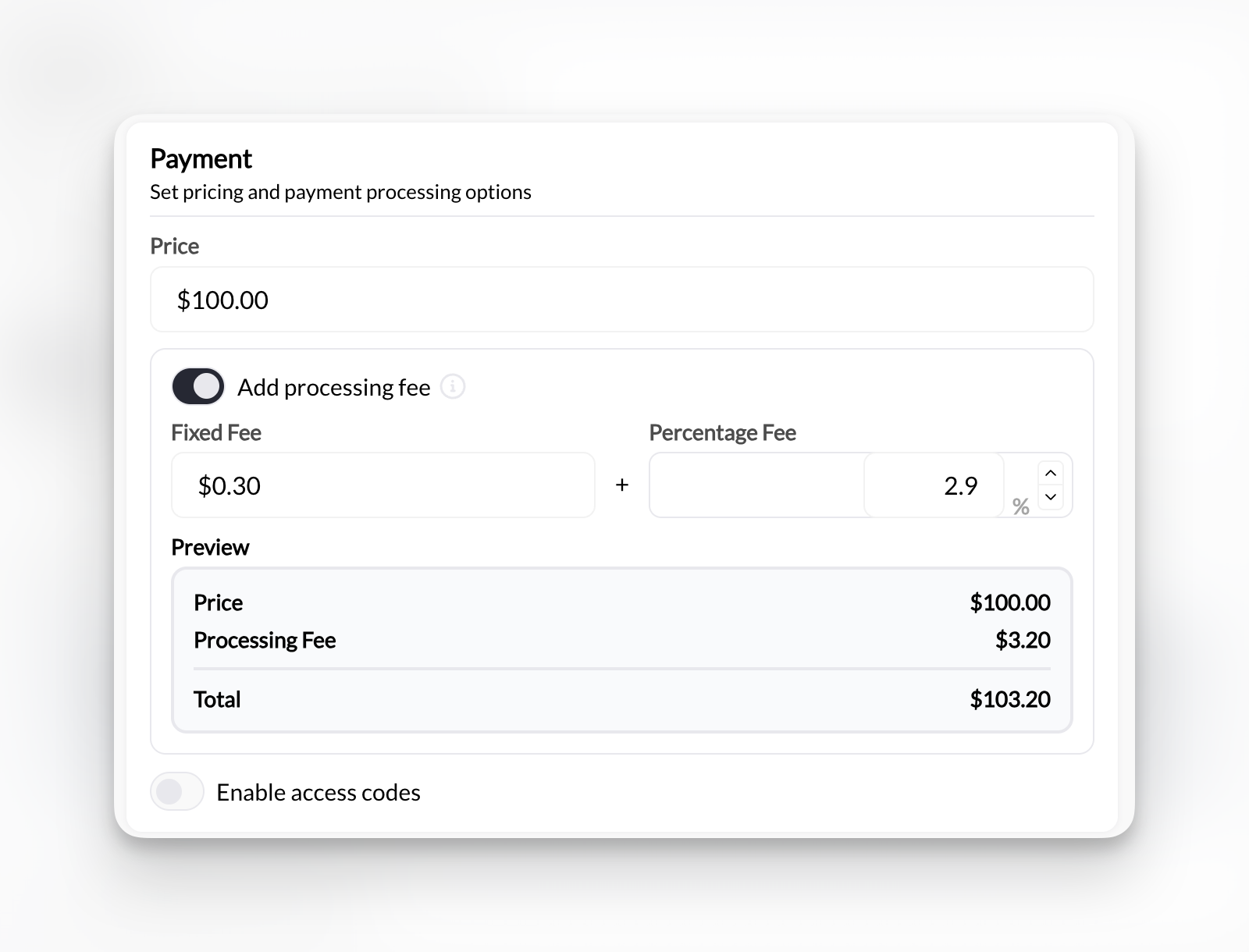
Where to find this: Product Builder → Section 2 (Payment Options) → Processing Fee

What processing fees are

Every successful transaction through Stripe incurs fees: US standard rates:
  • 2.9% of transaction amount
  • Plus $0.30 per transaction
Example:
  • $100 charge
  • Stripe fee: (100 × 0.029) + 0.30 = $3.20
  • You receive: $96.80
Fees set by Stripe, not CoachIQ. International cards and currency conversions may have additional fees.

Who pays the fees

You decide who covers Stripe’s processing fees:
Default option - You pay the feesClient pays product price. You receive product price minus Stripe fees.Example:
  • Product price: $100
  • Client pays: $100
  • Stripe fee: $3.20
  • You receive: $96.80
Pros:
  • Simpler pricing
  • Better client experience
  • Standard industry practice
Cons:
  • Reduces your revenue per sale
  • Fees add up over time
  • You lose 2.9%+ on every sale

Configure processing fees

1

Open Product Builder

Go to Payments → Products and either:
  • Click + Create Product for new product
  • Click existing product to edit
2

Navigate to Payment Options

Scroll to Section 2: Payment Options
3

Find Processing Fee toggle

Choose to toggle processing fee on or off
Processing Fee Pn
4

Decide on fee

Choose whether you or client pays Stripe fees.If you select Add processing fee, additional fields appear.
5

Configure fee structure (if client pays)

Two fields appear:Fixed amount: $0.30 (Stripe’s fixed fee)Percentage: 2.9% (Stripe’s percentage fee)These default to Stripe’s standard US rates. Adjust if your Stripe rates differ.
Check your actual Stripe rates in Stripe Dashboard. Rates may differ based on processing volume, country, or negotiated pricing.
6

Save product

Click Create Product.
Fee configuration saved. Applies to all future purchases of this product.

How clients see fees

Simple checkout - Client sees product price only
Product: 60-Minute Session
Price: $75.00
─────────────────────
Total: $75.00
Clean, simple. Client pays exactly what’s advertised.

Calculating fee amounts

Stripe’s standard formula: Fee = (Transaction amount × 0.029) + $0.30 Examples:
Product PriceStripe FeeYou AbsorbClient Pays
$50$1.75You get $48.25Client pays $51.75
$100$3.20You get $96.80Client pays $103.20
$200$6.10You get $193.90Client pays $206.10
$500$14.80You get $485.20Client pays $514.80
These calculations use 2.9% + $0.30. Your actual rates may differ based on your Stripe account.

Custom fee structures

Some coaches configure custom fee amounts: Higher than Stripe fees:
  • Cover additional costs (bookkeeping, software)
  • Flat $5 processing fee instead of calculated amount
  • Markup percentage (3.5% instead of 2.9%)
Lower than Stripe fees:
  • Split costs with client (1.5% + $0.15 each)
  • Absorb fixed fee, pass percentage only
  • Subsidize to reduce client price impact
Be transparent about fees. Unexpected charges damage trust and may violate consumer protection laws in some areas.
Before passing fees to clients, check: State regulations:
  • Some states prohibit credit card surcharges
  • Others require specific disclosures
  • Rules vary by location
Stripe’s terms:
  • Must comply with Stripe’s surcharging requirements
  • Proper labeling required
  • Card brand rules apply
Disclosure requirements:
  • Must inform clients before purchase
  • Can’t hide fees in fine print
  • Clear explanation of what fee covers
Consult legal counsel about surcharging regulations in your jurisdiction before implementing.

Impact on pricing strategy

Build fees into your base priceIf you absorb fees, increase base price to maintain margins:
  • Target: $100 profit per session
  • Stripe fee: ~3%
  • Set price: $103 + to net $100
Client sees: $103 (clean price)You receive: ~$100 after fees
Result: Similar final cost to client either way. Choose based on market expectations and legal compliance.

International and special fees

Additional Stripe fees may apply for: International cards:
  • Additional 1% for non-US cards
  • Configure: 3.9% + $0.30 for international
Currency conversion:
  • Additional 1% for currency conversion
  • Applies when charge currency differs from payout currency
Disputed charges:
  • $15 chargeback fee
  • Separate from processing fees
  • Usually not passed to clients
Most coaches use standard 2.9% + $0.30 for US cards and absorb international card fees rather than configuring multiple fee structures.

Changing fee configuration

Existing products:
  • Edit product → Section 2 → Update processing fee settings
  • Changes apply to future purchases only
  • Doesn’t affect past transactions
Active subscriptions:
  • Fee configuration locked at subscription creation
  • Can’t change mid-subscription
  • Applies to new subscriptions only
Changing who pays fees mid-campaign may confuse clients. Communicate changes clearly.

Best practices

Be transparent:
  • Clearly state who pays fees in product descriptions
  • Don’t surprise clients at checkout
  • Explain fee purpose if passing to clients
Stay consistent:
  • Apply same fee policy across similar products
  • Don’t switch approaches frequently
  • Document your policy
Comply with laws:
  • Research local surcharging regulations
  • Follow Stripe’s requirements
  • Consult legal if uncertain
Monitor impact:
  • Track conversion rates by fee approach
  • Gather client feedback
  • Adjust based on data, not assumptions

Next steps

  1. Revenue sharing - Split revenue with partners or contractors
  2. Guest checkout - Allow purchases without accounts
  3. Product Builder reference - Complete Product Builder guide