

Where to find this: Payments → Coupons → Create coupon
Create a coupon
- Open Payments → Coupons → Create coupon.
- Enter the Coupon code, then choose Free, Percentage off, or Amount off. Enter the percentage or amount when required.
- Under On memberships, this discount applies to, choose First payment only, A set number of months, or Every payment. Enter 1–36 months for a limited duration. See Coupons and subscriptions below.
- Under Limits, leave Unlimited use on or turn it off to set a total use limit. Add any per-client, first-purchase, expiry, or minimum-order restrictions. See Limits and dates.
- Turn on Automatic member discount only for a membership-based offer, then choose the qualifying memberships. See Member discounts.
- Under Products, choose All products (add any exceptions under Except) or Selected products and pick them. See Choose which products a coupon covers.
- Review the code, discount, duration, and restrictions, then select Create coupon. Cancel closes the window without saving.
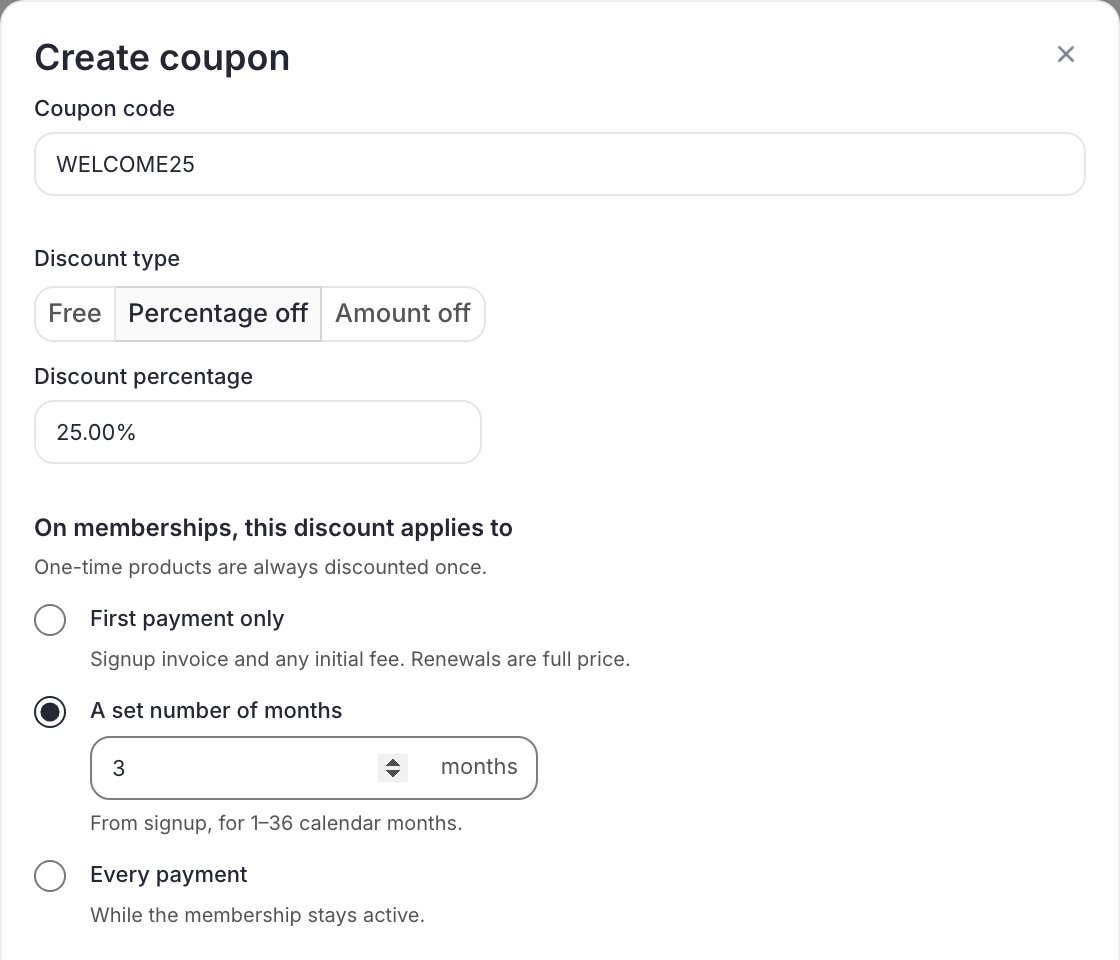
Example: WELCOME25 gives 25% off during the first three calendar months. This screenshot shows an unsaved example, not an active promotional code.
A deleted coupon’s code can’t be used again. If you try, you’ll be asked to choose a different code. This stops a new coupon from picking up the old one’s uses.
Amount fields keep cents as typed: 0.50 saves as $0.50. Apart from the products an All products coupon leaves out, coupons can’t be edited. To change anything else, delete the coupon and create a new one with a different code. If an older coupon looks too large, see Coupon troubleshooting.
Coupons and subscriptions
Choose how long the discount applies when creating the coupon:
One-time products receive their discount once. Checkout shows the introductory amount and later renewal price. An expiration date controls when a code can be redeemed; it is separate from the duration of a discount already applied to a membership.
Initial fees are discounted too. If the membership has an initial down payment, the coupon can reduce that up-front fee as well as eligible recurring charges within its discount duration. A 100%-off code on a month-to-month membership therefore makes the first payment genuinely free, rather than free on the recurring price only.
Use First payment only for an introductory offer instead of planning to remove a recurring discount manually. Automatic member discounts keep their ongoing membership rules.
Check the initial payment and renewal price
After a membership purchase, Orders shows the full Initial payment, including any discounted down payment, separately from the recurring rate. Billing also distinguishes the initial amount when it differs. A First payment only coupon reduces the initial eligible invoice, then the membership displays the normal renewal rate. Every payment keeps the eligible recurring discount. For a limited-duration coupon, check its end before explaining future renewals. Payment examples.Next steps
- Share and limit a coupon: limits, dates, products it covers, and member discounts
- Coupon troubleshooting: why a code didn’t apply