

- Announcements: the posts you send to your whole club, a role, a tag or chosen people.
- Direct Message: private conversations between a family and your staff.
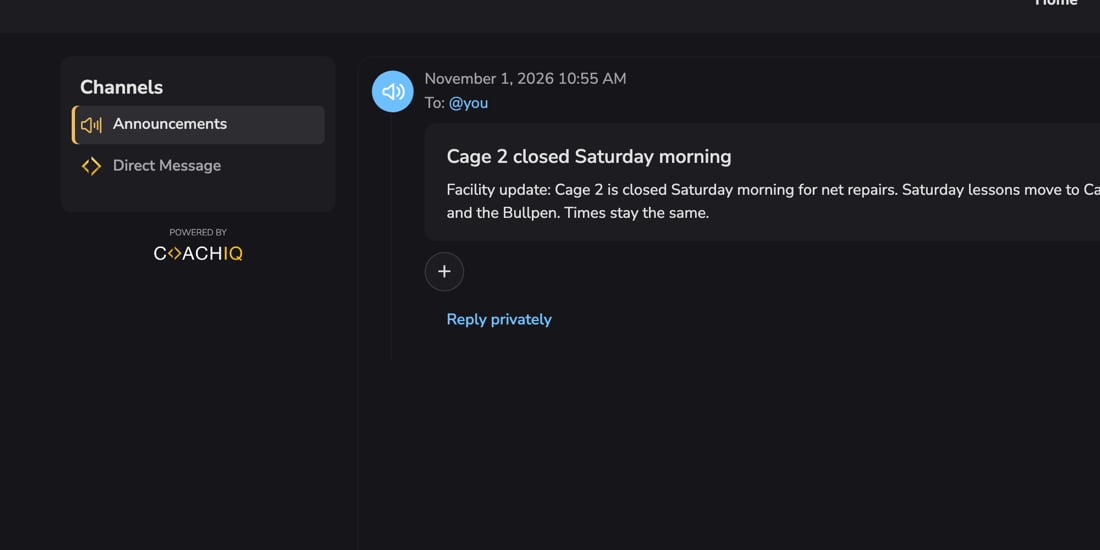
Announcements
In Announcements, families see each post with the date and time, who it was sent to (for example To: @you), the heading and your message, and any form, product, scheduler or media you attached as buttons.- React: families add one of four reactions (👍 ❤️ 🙏 🔥) with the + button.
- Reply privately: opens a private message to you about the post, which arrives in your Inbox like any direct message.
- Pinned: the announcement you pin stays at the top, with the newest posts under it.
Direct Message
In Direct Message, a family sees their conversation with your staff and can write to you, with photos and videos. Messages you send from the Inbox arrive here with a push notification on their phone. Their replies land in your Inbox. When you message several people at once, each person gets their own private copy. Nobody sees who else got it or anyone else’s replies. To send direct messages, see Direct messages.Who can see Channels
Only accepted members of your club get your announcements and can message your staff:- Someone who is signed in but hasn’t joined your club sees the join card instead, and can’t open your announcements, their reactions or their attachments, even from a direct link.
- When you remove someone from People, they lose your members’ menus and announcements straight away. Messages they try to send to your staff aren’t delivered.
- If you message someone who isn’t an active member (their membership is incomplete, suspended or declined), you see “This person can’t get messages until they are an active member of your club. Nothing was sent.” Your draft stays in the box. Check their status in People.
Common questions
A family says Announcements or Direct Message looks empty
A family says Announcements or Direct Message looks empty
An empty conversation says so. If messages can’t load, the family sees Try again instead of a blank panel. Ask them to tap Try again or refresh before you send again.
Fewer people got my announcement email than I expected
Fewer people got my announcement email than I expected
Announcements only go to accepted members. People who never finished joining, or who are suspended or declined, are left out. See Who gets an announcement.
Can families message each other?
Can families message each other?
No. Families can only message your staff.
Why isn't a family getting push notifications?
Why isn't a family getting push notifications?
Push notifications need the mobile app with notifications allowed in the phone’s settings. On the web, families see new messages when they open your app.
Related articles
Announcements
Post to your whole club, a role or a tag
Direct messages
Message one family privately
Inbox overview
Where you read and answer families
Your app: overview
What families see and where