

Some labels on this page still say “athlete portal”. That’s your app.
Pages & routes
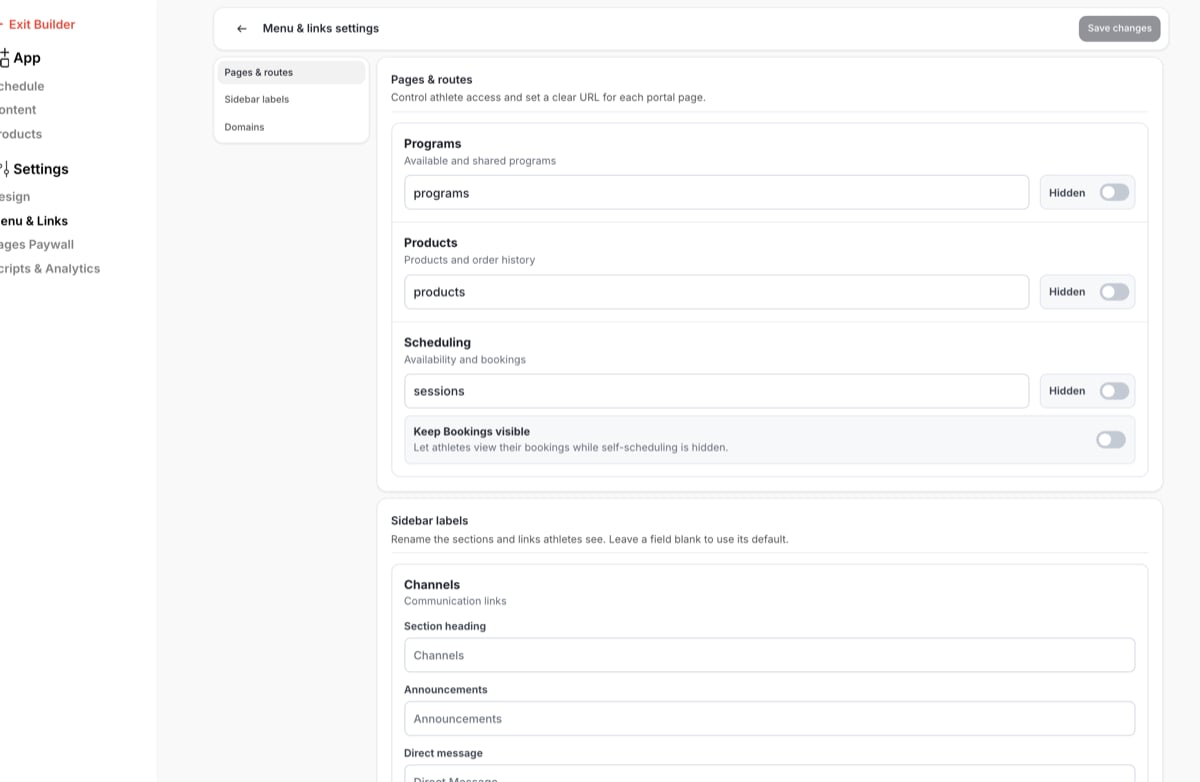
Three of your app’s sections can be shown or hidden: Programs, Products and Scheduling (the Sessions section). Channels always shows. For each one:- The switch shows or hides the section in your app. A hidden section shows Hidden here and on the App page. Hiding a section doesn’t delete anything: your schedulers, programs, products and families’ bookings stay as they are, and turning it back on brings the section back.
- The URL path is the end of the web address, such as
programsinapp.coachiq.io/your-business/programs. Change it if you want the address to match a new name, for examplescheduleinstead ofsessions. Update any links to the old address you’ve shared, such as on your website or in emails.
Keep Bookings visible
Under Scheduling, Keep Bookings visible lets families see their bookings while you’ve hidden self-scheduling. Use it when you book everyone yourself: families can’t book new sessions, but they can still see their upcoming, past and canceled sessions under Bookings. It only matters while Scheduling is hidden. When Scheduling shows, families have both Available and Bookings.Sidebar labels
Rename the sections and links in your app’s menu, for example “Training” instead of “Programs” or “Book a lesson” instead of “Sessions”. Leave a box blank to use the default name.
Use defaults on a section clears its boxes so it goes back to the default names.
The names you choose show in the menu and as page headings on the web, and in the menu, tabs and headings in the mobile app. A blank name falls back to the default.
Each page’s Page settings (the gear in the App builder) also has a page name and slug box for the same page.
Labels are set per group. If you run several groups, each group’s app has its own names.
Domains
Active domains lists the web addresses your app answers on. Click one to open your app there. To put your app on your own domain, such asapp.yourbusiness.com, contact CoachIQ support.
Common questions
Will hiding Scheduling cancel bookings?
Will hiding Scheduling cancel bookings?
No. Hiding Scheduling only takes the booking pages out of the menu. Existing bookings stay booked, and families can still see them if Keep Bookings visible is on.
Can I hide the Bookings page too?
Can I hide the Bookings page too?
Yes. With Scheduling hidden, turn Keep Bookings visible off and click Save changes.
I renamed a section but the mobile app still shows the old name
I renamed a section but the mobile app still shows the old name
Ask the family to close and reopen the app. If the name still doesn’t change, they may need the latest version of the app from the App Store or Google Play.
Related articles
Your app: overview
What families see and where
App builder
Edit pages and publish changes
Page access
Open pages only to paying members
Sharing schedulers
Other ways to share a scheduler