

What you’ll accomplish
Learn how to create and manage subscription-based credit products that generate recurring revenue—configure unlimited (∞) credit subscriptions, understand renewal behavior, handle inactive subscriptions, transition athletes from packages to subscriptions, and optimize your subscription business model.- Stripe account connected to CoachIQ (Stripe Setup Guide)
- Understanding of credit system basics (Credit System Overview)
Subscriptions vs packages: Understanding the difference
Before diving into subscription setup, understand how subscriptions differ from one-time credit packages.Core differences
- One-Time Credit Packages
- Subscription Credit Products
- Finite quantity (e.g., 10 credits)
- Do not renew automatically
- Athlete must manually purchase again when depleted
- New athletes testing your services
- Athletes who prefer flexibility
- Drop-in/casual training relationships
- Gift purchases
Why subscriptions transform your business
The revenue examples below are illustrative, not CoachIQ benchmarks or promised results. Retention and time saved depend on your services, pricing, and follow-up.Predictable Revenue (MRR)
- Month 1: 10 subscribers = $4,000 MRR
- Month 6: 25 subscribers = $10,000 MRR (with growth + retention)
- Month 12: 50 subscribers = $20,000 MRR
Higher Lifetime Value (LTV)
- Buys 10-pack for $450
- Uses 8 credits, stops
- LTV: $450
- Subscribes at $400/month
- In this example, stays 8 months
- Revenue over those months: $3,200
Better Athlete Retention
Reduced Admin Burden
- Athletes run out of credits
- You chase renewals
- Manual sales conversations
- Inconsistent cash flow
- Automatic billing via Stripe
- Credits renew automatically
- Athletes self-renew (passive)
- Consistent cash flow
Understanding unlimited credits (∞ notation)
The infinity symbol (∞) in CoachIQ has a specific meaning that’s critical to understand.What ∞ really means
Accurate interpretation:- ∞ = Unlimited credits this month/week/year (depending on subscription frequency)
- At renewal: Credits reset to ∞ for the new cycle
- If subscription ends: ∞ becomes 0 (credits disappear)
Credit display variations
∞ with Usage Tracking (Subscription Credits)
∞ with Usage Tracking (Subscription Credits)
- Athlete has unlimited credits for these schedulers this cycle
- Numbers show: (Credits used this cycle / Unlimited remaining)
- 3/∞ = Used 3 times this cycle, unlimited still available
- Coach monitoring (which sessions most popular?)
- Usage limit enforcement (if “max 3/week” limit exists)
- Athlete self-awareness (used 15 times this month—great engagement!)
Finite Credits That Display Differently
Finite Credits That Display Differently
- Athlete sees decreasing count (12 → 11 → 10…)
- When depleted to 0, must wait for renewal
- ∞ never shows decreasing count
- Resets at renewal
- Active only while subscription live
- Tied to billing cycle
Creating a subscription product
Step-by-step: Setting up recurring credit memberships.Navigate to product creation
Select subscription type
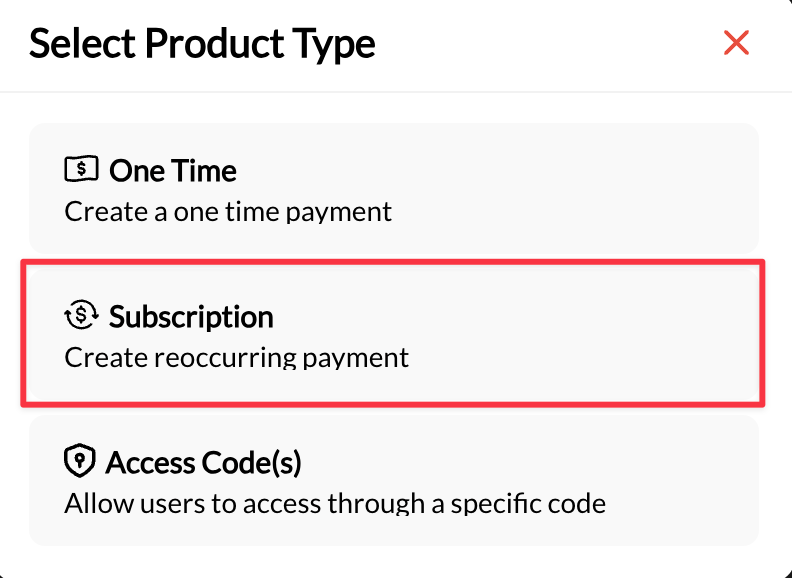
Configure basic product info
- ✅ “Unlimited Monthly Training Membership”
- ✅ “3x/Week Youth Program Subscription”
- ❌ “Training” (too vague)
- ❌ “Option 1” (meaningless to athletes)
- Monthly (most common)
- Weekly (less common, for frequent trainers)
- Yearly (annual pre-pay, large discount)
- Custom (every 2 weeks, quarterly, etc.)
Configure credit issuance
- Unlimited Credits (∞)
- Finite Credits Per Cycle
- Offering “all-you-can-train” membership
- Want maximum simplicity (no credit counting)
- Trust athletes not to abuse (or have usage limits configured)
Set credit restrictions
Configure usage limits (optional but recommended)
- Recommended: Weekly limit (e.g., “4 bookings per week”)
- Prevents abuse: Athlete can’t book 30 sessions in Week 1
- Encourages consistency: Spreads usage across month
- Often unnecessary (credit count is the limit)
- Consider if: Enforcing program structure (e.g., max 2/week for 8-week program)
Set renewal and cancellation policy
- Auto-renew: Enabled by default (this is how subscriptions work)
- Trial period: Optional first-month discount or free trial
- Renewal reminder: Auto-email 3 days before renewal (if available)
- Product description
- Website terms of service
- Confirmation email after purchase
- Athlete portal
Save and activate
- ✅ Product appears in Payments → Products list
- ✅ Product type shows “Subscription”
- ✅ Price displays as ”$/month” (or chosen frequency)
- ✅ Credit configuration correct (∞ or finite number)
- ✅ Redeemable schedulers listed
- ✅ Usage limits configured (if applicable)
- Assign product to test athlete account
- Process test payment via Stripe
- Verify credits appear in athlete profile
- Test booking with subscription credits
- Verify Stripe shows active subscription
Subscription credit renewal behavior
Understanding how credits refresh each billing cycle.How automatic renewal works
Subscription renewal date arrives
- Stripe attempts to charge athlete’s saved payment method
- If payment succeeds: Subscription stays active
- If payment fails: Subscription becomes inactive (more on this below)
Credits reset (if payment succeeds)
- Credit balance: Still shows ∞
- Usage tracking: Resets to 0/∞ for all schedulers
- Credit balance: Resets to original amount (e.g., 12)
- Unused credits: Expire OR carry over (per configuration)
- Usage limits: Reset to 0
Credit logs update
Stripe subscription status
Unused credit behavior at renewal
Critical decision: What happens to unused credits when subscription renews?- Expire at Renewal (Recommended)
- Carry Over (Accumulate)
- Athlete had 12 credits, used 8, has 4 remaining
- At renewal: Remaining 4 credits disappear
- Athlete gets fresh 12 credits
- ✅ Prevents credit hoarding (athletes can’t accumulate hundreds of unused credits)
- ✅ Encourages consistent usage (“use it or lose it”)
- ✅ Predictable liability for coach (max 12 credits/athlete outstanding)
- ✅ Aligns with “monthly membership” concept
- ❌ Athlete loses value if they don’t use all credits
- ❌ Can feel punitive (especially if illness/vacation caused underuse)
Managing subscription lifecycles
What happens at each stage of a subscription’s life.Active subscription stage
Status: Subscription active on Stripe, payments processing successfully Athlete experience:- Credits available (∞ or finite amount showing)
- Can book sessions using subscription credits
- Automatic renewals happening seamlessly
- Monitor usage (are athletes actually using subscriptions?)
- Engagement outreach if low usage (prevent voluntary cancellation)
- Upsell opportunities if high usage (upgrade to premium tier)
- Usage rate: How much of the membership do athletes use? Compare with their goals and your own historical patterns before deciding who needs outreach.
- Payment success rate: How many renewals complete successfully? Review failed payments and trends rather than treating an example percentage as a universal benchmark.
Payment failure (Involuntary churn)
What triggers it: Athlete’s payment method fails at renewal (expired card, insufficient funds) What happens automatically:Stripe attempts charge
Stripe retry logic
- Smart retries over 2-3 weeks
- Varies by Stripe settings (customize in Stripe dashboard)
Subscription status changes
- Subscription becomes inactive in CoachIQ
- Credits become unusable (even if balance shows ∞ or number)
- Athlete CANNOT book using these credits
- Athlete CAN still log in, CAN still book using Master Credits or direct payment
Athlete sees error
Week 1: Personal outreach
Week 1: Personal outreach
Week 2: Offer alternative
Week 2: Offer alternative
- Temporary issue (expired card) → Help resolve
- Financial hardship → Offer payment plan or pause
- Voluntary cancellation → Exit gracefully
Week 3: Final notice
Week 3: Final notice
Keep credit-funded sessions inside the billing cycle
For a membership whose credits expire each cycle, turn on Sessions must occur by expiration in the Product Builder. Credits from that cycle can only cover sessions occurring within their validity period, including the expiration day. Rescheduling and every occurrence of a recurring booking must stay within the same period. Leaving the setting off keeps the book-before-expiration rule. If a cancellation refunds a credit, it retains the original expiration; it does not gain a new cycle.Voluntary cancellation
Use the membership’s cancellation controls or help the family with their request. In the admin, open the athlete’s Products tab and choose Cancel membership. Review whether it ends immediately or at the end of the billing period before confirming. A scheduled cancellation can continue to show active access until the displayed end date. Check each credit’s expiration and the product’s usage rules; do not assume canceling immediately removes every existing credit. Refunds are a separate decision under your published policy. For example, a membership paid through February 15 and scheduled to end then can remain available after a February 3 cancellation request. Confirm the actual date and credit rules on the membership instead of calculating them from the request date. Follow Canceling and removing memberships for the full workflow. If one subscription covers siblings, use Shared Family Memberships to remove one athlete without ending the others’ memberships. Coach response to cancellation:Acknowledge promptly
Request feedback (optional survey)
- “What was the main reason for canceling?” (open-ended)
- Financial reasons
- Moving/relocating
- Schedule doesn’t fit anymore
- Not seeing results I wanted
- Prefer different training style
- Other (please specify)
Offer win-back opportunity
Document and tag
- Tag: “Former Subscriber”
- Note: Cancellation date and reason
- Flag: “Win-back candidate” (if reason was resolvable)
Common questions
Can athlete have multiple subscriptions at once?
Can athlete have multiple subscriptions at once?
- Athlete purchases “Basic Subscription” ($250/month)
- Later purchases “Premium Subscription” ($600/month)
- Now paying $850/month total for both
- Confusing for athlete (which credits to use?)
- Double billing (athlete likely didn’t intend this)
- Billing management nightmare
- Cancel old subscription
- Switch to new subscription
- Single active subscription at a time
- “Unlimited Classes” (400/month) + “Private Session Add-On” (150/month for 2 private sessions)
- This is intentional stacking, clearly communicated
What if athlete wants to downgrade subscription?
What if athlete wants to downgrade subscription?
- Athlete requests downgrade: Via message, email, or portal
- Confirm timing:
- Immediate: Lose premium benefits immediately, get partial refund (if you offer)
- End of period: Keep premium through paid period, then downgrade (recommended)
- Cancel current subscription: In Stripe, cancel Premium subscription
- Enroll in new tier: Add Basic subscription to athlete profile
- Process pricing difference (if mid-period):
- Pro-rate: Refund unused portion of Premium, charge for Basic
- Or: Wait until current Premium period ends, then start Basic (recommended)
Should I offer refunds on subscriptions?
Should I offer refunds on subscriptions?
- Not typically required if athlete has access through paid period
- Example: Athlete pays $400 for February, cancels Feb 10, has access through Feb 28 = no refund owed
- Service issue (your fault): Full refund appropriate
- Payment processing error: Issue refund + fix
- Athlete charged accidentally (didn’t mean to subscribe): Refund within 24-48 hours
- Athlete simply changed mind after using service
- “I didn’t train this month” (athlete’s choice, not your fault)
- Buyer’s remorse after 7+ days
Can I change subscription price for existing subscribers?
Can I change subscription price for existing subscribers?
- Grandfather: Keep existing subscribers at old price, new subscribers pay new price
- Universal: All subscribers pay new price after X date
- Stripe → Products → [Subscription] → Edit pricing
- Set effective date for new price
- Existing subscriptions: Update via Stripe dashboard